
1. Introduction
Thank you for choosing the NACON RIG 300 PRO HN Gaming Headset. This headset is designed to provide clear audio and communication for an immersive gaming experience across multiple platforms. This manual provides essential information for setting up, operating, and maintaining your headset.
The RIG 300 PRO HN is compatible with Nintendo Switch, PlayStation 5, PlayStation 4, Xbox consoles, PC, Mac, and mobile devices, connecting via a standard 3.5 mm audio jack.
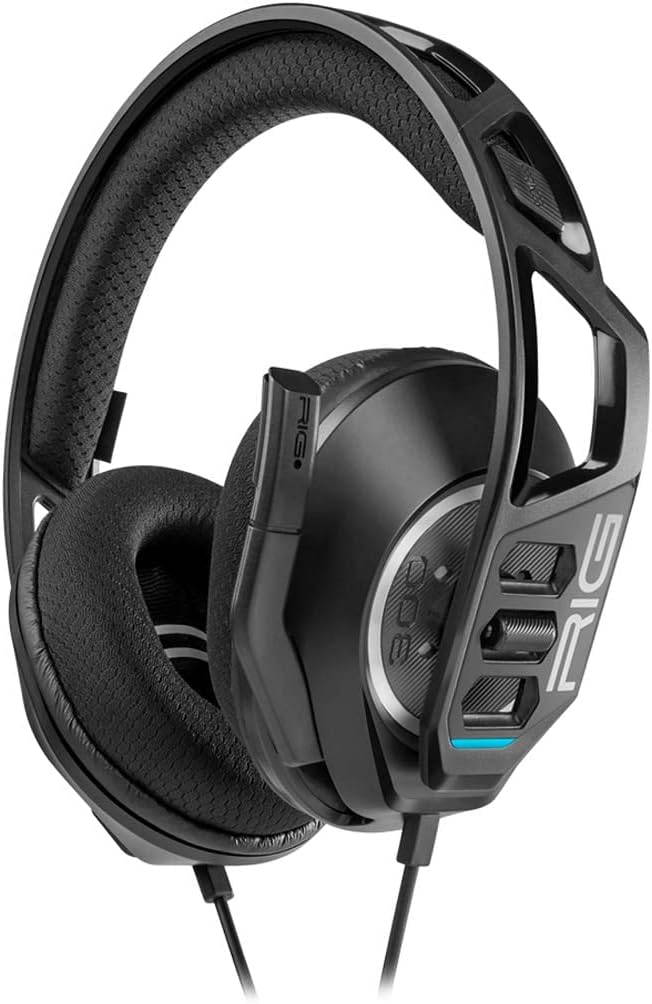
Figure 1: NACON RIG 300 PRO HN Gaming Headset (Front-side view)
2. Package Contents
Please check the package for the following items:
- NACON RIG 300 PRO HN Gaming Headset
- Integrated 3.5 mm Audio Cable

Figure 2: NACON RIG 300 PRO HN Gaming Headset (Side view showing earcup and microphone)
3. Setup
The NACON RIG 300 PRO HN Gaming Headset is designed for simple plug-and-play functionality.
- Connect the Headset: Locate the 3.5 mm audio jack on your gaming console controller, PC, Mac, or mobile device. Insert the headset's 3.5 mm cable firmly into the audio jack.
- Adjust Audio Settings (if necessary): On some devices, you may need to adjust the audio output settings to ensure the headset is selected as the primary audio device for both playback and microphone input. Refer to your device's user manual for specific audio configuration instructions.
- Fit the Headset: Place the headset over your ears, ensuring the earcups fully cover your ears for optimal comfort and sound isolation. Adjust the headband for a secure and comfortable fit.
- Position the Microphone: Position the microphone boom arm near your mouth for clear voice communication. The microphone can be adjusted up or down.
4. Operating Instructions
The RIG 300 PRO HN headset features intuitive controls for managing your audio experience.
- Volume Control: The headset includes an inline volume control dial located on the cable. Rotate the dial to increase or decrease the audio volume.
- Microphone Mute: The microphone can typically be muted by flipping the microphone boom arm upwards. Some models may feature an inline mute switch on the cable. Refer to the specific design of your headset.
- Audio Playback: Once connected, audio from your device will be routed through the headset.
- Voice Communication: The integrated microphone allows for clear voice communication in games or during calls. Ensure the microphone is positioned correctly and not muted.
5. Maintenance
Proper care will extend the life and performance of your headset.
- Cleaning: Use a soft, dry cloth to clean the headset. For earcups, a slightly damp cloth can be used, but ensure no moisture enters the speaker grilles. Avoid harsh chemicals or abrasive cleaners.
- Storage: Store the headset in a clean, dry place away from extreme temperatures and direct sunlight. Avoid tangling the cable.
- Cable Care: Do not pull on the cable to disconnect the headset. Always grasp the 3.5 mm jack directly. Avoid sharp bends or kinks in the cable.
6. Troubleshooting
If you encounter issues with your headset, try the following solutions:
- No Sound:
- Ensure the 3.5 mm jack is fully inserted into your device.
- Check the inline volume control and ensure it is turned up.
- Verify your device's audio output settings are configured to use the headset.
- Test the headset with another device to rule out a device-specific issue.
- Microphone Not Working:
- Ensure the microphone boom arm is lowered and not in the muted position.
- Check your device's microphone input settings to ensure the headset is selected.
- Confirm that the application you are using (e.g., game, chat software) has microphone access enabled.
- Distorted Audio:
- Lower the volume on both the headset and your device.
- Ensure the audio cable is not damaged or kinked.
7. Specifications
| Feature | Detail |
|---|---|
| Model Number | RIG300PROHN |
| Brand | NACON |
| Connectivity | Wired (3.5 mm Jack) |
| Compatible Devices | Nintendo Switch, PS5, PS4, Xbox, Windows, Mobile |
| Frequency Range | 20 Hz–20 kHz |
| Ear Placement | Over-Ear |
| Material | Plastic |
| Control Type | Volume Control |
| Noise Control | None |
| Item Weight | 0.49 Kilograms (1.08 pounds) |
| Product Dimensions | 19.69 x 19.69 x 11.02 inches |
8. Warranty and Support
The NACON RIG 300 PRO HN Gaming Headset comes with a 2-year spare part availability duration in the EU. For specific warranty terms and conditions, please refer to the warranty card included with your product or visit the official NACON website.
For technical support, troubleshooting assistance beyond this manual, or warranty claims, please contact NACON customer support through their official channels.