
Introduction
This manual provides instructions for the KWANWA Kids Alarm Clock Model EJ11. Please read these instructions carefully before using the product to ensure proper operation and longevity. This alarm clock features a large white LED display, battery operation, automatic night dimming, and 12/24-hour time format.
Setup
1. Battery Installation
The alarm clock requires 4 x AA alkaline batteries (not included) for operation. Ensure batteries are inserted with correct polarity.
- Locate the battery compartment on the back of the clock.
- Open the battery compartment cover.
- Insert 4 new AA alkaline batteries, matching the (+) and (-) terminals as indicated inside the compartment.
- Close the battery compartment cover securely.
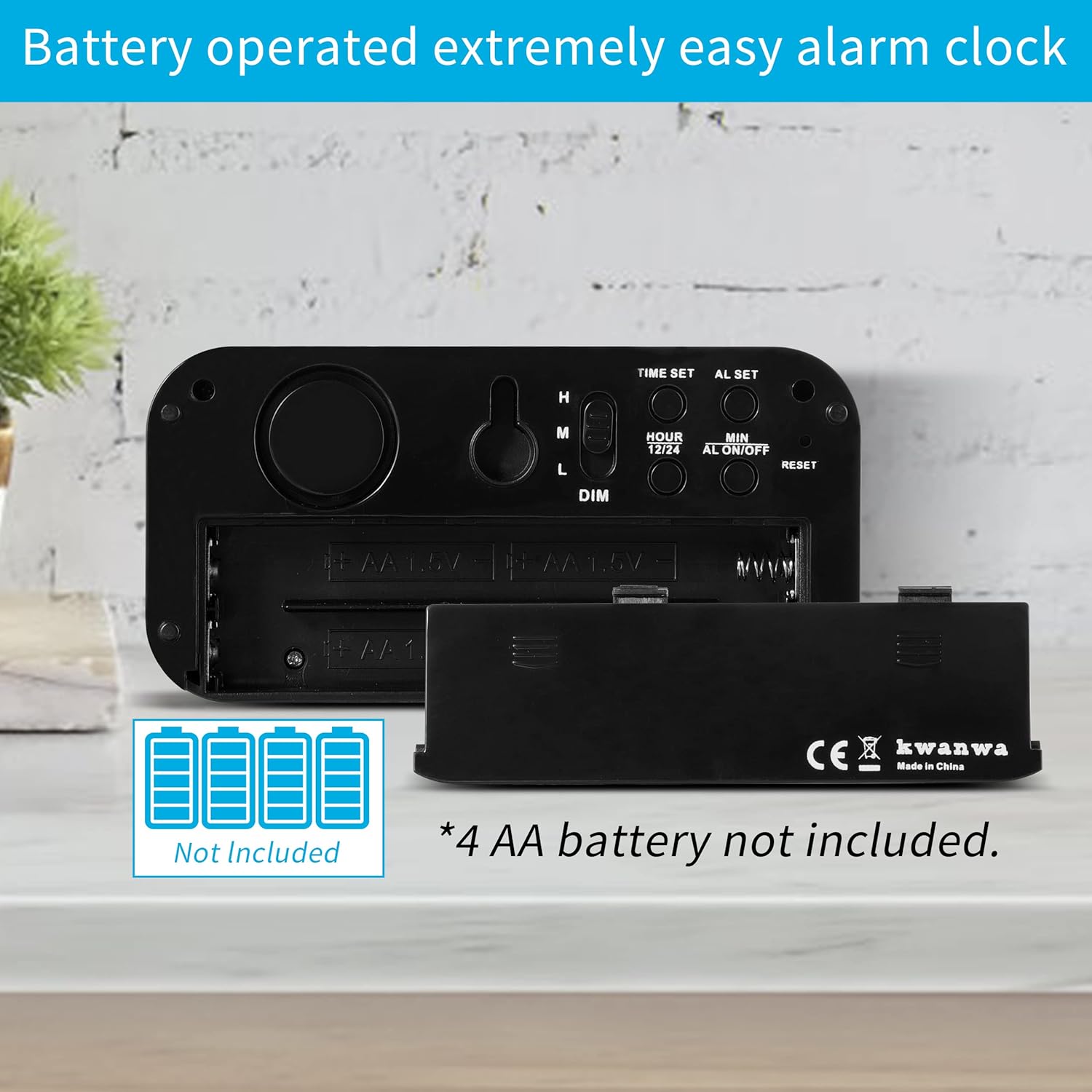
Figure 1: Battery compartment on the back of the alarm clock.
2. Placement
The KWANWA Kids Alarm Clock can be used as a table-top clock or wall-mounted. It is suitable for various indoor environments such as bedrooms, offices, or travel.
- Table-top: Place the clock on a flat, stable surface.
- Wall-mount: Use the integrated keyhole on the back of the clock to hang it on a wall hook or screw (not included).
Operating Instructions
The clock features intuitive buttons on the back for easy setup and adjustment.

Figure 2: Back panel controls of the alarm clock.
1. Setting the Time
- Press the TIME SET button once. The hour digits will flash.
- Use the HOUR/12-24Hr button to adjust the hour. Press and hold for faster adjustment.
- Press the TIME SET button again. The minute digits will flash.
- Use the MIN/DIM button to adjust the minutes. Press and hold for faster adjustment.
- Press TIME SET a third time to confirm and exit time setting mode.
2. 12/24 Hour Mode Selection
While in normal time display mode, press the HOUR/12-24Hr button to switch between 12-hour and 24-hour time formats. In 12-hour mode, a 'PM' indicator will appear for afternoon hours.
3. Setting the Alarm
- Press the AL SET button once. The alarm hour digits will flash.
- Use the HOUR/12-24Hr button to adjust the alarm hour.
- Press the AL SET button again. The alarm minute digits will flash.
- Use the MIN/DIM button to adjust the alarm minutes.
- Press AL SET a third time to confirm and exit alarm setting mode.
4. Activating/Deactivating the Alarm
Press the AL ON/OFF button to toggle the alarm function. When the alarm is active, an alarm icon will appear on the display. Pressing it again will deactivate the alarm, and the icon will disappear.
5. Snooze Function
When the alarm sounds, touch the large SNOOZE/STOP button on the top of the clock to activate the snooze function. The alarm will pause for 7 minutes and then sound again. This can be repeated up to 3 times. To stop the alarm completely for the day, press any other button on the back of the clock.
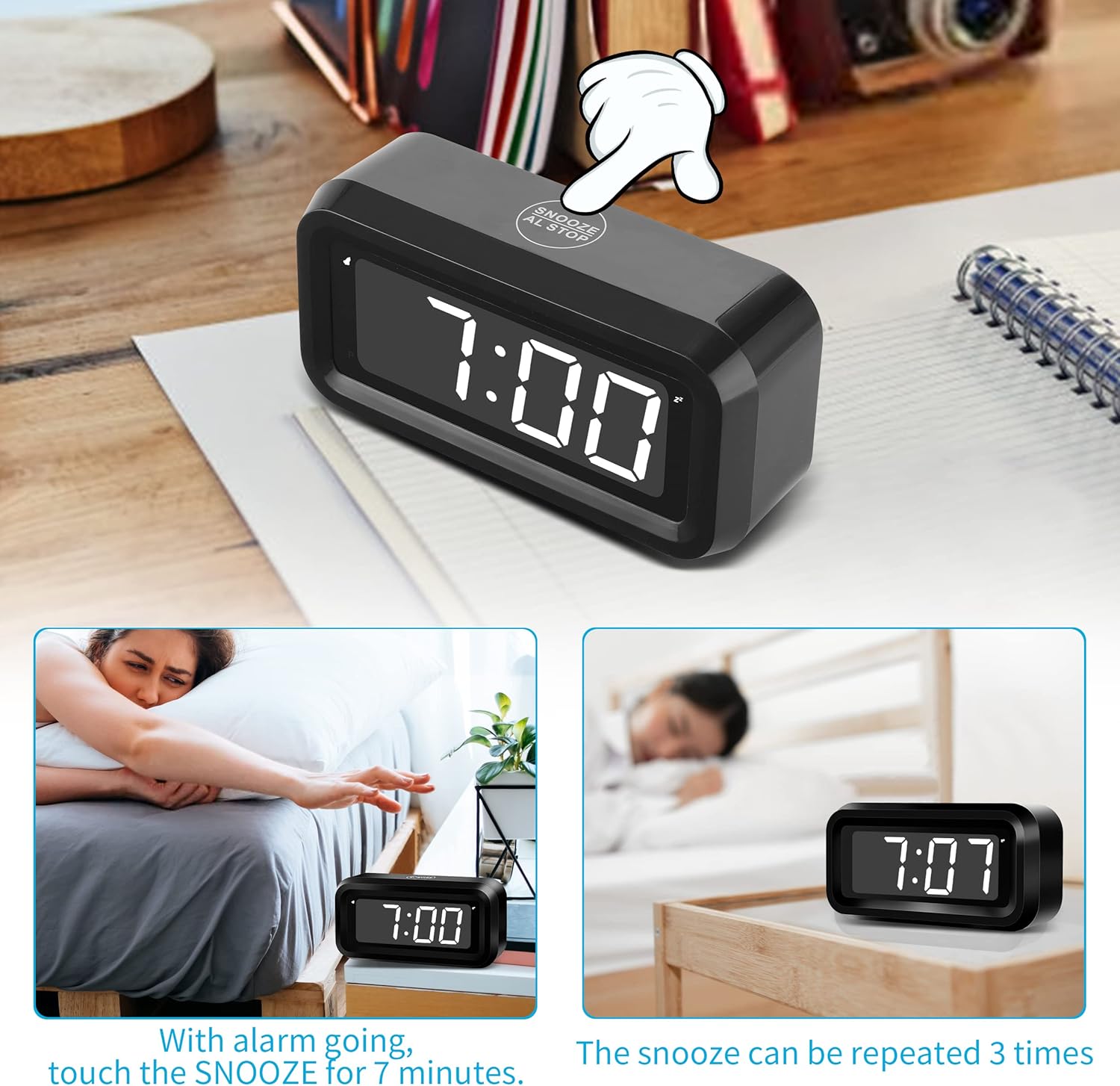
Figure 3: Activating the snooze function.
6. Adjusting Display Brightness
The clock offers three brightness levels (High, Medium, Low) for daytime use and an automatic night mode.
- Manual Adjustment: Use the DIM slider switch on the back of the clock to select High (H), Medium (M), or Low (L) brightness.
- Automatic Night Mode: The clock will automatically dim its display between 8:00 PM and 6:00 AM to conserve battery life and reduce light disturbance during sleep.

Figure 4: Display brightness levels.
Maintenance
1. Battery Replacement
When the display becomes dim or the clock stops functioning, it is time to replace the batteries. Follow the battery installation steps in the Setup section. It is recommended to replace all 4 AA batteries at the same time for optimal performance.
2. Cleaning
To clean the clock, gently wipe the surface with a soft, dry cloth. Do not use abrasive cleaners, solvents, or immerse the clock in water.
Troubleshooting
| Problem | Possible Cause | Solution |
|---|---|---|
| Display is dim or blank. | Low batteries or incorrect brightness setting. | Replace all 4 AA batteries. Check the DIM slider switch on the back and adjust to 'H' (High) or 'M' (Medium). |
| Alarm does not sound. | Alarm is not activated or set incorrectly. | Ensure the alarm icon is visible on the display. If not, press the AL ON/OFF button. Verify the alarm time is set correctly. |
| Time is inaccurate. | Minor drift over time. | The clock has a time accuracy of less than +/-30 seconds per month. Reset the time as needed using the TIME SET buttons. |
| Buttons are unresponsive. | Temporary software glitch or very low batteries. | Remove and reinsert batteries. If issue persists, replace batteries. Use the RESET button on the back with a pointed object if necessary. |
Specifications

Figure 5: Product dimensions.
- Brand: KWANWA
- Model: EJ11
- Color: Black Case-white Led
- Display Type: Digital LED
- Product Dimensions: 5.12" W x 2.56" H (approximately 5.1 inches x 2.6 inches)
- Power Source: 4 x AA Batteries (not included)
- Special Features: Adjustable Brightness, Alarm, Auto Dimmable (Night Mode), Cordless, Battery Operated, Large Display, Snooze, 12/24Hr Time Format, Portable Size
- Mounting Type: Wall Mount or Table-top
- Material: Acrylonitrile Butadiene Styrene (ABS)
- Item Weight: 3.52 ounces (0.1 Kilograms)
- Operation Mode: Manual
Warranty Information
This KWANWA product comes with a Limited Warranty. For specific details regarding warranty coverage, duration, and terms, please refer to the documentation included with your purchase or contact KWANWA customer support.
Customer Support
If you encounter any issues or have questions not covered in this manual, please contact KWANWA customer support through the retailer where you purchased the product or visit the official KWANWA website for assistance.

