
Introduction
The KWANWA KW618 is a battery-powered digital alarm clock designed for reliable timekeeping and ease of use. It features a large 1.2-inch LED display, adjustable brightness, and an alarm with a snooze function. This manual provides detailed instructions for setup, operation, and maintenance.
Setup
Battery Installation
The KW618 alarm clock operates solely on 4 AA alkaline batteries (not included). Ensure batteries are inserted correctly according to the polarity markings inside the battery compartment.

Image: Rear view of the alarm clock with the battery cover removed, showing the slots for four AA batteries.
After inserting the batteries, replace the battery cover securely. The clock display should illuminate.
Operating Instructions
Controls Overview
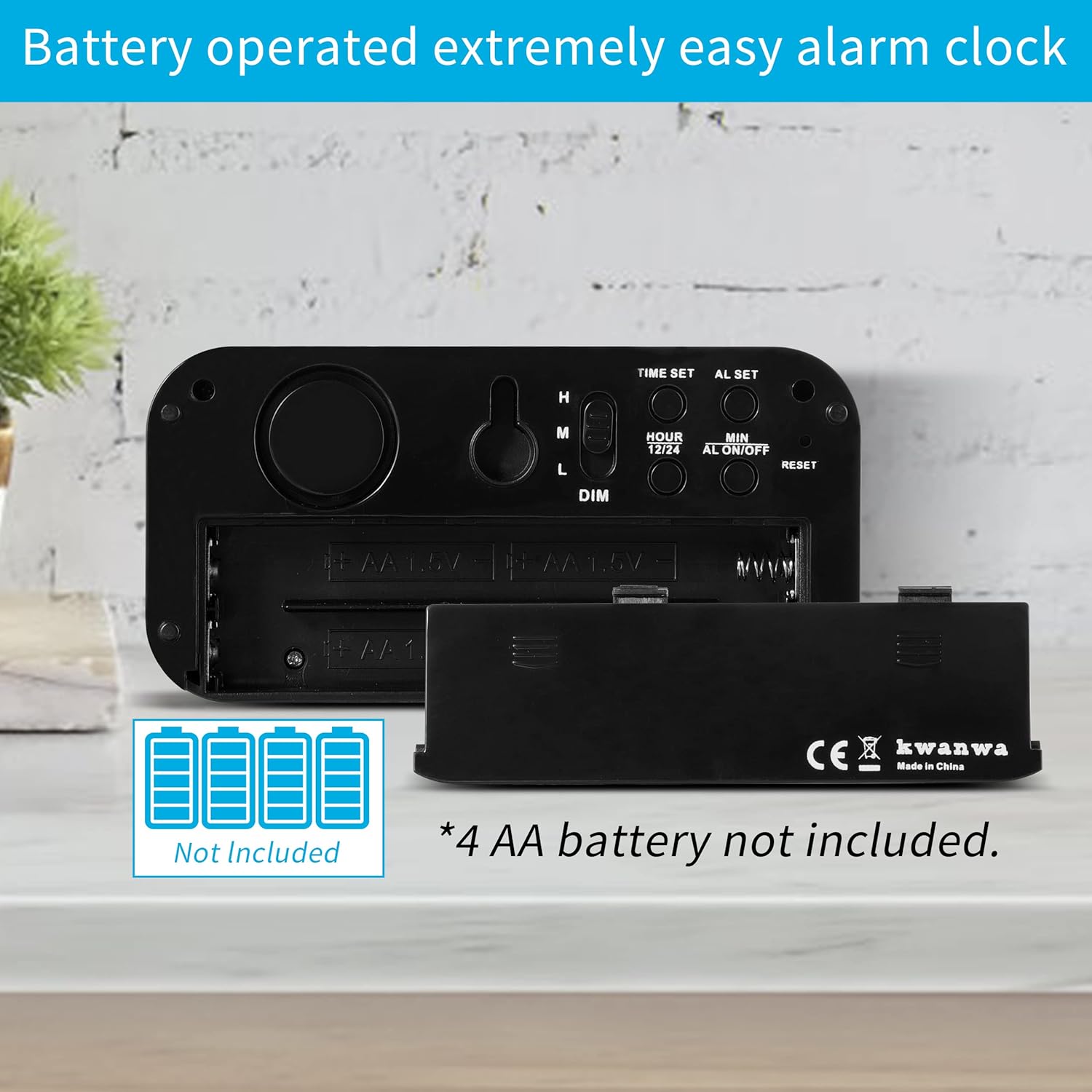
Image: Rear view of the alarm clock with labels for Time Set, AL Set, Hour, Min, 12/24, AL ON/OFF, Reset buttons, and the Dimmer switch.
Setting the Time
- Press and hold the "TIME SET" button for 2 seconds. The hour digits will flash.
- Press the "HOUR" button to adjust the hour.
- Press the "MIN" button to adjust the minutes.
- Press "TIME SET" again to save the time setting, or wait 30 seconds for it to save automatically.
Setting the Alarm
- Press and hold the "AL SET" button for 2 seconds. The alarm hour digits will flash.
- Press the "HOUR" button to adjust the alarm hour.
- Press the "MIN" button to adjust the alarm minutes.
- Press "AL SET" again to save the alarm setting, or wait 30 seconds for it to save automatically.
Alarm ON/OFF
- To activate or deactivate the alarm, press the "AL ON/OFF" button. An alarm icon will appear on the display when the alarm is active.
Snooze Function

Image: The alarm clock showing the snooze function in action, with a hand pressing the top button and the display showing the time after a snooze.
- When the alarm sounds, press the large "SNOOZE/AL STOP" button on top of the clock to activate the 7-minute snooze.
- The snooze can be repeated up to 3 times.
- To stop the alarm for the day, press any button on the back of the clock. The alarm will reset for the next day.
- To disable the snooze function completely, press and hold the "12/24" button for 2 seconds.
12/24 Hour Mode
- Press the "12/24" button to switch between 12-hour and 24-hour time formats.
Adjusting Display Brightness (Dimmer)
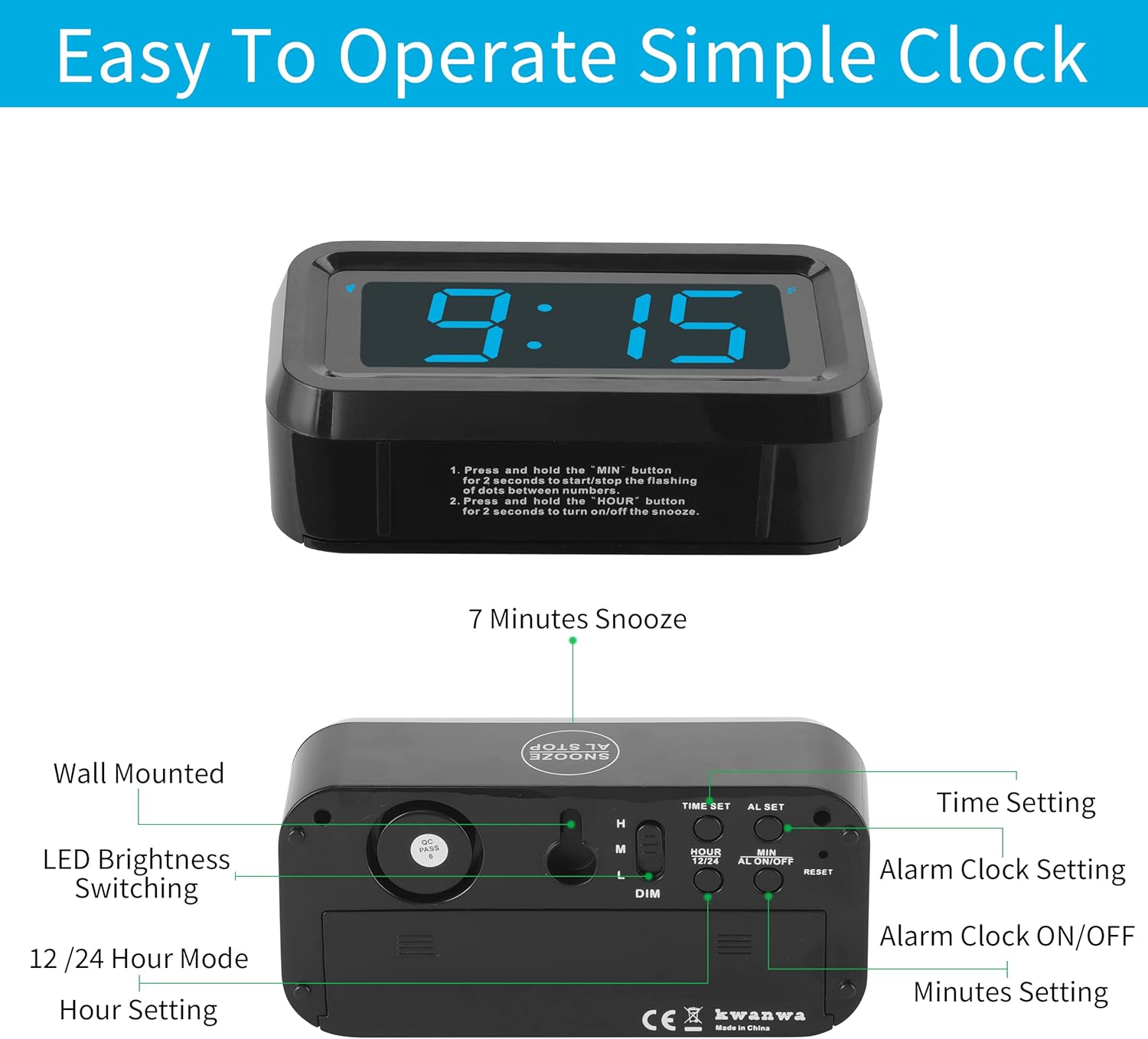
Image: The alarm clock display at High, Medium, and Dim brightness settings.
- Use the H/M/L (High/Medium/Low) switch on the back of the clock to manually adjust the display brightness.
- The clock features an automatic Night Mode that dims the display from 8:00 PM to 6:00 AM to conserve battery and reduce light disturbance.
Features
- Battery Powered: Operates on 4 AA alkaline batteries (not included) for cordless use.
- Large LED Display: 1.2-inch digits for clear visibility.
- Adjustable Brightness: 3 manual levels (High, Medium, Low) and automatic Night Mode.
- Progressive Alarm: Alarm volume increases over a 90-second cycle.
- Snooze Function: 7-minute snooze, repeatable up to 3 times.
- 12/24 Hour Format: Easily switch between time display modes.
- Versatile Placement: Designed for tabletop use or wall-mounting via a built-in keyhole slot.

Image: Examples of the alarm clock used as a desk clock, wall clock, and a portable travel clock.
Maintenance
Battery Replacement
When the display begins to dim significantly, it indicates that the batteries are running low. Replace all four AA alkaline batteries with new ones to ensure optimal performance and display brightness. Do not mix old and new batteries or different types of batteries.
Cleaning
Wipe the clock with a soft, dry cloth. Do not use abrasive cleaners or solvents.
Troubleshooting
- Display is dim or off: Check if the batteries are correctly installed. Replace all 4 AA batteries with new ones. Ensure the dimmer switch is not set to 'Low' if you desire a brighter display.
- Alarm not sounding: Verify that the alarm is set and the alarm icon is visible on the display. Ensure the volume is not too low (though this model has a progressive alarm).
- Time inaccuracy: The clock has a time accuracy of approximately +/-30 seconds per month. If significant deviation occurs, reset the time.
- Buttons unresponsive: Remove and reinsert batteries to perform a soft reset. If the issue persists, replace batteries.
Specifications
| Feature | Detail |
|---|---|
| Brand | KWANWA |
| Model Number | EJ11 |
| Display Type | Digital LED |
| Screen Size | 1.2 Inches (digit height) |
| Power Source | 4 x AA Batteries (not included) |
| Product Dimensions | 5.1"W x 2.6"H (5.1 inches wide and 2.6 inches tall) |
| Item Weight | 0.29 Pounds |
| Mounting Type | Tabletop / Wall Mount |
| Material Type | Plastic (Acrylonitrile Butadiene Styrene) |

Image: Dimensions of the KWANWA KW618 Digital Alarm Clock.
Warranty and Support
For warranty information, technical support, or any inquiries regarding your KWANWA KW618 Digital Alarm Clock, please refer to the documentation included with your purchase or visit the official KWANWA website. Contact details for customer service are typically provided on the product packaging or in the included user guide.


