
Aigital B0BR3F91X9
Contents
Aigital 2-in-1 Bluetooth Audio Adapter User Manual
Model: B0BR3F91X9 | Brand: Aigital
1. Introduction
The Aigital 2-in-1 Bluetooth Audio Adapter is a versatile device designed to enhance your audio experience by enabling Bluetooth connectivity for a wide range of non-Bluetooth devices. It functions as both a Bluetooth transmitter (TX mode) and a Bluetooth receiver (RX mode), offering seamless wireless audio streaming for various applications, from home entertainment to in-car audio systems.
This manual provides detailed instructions on how to set up, operate, and maintain your Aigital Bluetooth Audio Adapter, along with troubleshooting tips and product specifications.
2. Package Contents
- Aigital 2-in-1 Bluetooth Audio Adapter Unit
- 3.5mm Audio Cable
- USB Charging Cable
- User Manual (this document)
3. Product Features
- 2-in-1 Transmitter and Receiver: Supports both TX (transmit) and RX (receive) modes. In TX Mode, it converts non-Bluetooth devices (TVs, PCs, gym/flight equipment) into Bluetooth-enabled devices. In RX Mode, it allows wired speakers or car audio systems to receive audio from Bluetooth-enabled smartphones or tablets.
- Low Latency & No Audio Lag: Equipped with a premium low-latency chip and Bluetooth 5.0 technology. It incorporates CVC8.0 Noise Cancellation and Digital Signal Processor (DSP) technologies to ensure high-quality sound without audio-video synchronization issues, ideal for gaming and movies.
- Built-in Microphone and Hands-free Calling: The Bluetooth receiver features a built-in microphone, enabling convenient hands-free calls when connected to a car audio system or wired headphones. Easily answer, cancel, or end calls with a single button press.
- Long Battery Life: Features a built-in 150mAh rechargeable lithium battery, providing up to 8 hours of continuous use on a full charge. A full charge typically takes 1-1.5 hours.
- Extended Range: Capable of effectively transmitting audio up to 10 meters (approximately 33 feet) without significant obstruction.
4. Setup Guide
Before using the device, ensure it is fully charged. Connect the USB charging cable to the device's charging port and a USB power source. The indicator light will show charging status.

The Aigital 2-in-1 Bluetooth Audio Adapter unit with its 3.5mm audio jack cable.
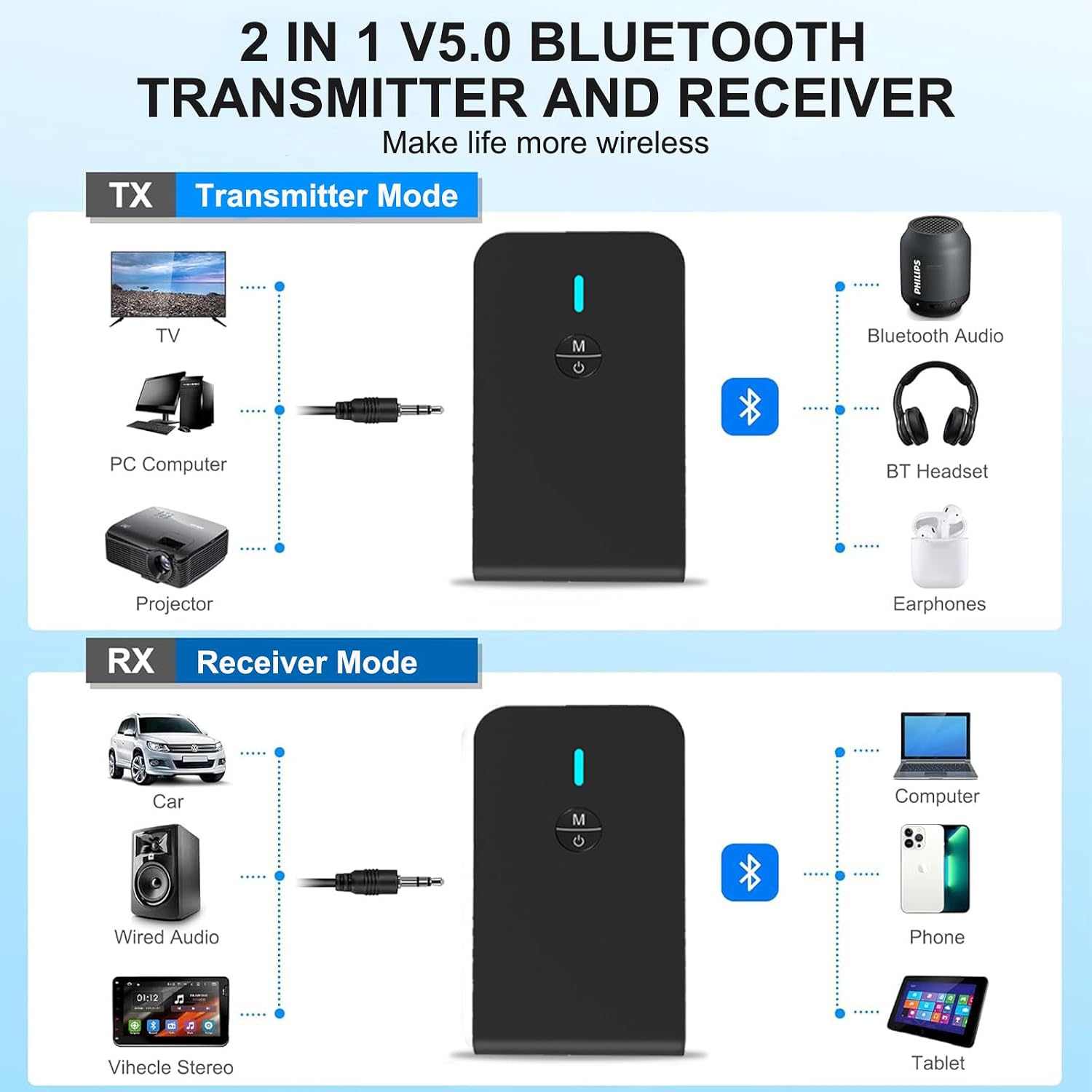
Visual diagram illustrating the two modes: Transmitter (TX) and Receiver (RX).
4.1. TX Mode (Transmitter) Setup
Use TX mode to enable non-Bluetooth devices (like TVs, PCs, or older audio equipment) to transmit audio wirelessly to Bluetooth headphones or speakers.
- Switch to TX Mode: Locate the TX/RX switch on the side of the device and slide it to the 'TX' position.
- Connect to Audio Source: Use the provided 3.5mm audio cable to connect the adapter's 3.5mm port to the audio output (headphone jack or AUX out) of your non-Bluetooth device (e.g., TV, PC, MP3 player).
- Pair with Bluetooth Device:
- Turn on your Bluetooth headphones or speaker and put them into pairing mode (refer to their respective manuals for instructions). The adapter's indicator light will flash blue, indicating it is searching for devices.
- The adapter will automatically search for and connect to nearby Bluetooth audio devices. Once connected, the indicator light will turn solid blue.
- Enjoy Wireless Audio: Audio from your non-Bluetooth source will now be transmitted wirelessly to your paired Bluetooth headphones or speaker.

A user enjoying TV audio privately through Bluetooth headphones using the adapter in TX mode.

The adapter connected to an airplane's in-flight entertainment system, allowing wireless headphone use.
4.2. RX Mode (Receiver) Setup
Use RX mode to enable wired audio systems (like car stereos, home speakers, or non-Bluetooth headphones) to receive audio wirelessly from Bluetooth-enabled devices (like smartphones or tablets).
- Switch to RX Mode: Slide the TX/RX switch on the side of the device to the 'RX' position.
- Connect to Audio Output Device: Use the provided 3.5mm audio cable to connect the adapter's 3.5mm port to the AUX input of your wired speaker, car stereo, or wired headphones.
- Pair with Bluetooth Device:
- Turn on Bluetooth on your smartphone or tablet.
- Search for Bluetooth devices. The adapter will appear as 'BT-6' or a similar identifier. Select it to pair.
- Once connected, the indicator light will turn solid blue.
- Enjoy Wireless Audio: You can now stream audio from your smartphone or tablet to your connected wired audio system.

A woman driving, utilizing the adapter to add Bluetooth functionality to her car's audio system for music and calls.

The adapter connected to a portable speaker, allowing music streaming from a smartphone at a gathering.
5. Operating Instructions
5.1. Power On/Off
- Power On: Press and hold the multi-function button (M/Power icon) for approximately 3 seconds until the indicator light flashes blue.
- Power Off: Press and hold the multi-function button for approximately 3 seconds until the indicator light turns red and then off.
5.2. Pairing
The device automatically enters pairing mode when powered on and not connected to a device. The indicator light will flash blue rapidly. If already connected, it will attempt to reconnect to the last paired device. To force pairing mode, ensure the device is powered on and not connected, then long-press the multi-function button until the blue light flashes rapidly.
5.3. Mode Switching
The TX/RX switch on the side of the device allows you to easily switch between Transmitter and Receiver modes. Ensure the device is powered off before changing modes for optimal performance.

Detail of the TX/RX mode switch on the side of the adapter.
5.4. Hands-free Calling (RX Mode Only)
When in RX mode and connected to a smartphone via Bluetooth, the built-in microphone allows for hands-free calling:
- Answer/End Call: Short press the multi-function button.
- Reject Call: Long press the multi-function button.
5.5. Charging
The device has a built-in rechargeable battery. When the battery is low, the indicator light may flash red. Connect the USB charging cable to the device and a 5V USB power source (e.g., computer USB port, USB wall adapter). The indicator light will be solid red during charging and turn off when fully charged. A full charge takes approximately 1-1.5 hours and provides up to 8 hours of usage.

The adapter offers extended battery life for prolonged wireless audio enjoyment.
6. Maintenance
- Keep the device dry. Avoid exposure to water or excessive humidity.
- Clean the device with a soft, dry cloth. Do not use harsh chemicals or abrasive cleaners.
- Store the device in a cool, dry place when not in use.
- Avoid extreme temperatures, as they can shorten the lifespan of electronic components and batteries.
- Do not attempt to disassemble or modify the device, as this will void the warranty and may cause damage.
7. Troubleshooting
- Device will not power on: Ensure the device is fully charged. Connect it to a USB power source and try again.
- Cannot pair with a Bluetooth device:
- Ensure the adapter is in the correct mode (TX for transmitting, RX for receiving).
- Make sure both the adapter and the target Bluetooth device are in pairing mode.
- Ensure they are within the 10-meter effective range.
- Clear the pairing list on your Bluetooth device and try pairing again.
- Restart both devices.
- No sound or poor sound quality:
- Check all cable connections (3.5mm audio cable) to ensure they are secure.
- Adjust the volume on both the adapter and the connected audio device.
- Ensure the adapter is correctly paired and connected.
- Verify that the audio source is playing sound.
- Reduce interference by moving away from other wireless devices or obstacles.
- Audio and video are out of sync (lag): The adapter features low-latency technology. If you experience significant lag, ensure your receiving Bluetooth device (headphones/speaker) also supports low-latency codecs. Some older or basic Bluetooth devices may introduce slight delays.
8. Specifications
| Feature | Specification |
|---|---|
| Model | B0BR3F91X9 |
| Bluetooth Version | 5.0 |
| Operating Modes | Transmitter (TX) / Receiver (RX) |
| Battery Capacity | 150mAh Lithium Polymer |
| Charging Time | Approx. 1-1.5 hours |
| Usage Time | Up to 8 hours |
| Wireless Range | Up to 10 meters (33 feet) |
| Connectivity Technology | Bluetooth, 3.5mm AUX |
| Item Weight | 2.08 ounces (0.06 Kilograms) |
| Package Dimensions | 4.09 x 3.58 x 0.75 inches |
| Manufacturer | Aigital |
9. Warranty and Support
Aigital provides a 12-month replacement warranty for non-human damage and lifelong technical support for this Bluetooth audio adapter. If you encounter any issues or have questions regarding the product, please do not hesitate to contact our customer support team for assistance. We are committed to providing the best support services.
10. Safety Information
Please read and follow these safety guidelines to ensure safe operation and prevent damage to the device or injury:
- Do not expose the device to extreme temperatures, direct sunlight, or high humidity.
- Avoid dropping or subjecting the device to strong impacts.
- Keep the device away from water and other liquids.
- Do not attempt to open, disassemble, or repair the device yourself. Refer all servicing to qualified personnel.
- Dispose of the device and its battery responsibly according to local regulations. Do not dispose of batteries in fire.
- Keep out of reach of children.
- If the device emits an unusual smell, heat, or changes color, discontinue use immediately and contact support.
Documents and downloads
Ask a question about this manual
Ask about setup, troubleshooting, compatibility, parts, safety, or missing instructions. Manuals+ will review the question and use this page’s manual context to help answer it.