
Introduction
This manual provides instructions for the Azwok AXD7661 replacement remote control, designed for use with various Pioneer AV receiver models. This remote offers full functionality without the need for programming, ensuring a straightforward user experience.
Setup
Battery Installation
The Azwok AXD7661 remote control requires two AAA batteries (not included) for operation. Follow these steps to install the batteries:
- Locate the battery compartment on the back of the remote control.
- Press down on the tab and slide the battery cover downwards to open it.
- Insert two AAA batteries, ensuring the positive (+) and negative (-) terminals align correctly with the markings inside the compartment.
- Slide the battery cover back into place until it clicks securely.

Once batteries are installed, the remote is ready for immediate use with compatible Pioneer AV receivers; no programming is required.
Operating Instructions
Basic Operation
This replacement remote control is designed to function identically to the original Pioneer AXD7661 remote. Simply point the remote at your Pioneer AV receiver and press the desired function button.
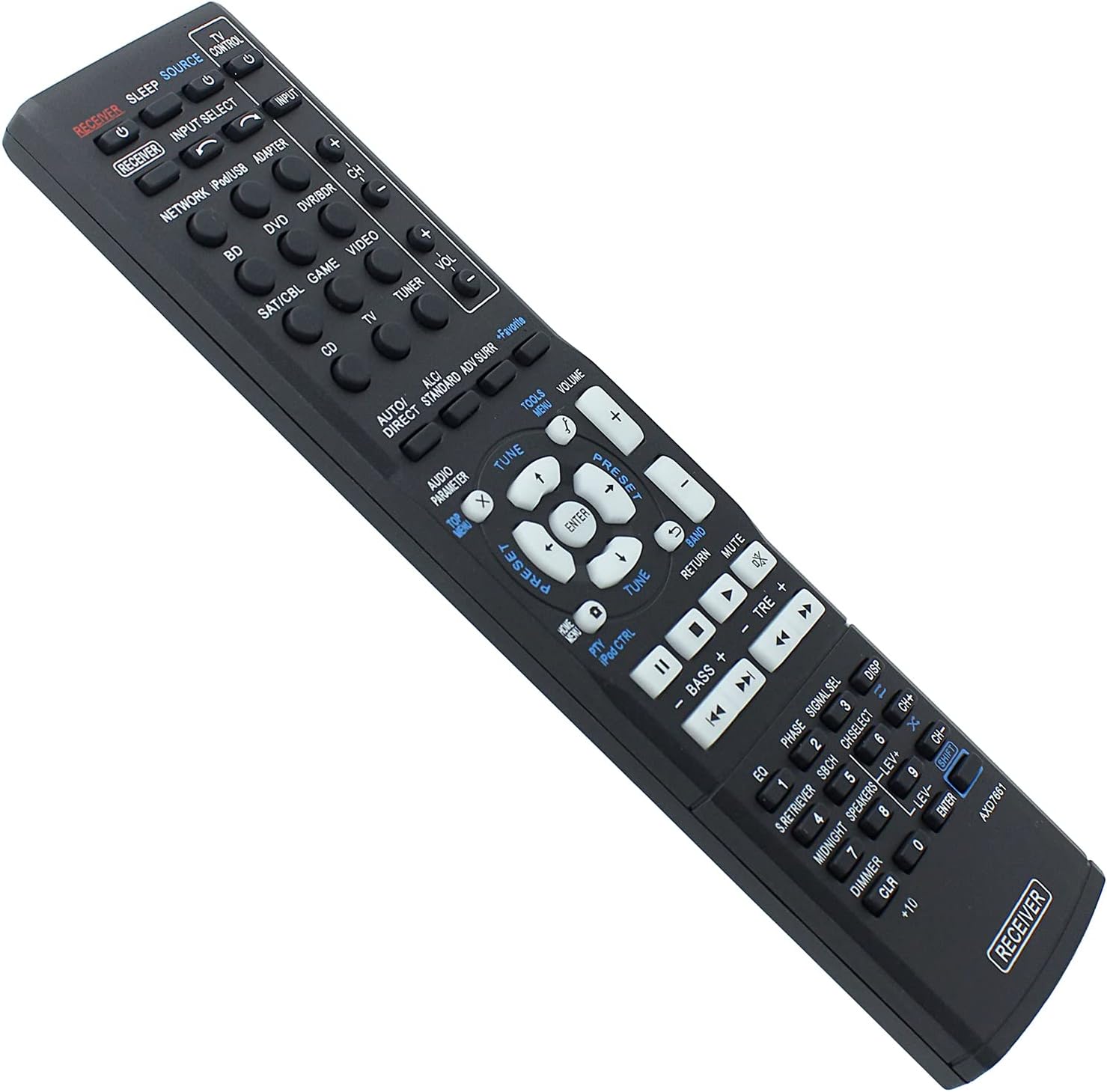
Compatible Models
This remote control is compatible with a wide range of Pioneer AV receiver models, including but not limited to:
- VSX-422-K, HTP-071, VSX-321-K-P, VSX-827, VSX42, VSX819VK, VSX921, VSX527, VSX827, VSX-422, VSX-521, VSX-1019, VSX521, VSX1019, VSX822, VSX1022, VSX-824-K
- HTP-070, VSX-421-K, VSX-421, VSX-422-S, VSX-529-K, VSX-529-S, VSX-424-K, VSX-329-K
- VSX-42, VSX-819V-K, VSX-921, VSX-527, VSX-822, VSX-1022
- AXD7662, AXD7621, AXD7622, AXD7624, AXD7660
If your specific model is not listed, or if you are unsure about compatibility, please refer to the support section for assistance.
Maintenance
Cleaning
To clean the remote control, use a soft, dry cloth. For stubborn dirt, lightly dampen the cloth with water or a mild, non-abrasive cleaner. Avoid using harsh chemicals or abrasive materials, as these can damage the remote's surface or internal components.
Battery Care
- Replace batteries when the remote's performance diminishes or stops working.
- Remove batteries if the remote will not be used for an extended period to prevent leakage and potential damage.
- Dispose of used batteries responsibly according to local regulations.
Troubleshooting
Remote Not Responding
- Check Batteries: Ensure batteries are inserted correctly with the correct polarity (+/-) and are not depleted. Replace with fresh AAA batteries if necessary.
- Line of Sight: Make sure there is a clear line of sight between the remote control and the AV receiver. Obstructions can block the infrared signal.
- Distance: Operate the remote within its effective range (up to 10 meters).
- Receiver Power: Confirm that your Pioneer AV receiver is powered on.
Specific Functions Not Working
- Compatibility: While this remote is broadly compatible, some highly specific functions might vary slightly depending on your exact receiver model. Refer to your receiver's original manual for detailed function mapping.
- Button Malfunction: If only one or a few buttons are unresponsive, gently clean around the buttons. If the issue persists, contact support.
Specifications
- Brand: Azwok
- Model Number: AU-AXD7661-PE002
- Special Feature: No Programming Required
- Max Number of Supported Devices: 1
- Compatible Devices: Home Theater (Pioneer AV Receivers)
- Connectivity Technology: Infrared (IR)
- Controller Type: Button Control
- Maximum Range: 10 Meters (approx. 33 feet)
- Batteries Required: 2 x AAA (Alkaline recommended)
- Item Weight: 77 Grams
Warranty Information
This Azwok AXD7661 replacement remote control comes with a 12-month warranty from the date of purchase. This warranty covers manufacturing defects and malfunctions under normal use. For warranty claims or further details, please contact customer support.
Customer Support
If you encounter any issues not covered in this manual, or if you require further assistance with your Azwok AXD7661 remote control, please contact the seller or manufacturer directly through your purchase platform. When contacting support, please provide your product model number (AU-AXD7661-PE002) and a detailed description of the issue.