
Introduction
This manual provides essential information for the safe and efficient operation of your Studebaker Portable Stereo CD Player with Bluetooth, AM/FM Stereo Radio, and Cassette Player/Recorder. Please read this manual thoroughly before using the unit and retain it for future reference.
Package Contents
- Portable Stereo CD Player Unit
- AC Power Cord
- Instruction Manual
Key Features
- Bluetooth Connectivity for Wireless Music Streaming
- AM/FM Analog Tuner with FM Telescopic Antenna
- Top Loading CD Player: CD-R/CD-RW Compatible
- 20 Programmable CD Tracks
- Cassette Player/Recorder with Auto-Stop Function
- Built-in Condenser Microphone for Cassette Recording
- 3.5 mm Aux-in Jack for External Audio Devices
- Red LED Display
- Portable Carrying Handle
- AC/DC Operation (requires 6 x 'C' batteries, not included)
Product Overview

Figure 1: Front view of the Studebaker Portable Stereo CD Player, showcasing the CD compartment, cassette deck, and control panel in a rose and gold finish.

Figure 2: Top-down view of the unit, highlighting the top-loading CD player cover and the integrated carrying handle.

Figure 3: A close-up view of the open CD compartment, showing a CD placed inside, ready for playback.
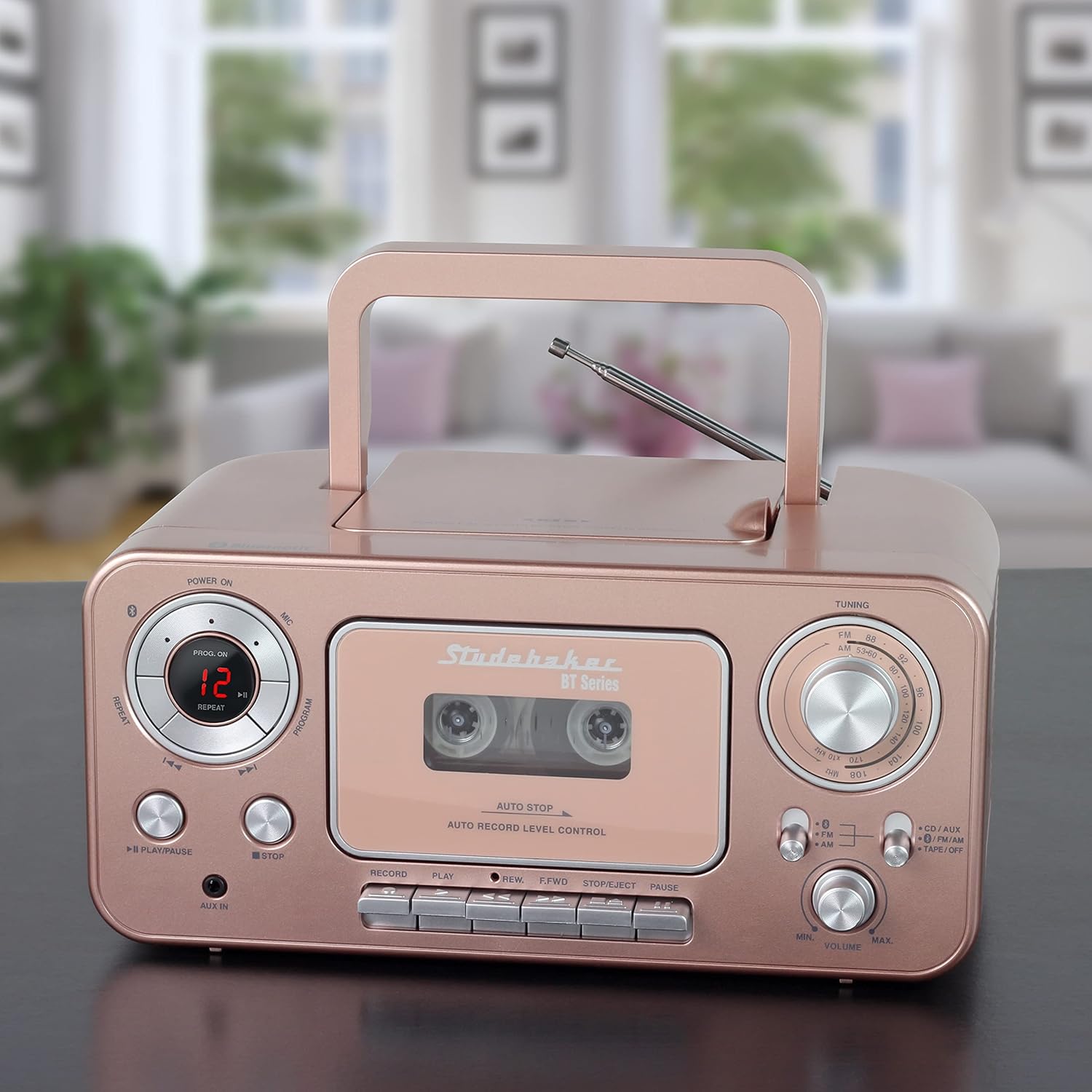
Figure 4: The portable stereo unit positioned on a surface in a home environment, demonstrating its compact size and aesthetic appeal.
Setup
Powering the Unit
The unit can be powered by either AC power or batteries.
- AC Power: Connect the supplied AC power cord to the AC IN jack on the back of the unit and then to a standard AC outlet (120V ~ 60Hz).
- Battery Power: Open the battery compartment on the bottom of the unit. Insert 6 x 'C' size batteries (not included), ensuring correct polarity (+/-). Close the battery compartment cover securely.
Antenna Adjustment
For optimal FM radio reception, fully extend the telescopic antenna. For AM reception, the unit has a built-in antenna, so no external adjustment is needed. Reposition the unit for best AM reception.
Operating Instructions
Bluetooth Pairing
- Switch the Function Selector to the BT position. The Bluetooth indicator will flash, indicating pairing mode.
- Enable Bluetooth on your external device (e.g., smartphone, tablet) and search for available devices.
- Select "SB2135BTRG" from the list of found devices.
- Once paired, the Bluetooth indicator will glow steadily. You can now stream audio from your device to the unit.
CD Player Operation
- Switch the Function Selector to the CD/AUX position.
- Open the CD compartment cover and place a CD (or CD-R/RW) with the label side facing up. Close the cover securely.
- The unit will read the disc, and the total number of tracks will appear on the LED display.
- Press the PLAY/PAUSE button to begin playback.
- Use the SKIP/SEARCH buttons (◀◀ / ▶▶) to skip tracks or search within a track.
- Press the STOP button to stop playback.
- To program tracks, press the PROGRAM button while in stop mode. Select desired tracks using SKIP/SEARCH and press PROGRAM to confirm each selection. Press PLAY/PAUSE to play the programmed sequence.
- Press the REPEAT button to repeat the current track or all tracks.
Cassette Player/Recorder Operation
- Switch the Function Selector to the TAPE/OFF position.
- Press the STOP/EJECT button to open the cassette door. Insert a cassette tape. Close the door.
- Press the PLAY button to begin playback.
- Use REW (Rewind) and F.FWD (Fast Forward) buttons to navigate the tape.
- Press PAUSE to temporarily stop playback, and press again to resume.
- Press STOP/EJECT to stop playback.
- Recording: To record from the built-in microphone, radio, or Aux-in, ensure the Function Selector is set to the desired source (FM/AM or CD/AUX). Insert a blank tape and press the RECORD button. The PLAY button will also engage. Press STOP/EJECT to end recording.
AM/FM Radio Operation
- Switch the Function Selector to the FM or AM position.
- Rotate the TUNING knob to select your desired radio station.
- Adjust the VOLUME knob to your preferred listening level.
Aux-in Operation
- Connect an external audio device (e.g., MP3 player) to the AUX IN jack using a 3.5mm audio cable (not included).
- Switch the Function Selector to the CD/AUX position.
- Start playback on your external device. Audio will be routed through the stereo unit's speakers.
Maintenance
Cleaning
Wipe the unit with a soft, damp cloth. Do not use abrasive cleaners or solvents. For the CD lens, use a specialized CD lens cleaner. For the cassette head, use a cotton swab lightly dampened with isopropyl alcohol.
Storage
When not in use for extended periods, disconnect the AC power cord and remove batteries. Store the unit in a cool, dry place away from direct sunlight and extreme temperatures.
Troubleshooting
| Problem | Possible Cause | Solution |
|---|---|---|
| No Power | AC cord not connected; Batteries depleted or incorrectly inserted. | Check AC connection; Replace batteries, ensuring correct polarity. |
| No Sound | Volume too low; Incorrect function mode selected; Headphones connected. | Increase volume; Select correct function (CD, BT, FM/AM, TAPE, AUX); Disconnect headphones. |
| CD Skipping/Not Playing | CD dirty or scratched; CD inserted incorrectly; Unit on an unstable surface. | Clean or replace CD; Insert CD correctly; Place unit on a stable, flat surface. |
| Poor Radio Reception | FM antenna not extended; Unit location. | Fully extend FM telescopic antenna; Reposition unit for better reception. |
| Bluetooth Not Connecting | Unit not in pairing mode; Device too far; Device already connected to another unit. | Ensure unit is in BT mode and flashing; Move device closer; Disconnect from other devices. |
Specifications
- Brand: Studebaker
- Model Number: SB2135BTRG
- Product Dimensions (L x W x H): 7.99 x 10.24 x 4.72 inches
- Item Weight: 4.29 pounds
- Connectivity Technology: Bluetooth
- Color: Rose & Gold
- Speaker Type: Mono
- Power Source: AC 120V ~ 60Hz or 6 x 'C' Batteries (DC 9V)
- CD Compatibility: CD, CD-R/RW
- Radio Frequencies: FM 88-108 MHz, AM 530-1700 KHz
Warranty and Support
For warranty information or technical support, please refer to the contact details provided on the product packaging or visit the official Studebaker website. Keep your purchase receipt as proof of purchase for warranty claims.


