
Studebaker SB2135BTBG
Studebaker Bluetooth Portable Stereo CD, AM/FM Stereo Radio and Cassette Player/Recorder User Manual
Model: SB2135BTBG
Brand: Studebaker
Introduction
This manual provides detailed instructions for the setup, operation, maintenance, and troubleshooting of your Studebaker Bluetooth Portable Stereo CD, AM/FM Stereo Radio and Cassette Player/Recorder, Model SB2135BTBG. Please read this manual thoroughly before using the unit to ensure proper function and to maximize your listening experience.
Setup
Powering the Unit
The SB2135BTBG can be powered by either AC power or batteries.
- AC Power: Connect the supplied AC power adapter to the AC IN jack on the unit and then to a standard AC wall outlet.
- Battery Power: Open the battery compartment cover on the bottom of the unit. Insert 6 x 'C' size batteries (not included), ensuring correct polarity (+/-). Close the battery compartment cover securely.
Antenna Setup
- FM Reception: Extend the telescopic FM antenna fully for optimal FM reception. Adjust its position for the best signal.
- AM Reception: The unit has a built-in AM antenna. Rotate the entire unit for the best AM reception.
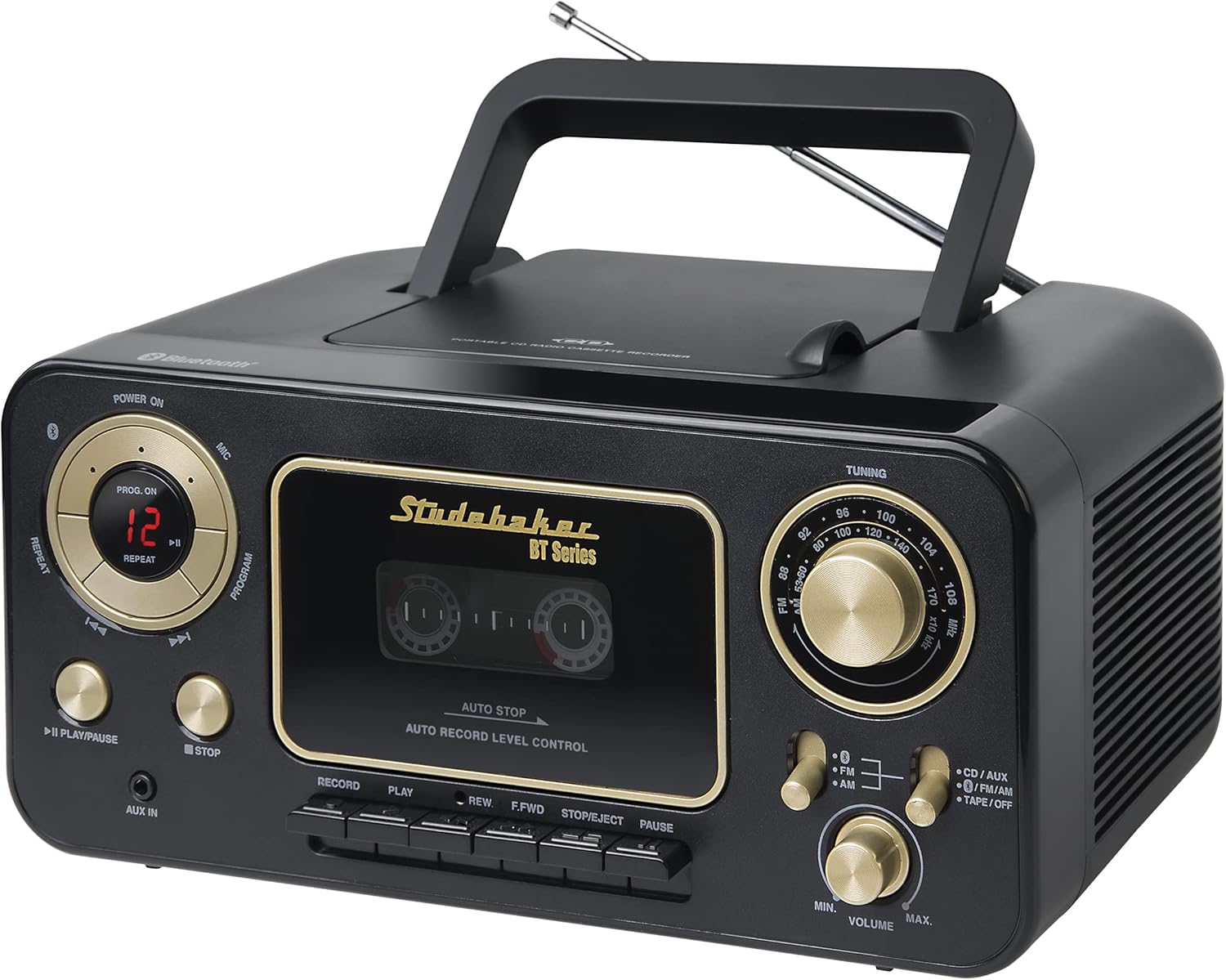
Image: Front view of the Studebaker SB2135BTBG unit, showing the CD player, cassette deck, radio tuner, and control buttons.
Operating Instructions
General Controls
- POWER ON/OFF: Press the POWER ON button to turn the unit on or off.
- FUNCTION Selector: Use the FUNCTION switch to select between CD/AUX, FM/AM, TAPE/OFF, and Bluetooth modes.
- VOLUME Control: Rotate the VOLUME knob to adjust the sound level.
CD Player Operation
- Switch the FUNCTION selector to "CD/AUX".
- Open the CD compartment cover by gently lifting it.
- Place a CD (CD-R/RW compatible) onto the center spindle with the label side facing up.
- Close the CD compartment cover. The CD will begin to spin, and the total number of tracks will be displayed.
- Press the PLAY/PAUSE button to start playback.
- Press the STOP button to stop playback.
- Use the SKIP/SEARCH buttons (◀◀ / ▶▶) to skip tracks or search within a track.
- REPEAT Function: Press the REPEAT button once to repeat the current track. Press it again to repeat all tracks on the CD. Press a third time to cancel.
- PROGRAM Function:
- In STOP mode, press the PROGRAM button. "PROG" will flash on the display.
- Use the SKIP/SEARCH buttons to select the desired track.
- Press PROGRAM again to confirm the track. Repeat for up to 20 tracks.
- Press PLAY/PAUSE to play the programmed sequence.

Image: Close-up view of the top-loading CD player with a compact disc placed inside the compartment.
AM/FM Radio Operation
- Switch the FUNCTION selector to "FM/AM".
- Select either "FM" or "AM" using the band selector switch.
- Rotate the TUNING knob to select your desired radio station.
- Adjust the VOLUME knob to your preferred listening level.
Cassette Player/Recorder Operation
- Switch the FUNCTION selector to "TAPE/OFF".
- Press the STOP/EJECT button to open the cassette compartment.
- Insert a cassette tape with the open edge facing up and the side to be played facing you.
- Close the cassette compartment.
- Playback: Press the PLAY button to start playback.
- Fast Forward/Rewind: Press the F.FWD or REW buttons. Press STOP/EJECT to stop.
- Recording:
- From Built-in Microphone: Ensure the FUNCTION selector is on "TAPE/OFF". Insert a blank cassette. Press the RECORD button (this will also engage PLAY). Speak into the built-in microphone. Press STOP/EJECT to end recording.
- From Radio: Switch the FUNCTION selector to "FM/AM" and tune to your desired station. Insert a blank cassette. Press the RECORD button. Press STOP/EJECT to end recording.
- From Aux-in: Connect an external audio source to the AUX IN jack. Switch the FUNCTION selector to "CD/AUX". Start playback on the external device. Insert a blank cassette. Press the RECORD button. Press STOP/EJECT to end recording.
- Auto-Stop Feature: The cassette player features an auto-stop mechanism that automatically stops playback or recording when the tape reaches its end.

Image: Front panel of the unit, highlighting the cassette player compartment and its control buttons (Record, Play, Rewind, Fast Forward, Stop/Eject, Pause).
Bluetooth Operation
- Switch the FUNCTION selector to "Bluetooth". The Bluetooth indicator will flash, indicating pairing mode.
- Enable Bluetooth on your external device (e.g., smartphone, tablet) and search for available devices.
- Select "SB2135BTBG" from the list of devices.
- Once paired, the Bluetooth indicator will stop flashing and remain solid.
- You can now stream audio from your device to the SB2135BTBG. Use your external device to control playback (play, pause, skip tracks).
- Adjust the VOLUME knob on the unit and the volume on your external device for optimal sound.
Aux-in Operation
- Connect an external audio device (e.g., MP3 player) to the AUX IN jack on the unit using a 3.5mm audio cable (not included).
- Switch the FUNCTION selector to "CD/AUX".
- Start playback on your external audio device.
- Adjust the VOLUME knob on the unit and the volume on your external device.
Maintenance
Cleaning the Unit
- Wipe the exterior of the unit with a soft, damp cloth. Do not use abrasive cleaners or solvents.
- Ensure the unit is unplugged from the power source before cleaning.
CD Lens Care
- If the CD lens gets dirty, use a standard CD lens cleaner disc to clean it.
- Avoid touching the lens directly.
Cassette Head Cleaning
- Periodically clean the tape heads, capstan, and pinch roller using a cotton swab lightly moistened with isopropyl alcohol.
- This helps maintain optimal sound quality and prevents tape damage.
Troubleshooting
| Problem | Possible Cause | Solution |
|---|---|---|
| No power | AC adapter not connected properly; Batteries depleted or incorrectly inserted. | Check AC adapter connection; Replace batteries or ensure correct polarity. |
| No sound | Volume too low; Incorrect function mode selected; Headphones connected. | Increase volume; Select correct function (CD/AUX, FM/AM, TAPE, BT); Disconnect headphones. |
| CD skips or does not play | CD is dirty or scratched; CD inserted incorrectly; CD compartment not closed. | Clean or replace CD; Insert CD with label side up; Close CD compartment securely. |
| Poor radio reception | FM antenna not extended; Unit position for AM reception. | Extend and adjust FM telescopic antenna; Rotate the unit for better AM signal. |
| Cassette tape not playing/recording | Tape incorrectly inserted; Tape mechanism dirty; Tape is jammed. | Ensure tape is inserted correctly; Clean tape heads; Do not force jammed tapes. |
| Bluetooth not pairing | Unit not in Bluetooth mode; Device too far; Device already paired with another unit. | Switch to Bluetooth mode; Move device closer; Disconnect from other devices and try again. |
Specifications
- Model: SB2135BTBG
- Power Source: AC 120V ~ 60Hz or 6 x 'C' size batteries (DC 9V)
- CD Player: Top-loading, CD-R/RW compatible, 20 programmable tracks
- Radio Tuner: AM/FM Analog
- Cassette Player/Recorder: Auto-stop mechanism, records from built-in mic, radio, and aux-in
- Bluetooth: Yes
- Aux-in: 3.5mm jack
- Dimensions (L x W x H): 10.24 x 7.99 x 4.72 inches (approx.)
- Weight: 4.33 pounds (approx.)
Warranty and Support
For warranty information or technical support, please refer to the documentation included with your purchase or visit the official Studebaker website. Do not attempt to repair the unit yourself, as this may void your warranty.
Related documentsSB2135BTBG


Ask a question about this manual
Ask about setup, troubleshooting, compatibility, parts, safety, or missing instructions. Manuals+ will review the question and use this page’s manual context to help answer it.