
Introduction
The Airthereal Revive Electric Kitchen Composter is designed to transform food scraps and kitchen waste into a dry, nutrient-rich powder. This process reduces waste volume and odor, providing a convenient method for managing organic household waste. The resulting material can be used as a soil amendment for plants or disposed of to minimize landfill contributions.
Key Features:
- Waste Reduction: Transforms food scraps into powder, reducing volume by up to 90%.
- Efficient Processing: Features SHARKSDEN Tri-Blades for effective grinding and drying.
- Odor Elimination: Integrated odor-reducing biodegradable carbon filters maintain a fresh kitchen environment.
- User-Friendly: Simple one-button operation and a 2.5-liter capacity for daily use.
- Easy Cleaning: The cast aluminum bucket is nonstick, easy to clean, and dishwasher safe.
- Quick Cycle: Processes food waste in approximately 2-4 hours, depending on content.
Safety Information
- Always unplug the composter before cleaning or handling the blades.
- Keep the composter clean to prevent pest attraction.
- Allow for proper ventilation and heat dissipation during operation.
- Do not compost sharp objects or harmful microorganisms.
- Always use protective gear when handling the composter or its contents.
Product Overview
Components and Dimensions:

Figure 1: Airthereal Revive R500 Composter components and dimensions.
- Kitchen Composter Unit: The main device housing the motor, heating element, and control panel.
- Lid: Covers the processing bucket, ensuring odor containment and safety during operation.
- Bucket: A 2.5-liter capacity, nonstick, cast aluminum container where food waste is processed. It is removable for easy cleaning.
- SHARKSDEN Tri-Blades: Internal blades designed for efficient grinding of food waste.
- Filter Outlet Cover: A removable panel on the back of the unit covering the carbon filters.
- Biodegradable Carbon Filters: Two filters located behind the filter outlet cover, responsible for odor reduction.

Figure 2: SHARKSDEN Tri-Blade system.

Figure 3: Nonstick Coating Bucket layers.
Setup
- Unpack: Carefully remove all components from the packaging. Ensure all parts listed in the Product Overview are present.
- Placement: Place the composter on a stable, flat surface in a well-ventilated area. Ensure there is adequate space around the unit for air circulation.
- Filter Installation:
- Locate the filter compartment on the back of the unit.
- Remove the back panel.
- Take off the black stickers from the back of the carbon filters.
- Insert the two biodegradable carbon filters into their designated slots.
- Replace the back panel securely.

Figure 4: Filter installation steps.
- Power Connection: Plug the power cord into a standard electrical outlet. The unit will emit a beep, and the power button will illuminate.
Operating Instructions
- Fill the Bucket:
- Open the lid by rotating it counter-clockwise to the unlock symbol and lifting it off.
- Add food scraps to the bucket. Ensure not to overfill past the maximum fill line.
- Close the lid by placing it back on and rotating it clockwise to the lock symbol.

Figure 5: Fill, Convert, Retrieve process.
- Start Composting: Press the power button once. The unit will begin the drying and grinding cycle. Indicator lights for "Drying," "Grinding," and "Cooling" will illuminate sequentially to show the current stage.
- Cycle Duration: A typical cycle lasts 2-4 hours, automatically adjusting based on the volume and moisture content of the food waste.
- Completion: The unit will beep when the cycle is complete, and the indicator lights will turn off, except for the power light.
- Retrieve Processed Material:
- Unplug the unit before opening the lid.
- Open the lid and remove the bucket.
- The processed material is a dry, finely ground powder suitable for garden use as a soil amendment or for disposal.
What Can Be Composted:
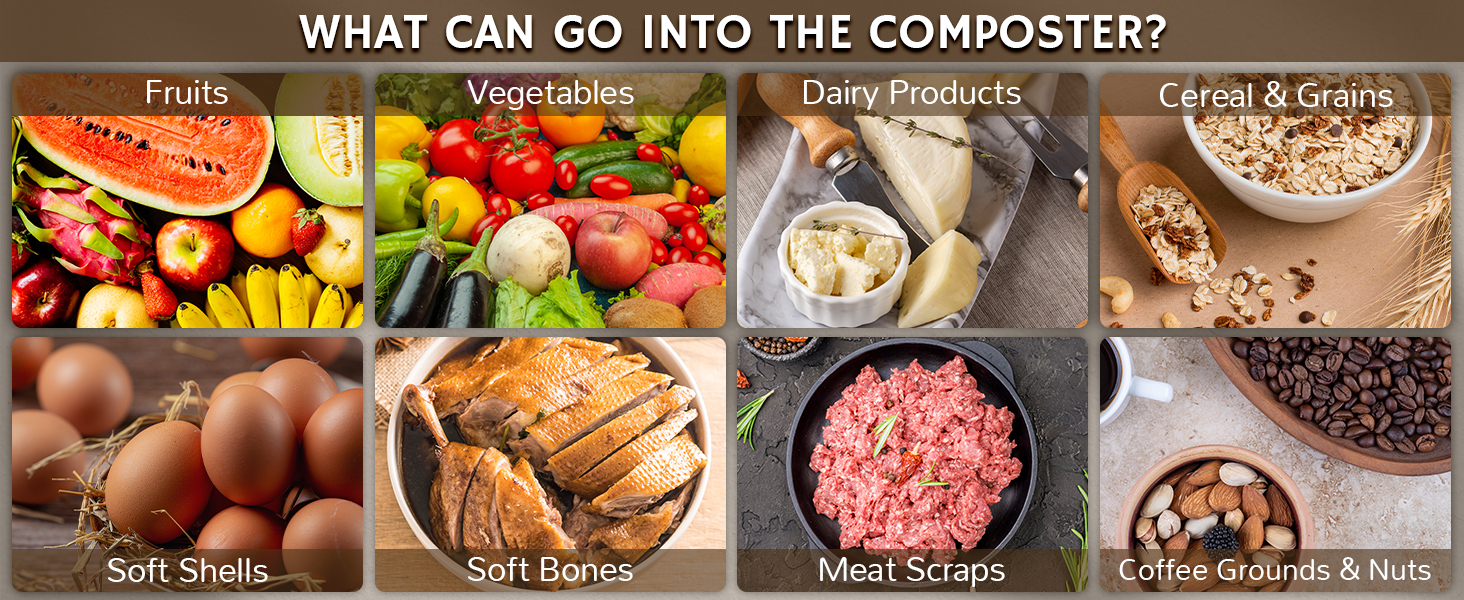
Figure 6: Examples of compostable items.
The Airthereal Revive R500 can process a wide variety of organic waste, including:
- Fruits and Vegetables (peels, cores, scraps)
- Dairy Products (small amounts)
- Cereals & Grains
- Soft Shells (e.g., eggshells, shrimp shells)
- Soft Bones (e.g., fish bones, small chicken bones)
- Meat Scraps (small amounts)
- Coffee Grounds & Nuts
Avoid large, hard bones, excessive liquids, and non-food items.
Maintenance
- Cleaning the Bucket:
- After each cycle, remove the bucket.
- The nonstick surface allows for easy cleaning with soap and water. The bucket is also dishwasher safe.
- For stubborn residue, soak the bucket in water for a few minutes to loosen dried food.
- Filter Replacement:
- The "Filter Reset" indicator light will illuminate when the carbon filters need to be replaced.
- Follow the filter installation steps in the Setup section to replace the old filters with new ones.
- After replacing, press and hold the "Filter Reset" button until the light turns off to reset the filter timer.
- Exterior Cleaning: Wipe the exterior of the unit with a damp cloth. Do not use abrasive cleaners or immerse the unit in water.
Specifications
| Feature | Detail |
|---|---|
| Brand | AIRTHEREAL |
| Model Number | Revive R500 |
| Material | Aluminum |
| Color | Gray |
| Capacity | 2.5 Liters |
| Product Dimensions | 12.5"L x 10"W x 12.5"H |
| Item Weight | 16.8 Pounds |
| UPC | 816621025168 |

Figure 7: Estimated annual electricity cost.
Official Product Videos
Airthereal Revive Electric Kitchen Composter Overview (by Newestneeds)
This video provides an overview of the Airthereal Revive Electric Kitchen Composter, highlighting its 2.5-liter capacity, electric operation, SHARKSDEN Tri-Blade system, and compact design for eco-conscious households.
Airthereal Revive Electric Kitchen Composter Demonstration (by Sain Store)
This video demonstrates the Airthereal Revive Electric Kitchen Composter in action, showing how to add food scraps like peels, shells, and coffee grounds, and the simple one-button operation to convert them into compost.
Support
For further assistance, product registration, or to view additional products, please visit the official AIRTHEREAL website.


