
1. Introduction
Welcome to the user manual for your new TOKIT 20MM 99-Level Ultra-Thin Induction Cooktop Pro. This portable induction cooktop is designed for precision cooking with its 99 adjustable heating levels, smart app control, and sleek, ultra-thin design. Please read this manual thoroughly before operating the appliance to ensure safe and efficient use.
2. Important Safety Information
Always follow basic safety precautions when using electrical appliances to reduce the risk of fire, electric shock, and injury.
General Safety Precautions:
- Read all instructions before using the appliance.
- Do not touch hot surfaces. Use handles or knobs.
- To protect against electrical shock, do not immerse cord, plugs, or the appliance in water or other liquid.
- Close supervision is necessary when any appliance is used by or near children.
- Unplug from outlet when not in use and before cleaning. Allow to cool before putting on or taking off parts.
- Do not operate any appliance with a damaged cord or plug or after the appliance malfunctions or has been damaged in any manner.
- The use of accessory attachments not recommended by the appliance manufacturer may cause injuries.
- Do not use outdoors.
- Do not let cord hang over edge of table or counter, or touch hot surfaces.
- Do not place on or near a hot gas or electric burner, or in a heated oven.
- Extreme caution must be used when moving an appliance containing hot oil or other hot liquids.
- Always attach plug to appliance first, then plug cord into the wall outlet. To disconnect, turn any control to "off", then remove plug from wall outlet.
Specific Warnings:
- Overheat Protection: The cooktop features built-in overheat protection. If the temperature exceeds a preset limit, heating will automatically stop.
- No Pot Detection: If no compatible pot is detected, heating will stop, and an alarm will sound on the OLED display.
- Ventilation: Do not place tablecloths or adhesive tape on the bottom of the product to prevent blocking the heat dissipation holes or interrupting normal heat dissipation. Regularly check the air inlet and outlet at the bottom of the induction cooker to ensure they are not obstructed by foreign objects to prevent parts from overheating.
- Compatible Cookware: We recommend using metal pans with a size between 120 mm and 280 mm that can be magnetized.
3. Product Overview
The TOKIT Induction Cooktop Pro combines advanced technology with a minimalist design, making it a versatile addition to any kitchen.
- Ultra-Thin Design: At only 20mm thick, this cooktop saves space and is highly portable.
- Black Crystal Panel: The durable black crystal panel is wear-resistant and easy to clean.
- OLED Display: An intelligent OLED screen provides clear feedback and enhances user interaction.
- Rotary Knob Control: Easily adjust power levels with the intuitive rotary knob.
- External Temperature Sensor: Capable of precisely measuring temperature within ±3°C (37.4°F) for accurate cooking.

Figure 3.1: TOKIT Induction Cooktop Pro in use, showcasing its sleek design and app connectivity.

Figure 3.2: Detailed view of the cooktop's surface, highlighting the heat sensor, black crystal panel, and OLED display.

Figure 3.3: The 20mm ultra-thin profile of the TOKIT Induction Cooktop Pro.
4. Setup
Unpacking:
- Carefully remove the cooktop and all accessories from the packaging.
- Check for any damage during transit. If damaged, do not use and contact customer support.
- Retain packaging for future storage or transport.
Placement:
- Place the cooktop on a stable, flat, and heat-resistant surface.
- Ensure adequate ventilation around the appliance. Do not block the air inlets and outlets located on the bottom and sides.
- Keep a safe distance from walls and other appliances.
Power Connection:
- Connect the power cord to the cooktop.
- Plug the power cord into a standard electrical outlet. Ensure the outlet voltage matches the cooktop's requirements (2100W power).
5. Operating Instructions
Basic Operation:
- Place a compatible, magnetizable pot or pan on the center of the cooktop.
- Turn on the cooktop using the power button (if available, or by placing a pot).
- Use the rotary knob to adjust the heating level. The cooktop offers 99 adjustable power levels, allowing for precise control from low simmer to rapid boil.
- For low-power applications like sous vide, the cooktop provides a constant 100W low-power heating to ensure stable and precise low-temperature cooking.
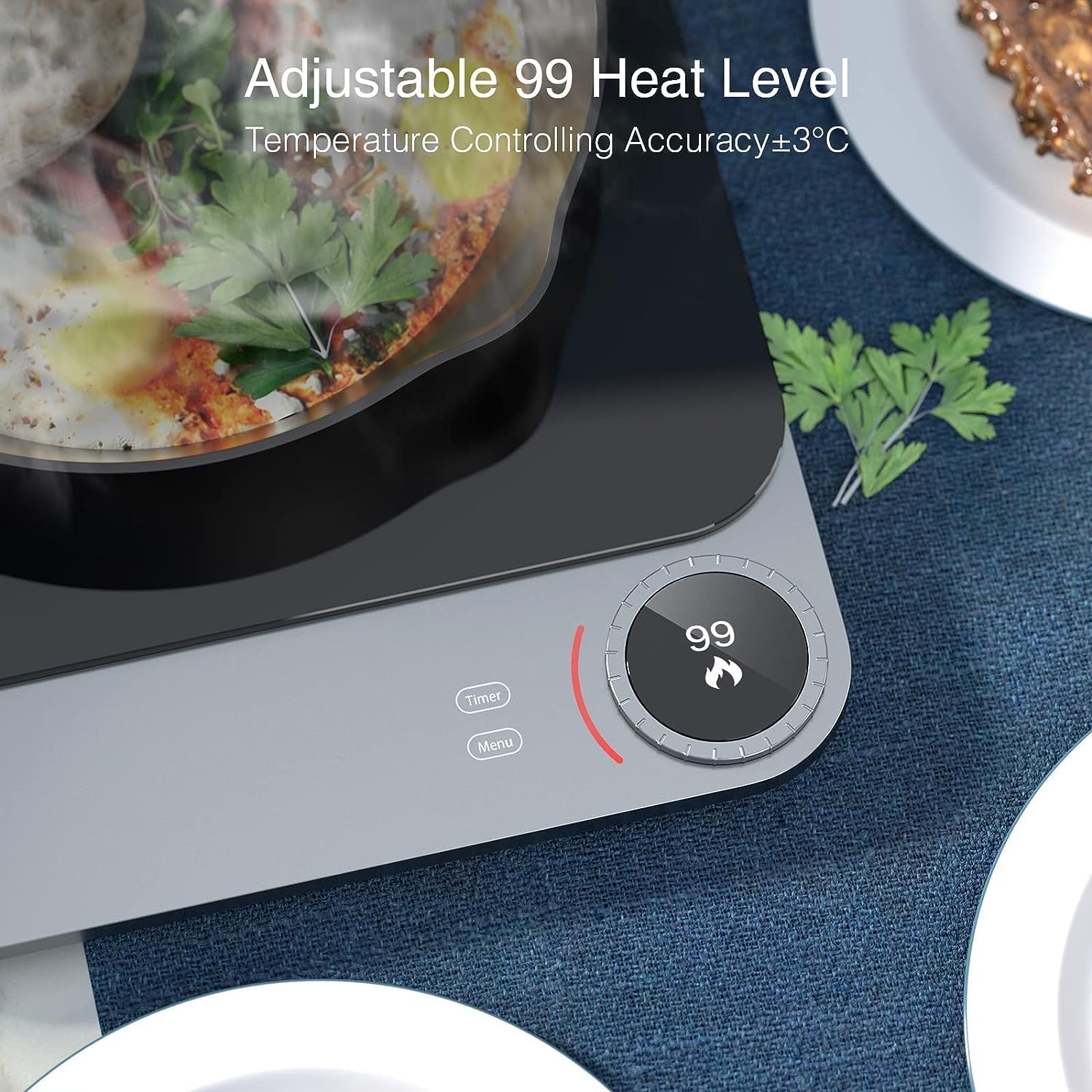
Figure 5.1: The intuitive rotary knob and OLED display for adjusting heat levels.
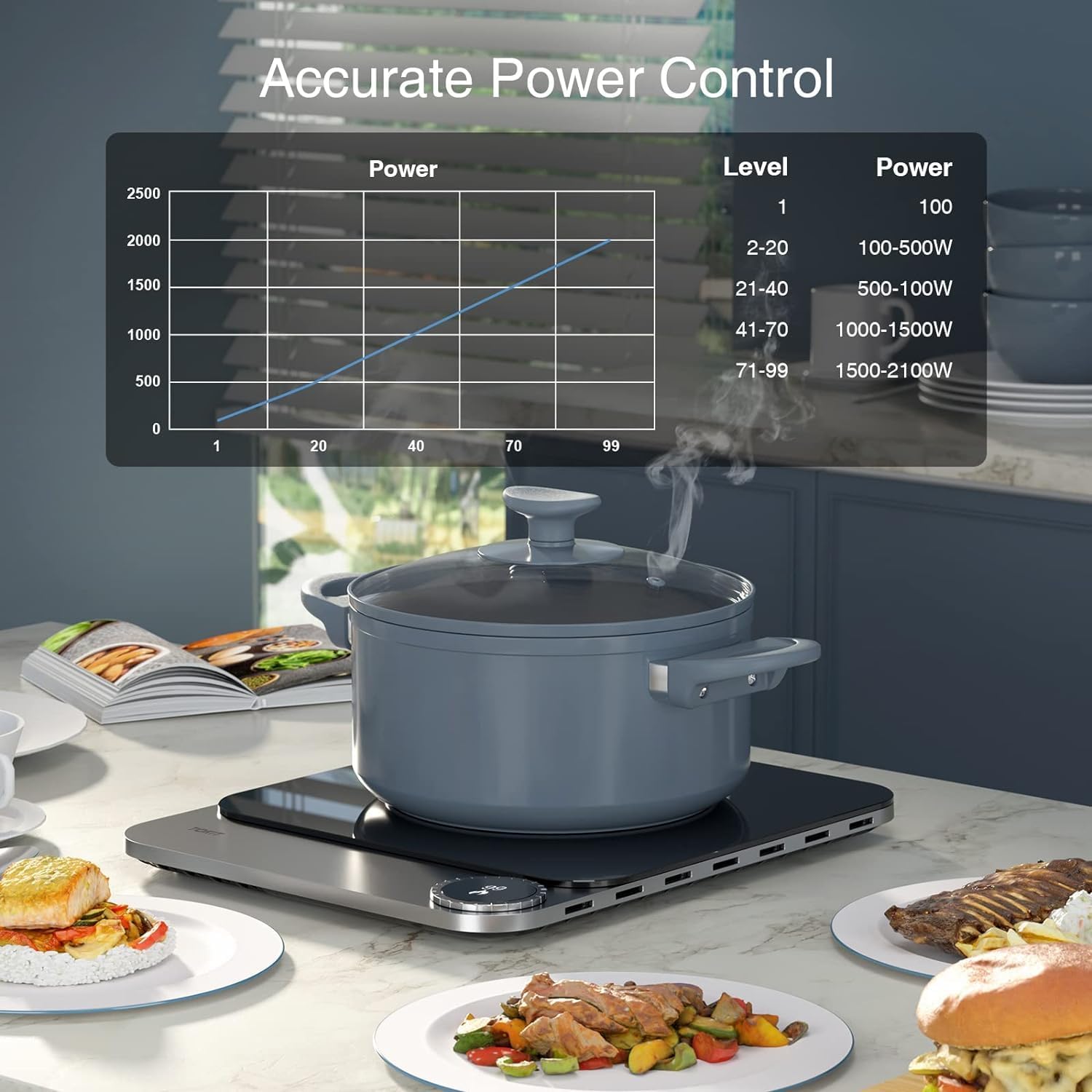
Figure 5.2: Accurate Power Control chart illustrating power output across 99 levels.
Using the Timer:
- Press the "Timer" button to set a cooking duration.
- Adjust the time using the rotary knob. The cooktop supports a 4-hour timer with 1-minute intervals.
- The cooktop will automatically turn off once the set time expires.
App Control (Mi-Home App):
For enhanced control and customization, connect your TOKIT Induction Cooktop Pro to the Mi-Home application.
- Download the Mi-Home app from your smartphone's app store.
- Follow the in-app instructions to pair your cooktop.
- Through the app, you can:
- Adjust individual modes such as yogurt, poached egg, sous vide, etc.
- Set precise temperature, power, and duration settings.
- Create and save custom cooking modes for future use.
- Access a variety of recipes and cooking programs.

Figure 5.3: Explore possibilities with manual and app control.

Figure 5.4: Steps to personalize cooking modes via the Mi-Home app.
6. Maintenance and Cleaning
Cleaning the Cooktop:
- Always unplug the cooktop and allow it to cool completely before cleaning.
- Wipe the black crystal panel with a soft, damp cloth and mild detergent.
- For stubborn stains, use a non-abrasive cleaner specifically designed for glass or ceramic cooktops.
- Do not use abrasive pads, harsh chemicals, or scouring agents, as they can damage the surface.
- Ensure no liquid enters the internal components.
Ventilation Maintenance:
- Regularly inspect the air inlets and outlets on the bottom and sides of the cooktop.
- Remove any dust, debris, or foreign objects that may obstruct airflow. Proper ventilation is crucial for preventing overheating and ensuring the longevity of the appliance.
Storage:
- When not in use for extended periods, store the cooktop in a dry, clean place.
- Its ultra-thin design allows for easy storage in small spaces.
7. Troubleshooting
If you encounter issues with your TOKIT Induction Cooktop Pro, refer to the following common problems and solutions:
| Problem | Possible Cause | Solution |
|---|---|---|
| Cooktop does not turn on. | No power supply; Cooktop not plugged in; Power outage. | Check if the power cord is securely plugged into a working outlet. Verify power supply. |
| No heating / "No Pot" alarm. | Incompatible cookware; Pot not centered; Pot too small/large. | Ensure you are using compatible, magnetizable cookware (120mm-280mm). Center the pot on the cooking zone. |
| Cooktop stops heating / Overheat alarm. | Overheating due to blocked ventilation; Prolonged high-power use. | Check and clear any obstructions from the air inlets/outlets. Allow the cooktop to cool down before resuming use. Ensure proper ventilation during operation. |
| App connection issues. | Wi-Fi connectivity problems; Incorrect pairing steps. | Ensure your Wi-Fi network is stable. Restart the cooktop and your smartphone. Re-attempt the pairing process as per app instructions. |
If the problem persists after trying these solutions, please contact TOKIT customer support for assistance.
8. Specifications
| Feature | Detail |
|---|---|
| Brand | TOKIT |
| Model Number | TCL02M-3A |
| Color | Pro |
| Dimensions (L x W x H) | 35 x 28 x 2 cm |
| Weight | 2.9 Kilograms |
| Power | 2100 Watts |
| Material | Glass |
| Special Feature | Electric |
| Heating Elements | 1 |
| Control Type | Button, Rotary Knob |
| Burner Type | Induction |
| Included Components | Power cord, Manual |
9. Warranty and Support
For detailed warranty information, please refer to the warranty card included with your product or visit the official TOKIT website.
If you require technical support, have questions about your product, or need to report an issue, please contact TOKIT customer service through their official channels.


