
1. Introduction
Thank you for choosing the ORICO 2.5-inch USB 3.0 to SATA External HDD/SSD Enclosure. This device provides a convenient and efficient solution for connecting your 2.5-inch SATA hard drives or solid-state drives to your computer via USB 3.0. Its transparent design allows for easy identification of the installed drive, while its tool-free installation ensures quick setup. This manual will guide you through the installation, operation, and maintenance of your new enclosure.
2. Product Features
- Transparent Design: High-quality clear PC material allows visibility of the internal drive.
- High-Speed Data Transfer: Supports UASP and TRIM protocols, offering up to 5Gbps data transfer speed via USB 3.0, which is significantly faster than traditional USB 3.0 without UASP. Backward compatible with USB 2.0 and 1.1 ports.
- Wide Compatibility: Compatible with 2.5-inch SATA I/II/III HDD and SSD (7mm/9.5mm thickness) up to 6TB capacity. Supports Windows, Linux, and Mac OS operating systems.
- Tool-Free Installation: Simple slide-open design allows for quick and easy installation without any tools.
- Plug & Play: No drivers required for operation. Supports hot-swap functionality.
- Intelligent Sleep Mode: Automatically enters sleep mode after 10 minutes of inactivity to prolong the lifespan of your hard drive.
- LED Indicator: A blue LED light indicates the working status of the enclosure.
- Enhanced Protection: Built-in safeguards against short-circuit, over-current, over-voltage, over-heat, and shock.
3. Package Contents
Please check the package for the following items:
- ORICO 2.5-inch USB 3.0 to SATA External HDD/SSD Enclosure
- USB-A to Micro-B 3.0 Data Cable (approx. 50cm)
- Foam Pad (for 7mm drives)
- User Manual
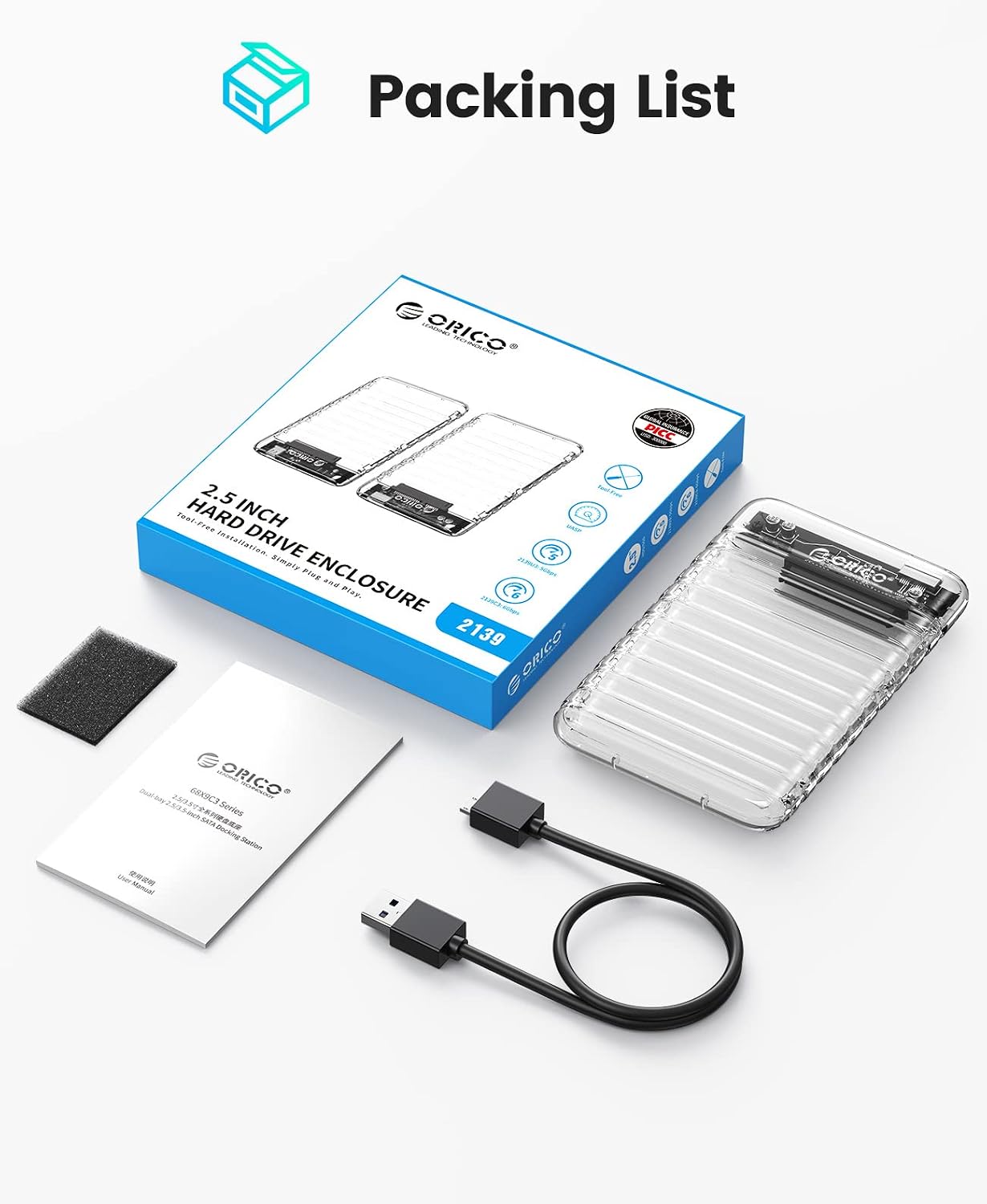
Image: Contents of the ORICO 2.5-inch USB 3.0 to SATA External HDD/SSD Enclosure package, including the enclosure, USB cable, foam pad, and user manual.
4. Setup Instructions
Follow these steps for tool-free installation of your 2.5-inch SATA HDD/SSD:
- Open the Enclosure: Gently slide open the top cover of the ORICO enclosure.
- Insert the Drive: Align your 2.5-inch SATA HDD or SSD with the SATA connector inside the enclosure and firmly push it into place. If using a 7mm thick drive, place the included foam pad inside the enclosure before inserting the drive to ensure a snug fit.
- Close the Enclosure: Slide the top cover back until it clicks securely into place.
- Connect to Computer: Connect one end of the provided USB 3.0 cable to the Micro-B port on the enclosure and the other end to an available USB 3.0 port on your computer.

Image: A four-step visual guide demonstrating how to open the enclosure, insert a 2.5-inch HDD/SSD, close the enclosure, and connect it to a laptop via USB.
5. Operating Instructions
Once connected, your operating system should automatically detect the drive. If it's a new drive, you may need to initialize and format it through your operating system's disk management utility before use.
- LED Indicator: The blue LED light on the enclosure will illuminate when connected and blink during data transfer, indicating active operation.
- Hot-Swap Functionality: The enclosure supports hot-swapping, allowing you to connect or disconnect the device while your computer is running, without needing to restart. Always ensure data transfer is complete before disconnecting.
- Intelligent Sleep: After 10 minutes of inactivity, the enclosure will enter an intelligent sleep mode to conserve power and extend the life of your drive. The drive will automatically wake up upon access.


Image: Details showing the LED indicator, Micro-B USB 3.0 interface, and the 10-minute auto-sleep function.
6. Maintenance
To ensure the longevity and optimal performance of your ORICO enclosure and the installed drive, consider the following maintenance tips:
- Handle with Care: Although the enclosure offers shock protection, avoid dropping or subjecting it to strong impacts.
- Keep Clean: Use a soft, dry cloth to clean the exterior of the enclosure. Avoid using liquid cleaners or solvents.
- Proper Disconnection: Always safely eject the drive from your operating system before physically disconnecting the USB cable to prevent data corruption.
- Environmental Conditions: Store and operate the enclosure in a cool, dry environment, away from direct sunlight, extreme temperatures, and high humidity.
7. Troubleshooting
If you encounter issues with your ORICO enclosure, please refer to the following common problems and solutions:
| Problem | Possible Cause | Solution |
|---|---|---|
| Drive not detected | Loose connection, faulty cable, uninitialized/unformatted drive, incompatible drive. | Ensure the drive is properly seated in the enclosure. Try a different USB port or cable. Check Disk Management (Windows) or Disk Utility (Mac) to initialize/format new drives. Verify drive compatibility (2.5-inch SATA HDD/SSD). |
| Slow transfer speeds | Connected to USB 2.0 port, UASP not enabled, drive performance limitations. | Connect to a USB 3.0 port (usually blue). Ensure your operating system and motherboard support UASP. Note that actual speeds depend on the drive's performance. |
| LED not lighting up | No power, faulty connection. | Ensure the USB cable is securely connected to both the enclosure and the computer. Try a different USB port. |
| Enclosure feels loose | 7mm drive without foam pad. | If using a 7mm thick drive, ensure the included foam pad is placed inside the enclosure to secure the drive. |
If the problem persists, please contact ORICO customer support.
8. Specifications
| Feature | Detail |
|---|---|
| Brand | ORICO |
| Model | 2139U3-V1-CR |
| Color | Transparent |
| Compatible Drive Type | 2.5-inch SATA I/II/III HDD & SSD (7mm/9.5mm) |
| Max Capacity | 6 TB |
| Output Interface | USB 3.0 Micro-B |
| Transfer Rate | Up to 5Gbps (USB 3.0) |
| Supported Protocols | UASP, TRIM |
| Operating System Compatibility | Windows, Linux, Mac OS |
| Power Supply | USB Bus-powered (no external power required) |
| Features | Tool-free, Hot-swap, Plug & Play, 10-min Auto-sleep, LED Indicator |
| Protection | Short-circuit, Over-current, Over-voltage, Over-heat, Shock-proof |
| Material | High-quality clear PC |
| Included Cable Length | 50cm |
9. Warranty and Support
This ORICO product comes with a 1-year warranty from the date of purchase. This warranty covers manufacturing defects and workmanship under normal use. It does not cover damage caused by misuse, accidents, unauthorized modifications, or natural disasters.
For technical support, warranty claims, or further inquiries, please contact ORICO customer service through the retailer where you purchased the product or visit the official ORICO website for contact information.
Please retain your proof of purchase for warranty service.


