
1. Product Overview
Thank you for choosing the Optonica OT6711 IP65 Waterproof LED Batten Light. This high-performance lighting fixture is designed for various applications, offering 55W of bright 6000K daylight white illumination. Its IP65 rating ensures protection against dust and water jets, making it suitable for demanding environments. Additionally, the integrated emergency battery provides essential lighting during power outages, enhancing safety and functionality.
Key Features:
- High Brightness: 55W LED for powerful illumination.
- Daylight White: 6000K color temperature for clear, crisp light.
- Waterproof & Dustproof: IP65 rated for outdoor and challenging indoor environments.
- Emergency Battery: Integrated backup power for continued operation during outages.
- Durable Construction: Made from aluminum for longevity.

Figure 1: Optonica OT6711 IP65 Waterproof LED Batten Light. This image shows the full length of the white LED batten light, highlighting its sleek, enclosed design suitable for robust environments.
2. Safety Instructions
Please read and understand all safety instructions before installation and operation. Failure to follow these instructions may result in electric shock, fire, or other hazards.
- Electrical Safety: Ensure the power supply is disconnected before any installation, maintenance, or cleaning. All wiring should be performed by a qualified electrician in accordance with local electrical codes.
- Voltage Compatibility: Verify that the supply voltage matches the requirements specified on the product label.
- Grounding: The fixture must be properly grounded to prevent electric shock.
- IP65 Rating: While IP65 rated for water and dust resistance, this fixture is not submersible. Do not install in locations where it may be submerged in water.
- Emergency Battery: The emergency battery is designed for temporary backup lighting. Do not attempt to open or replace the battery yourself. Contact qualified personnel for service.
- Heat: The LED fixture may become warm during operation. Do not touch the fixture immediately after prolonged use. Ensure adequate ventilation around the fixture.
- Mounting: Ensure the mounting surface is strong enough to support the weight of the fixture. Use appropriate mounting hardware.
3. Package Contents
Carefully unpack the box and ensure all items are present and undamaged. If any items are missing or damaged, contact your retailer.
- Optonica OT6711 LED Batten Light with Emergency Battery
- Mounting Brackets (quantity may vary)
- Screws and Wall Plugs (quantity may vary)
- User Manual (this document)
4. Setup and Installation
This fixture is designed for wall mounting. Follow these steps for safe and proper installation.
4.1 Tools Required
- Drill
- Screwdriver
- Pencil
- Measuring Tape
- Wire Strippers
- Voltage Tester
4.2 Installation Steps
- Disconnect Power: Before starting, ensure the main power supply to the installation area is turned off at the circuit breaker. Use a voltage tester to confirm no power is present.
- Mark Mounting Points: Hold the batten light or its mounting brackets against the desired wall surface. Use a pencil to mark the drilling points for the mounting brackets. Refer to the dimensions diagram for accurate spacing.
- Drill Holes: Drill holes at the marked points using an appropriate drill bit size for the provided wall plugs. Insert the wall plugs into the drilled holes.
- Attach Brackets: Secure the mounting brackets to the wall using the provided screws.
- Wire Connection: Open the wiring compartment of the batten light (if applicable, refer to internal diagrams). Connect the live (L), neutral (N), and earth (E) wires from your electrical supply to the corresponding terminals on the fixture. Ensure all connections are secure and insulated.
- Mount Fixture: Carefully attach the LED batten light to the secured mounting brackets. Ensure it clicks or locks into place securely.
- Restore Power: Once the installation is complete and all connections are checked, restore power at the circuit breaker.
- Initial Charge (Emergency Battery): For the emergency battery to function correctly, allow the fixture to remain powered for at least 24 hours after initial installation to fully charge the battery.
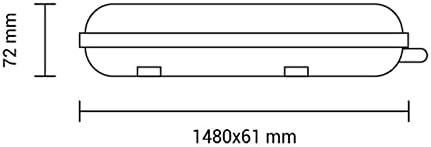
Figure 2: Dimensions of the Optonica OT6711 LED Batten Light. This diagram illustrates the physical measurements of the fixture, showing a length of 1480mm, a width of 61mm, and a height of 72mm, crucial for planning installation space.
5. Operating Instructions
The Optonica OT6711 LED Batten Light operates simply once installed and powered.
- Normal Operation: When power is supplied to the fixture, the LED batten light will illuminate. It can be controlled by an external wall switch connected to its power supply.
- Emergency Mode: In the event of a power failure, the integrated emergency battery will automatically activate, providing reduced illumination for a specified duration (typically 1-3 hours, refer to specifications for exact duration). The light will return to normal operation once main power is restored and the battery will begin recharging.
- Battery Status Indicator: Some models may include a small LED indicator to show the status of the emergency battery (e.g., green for charged, red for charging/fault). Consult the product label if present.
6. Maintenance
Regular maintenance ensures optimal performance and longevity of your LED batten light.
- Cleaning: Disconnect power before cleaning. Use a soft, damp cloth to wipe the exterior of the fixture. Do not use abrasive cleaners, solvents, or harsh chemicals, as these can damage the finish or internal components.
- Inspection: Periodically inspect the fixture for any signs of damage, loose connections, or wear. Ensure the mounting is secure.
- Emergency Battery Test: It is recommended to perform a functional test of the emergency battery at least once a month. To do this, temporarily cut the main power supply to the fixture and observe if the emergency lighting activates. Restore power after a short period (e.g., 30 seconds). A full discharge test (allowing the battery to run until depletion) should be performed annually to ensure the battery holds its charge for the specified duration.
- Component Replacement: This fixture contains non-user-replaceable parts. Do not attempt to open the sealed unit or replace LEDs or the emergency battery yourself. Contact qualified service personnel if repair is needed.
7. Troubleshooting
If you encounter issues with your Optonica OT6711 LED Batten Light, refer to the following common problems and solutions.
| Problem | Possible Cause | Solution |
|---|---|---|
| Light does not turn on (normal operation) |
|
|
| Emergency light does not activate during power outage |
|
|
| Emergency light duration is shorter than expected |
|
|
| Flickering or dim light |
|
|
If the problem persists after attempting these solutions, please contact Optonica customer support or a qualified electrician.
8. Specifications
| Specification | Detail |
|---|---|
| Brand | Optonica |
| Model Number | OT6711 |
| Power Consumption | 55 Watts |
| Color Temperature | 6000K (Daylight White) |
| Length | 150cm (approximately 1480mm) |
| Material | Aluminum |
| IP Rating | IP65 (Waterproof and Dustproof) |
| Special Feature | Emergency Battery Backup |
| Power Source | Electric Cable |
| Installation Type | Wall Mount |
| Color | White |
9. Warranty and Support
Information regarding the specific warranty period and terms for the Optonica OT6711 LED Batten Light was not available in the provided product data. For warranty details, please refer to the product packaging or contact your retailer or Optonica directly.
For technical support, service, or inquiries about spare parts, please contact Optonica customer service through their official website or the contact information provided with your purchase.


