
Introduction
This manual provides instructions for the Azwok R11HG replacement remote control, designed for various Midea air conditioner models. It covers setup, operation, and troubleshooting to ensure proper use and functionality with your compatible Midea air conditioning unit.
Setup: Battery Installation
The remote control requires two AAA batteries (not included) for operation.
- Locate the battery compartment on the back of the remote control.
- Slide the battery cover downwards to open the compartment.
- Insert two AAA batteries, ensuring correct polarity (+ and -) as indicated inside the compartment.
- Slide the battery cover back into place until it clicks securely.

Image: The remote control with its lower cover slid open, exposing the battery compartment and additional function buttons such as 'AIR DIRECTION', 'SWING', 'OK', 'TIMER ON', 'TIMER OFF', 'CLOCK', 'CANCEL', and 'TIME ADJUST'.
Operating Instructions
Basic Functions
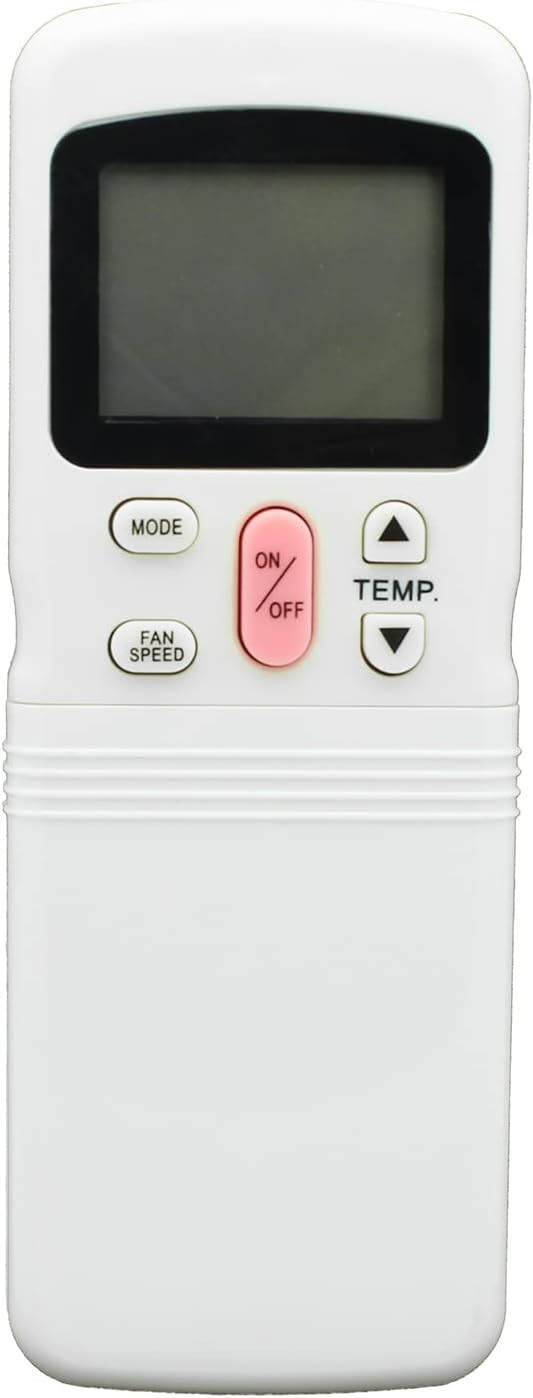
Image: A white remote control with a digital display at the top. Key buttons visible include 'MODE', 'ON/OFF' (pink), 'TEMP.' (up/down arrows), and 'FAN SPEED'.
- ON/OFF Button (Pink): Press this button to power the air conditioner on or off.
- MODE Button: Press to cycle through available operating modes such as Cool, Heat, Fan, Dry, or Auto, depending on your air conditioner's capabilities.
- TEMP. Buttons (Up/Down Arrows): Use these buttons to increase or decrease the desired temperature setting.
- FAN SPEED Button: Press to adjust the fan speed, typically cycling through options like Low, Medium, High, or Auto.
Advanced Functions (Under Cover)
Some advanced functions are accessible by sliding down the lower cover of the remote control, as shown in the battery installation image.
- AIR DIRECTION Button: Controls the direction of the airflow from the air conditioner.
- SWING Button: Activates or deactivates the automatic louver swing function for wider air distribution.
- OK Button: Used to confirm selections or settings on the remote control.
- TIMER ON Button: Sets a specific time for the air conditioner to turn on automatically.
- TIMER OFF Button: Sets a specific time for the air conditioner to turn off automatically.
- CLOCK Button: Allows you to set the current time displayed on the remote control's screen.
- CANCEL Button: Used to cancel any active timer settings.
- TIME ADJUST Buttons (Up/Down Arrows): Used to adjust time settings for the clock or timers.
Note: Specific functions and their availability may vary slightly depending on your Midea air conditioner model. Refer to your air conditioner's original manual for detailed function descriptions.
Compatible Midea Air Conditioner Models
This Azwok R11HG replacement remote control is compatible with the following Midea air conditioner models:
- R11
- R11CG/E
- R11HG-E
- R11HG/E
- R11HQ/E
- R11H
- R11HQ
- R11CG
- R11HG/C
If your specific model is not listed above, or if your original remote control differs significantly in appearance or button layout, please contact customer support for compatibility verification before purchase.
Troubleshooting
- Remote not responding: Ensure batteries are inserted correctly and are not depleted. Replace with new AAA batteries if necessary.
- Limited range: Ensure there is a clear line of sight between the remote control's infrared emitter and the air conditioner's receiver. Obstructions can block the signal.
- Incorrect functions: Verify that your air conditioner model is listed as compatible. Some advanced functions may not be supported by all Midea units.
- Display issues: If the remote's display is dim or blank, replace the batteries.
For persistent issues, refer to the air conditioner's original manual or contact Azwok customer support for further assistance.
Product Specifications
| Feature | Detail |
|---|---|
| Model Number | AU-R11HG-MD001 |
| Brand | Azwok |
| Product Dimensions | 6.3 x 2.17 x 0.59 inches |
| Item Weight | 2.89 ounces |
| Batteries Required | 2 x AAA (not included) |
| Connectivity Technology | Infrared |
| Special Feature | No Programming Required |
| Compatible Devices | Midea Air Conditioners |
Specifications are subject to change without notice.
Warranty and Support
This Azwok remote control comes with a 12-month replacement warranty from the date of purchase.
If you encounter any issues or have questions regarding compatibility or operation, please contact Azwok customer support. Returns are accepted for refund or exchange if the product does not function with your specified devices.