
1. Introduction
The Fmart T9SE is an automatic window cleaning robot designed for efficient cleaning of various glass surfaces, including windows, tiles, and mirrors. It features ultrasonic spraying, intelligent suction adjustment, and AI edge detection for thorough cleaning. This manual provides essential information for the safe and effective use of your device.
2. Safety Information
Always adhere to the following safety guidelines to prevent injury or damage to the device.
- Anti-Fall System: The robot is equipped with an integrated Uninterruptible Power Supply (UPS) system. In case of an unexpected power outage, the robot can continue to operate for up to 30 minutes, enhancing safety during use. Always ensure the safety rope is securely attached when operating the robot, especially on high or outdoor windows.
- First Use Precautions: Before initial operation, charge the robot for 3-5 hours to activate its battery.
- Power Connection: If the red light flashes, indicating poor contact, check the power socket and unplug the device. Wait a few minutes before reconnecting.
- Surface Suitability: Use the robot only on surfaces recommended in this manual (glass, tiles, mirrors).

Figure 2.1: Robot on a window, demonstrating the anti-fall sensor.
3. Package Contents
Verify that all components are present in the package:

Figure 3.1: Included components of the Fmart T9SE.
- Main Unit
- Power Plug
- Adapter
- Power Cord
- Replacement Wipes (x5)
- Ultrasonic Nozzle
- Safety Harness
- Water Bottle
- Remote Control
- User Manual
4. Setup
- Charge the Robot: Before first use, connect the robot to power and charge it for 3-5 hours.
- Attach Cleaning Pads: Securely attach the cleaning pads to the bottom of the robot.
- Fill Water Tank: Open the water tank cap and fill the 20ml electronic controlled water tank with appropriate window cleaning solution.
- Connect Safety Rope: Attach the safety rope to the robot and secure the other end to a stable indoor fixture.
- Connect Power: Plug the power cord into the robot and then into a power outlet.
5. Operating Instructions
The Fmart T9SE offers various cleaning modes and intelligent features for effective window cleaning.
5.1 Attaching and Starting the Robot
- Ensure the cleaning pads are clean and slightly damp (not soaking wet).
- Place the robot firmly on the glass surface. The strong suction power (up to 3800Pa) will secure it.
- Press the power button on the robot or use the remote control to start.
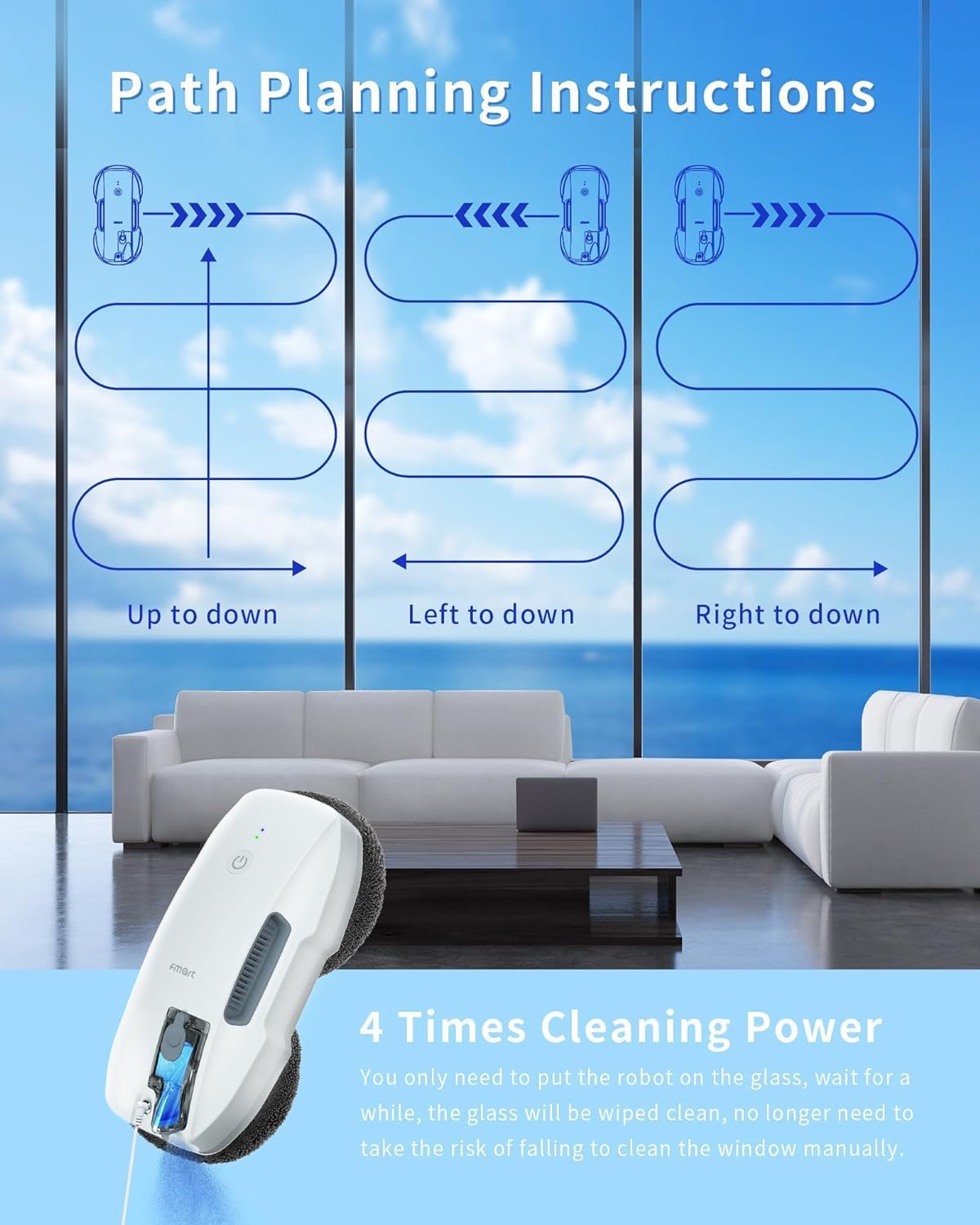
Figure 5.1: Robot in operation on a window.
5.2 Cleaning Modes
The robot features three cleaning modes:
- Automatic Cleaning: The robot intelligently plans its cleaning path.
- Deep Cleaning: For heavily soiled surfaces, this mode provides a more thorough clean.
- Manual Cleaning: Use the remote control to guide the robot to specific areas.

Figure 5.2: Path planning instructions.
5.3 Intelligent Features
- AI Edge Detection: The robot automatically identifies window frames and adjusts its direction. It can also clean frameless windows and avoid obstacles.
- Ultrasonic Atomization: The automatic ultrasonic atomization system ensures constant humidification and effectively dissolves tough stains. One fill of the 20ml water tank is sufficient for cleaning an area of 20-25m².
- Intelligent Suction Adjustment: The robot intelligently adjusts its suction power based on the dirt level on the glass for optimal cleaning.
5.4 Remote Control Operation
Use the provided remote control to manage the robot's functions, including selecting cleaning modes and manual navigation.

Figure 5.3: Remote control for the Fmart T9SE.
Upon completion of the cleaning task, the robot automatically returns to its starting point.
6. Maintenance
Regular maintenance ensures optimal performance and longevity of your Fmart T9SE.
- Cleaning Pads: It is recommended to replace the cleaning pads after each use, or as needed depending on the dirt level of the glass. Wash used pads thoroughly for reuse.
- Water Tank: Regularly clean the water tank to prevent residue buildup.
- Ultrasonic Nozzle: Ensure the ultrasonic nozzle is clear of obstructions for proper spraying function.

Figure 6.1: Cleaning effectiveness on various stains.
7. Troubleshooting
If you encounter issues with your Fmart T9SE, refer to the following common solutions:
- Robot not starting or red light flashing: Check the power connection. Ensure the power plug is securely inserted into both the robot and the wall outlet. Unplug and re-plug after a few minutes.
- Poor suction: Ensure the cleaning pads are correctly attached and not overly saturated. The glass surface should be clean and dry before placing the robot.
- Robot not moving or erratic movement: Check for any obstructions on the glass surface or around the robot's wheels. Ensure the cleaning pads are not too wet.
- Ineffective cleaning: Replace or clean the cleaning pads. Ensure the water tank is filled with an appropriate cleaning solution.
8. Specifications
| Feature | Specification |
|---|---|
| Brand | Fmart |
| Model Name | T9SE |
| Surface Recommendation | Ceilings, Tiles, Mirror |
| Special Features | Automatic ultrasonic atomization, intelligent suction adjustment, AI edge recognition, integrated UPS system, multiple cleaning modes, automatic return, remote control |
| Color | White |
| Product Dimensions (L x W x H) | 200mm x 200mm x 100mm |
| Controller Type | Remote Control |
| Included Components | Water tank, cleaning pads, remote control |
| Filter Type | HEPA (Note: This may refer to an internal air filter, not for water filtration) |
| Voltage | 100 Volts |
| Power Source | Corded Electric |
| Batteries Included | No (for remote control, robot has internal battery) |
| Form Factor | Portable |
| Manufacturer | Fmart |

Figure 8.1: Suction power and cleaning capability.
9. Warranty and Support
Fmart products come with a 365-day warranty. If you encounter any issues during use, please contact us via email. Our support team aims to resolve your concerns within 24 hours.
For support, please refer to the contact information provided with your purchase or visit the official Fmart website.


