
1. Introduction
Thank you for choosing the Havells Zurii 55L Tower Air Cooler. This manual provides essential information for the safe and efficient operation, maintenance, and troubleshooting of your new appliance. Please read it thoroughly before use and retain it for future reference.
2. Safety Instructions
To reduce the risk of fire, electric shock, or injury, always follow these basic safety precautions:
- Ensure the power supply voltage matches the cooler's rating.
- Do not immerse the cooler, cord, or plug in water or other liquids.
- Unplug the cooler from the outlet when not in use, before cleaning, or before performing any maintenance.
- Keep the cooler on a stable, level surface to prevent tipping.
- Do not block air inlets or outlets. Maintain adequate clearance around the unit.
- Do not allow children to operate the cooler unsupervised.
- Avoid placing the cooler near heat sources or in direct sunlight for prolonged periods.
- Use only clean water in the water tank.
3. Product Overview
The Havells Zurii 55L Tower Air Cooler is designed for efficient cooling and air purification in residential spaces. It features an electronic panel, remote control, and advanced air cleaning technologies.
Key Features:
- Air Delivery: 1250 m³/hr for effective air circulation.
- Honeycomb Pads: Smell-free, high-density honeycomb pads (35mm thickness) for high water retention and efficient cooling.
- Bacteria Shield Technology: Reduces 99.9% bacteria, preventing bacterial breeding in the water tank.
- Ionizer: Emits negative ions to remove dust, allergens, pollen, pet dander, and airborne bacteria.
- Dust Filter: Provides additional air cleaning by filtering micro-particles.
- Electronic Panel & Remote Control: For easy and convenient operation.
- Combo Mode: Automatically reduces fan mode for comfort during sleep.
- Collapsible Louvers: For enhanced air distribution and space-saving design.
Included Components:
- 1 N Tower Cooler
- 1 N Remote Control
- 4 N Castor Wheels
- 1 N Instruction Manual
Product View and Dimensions:
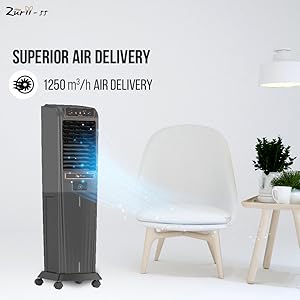
Image 3.1: Front view of the Havells Zurii 55L Tower Air Cooler, highlighting its thoughtful space-saving design and dimensions (39.4D x 39.7W x 138.5H Centimeters).
Control Panel:
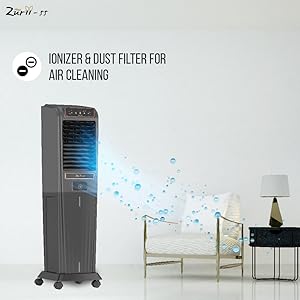
Image 3.2: Close-up of the electronic control panel and remote for easy operation.
4. Setup
Follow these steps for initial setup:
- Unpacking: Carefully remove the cooler from its packaging. Retain packaging materials for future storage or transport.
- Wheel Installation: Attach the four castor wheels to the base of the cooler. Ensure they are securely fastened for easy mobility.
- Placement: Place the cooler on a firm, level surface. Ensure there is adequate space around the unit for proper airflow.
- Water Filling: Open the water inlet and fill the 55-liter reservoir with clean water. Do not overfill beyond the maximum level indicator. For enhanced cooling, you may add ice packs or ice cubes to the ice chamber if available.
- Power Connection: Plug the power cord into a suitable electrical outlet (230 Volts).
5. Operating Instructions
Your Havells Zurii 55L Tower Air Cooler can be operated using the electronic control panel on the unit or the provided remote control.
Control Panel & Remote Functions:
- Power (On/Off): Press to turn the cooler on or off.
- Speed: Select from 3 fan speeds (Low, Medium, High) to adjust airflow intensity.
- Swing: Activate or deactivate the oscillation function for wider air distribution.
- Mode: Cycle through different operating modes (e.g., Normal, Sleep, Natural).
- Timer: Set a timer for automatic shutdown after a specified period.
- Ionizer: Activate the ionizer function for air purification.
- Combo Mode: This feature automatically adjusts the fan speed to a lower setting after a few hours, providing comfortable cooling during extended use, especially while sleeping.
Air Delivery and Ionizer Function:
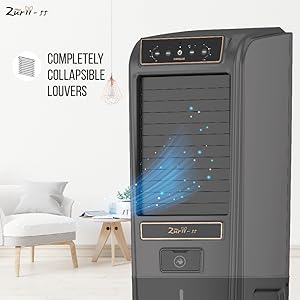
Image 5.1: Illustration of the superior air delivery (1250 m³/hr) from the cooler.
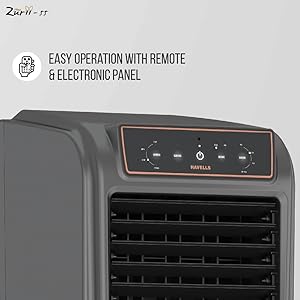
Image 5.2: The ionizer and dust filter working to clean the air by removing dust, allergens, and other airborne particles.
6. Maintenance
Regular maintenance ensures optimal performance and longevity of your air cooler.
Cleaning the Honeycomb Pads:
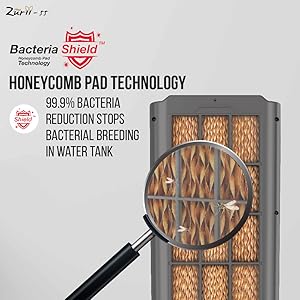
Image 6.1: Close-up of the high-density honeycomb pads, featuring Bacteria Shield Technology to prevent bacterial growth.
- Frequency: Clean the honeycomb pads every 2-4 weeks, or more often if used in dusty environments.
- Procedure: Disconnect power. Remove the back panel and carefully slide out the honeycomb pads. Rinse them under running water to remove dust and mineral deposits. For stubborn dirt, use a soft brush. Allow pads to dry completely before reinserting.
Cleaning the Water Tank:
- Frequency: Drain and clean the water tank weekly to prevent algae growth and odors.
- Procedure: Unplug the cooler. Drain all water from the tank using the drain plug. Wipe the inside of the tank with a soft cloth and mild detergent. Rinse thoroughly with clean water.
Cleaning the Dust Filter:
- Frequency: Clean the dust filter regularly to maintain air quality.
- Procedure: Remove the dust filter (usually located on the back panel). Gently brush off accumulated dust or rinse with water. Ensure it is dry before reattaching.
Storage:
- Before storing, ensure the water tank is completely empty and dry.
- Clean all components as described above.
- Store the cooler in a cool, dry place, preferably in its original packaging.
7. Troubleshooting
If you encounter issues with your cooler, refer to the following common problems and solutions:
| Problem | Possible Cause | Solution |
|---|---|---|
| Cooler does not turn on | No power supply; Power cord not plugged in; Power button not pressed. | Check power outlet; Ensure cord is securely plugged in; Press the power button on the panel or remote. |
| No cooling effect | Water tank empty; Honeycomb pads are dry or clogged; Pump not working. | Fill water tank; Clean or replace honeycomb pads; Check if the pump is operating (listen for sound). |
| Weak airflow | Air inlets/outlets blocked; Fan speed set too low; Dust filter clogged. | Clear obstructions; Increase fan speed; Clean the dust filter. |
| Unusual noise | Low water level; Foreign object in fan; Unit not on a level surface. | Fill water tank; Turn off and inspect for obstructions (unplug first); Place on a stable, level surface. |
| Water leakage | Overfilled water tank; Drain plug loose; Damaged water tank. | Do not overfill; Ensure drain plug is secure; Contact customer service if tank is damaged. |
If the problem persists after trying these solutions, please contact Havells customer support.
8. Specifications
| Feature | Specification |
|---|---|
| Brand | Havells |
| Model Name | Zurii 55 |
| Model Number | GHRACAZD55 |
| Capacity | 55 Liters |
| Form Factor | Tower |
| Material | Plastic |
| Colour | Black Grey |
| Wattage | 180 Watts |
| Voltage | 230 Volts |
| Number of Speeds | 3 |
| Controls Type | Remote |
| Item Weight | 17500 Grams |
| Item Dimensions (D x W x H) | 39.4D x 39.7W x 138.5H Centimeters |
| Special Features | Air-Cleaning Technology [Ionizer], Bacteria Shield Honeycomb Pad Technology, Easy Operation with Remote & Electronic Panel, Portable, Powerful Air Delivery |
9. Warranty and Support
Your Havells Zurii 55L Tower Air Cooler comes with a standard 1 Year Warranty from the date of purchase.
For warranty claims, technical assistance, or any product-related inquiries, please contact Havells customer support. Keep your purchase receipt and product model number handy when contacting support.
Manufacturer: 904, 9th Floor, Surya Kiran Building, K.G. Marg, Connaught Place, New Delhi – 110001, Havells India Limited
Importer/Packer: Havells India Limited, QRG Towers, 2D, Sec- 126, Expressway, Noida - 201304 U.P. (India)