
Product Overview
This manual provides detailed instructions for the hygger 14W 24/7 Full Spectrum LED Aquarium Light. This light features an LCD monitor, 7 color options, an adjustable timer, and three programmable modes, making it suitable for 30-45cm planted tanks.

Image: The hygger 14W LED Aquarium Light, showing the main light unit with its integrated LED array and the wired LCD controller for programming and adjustments.

Image: Details of the full spectrum light, including a spectral distribution graph highlighting blue and red wavelengths for plant growth, along with specifications: 14W power, 6500K color temperature, 820 Lm luminous flux, and a Color Rendering Index (CRI) of 89.
Package Contents
Verify that all components are present in the package:
- 1 x LED Light with Controller
- 1 x AC/DC Adapter
- 2 x Adjustable Metal Brackets
- 1 x User Manual
Setup
Installation
- Attach the two adjustable metal brackets to each end of the LED light unit. Ensure they are securely fastened.
- Place the light unit on top of your aquarium, extending the brackets as needed to fit the tank's width (suitable for 30-45cm tanks). The brackets are designed to rest on the edges of the aquarium.
- Connect the LED light unit to the wired LCD controller.
- Connect the AC/DC adapter to the controller, then plug the adapter into a standard electrical outlet.
- Ensure the light is positioned correctly and stable before powering on.

Image: The hygger aquarium light installed on top of a planted fish tank, demonstrating how the adjustable brackets allow it to sit securely on the tank edges.

Image: A composite image highlighting key features: the LCD monitor for settings, extendable metal brackets for tank fitting, fast heat dissipation design, water-resistant rating, and flicker-free LED technology for soft light and eye protection.
Operating Instructions
LCD Controller Overview
The wired LCD controller allows you to set the time, adjust brightness, and select lighting modes. The light features an IC memory function, retaining your settings even after a power interruption. You only need to set the local time.
Lighting Modes
The hygger aquarium light offers three programmable modes:
1. DIY Mode (24-Hour Loop Timer Program)
This mode allows for highly customizable lighting cycles over 24 hours. You can set 8 distinct periods, each with its own start time, end time, light color, and brightness level. The light will gradually turn on or off within 15 minutes during transitions to prevent startling fish.

Image: A diagram illustrating the DIY mode's 24-hour loop timer program, showing how brightness can be adjusted across 8 periods throughout the day, with gradual transitions.
2. Day Mode (White Light)
In Day Mode, the light simulates natural daylight. You can adjust the brightness of the white light from 10% to 100%. Other colors are not available in this mode. The light transitions gradually over 15 minutes at turn-on and turn-off times.
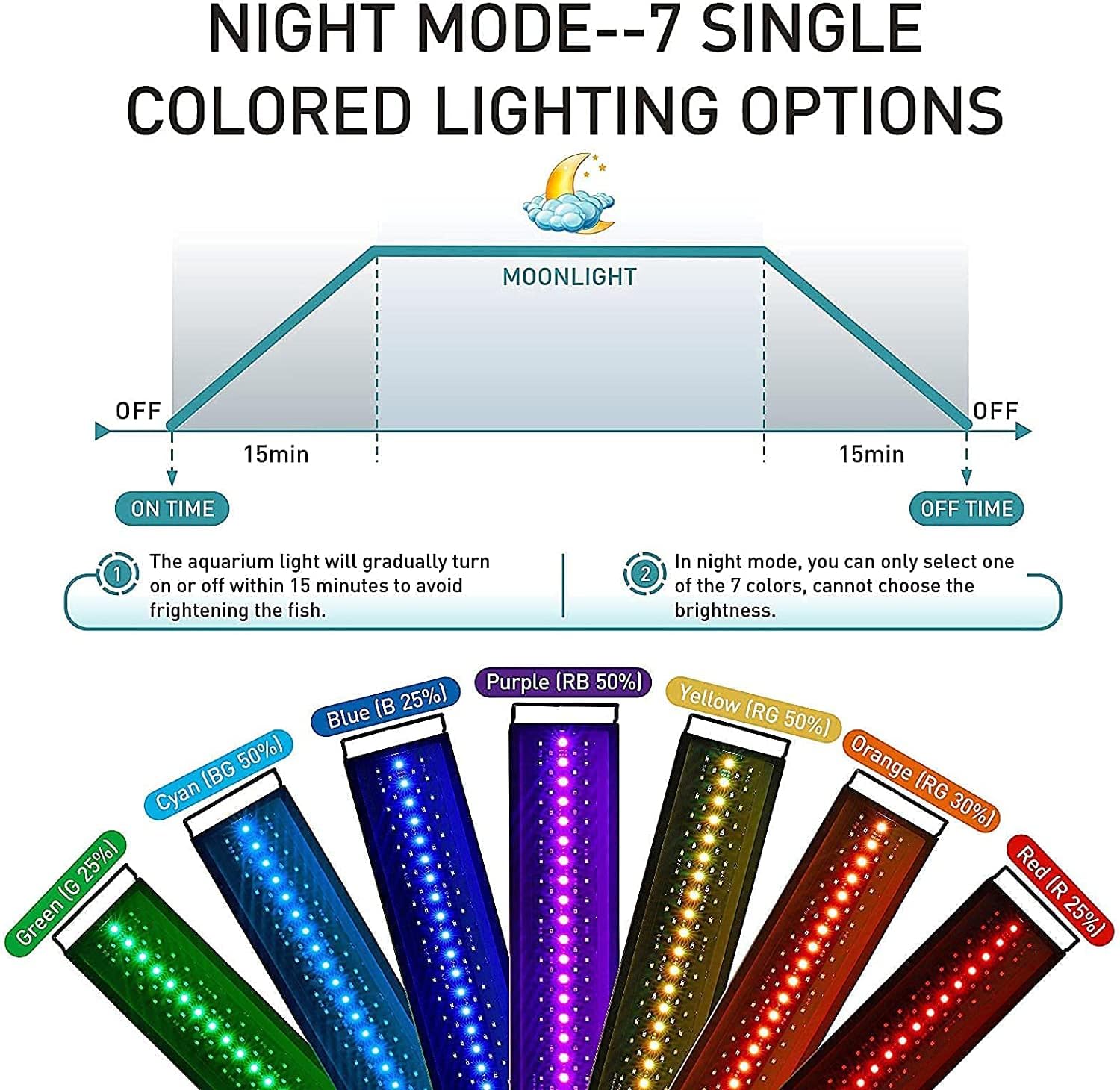
Image: A diagram depicting the Day Mode, showing a simulated daylight cycle with gradual sunrise and sunset transitions. Brightness of white light is adjustable from 10% to 100%.
3. Night Mode (7 Single Colored Lighting Options)
Night Mode provides a moonlight effect with 7 single color options: Red, Orange, Yellow, Green, Cyan, Blue, and Purple. Brightness is not adjustable in this mode. The light transitions gradually over 15 minutes at turn-on and turn-off times.
Image: A diagram illustrating the Night Mode, offering 7 single color options for a moonlight effect. The image shows examples of the light emitting red, orange, yellow, green, cyan, blue, and purple light.
Maintenance
Regular maintenance ensures optimal performance and longevity of your aquarium light.
- Cleaning: Periodically wipe the light unit and controller with a soft, damp cloth to remove dust and water spots. Ensure the unit is unplugged and completely dry before plugging it back in. Do not use abrasive cleaners or solvents.
- Water Resistance: The light unit has a water-resistant rating. However, it is not designed for submersion. Avoid direct contact with water beyond splashes. If the light accidentally falls into water, immediately unplug it and allow it to dry completely before attempting to use it again.
- Heat Dissipation: The aluminum alloy metal shell is designed for fast heat dissipation. Ensure the light unit has adequate airflow around it and is not covered, to prevent overheating.
Troubleshooting
| Problem | Possible Cause | Solution |
|---|---|---|
| Light does not turn on. | Power cable disconnected, adapter faulty, or light unit malfunction. | Check all cable connections. Ensure the adapter is securely plugged into the outlet. Test the outlet with another device. If issues persist, contact customer support. |
| Settings are not saving. | Incorrect setting procedure, or a rare internal memory issue. | Ensure you are following the programming steps correctly as outlined in the Operating Instructions. The light has an IC memory function, so settings should save automatically. If not, try resetting the device by unplugging it for a few minutes and then re-programming. |
| Light flickers or dims unexpectedly. | Unstable power supply, loose connection, or internal component issue. | Check power connections. Ensure the power outlet is stable. If the problem continues, discontinue use and contact customer support. |
| LCD display is blank or unreadable. | Power issue to the controller, or controller malfunction. | Verify power supply to the unit. If the light itself is on but the display is off, the controller may be faulty. Contact customer support. |
Specifications
| Feature | Detail |
|---|---|
| Brand | hygger |
| Model | HG999-14W |
| Power | 14 Watts |
| Voltage | 2.3E+2 Volts (AC) |
| Dimensions (L x W x H) | 39.2 x 12.3 x 6.1 cm |
| Weight | 680 grams |
| Material | Aluminum (base), Acrylic (lampshade) |
| Light Type | LED |
| Number of LED Bulbs | 29 White, 4 Red, 2 Green, 11 Blue, 12 RGB (Total 58) |
| Color Temperature | 6500K |
| Luminous Flux | 820 Lm |
| Color Rendering Index (CRI) | 89 |
| Special Features | 3 Programmable Modes (DIY, Day, Night), LCD Monitor, Memory Function, Gradual On/Off |
| Specific Uses | Aquarium plant growth, adjustable lighting for aquarium environments |
| Energy Efficiency Class | E (14 kWh/1000h) |

Image: European Union energy efficiency label for the hygger HG999-14W, indicating an energy class of E and consumption of 14 kWh per 1000 hours. For more details, visit the EPREL database.
Warranty and Support
For any questions or assistance, please contact hygger customer service. When reaching out, it is helpful to provide proof of purchase, such as your Amazon invoice, along with any relevant photos of the issue.

Image: An illustration encouraging users to contact customer service for questions, advising to provide purchase proof and related photos for assistance.


