
My Brand RP432KPT000A
Contents
Risco RisControl 8-inch High-Resolution Touch Keypad User Manual
Model: RP432KPT000A
Product Overview
The RisControl is an 8-inch, high-resolution touch keypad designed to provide an intuitive and user-friendly interface for managing security systems. It serves as a central access point for controlling alarms and cloud-based solutions from RISCO Group. This keypad offers a clear display of the system's status, facilitates simple arming and disarming operations, and allows for viewing live video feeds and recordings from the VUpoint Video Solution.
Communication with the central unit is established via RISCO Bus (RS-485), while connectivity to RISCO Cloud is managed through Wi-Fi. The keypad is engineered for straightforward installation, featuring a mounting bracket and a removable connector to simplify wiring. A single ProSYS Plus system can support the installation of up to 48 RisControl keypads.
Keypad Interface
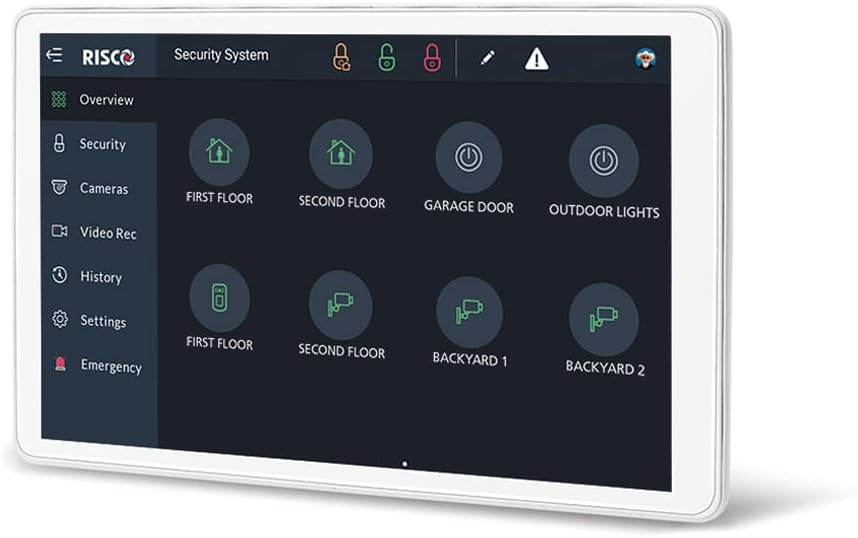
Figure 1: Risco RisControl Keypad Interface
The image displays the Risco RisControl 8-inch touch keypad. The screen features a dark interface with a navigation menu on the left side, including options such as Overview, Security, Cameras, Video Rec, History, Settings, and Emergency. The main display area presents large circular icons for controlling various aspects of the security system, such as 'FIRST FLOOR' and 'SECOND FLOOR' for home areas, 'GARAGE DOOR' and 'OUTDOOR LIGHTS' for specific functions, and camera views labeled 'BACKYARD 1' and 'BACKYARD 2'. Status icons, including locks and alert indicators, are visible at the top of the screen.
Setup and Installation
The RisControl keypad is designed for DIY installation. Follow these general guidelines for proper setup:
- Unpacking: Carefully remove all components from the packaging. The package includes the keypad, a mounting support, and a removable connector for wiring.
- Mounting: Use the provided mounting support to securely attach the keypad to a suitable wall surface. Ensure the mounting location allows for easy access and visibility.
- Wiring: Connect the keypad to the central unit using the RISCO Bus (RS-485) interface. The removable connector simplifies the wiring process. Ensure all connections are secure before powering on.
- Power Connection: Connect the keypad to an electrical power source. The keypad operates on 13 V ± 10 %.
- Network Configuration: Configure the Wi-Fi connection to establish communication with RISCO Cloud. Refer to the system's main control panel manual for detailed network setup instructions.
- System Integration: Up to 48 RisControl keypads can be integrated with a single ProSYS Plus system. Ensure proper addressing and configuration within the central unit's settings.
Operating Instructions
The RisControl keypad provides a tactile interface for managing your security system. Here are the primary operational functions:
- System Overview: The main screen provides a comprehensive overview of your security system's status. Icons represent different zones, devices, and functions.
- Arming/Disarming: Easily arm or disarm your security system by tapping the relevant icons on the screen. The interface is designed for simple and quick operation.
- Video Monitoring: Access live video feeds and review recorded footage from VUpoint Video Solution cameras directly on the 8-inch display. Navigate to the 'Cameras' or 'Video Rec' sections from the left-hand menu.
- Event History: Review past events and system activities by accessing the 'History' section.
- Settings: Adjust various system parameters and keypad settings through the 'Settings' menu.
- Emergency Functions: Utilize the 'Emergency' option for quick access to critical security functions.
- Compatibility: The keypad can be controlled and monitored via compatible tablets and smartphones through the RISCO Cloud platform.
Maintenance
To ensure optimal performance and longevity of your RisControl keypad, follow these maintenance recommendations:
- Cleaning: Gently wipe the screen and casing with a soft, dry, lint-free cloth. Avoid using abrasive cleaners, solvents, or aerosol sprays, as these can damage the surface.
- Software Updates: Periodically check for and install any available firmware or software updates for the keypad through the RISCO Cloud platform or your security system's central unit. Updates often include performance improvements and security enhancements.
- Environmental Conditions: Ensure the keypad operates within the specified temperature range of -10 °C to 55 °C. Avoid exposing the device to extreme humidity or direct sunlight for prolonged periods.
- Physical Inspection: Regularly inspect the keypad for any signs of physical damage or loose connections.
Troubleshooting
If you encounter issues with your RisControl keypad, consider the following troubleshooting steps:
- Keypad Unresponsive:
- Check the power connection to ensure the keypad is receiving adequate power (13 V ± 10 %).
- Verify that the RS-485 communication cable to the central unit is securely connected.
- Perform a power cycle by temporarily disconnecting and reconnecting the power supply.
- No Wi-Fi Connection:
- Ensure your Wi-Fi network (802.11 b/g/n 2.4 GHz) is active and within range.
- Verify the Wi-Fi password entered is correct in the keypad's settings.
- Restart your Wi-Fi router.
- Video Feed Issues:
- Confirm that your VUpoint Video Solution cameras are properly configured and online.
- Check your internet connection speed and stability.
- System Status Incorrect:
- Ensure the central unit is functioning correctly and communicating with all sensors and devices.
- Verify the keypad's connection to the central unit via RS-485.
If problems persist after attempting these steps, contact your security system installer or technical support.
Specifications
| Feature | Detail |
|---|---|
| Model Number | RP432KPT000A |
| Screen | 8" IPS Touch Display |
| Resolution | 800 x 1280 pixels |
| Speaker | 8 Ohms / 1 W |
| Wi-Fi | 802.11 b/g/n 2.4 GHz |
| System Interface | RISCO Bus (RS-485) |
| Tamper Protection | Anti-removal tamper |
| Dimensions (H x W x D) | 208 x 129 x 24 mm |
| Weight | 481 g |
| Voltage | 13 V ± 10 % |
| Current Consumption | Typically 200 mA, Max 300 mA |
| Operating Temperature | -10 °C to 55 °C |
| Certification | EN50131-3, Environmental Class II, PD 6662:2017 |
| Power Source | Electrical Cable |
| Installation Method | DIY |
| Alert Type | Audio and Motion |
| Control Method | Tactile |
| Compatible Devices | Tablet, Smartphone |
| Included Components | Mounting support, Removable connector |
| UPC | 806258167478 |
Warranty Information
Specific warranty details for the Risco RisControl keypad are not provided within this manual. For information regarding product warranty, terms, and conditions, please refer to the documentation supplied with your purchase or contact the authorized seller or manufacturer directly.
Support
For technical assistance, troubleshooting beyond the scope of this manual, or inquiries about spare parts, please contact your product supplier or the manufacturer's customer support. Ensure you have your product model number (RP432KPT000A) and purchase details available when seeking support.
Ask a question about this manual
Ask about setup, troubleshooting, compatibility, parts, safety, or missing instructions. Manuals+ will review the question and use this page’s manual context to help answer it.