
Bella Depot B6
Contents
Bella Depot B6 Low Profile Ceiling Fan with Dimmable LED Lights - User Manual
Model: B6
Introduction
Thank you for choosing the Bella Depot B6 Low Profile Ceiling Fan. This manual provides detailed instructions for the safe installation, operation, and maintenance of your new ceiling fan. Please read this manual thoroughly before installation and keep it for future reference.
Safety Instructions
- Always turn off the power at the main circuit breaker before installation or maintenance.
- Ensure all electrical connections comply with local codes and ordinances.
- Consult a qualified electrician if you are unsure about wiring.
- Mount the fan to a ceiling joist or support structure capable of supporting the fan's weight.
- Do not bend the blade holders during installation or cleaning.
- Keep children away from the fan during operation.
- This fan is designed for indoor use only.
Package Contents
Verify that all components are present before beginning installation:
- 1 x Bella Depot B6 Ceiling Fan with Light
- 1 x Remote Control
- Installation Hardware (screws, wire nuts, etc.)
- User Manual
Installation Guide
The Bella Depot B6 ceiling fan is designed for easy installation, with most functional parts pre-assembled. Follow these steps for a successful setup:
Step 1: Unboxing and Preparation
Carefully unbox the ceiling fan and lay out all components. Ensure no parts are damaged. Refer to the "unboxing and installation process" video for a visual guide.
Video: Unboxing and initial setup of the Bella Depot B6 ceiling fan, showing components and initial power test.
Step 2: Mounting the Bracket
Secure the mounting bracket to the ceiling junction box. Ensure it is firmly attached to a structural support to prevent the fan from falling.

Image: The Bella Depot B6 ceiling fan installed in a bedroom, showcasing both remote and app control options.
Step 3: Wiring Connections
Connect the fan's electrical wires to the household wiring according to the provided wiring diagram in the separate instruction sheet. Use the included wire nuts to secure connections. Ensure proper grounding.
Step 4: Attaching the Fan Body
Carefully lift the fan body and attach it to the mounting bracket. Secure it with the provided screws. Ensure the fan is stable and flush against the ceiling.

Image: Detailed view of the fan's transparent blades and the integrated LED light ring, highlighting the modern design.
Step 5: Final Check
Once installed, restore power and test all functions using the remote control or the mobile application.
Operating Instructions
Your Bella Depot B6 ceiling fan can be controlled via the included remote control or a smart mobile application.
Remote Control Operation
The remote control allows you to manage all fan and light functions. Ensure batteries are correctly inserted.

Image: Diagram of the remote control, showing buttons for light ON/OFF, light color toggle, brightness, fan reversible, 6-speed control, timing (2H/4H), natural wind, and fan OFF.
- Light ON/OFF: Toggles the light on or off.
- Light Color Toggle: Cycles through Cool White (6000K), Natural White (4000K), and Warm White (3000K).
- Brightness: Adjusts the light intensity from 5% to 100%.
- Fan Reversible (F/R): Changes the direction of fan rotation for summer (downward airflow) or winter (upward airflow for heat circulation).
- 6 Speed Control (1-6): Selects fan speed from gentle breeze (1-2) to strong winds (5-6).
- Timing (1H/2H/4H): Sets the fan to turn off automatically after 1, 2, or 4 hours.
- Natural Wind: Simulates a natural breeze by varying fan speed.
- Fan OFF: Turns the fan off.
Smart APP Control
Download the dedicated mobile application to control your fan from your smartphone. The app offers comprehensive control over all fan and light features, including 6-speed wind, timing, light brightness, color temperature, natural wind mode, and reversing function.
Video: Demonstration of the Bella Depot B6 ceiling fan being controlled via both the remote and a smartphone application, showing light and fan speed adjustments.

Image: Graphical representation of the mobile application interface for controlling the Bella Depot B6 ceiling fan, showing options for timing, fan blade reverse, light settings, fan speed, and power ON/OFF.
Light Features
The integrated LED light offers versatility to match your room's ambiance.
- Dimmable: Adjust brightness from 5% to 100%.
- Color Temperature: Choose between Cool White (6000K), Natural White (4000K), and Warm White (3000K).

Image: Visual representation of the three available light color temperatures (Cool White, Natural White, Warm White) and the dimmable brightness range of the LED light.
Fan Features
- 6 Wind Speeds: From a gentle breeze (speeds 1-2) to strong airflow (speeds 5-6).
- Reversible DC Motor: Allows for year-round use. In summer, the fan creates a downward airflow for cooling. In winter, reversing the blades creates an upward airflow to circulate warm air.

Image: Illustration showing the reversible function of the fan blades, demonstrating downward airflow for summer cooling and upward airflow for winter heat circulation.

Image: Graphic illustrating the 6-speed settings of the fan, categorizing them into comfortable breeze (1-2), natural winds (3-4), and strong winds (5-6).
Maintenance
- Cleaning: To clean the fan, wipe with a soft, damp cloth. Do not use abrasive cleaners or solvents. Ensure power is off before cleaning.
- Blade Care: The fan blades are designed to be easy to clean. Periodically wipe them to remove dust buildup.
- Light Source: The LED light source is integrated and not user-replaceable. Contact customer support if the light fails.
Troubleshooting
| Problem | Possible Cause | Solution |
|---|---|---|
| Fan does not start | No power; loose wiring; remote control battery dead. | Check circuit breaker; ensure all connections are secure; replace remote control batteries. |
| Light does not work | No power; loose wiring; LED module failure. | Check circuit breaker; ensure all connections are secure; contact customer support if LED module is faulty. |
| Fan makes noise | Loose screws; unbalanced blades. | Tighten all mounting screws; ensure blades are securely attached and balanced. |
| Remote control not working | Dead batteries; remote not paired. | Replace batteries; refer to pairing instructions (if applicable, usually automatic). |
Specifications
| Feature | Detail |
|---|---|
| Brand | Bella Depot |
| Model Number | B6 |
| Color | White |
| Material | Metal + ABS + Acrylic |
| Mounting Type | Flush Mount |
| Light Source | Integrated LED |
| Lighting Color Temperature | 3000K (Warm White), 4000K (Natural White), 6000K (Cool White) |
| Dimmable | Yes (5%-100%) |
| Fan Speed | 6 Speeds |
| Motor Type | Quiet Reversible DC Motor |
| Control Method | Remote Control, Smart APP Control |
| Timing Function | Yes (1H, 2H, 4H) |
| Dimensions | 19.2" Diameter x 4.9" Height (approx.) |
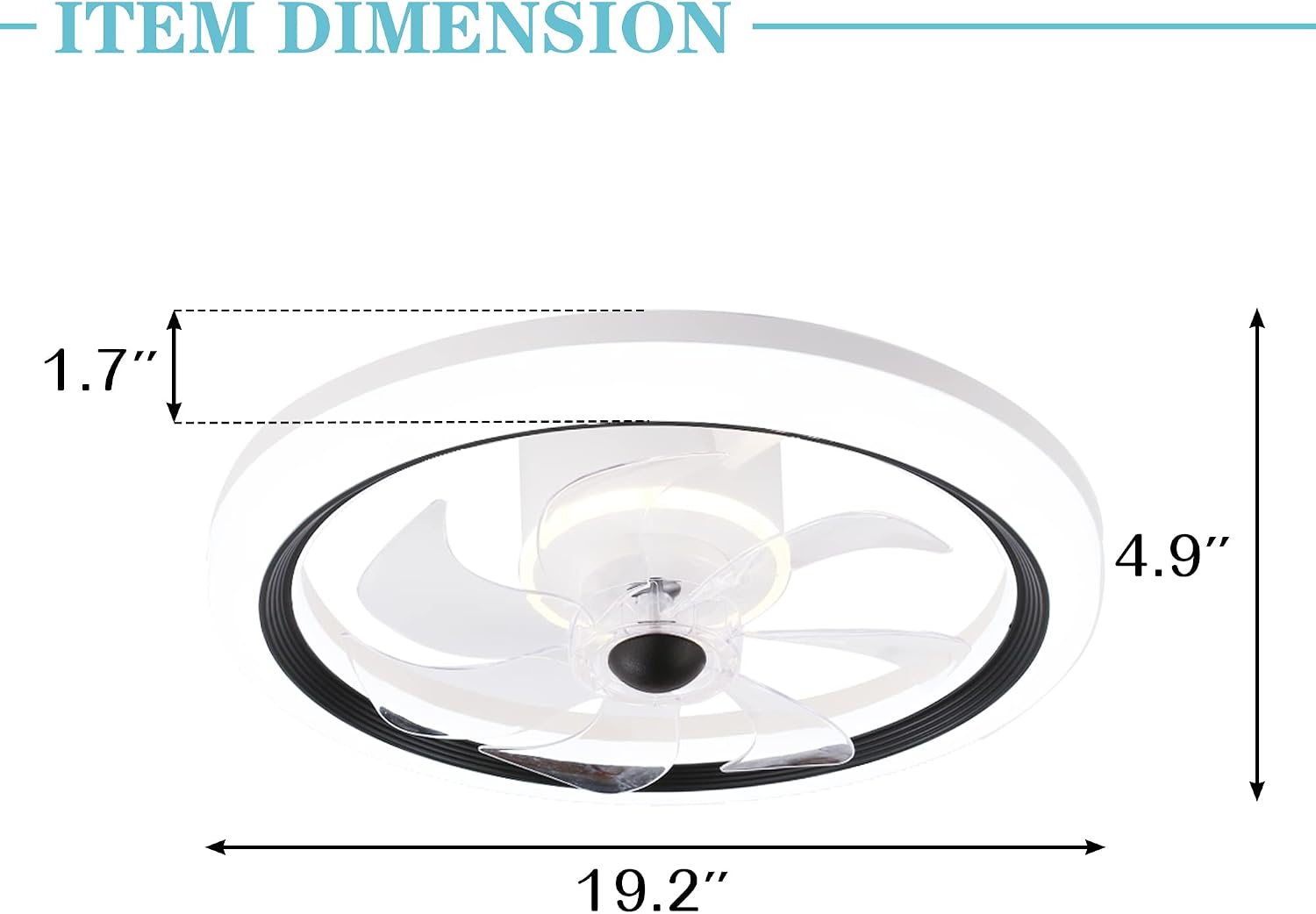
Image: Diagram showing the approximate dimensions of the Bella Depot B6 ceiling fan: 19.2 inches in diameter and 4.9 inches in height.
Warranty and Support
Bella Depot products are manufactured to high-quality standards. For warranty information, technical support, or replacement parts, please contact Bella Depot customer service. Keep your purchase receipt as proof of purchase.
For further assistance, visit the official Bella Depot store: Bella Depot Store
Documents and downloads
Ask a question about this manual
Ask about setup, troubleshooting, compatibility, parts, safety, or missing instructions. Manuals+ will review the question and use this page’s manual context to help answer it.