
Azwok RM-GCBLTV6EA-C4-UV005
GCBLTV6EA-C4 Remote Control User Manual
Model: RM-GCBLTV6EA-C4-UV005
Brand: Azwok
Product Overview
This manual provides instructions for the Azwok GCBLTV6EA-C4 replacement remote control, designed for various CHIQ TV models. This remote is a direct replacement and requires no programming.
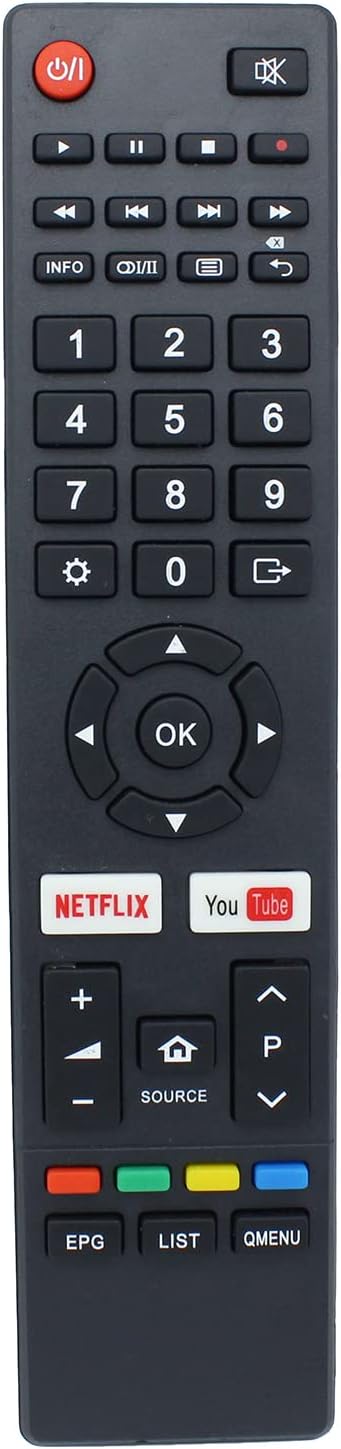
Figure 1: Front view of the GCBLTV6EA-C4 remote control. This image displays the full layout of the remote, highlighting the power button, numerical keypad, directional navigation buttons, volume and channel controls, and quick access buttons for Netflix and YouTube.

Figure 2: Angled view of the GCBLTV6EA-C4 remote control. This perspective illustrates the remote's profile and the arrangement of its buttons, providing a clearer view of the overall design.
Setup
- Battery Installation:
Locate the battery compartment on the back of the remote control. Slide the battery cover downwards to open it.

Figure 3: Rear view of the remote control with the battery cover removed. This image shows the open battery compartment, ready for battery insertion.
Insert two (2) AAA batteries into the compartment, ensuring the positive (+) and negative (-) terminals align correctly with the indicators inside the compartment.
Close the battery cover by sliding it back into place until it clicks securely.
- Initial Use:
Once batteries are installed, the remote control is ready for immediate use. No programming or pairing is required.
Point the remote control towards your CHIQ TV and press the Power button (Ⓘ) to turn on or off the television.
Operating Instructions
The GCBLTV6EA-C4 remote control provides full functionality for compatible CHIQ TV models. Below is a guide to common button functions:
- Power Button (Ⓘ): Turns the TV on or off.
- Mute Button (🔇): Mutes or unmutes the TV audio.
- Number Pad (0-9): Directly input channel numbers.
- Volume Up/Down (+ / -): Adjusts the TV volume.
- Channel Up/Down (▲ / ▼): Changes TV channels.
- Navigation Buttons (◀ ▲ ▶ ▼): Used to navigate menus and select options.
- OK Button: Confirms selections in menus.
- Back Button (↶): Returns to the previous screen or menu.
- Source Button (⌂): Selects input sources (HDMI, AV, etc.).
- Netflix Button: Direct access to the Netflix application.
- YouTube Button: Direct access to the YouTube application.
- EPG (Electronic Program Guide): Displays the program guide.
- LIST: Accesses channel lists or recorded programs.
- Q.MENU: Quick menu access.
For specific functions related to your CHIQ TV model, refer to your television's user manual.
Maintenance
- Cleaning: Use a soft, dry cloth to clean the remote control. Do not use liquid cleaners or abrasive materials.
- Battery Replacement: Replace batteries when the remote's response becomes sluggish or it stops functioning. Always replace both batteries simultaneously with new AAA batteries.
- Storage: If the remote control will not be used for an extended period, remove the batteries to prevent leakage and potential damage.
- Environmental Conditions: Avoid exposing the remote control to extreme temperatures, humidity, or direct sunlight.
Troubleshooting
| Problem | Possible Cause / Solution |
|---|---|
| Remote control is not working. |
|
| Remote control works intermittently. |
|
| Some buttons do not respond. |
|
Specifications
- Model Number: RM-GCBLTV6EA-C4-UV005
- Compatible Models: U75G8, U70G8, U65G6, U55G7, U55G6, U50G6, U58E7, L43G5, U50G9, U55H6, U65G9, U43H6 (and others compatible with GCBLTV6EA-C4)
- Power Source: 2 x AAA Batteries (not included)
- Connectivity: Infrared (IR)
- Dimensions: 8.27 x 1.77 x 0.79 inches (approx.)
- Weight: 2.46 ounces (approx.)
- Special Features: No programming required, ready to use.
Warranty and Support
This Azwok replacement remote control comes with a 12-month warranty from the date of purchase. This warranty covers manufacturing defects and ensures replacement if the product fails to function as intended under normal use.
If you encounter any issues or have questions regarding the compatibility or operation of your remote control, please do not hesitate to contact the seller or manufacturer for assistance. Providing your TV model number and the remote control's model number (RM-GCBLTV6EA-C4-UV005) will help expedite support.
For further assistance, please refer to the contact information provided by your retailer or the manufacturer, Azwok.
Ask a question about this manual
Ask about setup, troubleshooting, compatibility, parts, safety, or missing instructions. Manuals+ will review the question and use this page’s manual context to help answer it.