
1. Introduction
This manual provides detailed instructions for the installation, operation, and maintenance of the Phonocar 09302 Universal Alarm System for motorcycles and scooters. This system is designed to enhance the security of your vehicle by offering various anti-theft and protection features.
Please read this manual thoroughly before installation and use to ensure proper function and to maximize the benefits of your alarm system.
2. Safety Information
- Professional Installation Recommended: For optimal performance and to avoid damage to your vehicle's electrical system, installation by a qualified technician is strongly recommended.
- Power Disconnection: Always disconnect the vehicle's battery before attempting any electrical installation.
- Wiring: Ensure all wiring connections are secure and properly insulated to prevent short circuits.
- Water Exposure: Protect the main alarm unit and siren from direct water exposure.
- Remote Control Care: Keep remote controls dry and avoid dropping them.
3. Package Contents
Verify that all components are present in the package:
- Main Alarm Unit (ECU)
- Siren
- Two Transponder Remote Controls
- Wiring Harness
- User Manual (this document)
4. Installation
Note: Professional installation is highly recommended due to the complexity of vehicle electrical systems.
4.1. Component Placement
- Main Alarm Unit (ECU): Mount the ECU in a hidden, secure, and dry location on the motorcycle or scooter. Ensure it is protected from vibrations and extreme temperatures.
- Siren: Install the siren in a location where its sound is not obstructed and it is difficult for a thief to access. Ensure it is protected from water.
- Wiring: Route the wiring harness away from moving parts, heat sources, and sharp edges. Secure all cables with zip ties.
4.2. Electrical Connections
The alarm system requires connection to the vehicle's 12V power supply, ignition, and turn signals. It also features a double engine block for enhanced security.
- Power Supply: Connect the main power wires (typically red and black) to the vehicle's 12V battery, ensuring proper polarity.
- Ignition Wire: Connect the ignition wire to a switched 12V source that is active when the ignition is on.
- Turn Signals: Connect the alarm's turn signal wires to the vehicle's left and right turn signal circuits.
- Engine Block: Integrate the double engine block wires into the vehicle's ignition or fuel pump circuit as per the detailed wiring diagram (not provided in this general manual, refer to specific product wiring diagram). This feature prevents the engine from starting when the alarm is armed.
- External Alarm Input (Optional): If using an external sensor (e.g., shock sensor, tilt sensor), connect it to the designated input wire.
After all connections are made, re-connect the vehicle's battery and test the system.
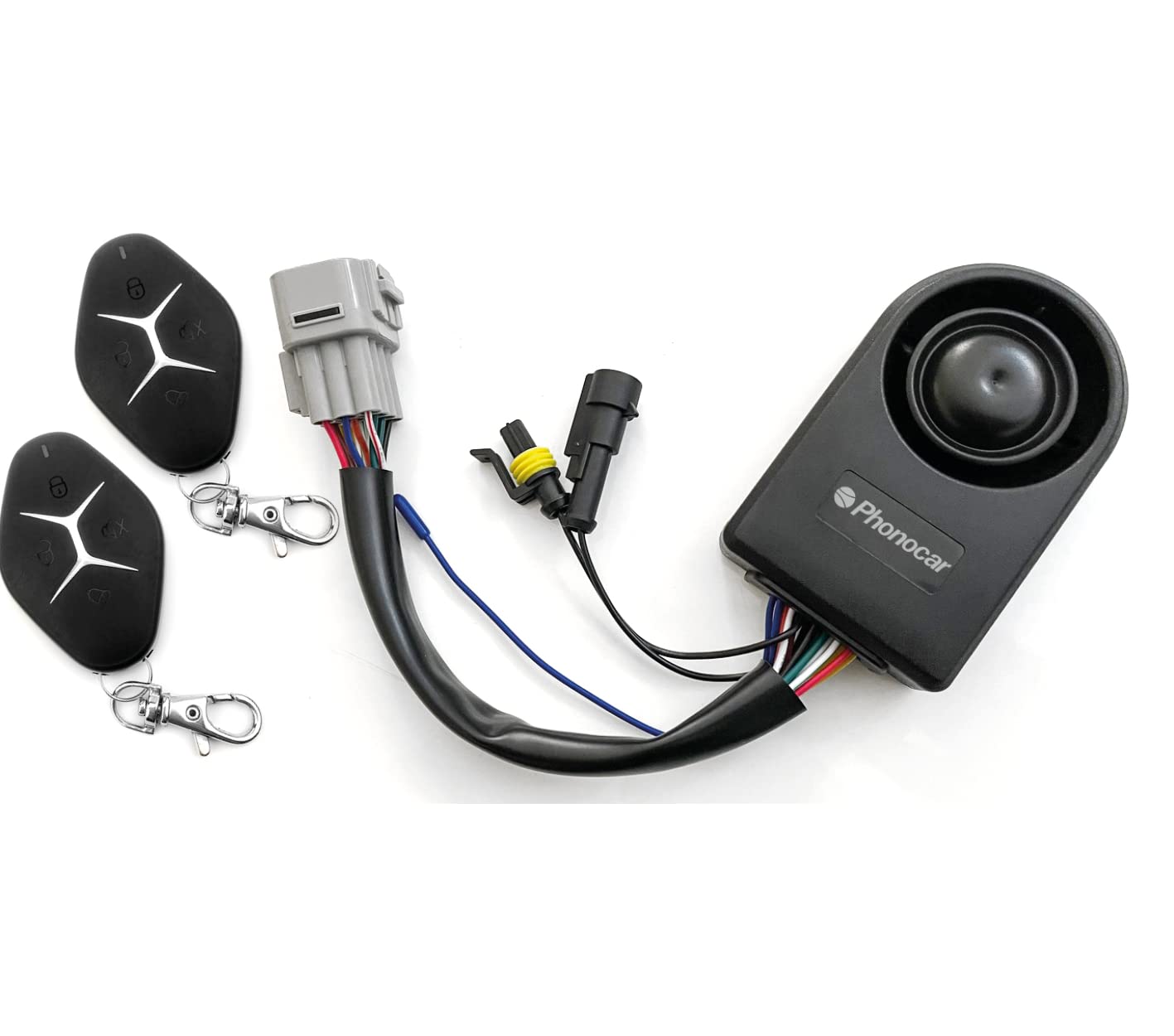
Image 1: Phonocar 09302 Universal Alarm System components, including the main unit and remote controls.
5. Setup
The Phonocar 09302 system comes with two transponder remote controls already paired and programmed for user recognition.
5.1. Remote Control Pairing (if needed)
In case a remote control needs to be re-paired or a new one added, refer to the specific programming instructions provided with the full product documentation. Generally, this involves a sequence of ignition cycles and button presses on the remote.
5.2. Programmable Functions
Certain functions can be programmed to customize the alarm's behavior:
- Biker Recognition: This feature allows the system to recognize the authorized user, potentially disarming the alarm automatically when the user is in proximity.
- Anti-Robbery Alarm: Activates an alarm in case of a robbery attempt.
- Turn Signal Alarm: Configures how the turn signals flash during alarm events.
- External Alarm Input: Enables or disables the input for additional sensors.
Consult the full product manual for detailed steps on how to program these functions using the remote controls or specific button sequences.
6. Operating Instructions
The alarm system is operated primarily using the provided remote controls.
6.1. Arming the Alarm
Press the Lock button on the remote control once. The system will respond with a confirmation sound (e.g., a single chirp) and the turn signals may flash. The engine block will activate, preventing the vehicle from starting.
6.2. Disarming the Alarm
Press the Unlock button on the remote control once. The system will respond with a confirmation sound (e.g., two chirps) and the turn signals may flash. The engine block will deactivate, allowing the vehicle to start.
6.3. Panic Alarm / Vehicle Location
In an emergency or to locate your vehicle in a crowded area, press and hold the Panic button (often represented by a bell or speaker icon) on the remote control. The siren will sound, and the turn signals will flash. Release the button to stop the alarm.
7. Alarm Functions
The Phonocar 09302 alarm system includes several active and programmable security functions:
7.1. Active Functions
- Alarm: Standard alarm activation upon unauthorized access or tampering.
- Panic Alarm / Vehicle Location: Manual activation of siren and lights for emergency or locating the vehicle.
- Anti-Sabotage (Cable Cutting Protection): Triggers the alarm if critical wiring is cut.
- Anti-Tow: Detects unauthorized movement or towing of the vehicle and triggers the alarm.
- Double Engine Block: Prevents the engine from starting when the alarm is armed, providing a strong deterrent against theft.
7.2. Programmable Functions
- Biker Recognition: Automatic user recognition for convenient arming/disarming.
- Anti-Robbery Alarm: Specific alarm mode for robbery situations.
- Turn Signal Alarm: Customization of turn signal behavior during alarm events.
- External Alarm Input: Integration with additional security sensors.
8. Maintenance
- Remote Control Batteries: Replace remote control batteries when the range decreases or the indicator light dims. Use specified battery types (e.g., CR2032, check remote for exact type).
- Cleaning: Clean the main unit and siren with a soft, dry cloth. Do not use harsh chemicals or abrasive cleaners.
- Wiring Inspection: Periodically check all wiring connections for corrosion or damage, especially after vehicle maintenance.
9. Troubleshooting
If you encounter issues with your alarm system, refer to the following common problems and solutions:
- Alarm does not arm/disarm:
- Check remote control battery.
- Ensure you are within the remote control's operating range (15 meters).
- Verify the main alarm unit has power.
- Alarm triggers unexpectedly:
- Check for loose wiring connections.
- If an external sensor is connected, adjust its sensitivity or check its wiring.
- Ensure the anti-tow function is not overly sensitive if the vehicle is parked on an unstable surface.
- Engine does not start when alarm is disarmed:
- Confirm the alarm is fully disarmed (two chirps).
- Check the engine block wiring connections.
If problems persist, contact a qualified technician or Phonocar customer support.
10. Specifications
| Nominal Voltage | 12V |
| Operating Voltage | DC 9~16V |
| Operating Frequency (Alarm) | 433.92 MHz ±150KHz |
| Siren Acoustic Power | 105-120dB |
| Stand-by Current (SLEEP) | ≤6.8uA |
| ECU Working Current | ≤5mA |
| Operating Frequency (Remote Control) | 433.92 MHz ±150KHz |
| Remote Control Range | 15 meters |
| Remote Control Operating Mode | ASK (Variable Code) |
| Operating Temperature | -20°C ~ +65°C |
| RC Battery Operating Voltage | 2.1V ~ 3.2V |
| Backup Battery Capacity | 200mAh |
11. Warranty and Support
For warranty information, please refer to the warranty card included with your product or contact your retailer. Phonocar provides customer support for technical assistance and inquiries.
For the latest information and support, please visit the official Phonocar website or contact their customer service department.