
Introduction
This manual provides detailed instructions for the setup, operation, and maintenance of your Azwok EN2A30 replacement remote control for Hisense Smart 4K TVs. Please read this manual carefully before using the remote control to ensure proper functionality and longevity.
Package Contents
- 1 x Azwok EN2A30 Remote Control
- (Batteries are not included)
Setup
1. Battery Installation
The Azwok EN2A30 remote control requires two AAA batteries (not included) for operation. Follow these steps to install the batteries:
- Locate the battery compartment cover on the back of the remote control.
- Press down on the tab and slide the cover downwards to open the compartment.
- Insert two AAA batteries, ensuring the positive (+) and negative (-) terminals align correctly with the markings inside the compartment.
- Slide the battery compartment cover back into place until it clicks securely.
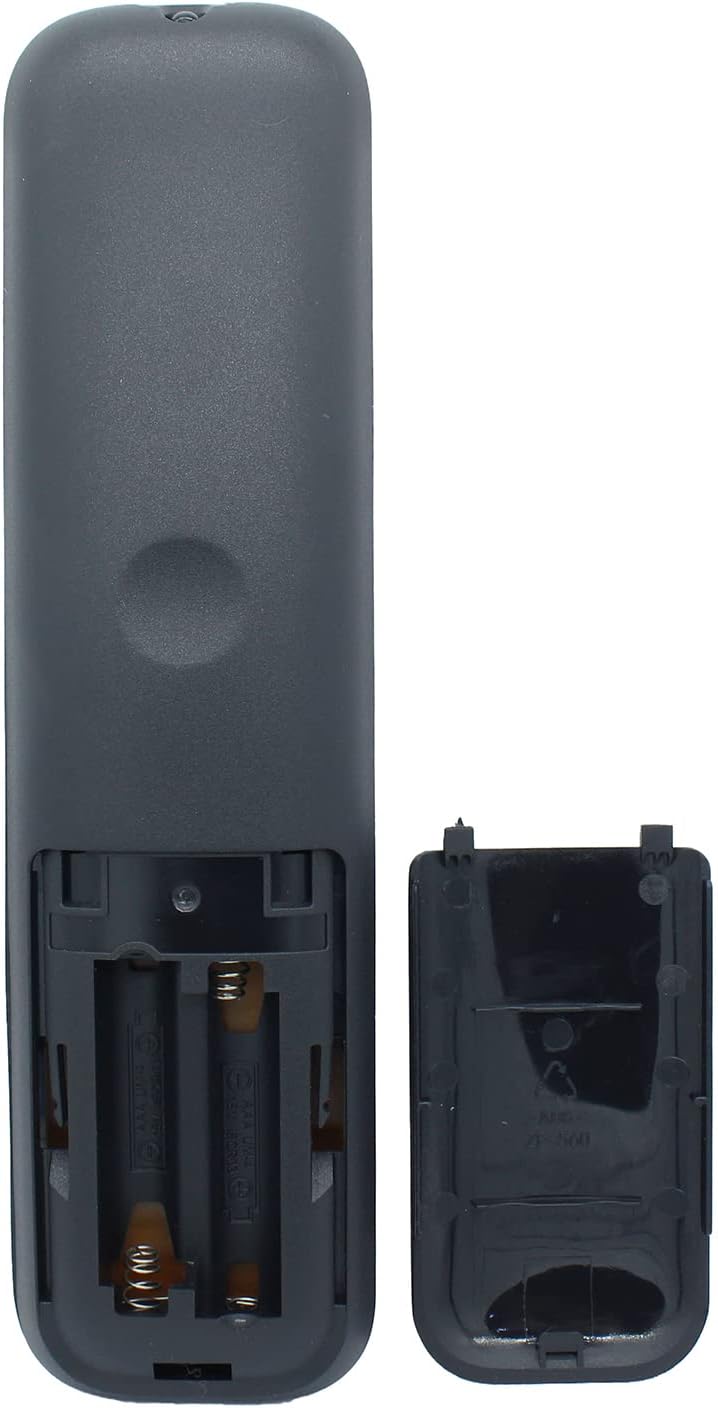
Image: Back of the remote control with the battery compartment open, illustrating correct battery placement.
2. Initial Use (No Programming Required)
This replacement remote control is designed to work immediately with compatible Hisense Smart 4K TVs without any programming. Once batteries are installed, it is ready for use.
- Point the remote control directly at your Hisense Smart 4K TV.
- Press the Power button to turn on your TV.
- Verify all functions are working as expected.
Operating Instructions
The Azwok EN2A30 remote control provides all major buttons and functions of the original Hisense EN2A30 remote. Below is a general overview of common button functions:

Image: Front view of the Azwok EN2A30 remote control.
- Power Button (Red): Turns the TV on or off.
- Input Button: Selects the input source (HDMI 1, HDMI 2, AV, etc.).
- Number Pad (0-9): Directly enters channel numbers.
- CH.LIST / GUIDE: Accesses the channel list or TV program guide.
- Navigation Pad (Up, Down, Left, Right, OK): Navigates menus and confirms selections.
- VOL +/-: Adjusts the volume level.
- CH +/-: Changes TV channels.
- Mute Button: Mutes or unmutes the TV audio.
- Exit Button: Exits the current menu or application.
- Smart App Buttons: Dedicated buttons for popular streaming services (e.g., Netflix, YouTube, Prime Video, etc.).
- Media Playback Controls: Play, Pause, Stop, Fast Forward, Rewind buttons for media content.
For specific functions related to your Hisense Smart 4K TV model, please refer to your TV's original user manual.
Maintenance
- Battery Replacement: Replace batteries when the remote's response becomes sluggish or it stops working. Always replace both batteries at the same time with new AAA batteries.
- Cleaning: Use a soft, dry cloth to clean the remote control. Do not use liquid cleaners or abrasive materials, as they may damage the surface or internal components.
- Storage: If the remote control will not be used for an extended period, remove the batteries to prevent leakage and potential damage. Store in a cool, dry place.
- Avoid Exposure: Do not expose the remote control to direct sunlight, high temperatures, humidity, or water.
Troubleshooting
- Remote is not responding:
- Check if the batteries are installed correctly with the correct polarity (+/-).
- Replace old batteries with new AAA batteries.
- Ensure there are no obstructions between the remote control and the TV's infrared receiver.
- Make sure you are within the effective operating range and pointing the remote directly at the TV.
- Certain buttons are not working:
- This remote is a direct replacement for the Hisense EN2A30 model. If your original remote was a different model, some advanced or specific functions might not be supported.
- Ensure the TV is powered on and not in a menu that restricts button functionality.
- Remote works intermittently:
- This often indicates low battery power. Replace the batteries.
- Ensure the remote's infrared emitter is clean and free from dust or debris.
If troubleshooting steps do not resolve the issue, please refer to the Support section for further assistance.
Specifications
| Model Number | EN2A30 (AU-EN2A30-HS034) |
| Brand | Azwok |
| Compatible Devices | Hisense Smart 4K Televisions (specifically models originally using EN2A30 remote) |
| Connectivity Technology | Infrared (IR) |
| Power Source | 2 x AAA Batteries (not included) |
| Product Dimensions | 7.09 x 1.77 x 0.59 inches (18 x 4.5 x 1.5 cm) |
| Item Weight | 2.72 ounces (77 grams) |
| Special Feature | No Programming Required |
Warranty
This Azwok EN2A30 remote control comes with a 12-month replacement warranty from the date of purchase. If the product is found to be defective or does not function as intended within this period, please contact customer support for a replacement or refund.
Returns are accepted for refund or exchange if the remote control does not work with your devices, provided it is within the specified return period (typically 30 days from purchase, as per standard retail policies).
This warranty does not cover damage caused by misuse, accident, unauthorized modification, or battery leakage.
Support
If you encounter any issues not covered in the troubleshooting section, or if you are unsure about the compatibility of this remote control with your specific Hisense TV model, please contact Azwok customer support.
When contacting support, please provide the following information:
- Your Azwok EN2A30 remote control model number (EN2A30).
- Your Hisense TV model number.
- A detailed description of the issue you are experiencing.
Contact information for Azwok customer support can typically be found on the product packaging, the retailer's website, or through your purchase order details.