
1. Important Safety Instructions
Please read and understand all instructions before beginning installation. Failure to follow these instructions may result in electric shock, fire, or personal injury.
- Ensure the power is turned off at the circuit breaker before installation or maintenance.
- All electrical connections must be in accordance with local codes and ordinances.
- Consult a qualified electrician if you are unsure about wiring or installation.
- Mount the fan directly to a structural ceiling joist or an outlet box marked 'Acceptable for Fan Support of 35 lbs (15.9 kg)'.
- Do not insert objects into the fan blades while the fan is operating.
- Keep children away from the fan during operation.
2. Package Contents
Verify that all components are present before proceeding with installation.
- Motor Housing with Blades
- Downrod (various lengths available)
- Mounting Bracket
- Remote Control
- LED Light Kit
- Hardware Pack (screws, washers, wire nuts)
- User Manual
3. Product Specifications
| Feature | Specification |
|---|---|
| Brand | Ohniyou |
| Model Name | GLX047B |
| Electric Fan Design | Ceiling Fan |
| Power Source | DC |
| Style | Modern |
| Product Dimensions | 7.6"D x 17.23"W x 9.79"H |
| Blade Length | 38 Inches |
| Number of Blades | 4 |
| Room Type | Study Room (suitable for various rooms) |
| Noise Level | 35 Decibels |
| Wattage | 35 watts |
| Finish Type | Painted |
| Switch Type | Remote |
| Included Components | Remote |
| Indoor/Outdoor Usage | Outdoor |
| Control Method | Remote |
| Number of Power Levels | 6 |
| Material | Metal, Plastic |
| Mounting Type | Ceiling Mount |
For detailed energy information, refer to the official EPREL database: EPREL QR Code Link
4. Installation Guide
Follow these steps carefully to install your Ohniyou GLX047 ceiling fan. It is recommended to have two people for installation.
4.1 Pre-Installation
- Turn off power: Ensure the power supply to the installation location is disconnected at the circuit breaker.
- Prepare mounting: Securely attach the mounting bracket to the ceiling joist or fan-rated outlet box.
4.2 Assembling the Fan
- Attach the fan blades to the motor housing using the provided screws. Ensure they are securely fastened.
- Connect the LED light kit to the motor housing. Secure the light kit with the provided screws.
- Insert the downrod through the canopy and connect the wires. Secure the downrod to the motor housing with the pin and screws.
Video: Assembly Video for Ohniyou Ceiling Fan - 38 inch. This video demonstrates the step-by-step assembly process of the ceiling fan, including attaching blades, installing the light kit, and securing the downrod.
4.3 Mounting and Wiring
- Hang the assembled fan onto the ceiling mounting bracket.
- Make electrical connections: connect the fan wires to the household wiring according to the wiring diagram in the full manual. Ensure all connections are secure with wire nuts.
- Tuck wires into the outlet box and slide the canopy up to cover the mounting bracket. Secure the canopy.
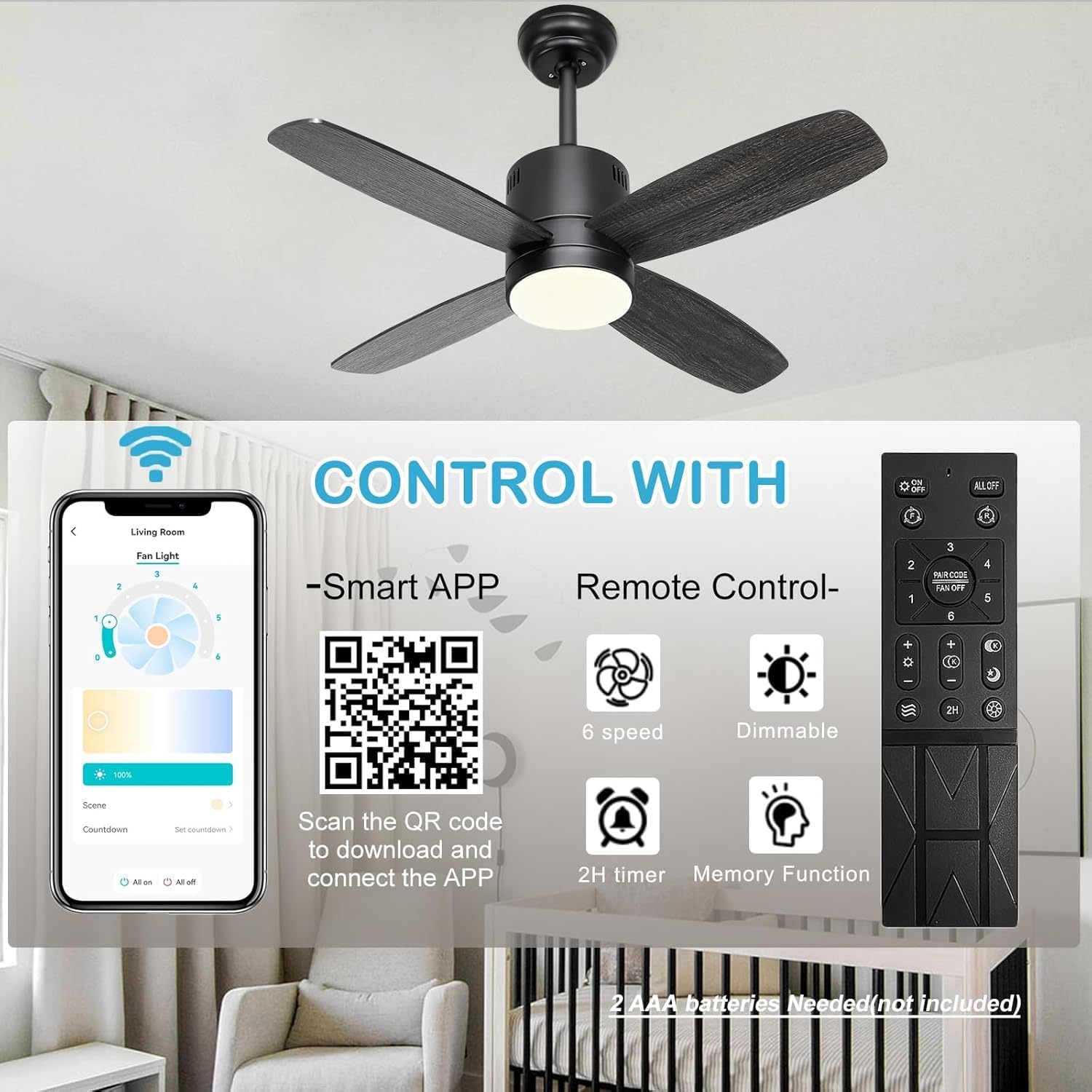
Image: A complete view of the Ohniyou 38-inch ceiling fan with integrated lights, showcasing its modern design and four blades.

Image: Detailed dimensions of the Ohniyou 38-inch ceiling fan, including blade length, downrod options (4-inch and 8-inch), and overall height and width.
5. Operating Instructions
Your Ohniyou GLX047 ceiling fan can be controlled via the included remote control or a smartphone application.
5.1 Remote Control Functions
- Fan ON/OFF: Press the fan button to turn the fan on or off.
- Fan Speed: Use the '1' to '6' buttons to select desired fan speed (6 speeds available).
- Light ON/OFF: Press the light button to turn the light on or off.
- Light Dimming: Use the '+' and '-' buttons to adjust light brightness.
- Color Temperature: Cycle through 3 color temperatures (warm, neutral, cool) by pressing the color temperature button.
- Timer: Set a 2-hour timer for automatic fan shutdown.
- Natural Breeze Mode: Activates a varying fan speed to simulate natural wind.
- Memory Function: The fan remembers the last light and fan settings.
5.2 App Control
Scan the QR code provided in the product packaging or on the product image to download the companion smartphone application. The app offers full control over fan speed, light dimming, color temperature, and timer functions.

Image: This image illustrates the dual control options for the Ohniyou ceiling fan: a remote control with dedicated buttons for fan speed, light, timer, and dimming, and a smartphone app interface for comprehensive control. A QR code for app download is also visible.

Image: Demonstrates the 3-color temperature options (3000K, 4000K, 6000K) and dimmable brightness (1% to 100%) of the integrated LED light, controllable via remote or app.
5.3 Reversible DC Motor
The fan features a reversible DC motor for year-round comfort.
- Downdraft Mode (Summer): Blades rotate counter-clockwise to create a cooling breeze.
- Updraft Mode (Winter): Blades rotate clockwise to circulate warm air trapped near the ceiling.

Image: Illustrates the reversible DC motor function, showing airflow patterns for both downdraft (cooling in summer) and updraft (circulating warm air in winter) modes.
5.4 Energy Saving Features

Image: Highlights key energy-saving features including a quiet and efficient DC motor, a 2-hour timer function, and a night light mode for soft illumination during sleep.
6. Maintenance
Regular maintenance ensures optimal performance and longevity of your ceiling fan.
- Cleaning: Use a soft, damp cloth to clean the fan blades and motor housing. Do not use abrasive cleaners or solvents.
- Blade Balance: If the fan wobbles, check that all blade screws are tight. Refer to the full manual for detailed balancing instructions if needed.
- Light Source: The integrated LED light is designed for long life and is not user-replaceable.
7. Troubleshooting
If you encounter issues with your fan, refer to the following common problems and solutions.
| Problem | Possible Cause | Solution |
|---|---|---|
| Fan does not start | No power, loose wiring, remote control issue | Check circuit breaker. Verify all wire connections. Replace remote batteries. |
| Light does not work | Loose wiring, LED driver issue | Check light kit wiring connections. If problem persists, contact customer support. |
| Fan wobbles | Loose blades, unbalanced blades, improper mounting | Ensure all blade screws are tight. Use a balancing kit (not included) if necessary. Recheck mounting bracket. |
| Remote control not working | Dead batteries, remote not paired | Replace batteries (2 AAA batteries, not included). Refer to the full manual for remote pairing instructions. |
8. Warranty and Support
Ohniyou products are manufactured to high-quality standards. For warranty information, technical support, or replacement parts, please contact Ohniyou customer service through the retailer where the product was purchased or visit the official Ohniyou website.
Online Resources:
- Ohniyou Store: Visit the Ohniyou Store on Amazon


