
isinwheel E9
isinwheel S9 Pro Electric Scooter User Manual
Model: S9 Pro (E9)
1. Introduction
This user manual provides essential information for the safe operation, maintenance, and troubleshooting of your isinwheel S9 Pro Electric Scooter. Please read this manual thoroughly before your first ride to ensure proper use and to maximize the lifespan of your scooter.
The isinwheel S9 Pro Electric Scooter is designed for personal urban commuting and recreational use, offering a portable and efficient mode of transport. It features a powerful motor, long-range battery, dual suspension, and a smart app for enhanced control.
2. Safety Guidelines
Your safety is paramount. Always adhere to the following guidelines:
- Always wear a helmet and appropriate safety gear (knee pads, elbow pads) when riding.
- Do not ride in heavy rain or through puddles deeper than 0.8 inches (2 cm).
- Ensure both brakes are functioning correctly before each ride.
- Observe all local traffic laws and regulations.
- Do not allow children under 16 to ride the scooter.
- Avoid riding on slippery surfaces, steep inclines, or uneven terrain.
- Maintain a safe distance from other vehicles and pedestrians.
- Do not perform stunts or sudden maneuvers.
- The maximum weight limit for the rider is 220 lbs (100 kg).

Image: A person riding the isinwheel S9 Pro Electric Scooter, demonstrating safe operation in an urban environment.
3. Product Components
Familiarize yourself with the main parts of your isinwheel S9 Pro Electric Scooter:
- Handlebar: Controls steering and houses the display, accelerator, and brake levers.
- Smart LED Dashboard: Displays speed, battery level, and riding mode.
- Brake Lever: Activates the dual braking system (Disc brake & EABS anti-lock brake).
- Accelerator: Controls the scooter's speed.
- Headlight: Front illumination for visibility.
- Folding Mechanism: Allows for compact storage and transport.
- Deck: Foot platform for the rider.
- Kickstand: Supports the scooter when parked.
- 8.5-inch Pneumatic Tires: Provide shock absorption and traction.
- Rear Dual Suspension: Enhances ride comfort over uneven surfaces.
- Taillight/Brake Light: Rear illumination and brake indication.
- Charging Port: For connecting the charger.

Image: Overview of the isinwheel S9 Pro Electric Scooter, showing its main components and the accompanying mobile application interface.

Image: Detailed view of the Smart LED Dashboard, highlighting the brake lever and accelerator controls.
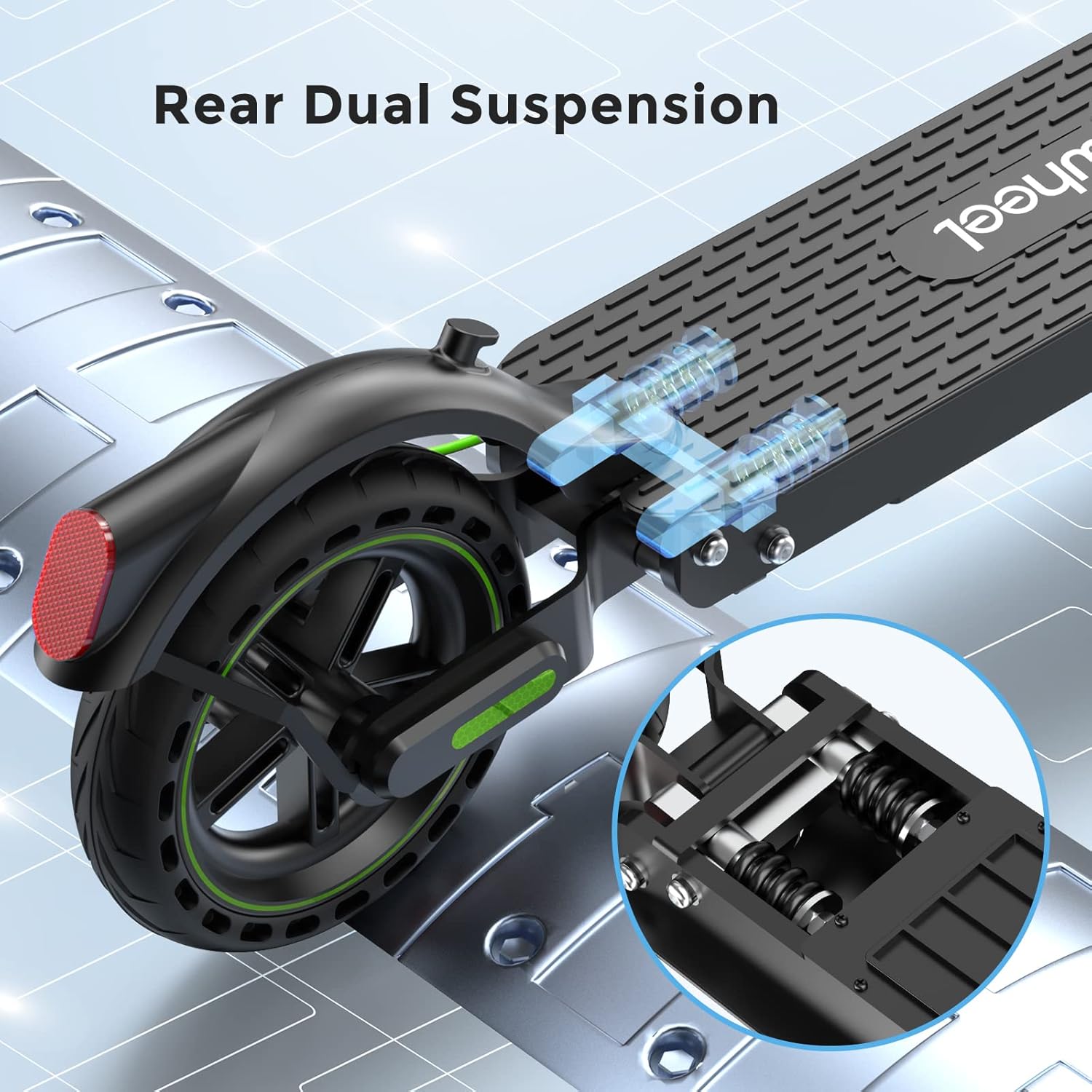
Image: Illustration of the rear dual suspension system, showing the shock-absorbing springs for a smoother ride.
4. Setup and First Use
4.1 Unboxing and Assembly
- Carefully remove all components from the packaging.
- Unfold the scooter by releasing the folding mechanism. Ensure it clicks securely into place.
- Attach the handlebar to the stem, ensuring all cables are properly connected and secured.
- Tighten all screws and bolts as per the quick start guide.
4.2 Initial Charging
Before your first ride, fully charge the scooter's battery. This typically takes approximately 5 hours.
- Locate the charging port on the scooter.
- Connect the charger to the scooter, then plug the charger into a power outlet.
- The indicator light on the charger will change (e.g., from red to green) when charging is complete.
4.3 App Connection (MiniRobot APP)
Enhance your riding experience by connecting to the MiniRobot APP:
- Download the "MiniRobot" app from the App Store (iOS) or Google Play Store (Android).
- Turn on your scooter and enable Bluetooth on your smartphone.
- Open the MiniRobot app and follow the on-screen instructions to pair with your scooter.
- The app allows you to lock/unlock the scooter, control lights, adjust gears, set start mode (zero/non-zero), and manage maximum speed and cruise control.

Image: The isinwheel S9 Pro Electric Scooter alongside a smartphone displaying the MiniRobot App interface, showing various control options.

Image: A close-up of the MiniRobot App settings screen, demonstrating options like unit selection, cruise control, battery capacity, energy recovery, riding mode, and zero start.
5. Operating Instructions
5.1 Starting the Scooter
- Press the power button to turn on the scooter.
- For non-zero start mode (default): Kick off with one foot to gain a little speed (approx. 1.8 mph / 3 km/h), then press the accelerator.
- For zero start mode (can be enabled via app): Press the accelerator directly from a standstill.
5.2 Riding
- Place both feet firmly on the deck.
- Gently press the accelerator to increase speed. The scooter has a top speed of 15.6 mph (25 km/h).
- Steer by leaning slightly in the desired direction and turning the handlebar.
5.3 Braking
The S9 Pro features a dual brake system for effective stopping:
- Gently squeeze the brake lever on the handlebar to engage both the disc brake and EABS anti-lock brake.
- Apply brakes smoothly to avoid sudden stops, especially at higher speeds.

Image: Illustration of the dual brake system, showing the brake lever on the handlebar and the disc brake on the rear wheel, along with the headlight and taillight.
5.4 Folding and Carrying
- Ensure the scooter is powered off.
- Locate and release the folding mechanism.
- Fold the stem down until it locks into place with the rear fender.
- The scooter weighs approximately 26 lbs (11.8 kg), making it portable for carrying or storing in compact spaces.

Image: A diagram illustrating the dimensions of the isinwheel S9 Pro Electric Scooter in both its unfolded and folded states, highlighting its compact design.
6. Maintenance
6.1 Cleaning
- Wipe the scooter with a soft, damp cloth. Do not use high-pressure water jets or harsh cleaning agents.
- Ensure the charging port cover is securely closed before cleaning.
6.2 Tire Care
- Regularly check tire pressure. Proper inflation ensures optimal performance and range.
- Inspect tires for wear, punctures, or damage before each ride.
6.3 Battery Care
- Charge the battery fully before long periods of storage.
- Store the scooter in a cool, dry place between 50°F and 77°F (10°C and 25°C).
- Recharge the battery every 30-60 days if not in use to prevent deep discharge.
- The battery has over-charge and over-discharge protection and can be recharged more than 1000 times.
6.4 General Inspection
- Periodically check all screws and bolts for tightness.
- Ensure the folding mechanism operates smoothly and locks securely.
- Verify that the brake levers, accelerator, and lights are functioning correctly.
7. Troubleshooting
| Problem | Possible Cause | Solution |
|---|---|---|
| Scooter does not turn on. | Low battery; Power button not pressed correctly. | Charge the battery; Press and hold the power button firmly. |
| Reduced range or speed. | Low tire pressure; Overloaded; Riding uphill; Cold weather. | Check and inflate tires; Reduce load; Ride on flatter terrain; Battery performance decreases in cold. |
| Brakes feel loose or ineffective. | Brake cable adjustment needed; Worn brake pads. | Adjust brake cable tension; Inspect and replace brake pads if worn. |
| App connection issues. | Bluetooth off; Scooter off; App not updated. | Ensure Bluetooth is on and scooter is powered; Restart app/scooter; Update app. |
| Error Code E-14 (as per customer review). | Accelerator malfunction or wiring issue. | Contact customer support for diagnosis and replacement parts. Do not attempt to disassemble without proper knowledge. |
If you encounter issues not listed here or if solutions do not resolve the problem, please contact isinwheel customer support.
Video: Official isinwheel S9Pro & S9MAX Electric Scooter overview, demonstrating features and usage scenarios. This video provides a visual guide to the scooter's capabilities and general operation.
8. Specifications
| Feature | Detail |
|---|---|
| Model Name | E9 (S9 Pro) |
| Motor Power | 350W Brushless Motor (Peak Power: 700W) |
| Top Speed | Up to 15.6 mph (25 km/h) |
| Max Range | Up to 18 miles (29 km) |
| Battery Capacity | 7.5 Ah Lithium-ion |
| Charging Time | Approx. 5 hours |
| Weight Limit | 220 lbs (100 kg) |
| Tire Size | 8.5-inch Pneumatic Tires |
| Brake System | Dual Brake System (Disc brake & EABS anti-lock brake) |
| Suspension | Rear Dual Suspension |
| Frame Material | Aviation-grade Aluminum |
| Item Weight | Approx. 26 lbs (11.8 kg) |
| Dimensions (LxWxH) | 45 x 5 x 20 inches (unfolded) |

Image: An exploded view illustrating the 8.5-inch tires and the internal motor components of the isinwheel S9 Pro Electric Scooter, highlighting its power and load capacity.
9. Warranty and Support
9.1 Warranty Information
The isinwheel S9 Pro Electric Scooter comes with a limited warranty. Specific warranty periods may vary for different parts (e.g., 12-month or 180-day for different components). Please refer to your purchase documentation for detailed warranty terms and conditions.
9.2 Customer Support
For any questions, technical assistance, or warranty claims, please contact isinwheel customer support. Contact information can typically be found on the official isinwheel website or through your purchase platform.
When contacting support, please have your model number (E9) and purchase details ready to expedite the process.
Ask a question about this manual
Ask about setup, troubleshooting, compatibility, parts, safety, or missing instructions. Manuals+ will review the question and use this page’s manual context to help answer it.