
1. Introduction
Thank you for choosing a Hitachi Air Conditioner. This manual provides important information regarding the safe operation, installation, maintenance, and troubleshooting of your new 1.5 Ton 3 Star Fixed Speed Split AC, Model RAS.B318PCAIBA. Please read this manual thoroughly before using the appliance and keep it for future reference.
2. Safety Information
Always follow basic safety precautions to reduce the risk of fire, electric shock, or injury. This appliance is not intended for use by persons (including children) with reduced physical, sensory or mental capabilities, or lack of experience and knowledge, unless they have been given supervision or instruction concerning use of the appliance by a person responsible for their safety.
- Ensure the AC is installed by a qualified technician.
- Do not insert fingers or objects into the air inlet/outlet.
- Do not operate the AC with wet hands.
- Disconnect power before cleaning or performing maintenance.
- Use only the specified refrigerant (R32).
3. Package Contents
Verify that all components are present upon unpacking:
- 1 Indoor Unit
- 1 Outdoor Unit
- 3 m Length Inter Connecting Copper Pipe
- 1 Remote Control
- 1 User Manual (this document)
- 1 Warranty Card
4. Setup and Installation
Installation of this split air conditioner requires specialized tools and knowledge. It is strongly recommended that installation be performed by a certified professional to ensure proper functioning and safety.
4.1 Indoor Unit Placement
The indoor unit should be mounted on a wall, ensuring sufficient space around it for proper airflow. Avoid direct sunlight and heat sources. The unit dimensions are 25D x 105W x 29.4H Centimeters.

Figure 1: Indoor Unit Dimensions
4.2 Outdoor Unit Placement
The outdoor unit should be placed in a well-ventilated area, away from obstructions that could impede airflow. Ensure it is on a stable, level surface.
4.3 Electrical Connection
Connect the unit to a dedicated power circuit as per local electrical codes. The unit operates on 230 Volts. Ensure proper grounding.
5. Operating Instructions
Your Hitachi AC comes with a remote control for convenient operation. Ensure batteries (Zinc Carbon, included) are correctly inserted.
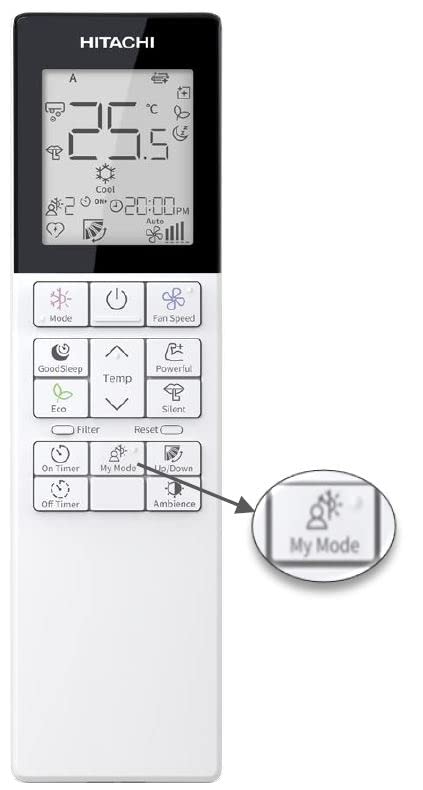
Figure 2: Remote Control Overview
5.1 Basic Operation Modes
- Cool Mode: For cooling the room. Adjust temperature using the Temp buttons.
- Fan Mode: Circulates air without cooling.
- Dry Mode: Reduces humidity in the room.
- Auto Mode: The AC automatically selects the appropriate mode based on the room temperature.
5.2 Special Features
- Ambience Light: Provides subtle lighting.
- My Mode: Allows saving preferred settings for quick access.
- Auto Fan Speed: Automatically adjusts fan speed for optimal comfort.
- Auto Restart: The unit restarts with previous settings after a power outage.
- Long Air Throw: Designed to deliver air over a longer distance for uniform cooling.
- Silent Air: Optimized design for reduced operational noise.
6. Maintenance
Regular maintenance ensures optimal performance and longevity of your AC unit. Always disconnect power before performing any maintenance.
6.1 Air Filter Cleaning
The dust filter should be cleaned regularly (e.g., every two weeks or as indicated by the Filter Clean Indicator) to maintain air quality and cooling efficiency.
- Open the front panel of the indoor unit.
- Remove the air filters.
- Clean filters with a vacuum cleaner or wash with lukewarm water.
- Allow filters to dry completely before reinserting.
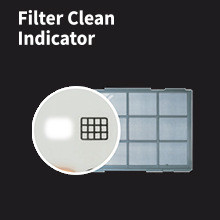
Figure 3: Filter Clean Indicator
6.2 Coil Cleaning
The indoor and outdoor coils should be inspected and cleaned periodically by a professional technician to ensure efficient heat exchange.
7. Troubleshooting
Before contacting customer service, refer to the following table for common issues and solutions:
| Problem | Possible Cause | Solution |
|---|---|---|
| AC not cooling effectively | Dirty air filters, blocked outdoor unit, wrong mode selected, room too large. | Clean filters, clear obstructions, select Cool mode, ensure capacity matches room size. |
| Unit not turning on | No power, remote control batteries low, circuit breaker tripped. | Check power supply, replace remote batteries, reset circuit breaker. |
| Unusual noise | Loose parts, foreign objects, fan imbalance. | Turn off unit and inspect for loose parts or objects. If persistent, contact service. |
If the problem persists after attempting these solutions, please contact Hitachi customer support.
8. Specifications
| Feature | Detail |
|---|---|
| Brand | Hitachi |
| Model | RAS.B318PCAIBA |
| Energy Efficiency | 3 Star (ISEER Value: 3.82) |
| Capacity | 1.5 Tons (17500 British Thermal Units) |
| Annual Energy Consumption | 1039.62 Kilowatt Hours |
| Noise Level | 39 Decibels |
| Installation Type | Split System |
| Refrigerant | R32 (Green Refrigerant) |
| Condenser Coil | 100% Inner Grooved Copper Tube |
| Special Features | Ambience Light, Bigger IDU (1050 mm), Long air throw, My Mode, Odour-free air, 5 Fan Speed, Silent Air, Tropical Design, Filter Clean Indicator, 3M Coating |
| Colour | White |
| Voltage | 230 Volts |
| Wattage | 1343 KW |
| Item Weight | 47 kg 500 g |
| Product Dimensions (LxWxH) | 25 x 105 x 29.4 Centimeters |

Figure 4: Energy Savings Guide
9. Warranty and Support
Your Hitachi AC comes with a manufacturer's warranty:
- 1 Year Comprehensive Warranty on the Product.
- 5 Years Warranty on the Compressor.
For service, support, or warranty claims, please contact:
Hitachi Customer Care: 7567884848
Email: customercare@jci-hitachi.com
Manufacturer Address: JCH-IN., Hitachi Complex, Karannagar, Kadi. Dist. Mehsana- 382715. Gujarat. India.