
1. Introduction
This manual provides detailed instructions for the assembly, operation, and maintenance of your HOMCOM TV Stand Cabinet, model 839-281. Please read this manual thoroughly before assembly and use to ensure proper installation and safe operation of the product. Keep this manual for future reference.

Figure 1: The HOMCOM TV Stand Cabinet 839-281, fully assembled and in use.
2. Safety Information
Please observe the following safety precautions to prevent injury and damage to the product:
- Read all instructions: Ensure you understand all assembly steps before beginning.
- Use appropriate tools: Only use the tools specified or recommended in the assembly instructions.
- Assemble on a soft surface: To prevent scratches, assemble the unit on a clean, soft surface like a carpet or blanket.
- Two-person assembly recommended: Some steps may require assistance for safe and efficient assembly.
- Do not overtighten screws: Overtightening can damage the material.
- Check stability: After assembly, ensure the TV stand is stable and all connections are secure before placing a TV or other items on it.
- Weight limits: Do not exceed the specified weight capacities for the tabletop and shelves.
- Children safety: Keep small parts away from children during assembly. Do not allow children to climb on or play with the TV stand.
- Tip-over prevention: Consider securing the TV stand to a wall using anti-tip hardware (not included) to prevent accidental tip-overs, especially in homes with children or pets.
3. Package Contents
Verify that all components are present before beginning assembly. If any parts are missing or damaged, please contact customer support.
- TV Stand components (particle board panels, solid wood legs)
- Assembly hardware (screws, dowels, cam locks, hinges, handles)
- Instruction Manual
4. Assembly Instructions
Follow these steps carefully for proper assembly. It is recommended to have two people for assembly.
- Unpack and Identify Parts: Carefully unpack all components and hardware. Lay them out on a soft, clean surface. Refer to the parts list (if provided in the physical manual) to identify each piece.
- Assemble Side Panels: Attach the side panels to the bottom panel using the provided dowels and screws. Ensure they are aligned correctly.
- Install Middle Shelf Supports: Insert the shelf pins or supports into the pre-drilled holes for the middle shelves.
- Attach Back Panel: Secure the back panel to the assembled frame. Ensure the cable holes are correctly oriented.
- Install Top Panel: Attach the top panel to complete the main frame of the TV stand.
- Assemble Doors: Attach hinges to the cupboard doors, then attach the doors to the side panels of the TV stand. Install handles on the doors.
- Attach Solid Wood Legs: Carefully turn the unit over and attach the solid wood legs to the designated points on the bottom panel. Ensure they are securely fastened.
- Insert Shelves: Place the adjustable shelves onto the installed shelf supports in the open compartments.
- Final Check: Verify that all screws are tightened, and the unit is stable.

Figure 2: Exploded view and dimensions for assembly reference.
5. Usage
This HOMCOM TV Stand Cabinet is designed to accommodate TVs up to 55 inches and provide organized storage for your media devices and accessories.
- TV Placement: Place your television centrally on the top surface. Ensure the TV base fits within the dimensions of the stand's top. The stand supports TVs up to 55 inches.
- Storage: Utilize the two open shelves for media players, gaming consoles, or decorative items. The two cupboards with doors offer concealed storage for other items.
- Cable Management: Use the integrated cable holes on the back panel to route and organize power cords and signal cables, keeping them tidy and out of sight.

Figure 3: Overview of the storage compartments.
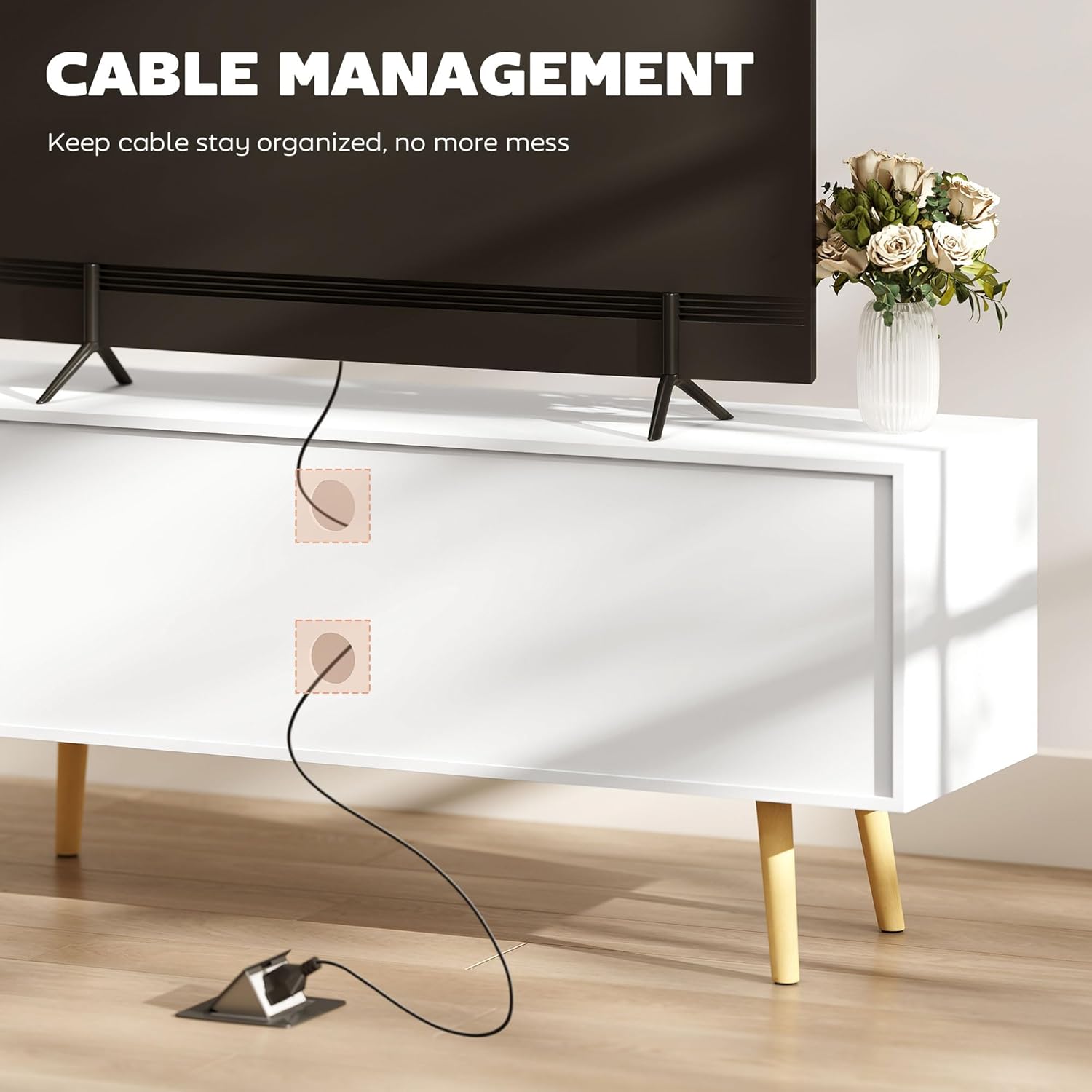
Figure 4: Detail of the cable management feature.

Figure 5: Solid wood legs providing clearance for cleaning.

Figure 6: TV size compatibility.
6. Maintenance and Care
To keep your HOMCOM TV Stand Cabinet in optimal condition:
- Cleaning: Wipe the surfaces with a dry, soft cloth. Avoid using harsh chemicals or abrasive cleaners, which can damage the finish.
- Spills: Immediately wipe up any spills with a dry cloth to prevent moisture damage.
- Hardware Check: Periodically check all screws and fasteners to ensure they remain tight. Retighten if necessary.
- Avoid Direct Sunlight: Prolonged exposure to direct sunlight can cause fading or discoloration.
- Avoid Excessive Heat/Moisture: Do not place hot items directly on the surface without protection. Avoid placing the unit in areas with high humidity.
7. Troubleshooting
If you encounter any issues with your TV stand, refer to the following common problems and solutions:
- Unit is wobbly:
- Ensure all screws and fasteners are securely tightened.
- Check that the unit is placed on a flat, level surface.
- Adjust the leveling feet (if applicable) or place shims under the legs if the floor is uneven.
- Missing parts:
- Carefully re-check all packaging materials to ensure no small parts were overlooked.
- Contact HOMCOM customer support with your model number and a description of the missing part.
- Doors do not align:
- Adjust the hinges. Most furniture hinges allow for minor adjustments to align doors horizontally, vertically, and in depth.
- Ensure the unit is on a level surface, as an uneven base can affect door alignment.
8. Specifications
| Model Number | 839-281 |
| Color | White |
| Material | Particle Board, Solid Wood Legs |
| Overall Dimensions (W x D x H) | 47.2" x 13.4" x 19.7" (120 x 34 x 50 cm) |
| Cupboard Inner Size (W x D x H) | 13.1" x 12.2" x 11.7" (33.4 x 31 x 29.8 cm) |
| Middle Shelf Size (W x D x H) | 18.8" x 12.5" x 5.5" (47.8 x 31.7 x 14 cm) |
| Floor Clearance | 6.9" (17.5 cm) |
| Cable Hole Size | Φ2" (5 cm) |
| Weight Capacity (Total) | 110 lbs. (50 kg) |
| Weight Capacity (Tabletop) | 44 lbs. (20 kg) |
| Weight Capacity (Shelf) | 18 lbs. (8 kg) |
| Max TV Size | 55 inches |
| Assembly Required | Yes |
Figure 7: Detailed product dimensions and weight capacities.
9. Warranty & Support
For warranty information, missing parts, or technical support, please contact HOMCOM customer service. Refer to your purchase documentation for specific contact details or visit the official HOMCOM website.
Website: www.aosom.com (Aosom is the manufacturer of HOMCOM products)