
1. Introduction and Overview
The AMLINK Portable Power Station M300 is a versatile and compact power solution designed for various applications, including camping, outdoor activities, and home emergency backup. Featuring a 299Wh LiFePO4 battery and 300W output, it provides reliable power for a wide range of electronic devices.
Key features include multiple output ports, an integrated LCD screen for real-time status updates, and a built-in LED emergency light. Its durable, lightweight design with a wave-shaped anti-slip handle ensures portability and ease of use.

Figure 1: Front view of the AMLINK Portable Power Station M300, showcasing its display and various ports.
2. Safety Information
Please read all safety instructions before operating the AMLINK Portable Power Station M300 to ensure safe and efficient use. Failure to follow these guidelines may result in electric shock, fire, or serious injury.
- Do not disassemble, repair, or modify the unit.
- Avoid exposure to rain, moisture, or direct sunlight for prolonged periods.
- Keep the device away from heat sources, open flames, and flammable materials.
- Ensure proper ventilation during use and charging to prevent overheating.
- Use only approved accessories and charging cables.
- Do not operate the unit if it has been damaged or dropped.
- Keep out of reach of children and pets.
- The LiFePO4 battery is designed for safety and durability, but proper handling is still essential.
3. Package Contents
Verify that all items are present in the package:
- AMLINK Portable Power Station M300 (300W, 299Wh)
- 100W DC Adapter
- Solar Panel Connection Wire
- Power Cord
- Car Charging Cable
- User Manual
4. Product Diagram and Components
Familiarize yourself with the layout and functions of the power station's ports and controls.
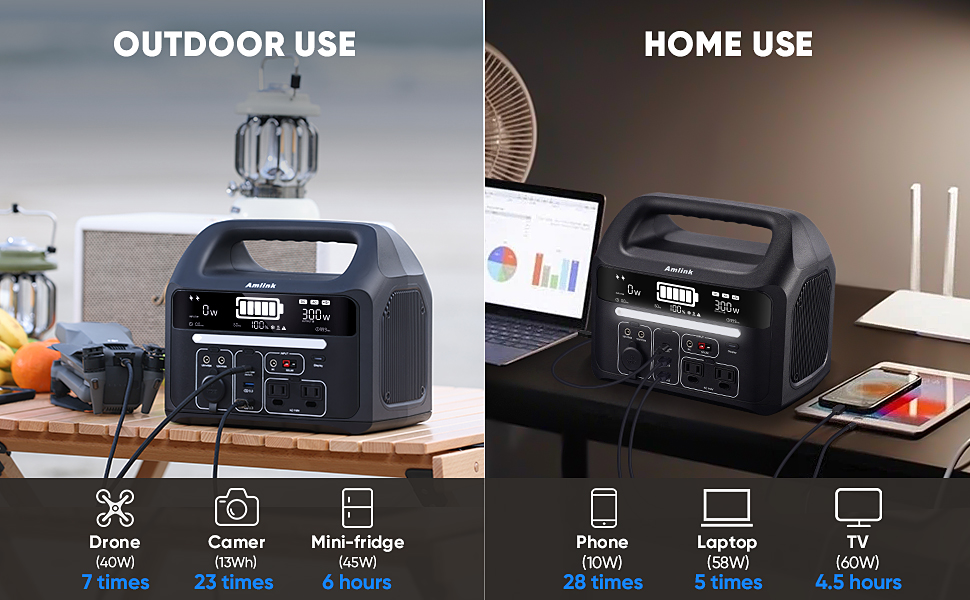
Figure 2: Detailed view of the power station's front panel with labeled input and output ports.
4.1 Output Ports
- 2 x AC Outlets (110V): For standard household appliances up to 300W.
- 1 x USB-C Port (PD 100W In/Out): For fast charging compatible USB-C devices or charging the power station itself.
- 2 x USB-A Ports (QC 3.0): For quick charging compatible USB-A devices.
- 2 x DC 5521 Ports (12V/10A): For DC-powered devices.
- 1 x Car Socket (12V/10A): For car-powered accessories.
4.2 Input Ports
- DC Input: For charging via the included 100W DC adapter.
- Solar Input: For charging via a compatible solar panel (12-30V, 100W max, M4 male connector).
- USB-C Port (PD 100W In/Out): Can also be used as an input for charging.
4.3 Controls and Display
- LCD Display: Shows real-time power status, input/output wattage, and battery percentage.
- Individual Port Switches: Each output section (AC, USB, DC) has a dedicated power button to activate/deactivate.
- LED Light: Integrated emergency light with multiple modes.
5. Setup
Before initial use, it is recommended to fully charge the power station.
5.1 Initial Charging
- Connect the 100W DC adapter to the DC input port on the power station.
- Plug the power cord into a wall outlet.
- The LCD display will show charging status and battery percentage.
- Charge until the display indicates 100%.
6. Operating Instructions
6.1 Powering On/Off
Press and hold the main power button (usually near the display) to turn the unit on or off.
6.2 Using Output Ports
To use any output port (AC, USB, DC), first ensure the main power is on, then press the dedicated button for that specific output section. The corresponding indicator light will illuminate.
- AC Outlets: Plug your AC devices into the 110V outlets. Ensure the total wattage does not exceed 300W.
- USB Ports: Connect your USB devices for charging. The USB-C port supports Power Delivery (PD) up to 100W.
- DC/Car Socket: Plug in your 12V DC devices.
6.3 LCD Display Information
The LCD screen provides real-time data:
- Battery Level: Displays the current charge percentage.
- Input Wattage: Shows the power being drawn during charging.
- Output Wattage: Indicates the power consumed by connected devices.
- Time Remaining: Estimates the remaining runtime or charging time.
6.4 LED Emergency Light
Press the dedicated LED light button to cycle through its four different light modes (e.g., low, medium, high, SOS).
7. Charging the Power Station
The AMLINK M300 offers multiple charging options:
7.1 AC Wall Charging
Use the provided 100W DC adapter and power cord. Charging time is approximately 3.5 hours.
7.2 Car Charging
Connect the car charging cable to the DC input port and your vehicle's 12V cigarette lighter socket. Charging time is approximately 3.5 hours.
7.3 Solar Panel Charging
Connect a compatible solar panel (12-30V, 100W max, M4 male connector) using the solar panel connection wire to the solar input port. Charging time is approximately 4 hours with a 100W solar panel.
7.4 USB-C PD Charging
The USB-C port supports 100W Power Delivery input. This can be used alone or in conjunction with AC/solar charging for faster charging. Combined AC wall outlet + USB-C PD charging can fully charge the unit in approximately 2.5 hours.
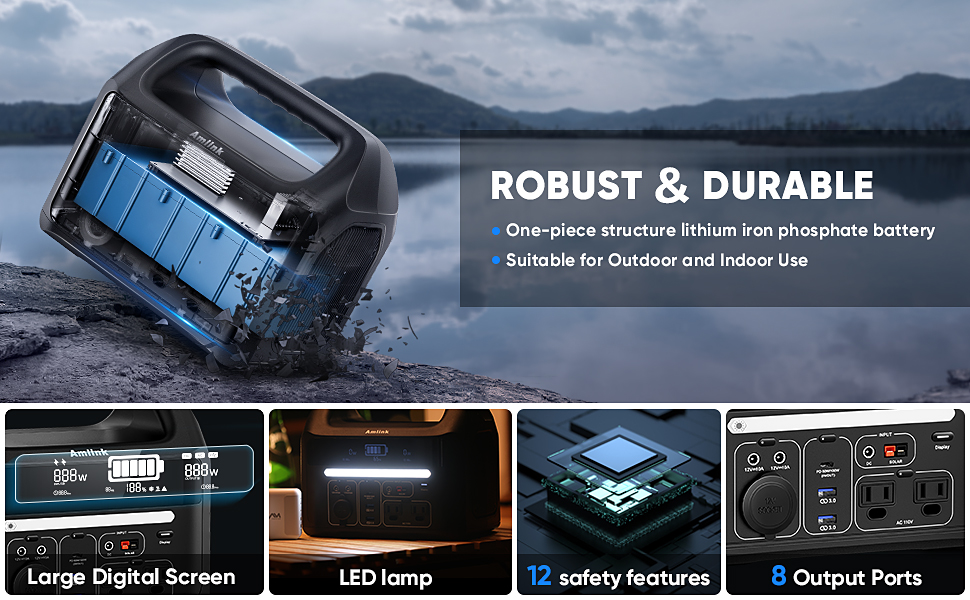
Figure 3: The power station can be charged via multiple methods, including solar panels and USB-C.
8. Maintenance
Proper maintenance ensures the longevity and performance of your power station:
- Regular Charging: Fully charge and discharge the battery at least once every 3 months to maintain battery health.
- Storage: Store the power station in a cool, dry place away from direct sunlight and extreme temperatures. Ensure all output ports are turned off before storing.
- Cleaning: Use a dry, soft cloth to clean the exterior of the unit. Do not use liquid cleaners.
9. Troubleshooting
If you encounter issues, refer to the following common problems and solutions:
- Power Display Not Normal: If the power display is inaccurate after transportation, perform 2-3 full charge/discharge cycles. This allows the internal MCU to recalibrate and restore normal percentage readings.
- Device Automatically Shuts Down: To prevent prolonged power consumption, the device has a sleep function.
- Car charging port output less than 200mA: 3-minute delay to close.
- AC outlet output less than 3W: 15-minute delay to close.
- USB-A port output less than 60mA: 3-minute delay to close.
- Overload Protection: If a connected device exceeds the power station's output limit (e.g., 300W for AC), the unit may display an exclamation sign and shut down the overloaded port to prevent damage. Disconnect the high-power device and restart the port.
10. Specifications
| Feature | Specification |
|---|---|
| Brand | AMLINK |
| Model Number | M300 |
| Battery Type | LiFePO4 |
| Capacity | 299Wh (93600mAh) |
| Output Wattage | 300 Watts (Running), 750 Watts (Starting) |
| AC Voltage | 110 Volts |
| Frequency | 50 Hz |
| Total Power Outlets | 8 (2 AC, 1 USB-C, 2 USB-A, 2 DC, 1 Car Socket) |
| USB-C Output | PD 100W (In/Out) |
| DC Input | 100W Adapter |
| Solar Input | Up to 100W (12-30V) |
| Item Weight | 9.9 Pounds |
| Item Dimensions (L x W x H) | 10.2"L x 8.6"W x 7.2"H |
| Recommended Uses | Camping, Home Emergency Backup Power, RV Travel |
11. Warranty and Support
The AMLINK Portable Power Station M300 comes with a 5-year warranty. For technical support, warranty claims, or any product-related inquiries, please refer to the contact information provided in your product packaging or visit the official AMLINK website.
12. Product Video Overview
Watch this official video from AMLINK-US for a visual guide on the features and operation of the Portable Power Station M300.
Video 1: AMLINK Portable Power Station M300 Overview. This video provides a detailed look at the product's design, ports, and functionality, demonstrating its ease of use and versatility.