
Mubarek YX-168
Mubarek 500ML Essential Oil Diffuser User Manual
Model: YX-168
1. Introduction
Thank you for choosing the Mubarek 500ML Essential Oil Diffuser. This versatile device combines aromatherapy with a HIFI 3.0 Bluetooth speaker and vibrant RGB mood lighting, designed to enhance the ambiance of your large room. This manual provides detailed instructions for safe and effective use, ensuring you get the most out of your new diffuser.
2. Product Overview
2.1 Components
- Diffuser Unit (500ML capacity)
- Power Adapter
- Remote Control
- 6-Pack Essential Oil Set (Lavender, Mint, Rosemary, etc.)
- User Manual (this document)
2.2 Key Features
- Large Capacity: 500ML water tank, covering up to 480 sq ft.
- HIFI 3.0 Bluetooth Speaker: Enjoy music while diffusing essential oils.
- 8 RGB Mood Lighting Colors: Create a relaxing atmosphere with customizable light settings.
- Remote Control: Convenient operation from a distance.
- Two Mist Spraying Modes: Continuous and Intermittent modes.
- Ultra-Quiet Operation: Less than 23dB, ideal for sleep or meditation.
- Waterless Auto-Off Safety: Automatically shuts off when water runs low.
- Easy to Use & Clean: Simple 3-step operation and quick cleaning.

Figure 1: Mubarek 500ML Essential Oil Diffuser with included remote control and essential oil set.
3. Setup
Follow these simple steps to set up your diffuser:
- Place the Diffuser: Position the diffuser on a flat, stable surface away from direct sunlight or heat sources.
- Connect Power: Plug the power adapter into the diffuser's power input port (located at the bottom) and then into a wall outlet.
- Remove the Lid: Gently lift the top cover of the diffuser.
- Add Water: Fill the water tank with clean tap water up to the MAX water level line. Do not overfill.
- Add Essential Oils: Add 3-5 drops of your preferred essential oil directly into the water tank. Adjust the amount based on your preference and room size.
- Replace the Lid: Carefully place the top cover back onto the diffuser, ensuring it is properly seated.
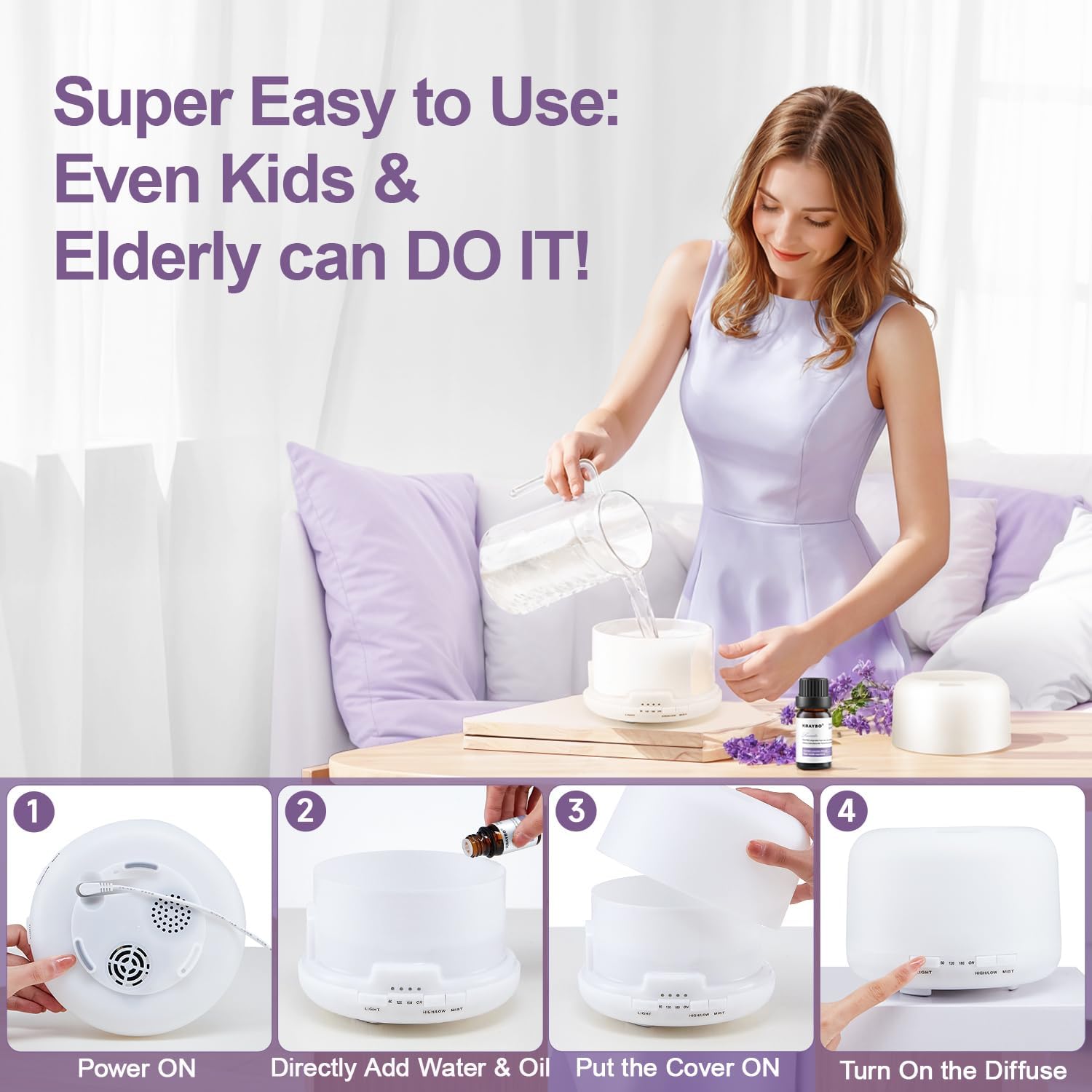
Figure 2: Step-by-step guide for initial diffuser setup.
4. Operating Instructions
4.1 Power On/Off & Mist Control
The diffuser can be operated using the buttons on the unit or the included remote control.
- Power On: Press the "Mist" button once to turn on the diffuser in continuous mist mode.
- Mist Modes: Press the "Mist" button repeatedly to cycle through mist modes: Continuous (ON) → Intermittent (1H/2H/3H timer) → Off.
- Timer Settings: Use the remote control to select 1-hour, 2-hour, or 3-hour intermittent mist settings. The diffuser will automatically shut off after the selected time or when water runs out.

Figure 3: Remote control for easy access to timer and light functions.
4.2 RGB Mood Lighting
The diffuser features 8 vibrant RGB light colors to enhance your environment.
- Turn On/Cycle Lights: Press the "Light" button once to turn on the light. Press repeatedly to cycle through the 8 colors.
- Fixed Color: Stop pressing when your desired color appears to keep it fixed.
- Turn Off Lights: Press and hold the "Light" button for 2 seconds to turn off the lights.

Figure 4: The diffuser offers 8 romantic mood lighting options.
4.3 Bluetooth Speaker Function
Connect your device to the diffuser's built-in HIFI 3.0 Bluetooth speaker to enjoy your favorite audio.
- Enable Bluetooth: Ensure the diffuser is powered on.
- Pairing: On your smartphone or other Bluetooth-enabled device, search for "Mubarek Diffuser" (or similar name) in the Bluetooth settings.
- Connect: Select the diffuser to pair. Once connected, you will hear a confirmation sound.
- Play Audio: Start playing audio from your device, and it will play through the diffuser's speaker.

Figure 5: Enjoy soft music while diffusing scents with the HIFI 3.0 Bluetooth speaker.
5. Maintenance
5.1 Cleaning Instructions
Regular cleaning helps maintain optimal performance and extends the lifespan of your diffuser. It is recommended to clean the diffuser after every 5-6 uses or every 3-5 days.
- Unplug: Always unplug the diffuser from the power outlet before cleaning.
- Empty Water: Remove the lid and carefully empty any remaining water from the tank.
- Wipe Down: Use a soft cloth or sponge to wipe the inside of the water tank and the ultrasonic disc. For stubborn residue, use a cotton swab dipped in white vinegar to gently clean the ultrasonic disc.
- Rinse (Optional): If using vinegar, rinse the tank with clean water, being careful not to get water into the air outlet.
- Dry: Wipe all parts dry with a clean cloth before reassembling or storing.
Note: Do not use corrosive detergents or harsh chemicals, as this may damage the diffuser. Do not immerse the entire unit in water.
6. Troubleshooting
| Problem | Possible Cause | Solution |
|---|---|---|
| No mist or low mist output | Insufficient water; Water level too high; Ultrasonic disc dirty; Air outlet blocked. | Add water to appropriate level; Ensure water is below MAX line; Clean ultrasonic disc; Check for blockages. |
| No power/Unit not turning on | Power adapter not connected; No power from outlet; Unit damaged. | Check power connections; Try a different outlet; Contact customer support. |
| Light not working | Light function off; Malfunction. | Press the "Light" button to turn on; Contact customer support. |
| Bluetooth not connecting | Bluetooth not enabled on device; Diffuser not in pairing mode; Interference. | Ensure Bluetooth is on and discoverable; Restart both devices; Move closer to diffuser. |
7. Specifications
| Brand | Mubarek |
| Model Name | YX-168 |
| Capacity | 500 Milliliters |
| Coverage Area | 480 Square Feet |
| Power Source | Corded Electric |
| Wattage | 12 watts |
| Noise Level | <23 dB |
| Auto Shutoff | Yes (Waterless) |
| Product Dimensions | 7.08"L x 7.48"W x 7.87"H |
| Material | Plastic |
| Light Source Type | LED |
8. Safety Information
Please read and follow these safety guidelines carefully:
- Avoid direct skin contact with undiluted essential oils.
- Keep out of reach of children and pets.
- Ensure proper ventilation during use.
- Do not place the diffuser on unstable surfaces.
- Do not block the mist outlet during operation.
- Only use the provided power adapter.
- Do not attempt to disassemble or repair the unit yourself.
9. Warranty and Support
Mubarek offers a 24-month quality promise for this essential oil diffuser. If you encounter any questions or issues with your product, please do not hesitate to contact our customer support team. We are dedicated to providing world-class service and ensuring your valued experience.
For support, please refer to the contact information provided with your purchase or visit the official Mubarek store on Amazon: Mubarek Store.
Ask a question about this manual
Ask about setup, troubleshooting, compatibility, parts, safety, or missing instructions. Manuals+ will review the question and use this page’s manual context to help answer it.