
Introduction
Thank you for choosing the Edospor LS-K20 4K Dash Cam. This device is designed to provide reliable front and rear video recording for your vehicle, enhancing safety and providing crucial evidence in case of incidents. Featuring 4K front recording, 1080P rear recording, built-in WiFi, GPS, night vision, and parking monitoring, this dash cam offers comprehensive coverage. Please read this manual carefully to ensure proper installation, operation, and maintenance of your device.
Package Contents
Please verify that all items listed below are included in your package:
- Edospor LS-K20 4K Front Camera
- 1080P Rear Camera
- User Manual
- Type-C Car Charger (with A USB Port)
- Suction Mount
- 64GB SD Card
- Cable Clips
- Installation Crowbar
- Reset Pin
- SD Card Reader
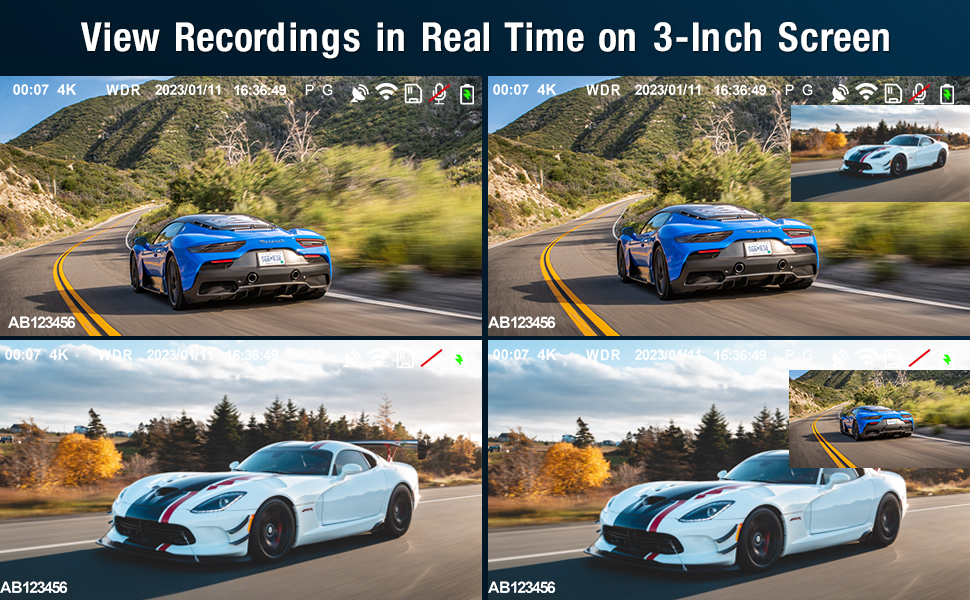
Image: All components included in the Edospor LS-K20 Dash Cam package, including the front camera, rear camera, car charger, suction mount, 64GB SD card, and various accessories.
Product Overview
Key Features
- 4K Front & 1080P Rear Recording: Captures high-resolution video from both front and rear perspectives.
- Built-in WiFi: Allows wireless connection to your smartphone for live view, playback, and settings adjustment via a dedicated app.
- Built-in GPS: Records driving route and speed data, viewable on PC or smartphone.
- 3-inch IPS Screen: Provides clear real-time viewing and playback directly on the device.
- 170° Wide Angle (Front) & 140° Wide Angle (Rear): Offers extensive road coverage.
- WDR (Wide Dynamic Range): Enhances video clarity in varying light conditions.
- Super Night Vision: Improves video quality in low-light environments.
- Loop Recording: Automatically overwrites the oldest files when the SD card is full, ensuring continuous recording.
- G-Sensor (Emergency Lock): Detects sudden impacts and automatically locks the current video file to prevent overwriting.
- Parking Monitor: Automatically records video when a collision is detected while the vehicle is parked.
- Supports up to 256GB SD Card: Provides ample storage for recordings. (Note: A 64GB SD card is included).
Device Layout

Image: Front view of the Edospor LS-K20 Dash Cam, showing the main lens and screen.

Image: Side view of the Edospor LS-K20 Dash Cam, highlighting the control buttons for navigation and settings.

Image: Top view of the Edospor LS-K20 Dash Cam, showing the AV port for the rear camera, reset button, microphone, and Type-C power port.
Setup
1. SD Card Installation and Formatting
- Ensure the dash cam is powered off.
- Insert the provided 64GB Micro SD Card (Class 10 or higher, up to 256GB supported) into the TF card slot on the side of the dash cam. Push until it clicks into place.
- Power on the dash cam.
- Access the dash cam settings menu and locate the "Format SD Card" option. Select it to format the card. This prepares the card for optimal performance with the dash cam.
2. Dash Cam Installation
- Clean the area on your windshield where you intend to mount the dash cam. Ensure it does not obstruct your view.
- Attach the suction mount to the windshield and secure the dash cam to the mount.
- Connect the Type-C car charger to the dash cam's Type-C port and plug the other end into your car's cigarette lighter socket.
- Route the power cable neatly along the windshield edge and dashboard using the provided cable clips and installation crowbar to hide it.
- Connect the rear camera to the dash cam's AV port. Route the rear camera cable to the back of your vehicle, typically along the headliner and pillar trim.
- Mount the rear camera on the rear windshield, ensuring a clear view.

Image: Visual guide for easy installation of the Edospor LS-K20 Dash Cam on the windshield, showing cable routing and component placement.
Operating Instructions
1. Power On/Off
- The dash cam will automatically power on and begin recording when your vehicle's ignition is turned on.
- It will automatically power off when the ignition is turned off.
- To manually power on/off, press and hold the power button on the side of the device.
2. Basic Recording
- Once powered on, the dash cam will automatically start loop recording.
- The front camera records in 4K resolution, and the rear camera records in 1080P.
- You can view recordings in real-time on the 3-inch IPS screen.

Image: Illustrates the Loop Recording function, Emergency Lock Video (G-Sensor), and Parking Monitoring features of the dash cam.
3. App Control (WiFi Function)
Download the free "Viidure" app from the App Store or Google Play. Connect your smartphone to the dash cam's WiFi network to:
- View live video feed.
- Playback and download recorded videos.
- Adjust dash cam settings.
- Easily share videos to social media platforms.

Image: Demonstrates the "Viidure" app interface on a smartphone, showing live video view, playback, and sharing options for the dash cam.
4. GPS Tracking
The built-in GPS module records your driving route and speed. This data can be viewed on your smartphone via the "Viidure" app or on a computer using the "Hit GPS Player" application (included in the SD card's installation package).

Image: Shows the dash cam's built-in GPS feature, allowing users to view driving routes and speed on a PC or smartphone.
Video: Demonstrates the GPS tracking feature of the Edospor LS-K20 dash cam, showing how recorded routes and speed can be viewed on a map.
5. Super Night Vision
The dash cam utilizes advanced technology to capture clear details and colors even in low-light or nighttime environments, ensuring important information like license plates and road signs are visible.

Image: Illustrates the Super Night Vision capability of the dash cam, showing clear video capture in dark conditions.
6. G-Sensor (Emergency Lock)
In the event of a sudden collision or impact, the built-in G-sensor will automatically detect the event and lock the current video file. This prevents the footage from being overwritten by loop recording, preserving critical evidence.
7. Parking Monitor
When the car is turned off, the dash cam will automatically turn off. However, if the dash cam detects a sudden collision while parked, it will automatically power on and record a video, providing surveillance for your vehicle.
8. Wide Angle Coverage
The front camera provides a 170° wide-angle view, and the rear camera offers a 140° wide-angle view, ensuring comprehensive coverage of the road ahead and behind your vehicle.

Image: Diagram illustrating the 170° front and 140° rear wide-angle coverage provided by the Edospor LS-K20 Dash Cam.
Maintenance
- Clean the Lens: Regularly clean the camera lenses with a soft, lint-free cloth to ensure clear video quality.
- Check SD Card: Periodically check the SD card for errors or degradation. It is recommended to format the SD card once a month to maintain optimal performance and prevent data corruption.
- Firmware Updates: Check the manufacturer's website for any available firmware updates to ensure your dash cam has the latest features and bug fixes.
- Temperature: The dash cam's body is made of metal, which provides good thermostability and thermal conductivity. It is normal for the camera to feel slightly warm during operation. Avoid exposing the device to extreme temperatures for prolonged periods.
Troubleshooting
- Dash Cam Not Powering On: Ensure the car charger is properly connected and the vehicle's ignition is on. Check the fuse in your car's cigarette lighter socket.
- Recording Issues: Format the SD card. Ensure the SD card is Class 10 or higher. If issues persist, try a different compatible SD card.
- Poor Video Quality: Clean the camera lenses. Ensure the protective film has been removed from the lenses. Check settings for resolution and WDR.
- GPS Not Working: Ensure the GPS module is properly connected (if external) or that the dash cam has a clear view of the sky for signal acquisition.
- WiFi Connection Problems: Ensure the "Viidure" app is installed correctly. Restart both the dash cam and your smartphone.
- Dash Cam Freezing/Unresponsive: Use the provided reset pin to press the reset button on the device.
Specifications
| Feature | Specification |
|---|---|
| Brand | Edospor |
| Model Name | LS-K20 |
| Vehicle Service Type | Car |
| Connectivity Technology | USB, WiFi |
| Special Features | Built-In GPS, Night Vision, Parking Monitor, WDR |
| Video Capture Resolution | Front: 4K, Rear: 1080P |
| Included Components | Memory Card, Suction Mount, Rear Camera, Car Charger, Cable Clips, Installation Crowbar, Reset Pin, SD Card Reader |
| Mounting Type | Suction Mount |
| Color | Black |
| Field Of View | Front: 170 Degrees, Rear: 140 Degrees |
| Control Method | Touch |
| Screen Size | 3 Inches |
| Optical Sensor Technology | CMOS |
| Flash Memory Type | SD |
| Maximum Aperture | 1.8 f |
| Auto Part Position | Front and Rear |
| Are Batteries Included | Yes (Lithium Ion) |
| Display Type | LCD |
| Frame Rate | 30 FPS |
| Included Memory Card Size | 64 GB |
| Flash Memory Supported Size Maximum | 256 GB |
Warranty and Support
Thank you for your purchase of the Edospor LS-K20 Dash Cam. We are committed to providing high-quality products and excellent customer service.
If you receive a product that is damaged, has missing accessories, or if you encounter any problems during use, please contact us directly. We will provide you with the best service to resolve the issue promptly.
Video: Concludes with a message of appreciation and contact information for customer support regarding product issues.