1. Introduction
Thank you for choosing the Cecotec Conga 11090 Spin Revolution Home&Wash Robot Vacuum Cleaner. This advanced robot is designed to provide comprehensive cleaning for your home, combining powerful vacuuming with effective mopping capabilities and an automatic self-emptying and mop-washing station. Please read this manual carefully before using the product to ensure proper operation, maintenance, and safety.
2. Important Safety Instructions
Always follow basic safety precautions when using electrical appliances to reduce the risk of fire, electric shock, or injury.
- Read all instructions before using the appliance.
- Do not allow children to operate the robot. Supervise children and pets when the robot is operating.
- Ensure the power voltage matches the voltage indicated on the rating label.
- Do not use the robot on wet surfaces or in areas with standing water.
- Keep hair, loose clothing, fingers, and all parts of the body away from openings and moving parts.
- Do not pick up large objects, sharp objects, or liquids with the robot.
- Turn off the robot and unplug the charging station before performing any maintenance or cleaning.
- Use only manufacturer-recommended attachments and accessories.
- Store the robot and charging station indoors in a cool, dry place.
- Do not operate the robot if it has been dropped, damaged, left outdoors, or dropped into water.
3. Package Contents
Verify that all components are present in the package:
- 1 x Robot Vacuum Cleaner
- 1 x Side Brush
- 2 x Rotating Mops
- 1 x Self-emptying Base with 2 Tanks (1 x Clean Water Tank, 1 x Dirty Water Tank)
- 1 x Dust Bag
- 1 x Power Cable
- 1 x Self-cleaning Brush
- 1 x Multifunction Brush
- 1 x Instruction Manual

4. Product Overview
The Conga 11090 Spin Revolution Home&Wash is an intelligent cleaning solution featuring advanced navigation and comprehensive cleaning capabilities.
4.1 Robot Vacuum Cleaner
- Smart Navigation: Equipped with iTech Laser Eye technology for precise mapping and obstacle avoidance.
- Powerful Suction: Delivers up to 5000 Pa suction power for effective dirt and debris removal.
- Spin Revolution Mopping: Features two rotating mops for deep scrubbing and floor cleaning.
- Long Battery Life: Provides up to 140 minutes of cleaning autonomy.


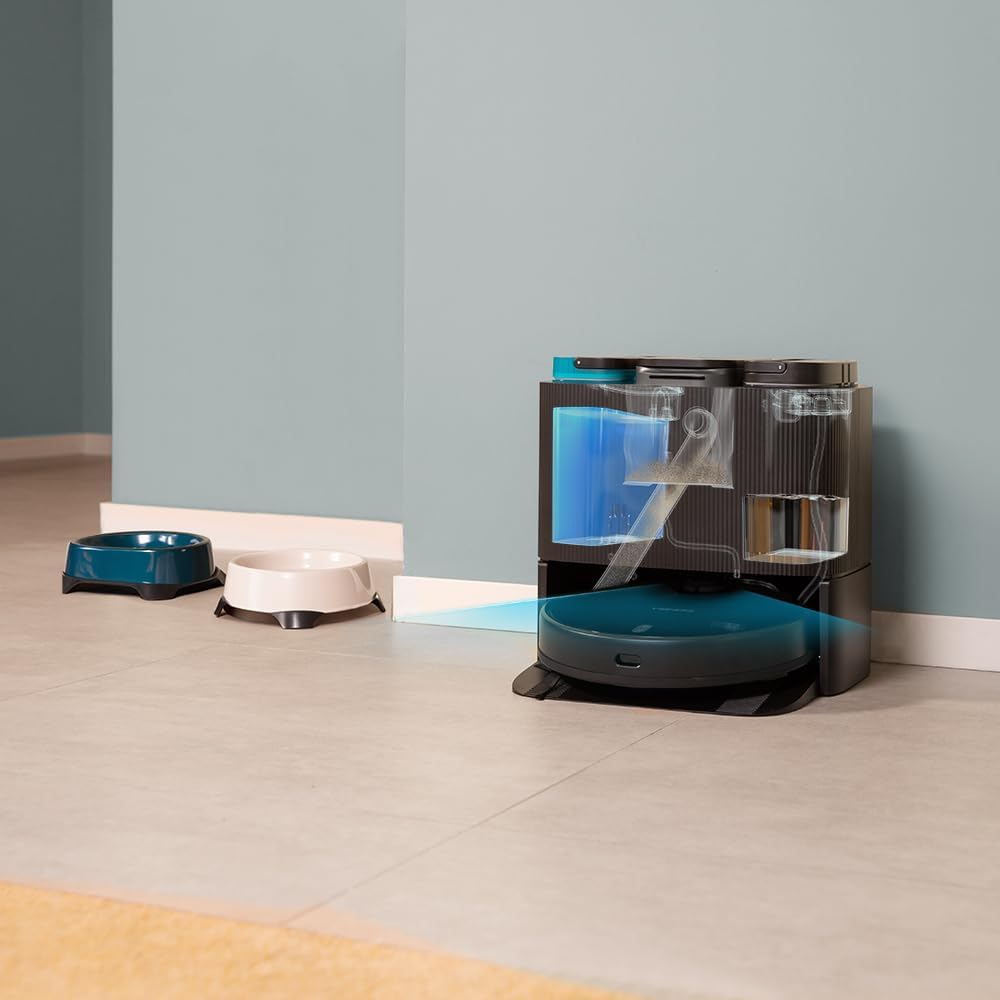
4.2 Self-Emptying and Mop-Washing Station
- Automatic Dust Collection: The robot automatically empties its dustbin into a 2L dust bag in the station.
- Automatic Mop Washing: The station cleans the robot's mopping pads with clean water from its 2.8L tank and collects dirty water in a 2.4L tank.
- Convenient Design: Reduces manual intervention for a truly hands-free cleaning experience.


5. Setup
5.1 Unpacking and Placement
- Carefully remove all components from the packaging.
- Choose a suitable location for the self-emptying station. Ensure there is at least 1.5 meters of clear space in front of the station and 0.5 meters on either side.
- Plug the power cable into the station and connect it to a power outlet.
5.2 Initial Charging
Place the robot onto the charging contacts of the self-emptying station. Ensure the robot is properly aligned. The robot will begin charging automatically. For first use, it is recommended to fully charge the robot before operation.
5.3 App Installation and Connection
Download the "CECOTEC" app from your smartphone's app store (iOS or Android). Follow the in-app instructions to connect your robot to your home Wi-Fi network (2.4 GHz) and Bluetooth. The app provides enhanced control and mapping features.

6. Operating the Robot
6.1 Starting a Cleaning Cycle
- Via Robot Button: Press the power button on the robot to start a general cleaning cycle.
- Via App: Open the CECOTEC app. You can select various cleaning modes such as "Clean All", "Spot Clean", "Zone Clean", or schedule cleanings.

6.2 Mapping and Navigation
The robot uses its iTech Laser Eye to create a detailed map of your home during its first cleaning cycle. This map can be viewed and customized in the app. You can set virtual walls, restricted zones, and specific cleaning areas.

6.3 Automatic Self-Maintenance
During and after cleaning cycles, the robot will automatically return to its station to empty its dustbin and wash its mopping pads. The frequency of these actions can be configured in the app.
7. Maintenance
Regular maintenance ensures optimal performance and extends the lifespan of your robot vacuum cleaner.
7.1 Cleaning the Robot
- Main Brush: Remove the main brush and clean it regularly using the provided self-cleaning brush to remove tangled hair and debris.
- Side Brush: Check and clean the side brush for any tangled hair or debris. Replace if worn.
- Mopping Pads: Although the station washes them, it is recommended to manually remove and rinse the mopping pads periodically.
- Sensors: Wipe all sensors (cliff sensors, laser sensor) with a clean, dry cloth to ensure proper navigation.

7.2 Maintaining the Self-Emptying Station
- Dust Bag: Replace the dust bag in the station when it is full. The app will notify you.
- Water Tanks: Regularly empty the dirty water tank and refill the clean water tank. Clean both tanks to prevent mold or odor buildup.
- Washing Tray: Clean the washing tray where the mops are cleaned to remove any residue.

8. Troubleshooting
If you encounter issues with your robot, refer to the following common problems and solutions:
| Problem | Possible Cause | Solution |
|---|---|---|
| Robot does not turn on. | Low battery; power cable not connected. | Place robot on charging station; ensure power cable is securely connected. |
| Robot cannot find charging station. | Station is blocked; robot is too far. | Ensure clear space around station; manually place robot closer to station. |
| Poor cleaning performance. | Brushes tangled; dustbin full; mops dirty. | Clean main/side brushes; empty dustbin/replace bag; clean mopping pads. |
| Robot gets stuck frequently. | Obstacles; dark surfaces; dirty sensors. | Clear obstacles; use virtual walls in app; clean sensors. |
| App connection issues. | Incorrect Wi-Fi password; 5GHz network; Bluetooth off. | Verify Wi-Fi password; ensure 2.4GHz network; enable Bluetooth; restart robot and router. |
9. Specifications
| Feature | Detail |
|---|---|
| Brand | Cecotec |
| Model Name | Conga 11090 Spin Revolution Home&Wash |
| Model Number | 08105 |
| Color | Black |
| Product Dimensions (Robot) | 34.3 x 34.5 x 10.8 cm |
| Product Weight | 11.25 kg |
| Voltage | 120 Volts |
| Noise Level | 75 dB |
| Operating Time | Up to 2 hours and 20 minutes (140 minutes) |
| Dust Bag Capacity (Station) | 2 Liters |
| Clean Water Tank Capacity (Station) | 2.8 Liters |
| Dirty Water Tank Capacity (Station) | 2.4 Liters |
| Special Features | Wireless, Automatic Shut-off, iTech Laser Eye Navigation |
| Compatible Devices | Smartphones (via CECOTEC App) |
10. Warranty and Support
Cecotec products are manufactured to high-quality standards. For warranty information, please refer to the warranty card included in your product packaging or visit the official Cecotec website. For technical support, troubleshooting assistance, or spare parts, please contact Cecotec customer service or the retailer from whom you purchased the product.
Online Support: Visit the Cecotec Brand Store on Amazon for additional product information and support resources.


