
Cecotec 01729
Cecotec Power Espresso 20 Barista Maestro Coffee Machine User Manual
Model: 01729
1. Introduction
Welcome to the user manual for your new Cecotec Power Espresso 20 Barista Maestro coffee machine. This manual provides essential information for the safe and efficient operation, maintenance, and troubleshooting of your appliance. Please read this manual thoroughly before first use and keep it for future reference.
2. Important Safety Instructions
When using electrical appliances, basic safety precautions should always be followed to reduce the risk of fire, electric shock, and/or injury to persons, including the following:
- Read all instructions before using the appliance.
- Do not touch hot surfaces. Use handles or knobs.
- To protect against fire, electric shock, and injury to persons, do not immerse cord, plugs, or appliance in water or other liquid.
- Close supervision is necessary when any appliance is used by or near children.
- Unplug from outlet when not in use and before cleaning. Allow to cool before putting on or taking off parts, and before cleaning the appliance.
- Do not operate any appliance with a damaged cord or plug or after the appliance malfunctions, or has been damaged in any manner.
- The use of accessory attachments not recommended by the appliance manufacturer may result in fire, electric shock, or injury to persons.
- Do not use outdoors.
- Do not let cord hang over edge of table or counter, or touch hot surfaces.
- Do not place on or near a hot gas or electric burner, or in a heated oven.
- Always attach plug to appliance first, then plug cord into the wall outlet. To disconnect, turn any control to "off", then remove plug from wall outlet.
- Do not use appliance for other than intended use.
- Exercise extreme caution when dispensing hot steam.
- Ensure the water tank is properly filled before operating.
3. Product Components
Familiarize yourself with the various parts of your Cecotec Power Espresso 20 Barista Maestro coffee machine.

Figure 3.1: Front view of the coffee machine, showing the main controls, portafilter, and drip tray.
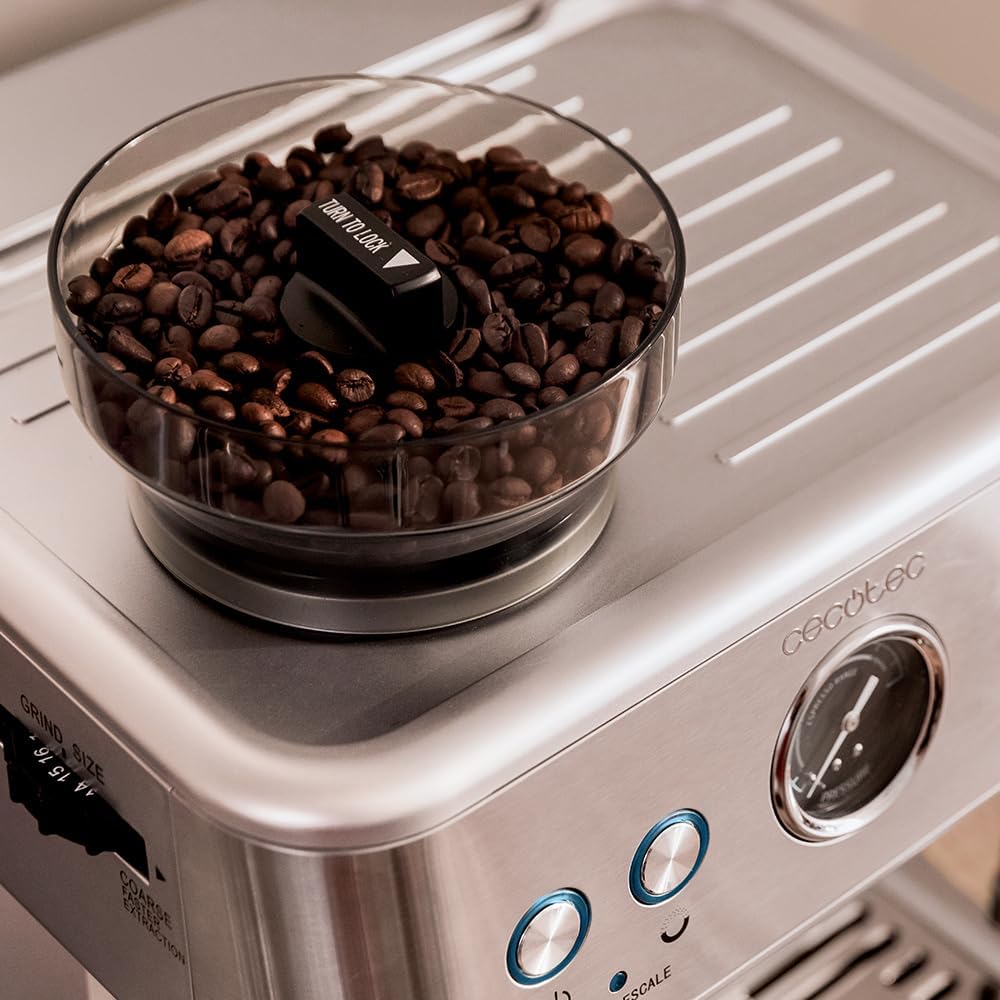
Figure 3.2: Coffee bean hopper, located on top of the machine, for whole coffee beans.

Figure 3.3: Control panel with power button, single/double shot buttons, steam/hot water button, and pressure gauge.

Figure 3.4: Adjustable steam wand for frothing milk and dispensing hot water.

Figure 3.5: Removable water tank, located at the back of the machine, with a capacity of 2.4 liters.

Figure 3.6: Removable drip tray for easy cleaning of spilled liquids.

Figure 3.7: Included accessories: portafilter with double spout, single and double shot filters, and a premium tamper.
4. Setup and First Use
4.1 Unpacking and Initial Cleaning
- Carefully remove the coffee machine and all accessories from the packaging.
- Wash the water tank, portafilter, filters, and drip tray with warm soapy water. Rinse thoroughly and dry.
- Wipe the exterior of the machine with a damp cloth.
4.2 Filling the Water Tank
- Remove the water tank from the back of the machine.
- Fill the tank with fresh, cold water up to the MAX line. Do not exceed the maximum fill level.
- Place the water tank back into its position, ensuring it is securely seated.
4.3 Filling the Bean Hopper
- Open the lid of the bean hopper located on top of the machine.
- Pour fresh, whole coffee beans into the hopper. The capacity is approximately 250g.
- Close the lid securely.
4.4 Priming the Machine (First Use)
- Ensure the water tank is filled.
- Place a large container under the portafilter and steam wand.
- Plug the machine into a grounded electrical outlet. Press the power button (⏻). The machine will begin heating.
- Once the machine is heated (indicator lights stop flashing), press the single shot button to dispense water through the group head. Let it run for about 30 seconds.
- Turn the steam knob to release steam through the steam wand for about 30 seconds to prime the steam system. Close the steam knob.
- The machine is now primed and ready for use.
5. Operating Instructions
5.1 Grinding Coffee Beans
- Ensure the bean hopper is filled.
- Adjust the grind size selector, located near the bean hopper, to your desired setting. There are 20 grind levels available. For espresso, a fine grind (levels 1-5) is typically recommended.
- Insert the portafilter into the grinding cradle and press to activate the grinder. The grinder will dispense fresh coffee grounds into the portafilter.
- Once the desired amount is dispensed, remove the portafilter. Tamp the grounds firmly and evenly using the included tamper.
5.2 Brewing Espresso
- Ensure the machine is heated and ready.
- Insert the filled and tamped portafilter into the group head. Turn it firmly to the right until it locks into place.
- Place one or two espresso cups on the drip tray, directly under the portafilter spouts.
- Press the single shot (☕) or double shot (☕☕) button. The machine will begin pre-infusion, then brew the espresso.
- Monitor the pressure gauge during brewing. The optimal pressure range for espresso is typically indicated on the gauge.
- Once brewing is complete, the machine will stop automatically. Remove the portafilter and discard the used coffee grounds.

Figure 5.1: The machine brewing two shots of espresso simultaneously.
5.3 Frothing Milk with the Steam Wand
- Fill a stainless steel milk pitcher with cold milk (dairy or non-dairy).
- Press the steam/hot water button (♨) to activate the steam function. Wait for the indicator light to stabilize, indicating the steam system is ready.
- Position the steam wand just below the surface of the milk in the pitcher.
- Slowly turn the steam knob to release steam. Lower the pitcher slightly to introduce air for frothing, then submerge the wand deeper to heat the milk.
- Continue until the milk reaches the desired temperature and texture. Turn off the steam knob before removing the pitcher.
- Immediately wipe the steam wand with a damp cloth to prevent milk residue from drying.

Figure 5.2: Frothing milk using the integrated steam wand.
5.4 Dispensing Hot Water
- Place a cup under the steam wand.
- Press the steam/hot water button (♨) and wait for the indicator light to stabilize.
- Turn the steam knob to dispense hot water. Turn it off when the desired amount is reached.
6. Cleaning and Maintenance
Regular cleaning and maintenance will ensure the longevity and optimal performance of your coffee machine.
6.1 Daily Cleaning
- Drip Tray: Empty and clean the drip tray daily. It is removable for easy cleaning.
- Portafilter and Filters: After each use, remove the portafilter, discard grounds, and rinse the portafilter and filter basket under hot water.
- Steam Wand: Immediately after frothing milk, wipe the steam wand with a damp cloth. Purge the wand briefly by opening the steam knob to clear any milk residue from inside.
- Group Head: Wipe the shower screen and gasket of the group head with a damp cloth to remove any coffee grounds.
6.2 Descaling
Descaling is essential to remove mineral buildup and maintain machine performance. The machine features a "CLEAN/DESCALE" function. Refer to the specific descaling instructions in the full manual or on the manufacturer's website for detailed steps and recommended descaling solutions. Descale every 2-3 months, or more frequently in areas with hard water.
6.3 Grinder Cleaning
Periodically clean the grinder burrs to ensure consistent grind quality. Consult the full manual for instructions on how to access and clean the grinder components. Always unplug the machine before cleaning the grinder.
7. Troubleshooting
This section addresses common issues you might encounter with your coffee machine. For problems not listed here, please contact customer support.
| Problem | Possible Cause | Solution |
|---|---|---|
| No coffee dispenses / Very slow flow |
|
|
| Coffee is weak or watery |
|
|
| No steam or weak steam from wand |
|
|
| Machine leaks water |
|
|
| Pressure gauge not working or showing no pressure |
|
|
8. Technical Specifications
| Feature | Specification |
|---|---|
| Model Number | 01729 |
| Brand | Cecotec |
| Power | 2250 W |
| Pressure | 20 bars (ForceAroma Technology) |
| Water Tank Capacity | 2.4 Liters |
| Bean Hopper Capacity | 250 g |
| Grind Levels | 20 levels |
| Heating System | Two Thermoblocks |
| Material | Stainless Steel |
| Dimensions (L x W x H) | 40 x 33 x 35 cm |
| Weight | 10.91 kg |
9. Warranty and Support
Cecotec products are manufactured to the highest standards. For information regarding warranty coverage, spare parts availability, or technical support, please refer to the warranty card included with your product or visit the official Cecotec website. Keep your proof of purchase for any warranty claims.
Spare parts availability: 10 Years (as per product specifications).
Related documents01729


Ask a question about this manual
Ask about setup, troubleshooting, compatibility, parts, safety, or missing instructions. Manuals+ will review the question and use this page’s manual context to help answer it.