
1. Important Safety Instructions
Please read these instructions carefully before using the appliance and keep them for future reference. Failure to follow these instructions may result in electric shock, fire, or serious injury.
- Always ensure the voltage indicated on the rating label matches your mains voltage.
- Do not use this heater in the immediate surroundings of a bath, a shower, or a swimming pool.
- Do not cover the heater. Overheating can occur if the heater is covered or obstructed.
- Keep flammable materials such as furniture, curtains, and other combustible items at least 1 meter (3.3 feet) from the front and sides of the heater.
- This appliance is not intended for use by persons (including children) with reduced physical, sensory or mental capabilities, or lack of experience and knowledge, unless they have been given supervision or instruction concerning use of the appliance by a person responsible for their safety.
- Unplug the heater when not in use or before cleaning.
- Do not operate any heater with a damaged cord or plug, or after the heater malfunctions, has been dropped or damaged in any manner.
- Avoid using extension cords as they may overheat and cause a fire risk.
2. Product Overview
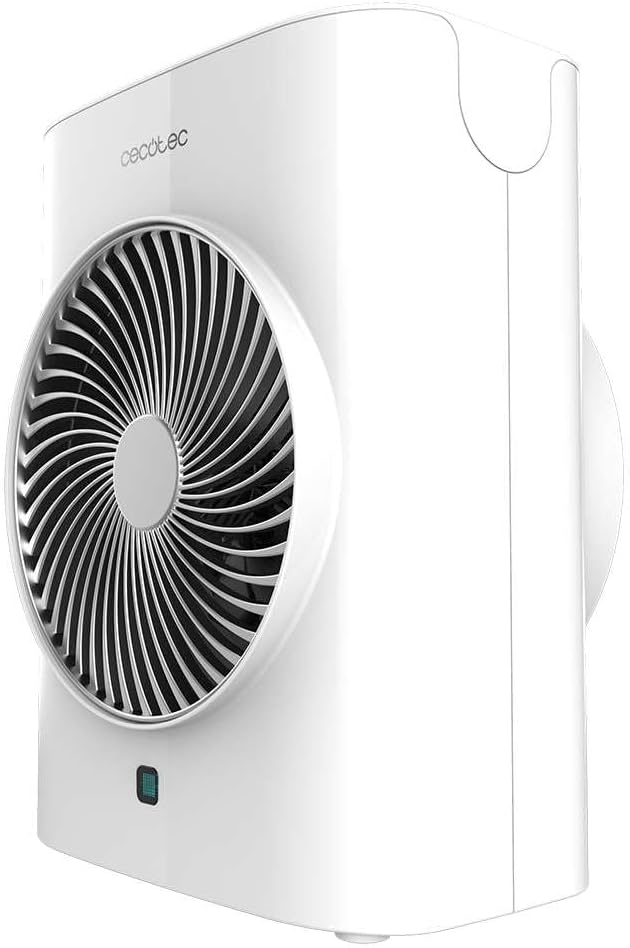
The Cecotec ReadyWarm 2070 Max Force Smart White is a powerful and versatile fan heater designed for efficient heating and air circulation. It features 2000W power, two power levels, three operating modes, an LED display, and a remote control for convenient operation.
2.1 Components
- Air Outlet Grille
- Control Panel with LED Display
- Remote Control Receiver
- Power Cord
- Anti-Tip Safety Switch (located at the bottom)
- Carrying Handle



3. Setup
Follow these steps to set up your fan heater for the first time:
- Unpack: Carefully remove the heater from its packaging. Retain the packaging for future storage or transport.
- Placement: Place the heater on a firm, level surface. Ensure there is at least 1 meter (3.3 feet) of clear space around the heater to allow for proper airflow and to prevent fire hazards. Do not place it near curtains, drapes, or other objects that could block the air inlets or outlets.
- Power Connection: Plug the power cord into a suitable 220-240V, 50/60Hz grounded electrical outlet. Ensure the outlet is easily accessible.

4. Operating Instructions
The Cecotec ReadyWarm 2070 Max Force Smart White can be operated using the touch control panel on top of the unit or the included remote control.
4.1 Control Panel

The control panel features touch-sensitive buttons and an LED display:
- Power Button (O): Turns the heater ON or OFF.
- Mode Button (≡): Cycles through the operating modes: Fan (Cool Air), Low Heat (1000W), High Heat (2000W). The LED display color changes to indicate the mode: Blue for Fan, Green for Low Heat, Red for High Heat.
- Temperature/Timer Button (A): Adjusts the desired temperature in heating modes or sets the timer.
- Oscillation Button (|i|): Activates or deactivates the oscillation function, allowing the heater to rotate and distribute heat more widely.
4.2 Remote Control

The remote control duplicates the functions of the control panel, offering convenient operation from a distance. Ensure batteries are correctly inserted (not included).
4.3 Operating Modes and Settings
- Fan Mode (Cool Air): Provides a refreshing breeze without heat. Ideal for air circulation.
- Low Heat (1000W): Provides gentle heating for smaller spaces or energy-saving operation.
- High Heat (2000W): Delivers maximum heating power for rapid warming of larger areas.
- Temperature Adjustment: In heating modes, use the Temperature/Timer button to set your desired room temperature. The heater will automatically maintain this temperature.
- Timer Function: Set the heater to operate for a specific duration (e.g., 1-12 hours) before automatically turning off.
- Oscillation: Activate oscillation to distribute warm air evenly across a wider area.

5. Maintenance
Regular maintenance ensures optimal performance and extends the lifespan of your heater.
- Before Cleaning: Always unplug the heater from the power outlet and allow it to cool down completely before cleaning.
- Exterior Cleaning: Wipe the exterior surfaces with a soft, damp cloth. Do not use abrasive cleaners, solvents, or harsh chemicals, as these can damage the finish.
- Air Inlets/Outlets: Use a vacuum cleaner with a brush attachment to gently remove dust and debris from the air inlet and outlet grilles. Ensure these areas remain clear for efficient operation.
- Storage: If storing the heater for an extended period, clean it thoroughly and place it back in its original packaging. Store in a cool, dry place.

6. Troubleshooting
If you encounter issues with your heater, refer to the following common problems and solutions:
| Problem | Possible Cause | Solution |
|---|---|---|
| Heater does not turn on. | No power supply. Anti-tip switch activated. Overheat protection activated. | Check if the power cord is securely plugged in. Ensure the heater is on a flat, stable surface. Unplug, let cool for 30 minutes, then restart. |
| No heat output. | Incorrect mode selected. Temperature setting too low. | Select Low Heat or High Heat mode. Increase the desired temperature setting. |
| Heater turns off unexpectedly. | Overheat protection activated. Anti-tip switch activated. Timer function expired. | Unplug, let cool for 30 minutes, then restart. Ensure the heater is on a flat, stable surface. Check timer settings. |
| Unusual noise. | Dust or debris in fan. | Unplug and clean air inlets/outlets as per maintenance section. |
If the problem persists after attempting these solutions, please contact customer support.
7. Specifications
| Feature | Detail |
|---|---|
| Brand | Cecotec |
| Model | ReadyWarm 2070 Max Force Smart White |
| Model Number | 08260 |
| Power | 2000 W |
| Power Levels | 2 (1000W / 2000W) |
| Operating Modes | 3 (Fan, Low Heat, High Heat) |
| Dimensions (L x W x H) | 23 x 15 x 28 cm |
| Weight | 1.38 kg |
| Special Features | Remote Control, LED Display, Oscillation, Automatic Shut-off, Anti-tip Safety Switch |
| Input Voltage | 220-240V ~ 50/60Hz |
8. Warranty and Support
This Cecotec product comes with a standard manufacturer's warranty. Please refer to the warranty card included with your purchase for specific terms and conditions, including the warranty period and coverage details.
For technical support, service, or warranty claims, please contact Cecotec customer service through their official website or the contact information provided in your product documentation.
You can find more information about Cecotec products and support at the official Cecotec store: Cecotec Store


