
Important Safety Instructions
Please read these instructions carefully before using the appliance and keep them for future reference. Failure to follow these instructions may result in accidents or damage to the product.
- Always ensure the voltage indicated on the appliance matches your mains voltage.
- Do not immerse the appliance, power cord, or plug in water or any other liquid.
- Keep the appliance out of reach of children.
- Do not leave the appliance unattended when connected to the power supply.
- Unplug the appliance after use and before cleaning.
- Do not operate the appliance if the power cord or plug is damaged, or if the appliance malfunctions or has been dropped or damaged in any way.
- Use only manufacturer-recommended accessories.
- Do not direct steam at people, animals, or electrical appliances.
- The appliance becomes very hot during use. Handle with care.
Setup and Assembly
Before first use, ensure all packaging materials are removed. Familiarize yourself with the components of your Cecotec IronHero 1800 Ultimate vertical steam iron.
Components Overview
- Main unit with ceramic soleplate
- Water tank
- Power cord
- Lint brush attachment
- LED Touch Control panel

Figure 1: Front view of the Cecotec IronHero 1800 Ultimate vertical steam iron, showing the main body and control panel.
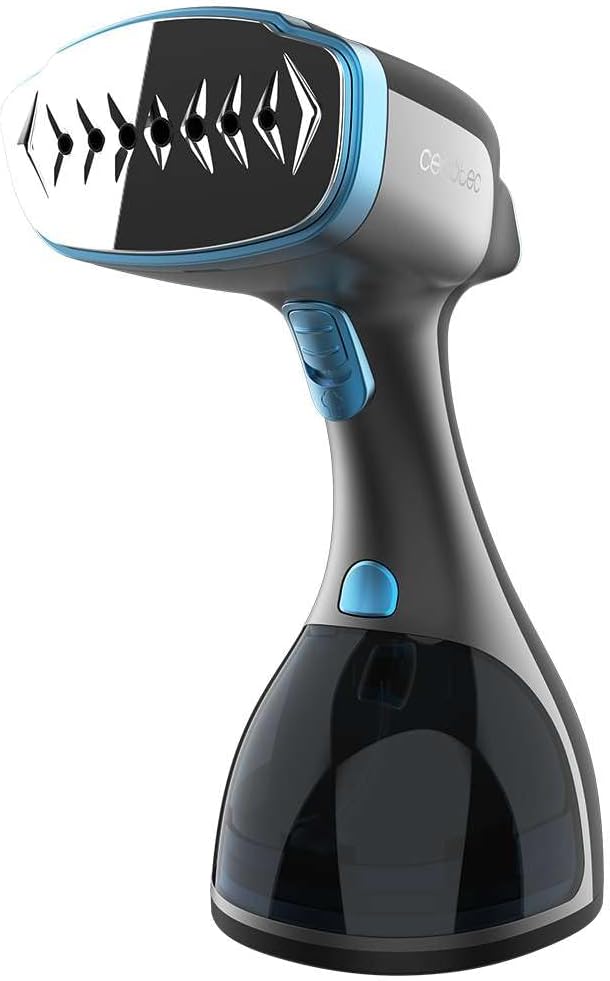
Figure 2: Side view of the steam iron, highlighting the water tank and ergonomic handle.
Filling the Water Tank
- Ensure the appliance is unplugged from the power outlet.
- Remove the water tank from the main unit.
- Fill the water tank with clean tap water up to the MAX fill line. Do not overfill.
- Reinsert the water tank securely into the main unit.
Operating Instructions
Follow these steps to effectively use your vertical steam iron for wrinkle removal and garment care.
Powering On and Heating
- Plug the power cord into a suitable electrical outlet (230V AC).
- Press the power button on the LED Touch Control panel to turn on the appliance. The indicator light will illuminate.
- The iron will begin to heat up. The "Fast Steam" technology ensures it is ready for use in approximately 30 seconds.
- Once the indicator light stops flashing and remains steady, the iron is ready to produce steam.

Figure 3: Activating the steam iron using the power button on the LED touch control panel.
Selecting Steam Modes
The IronHero 1800 Ultimate features 2 steam modes to suit different fabric types.
- Use the touch control panel to cycle through the available steam modes.
- Select a lower steam setting for delicate fabrics and a higher setting for heavier materials like cotton or linen.
- The "Power Steam" technology provides a continuous steam output of 28 g/min for effective wrinkle removal.
Steaming Garments
- Hang the garment on a hanger.
- Hold the steam iron vertically, keeping the soleplate a few centimeters away from the fabric.
- Press the steam trigger to release steam. Move the iron slowly over the garment, from top to bottom.
- For stubborn wrinkles, gently press the soleplate against the fabric while steaming.
- The "Clean Steam" function helps to disinfect and deodorize your clothes during the process.

Figure 4: Steaming a shirt while it is on a hanger, demonstrating vertical use.
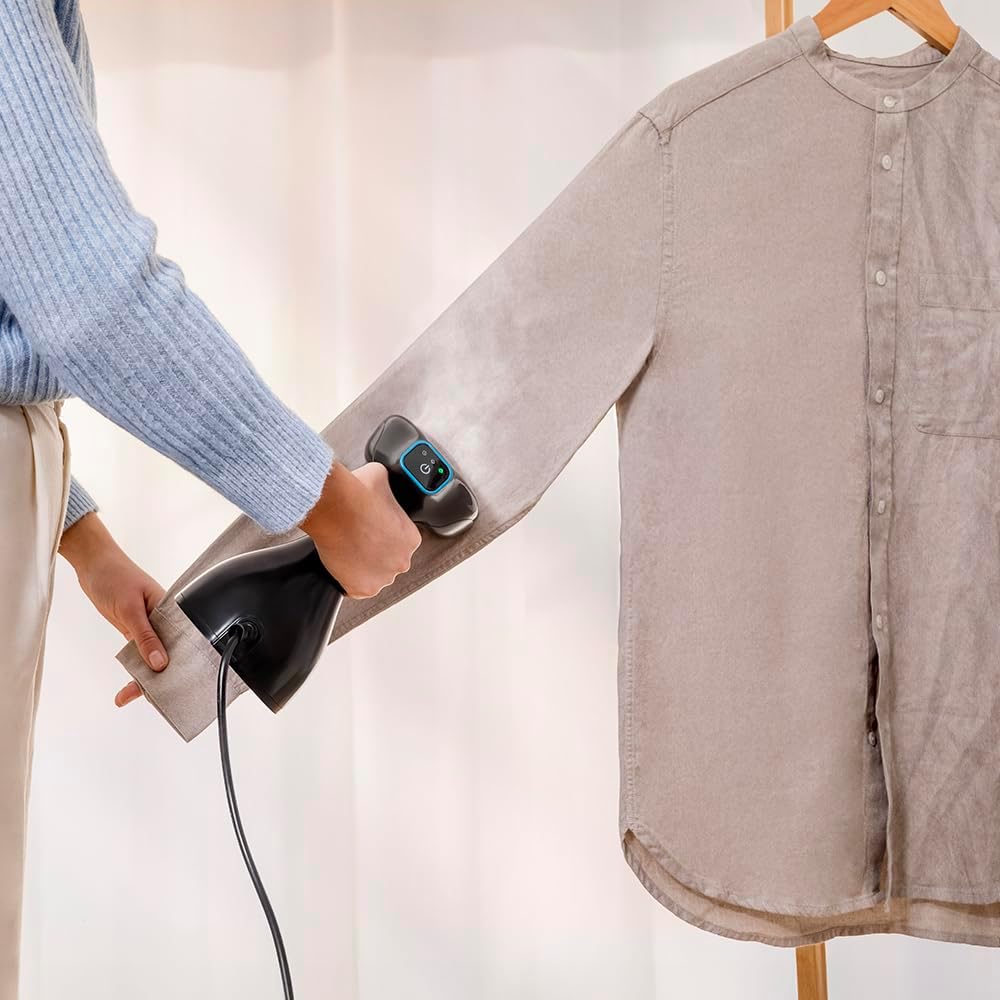
Figure 5: Detailed view of steaming a shirt sleeve, showing the steam output.
Using the Lint Brush Attachment
The included brush attachment is designed to remove lint, threads, and brush fabrics.
- Ensure the iron is cool and unplugged before attaching or detaching the brush.
- Align the brush attachment with the soleplate and press firmly until it clicks into place.
- Use the brush attachment while steaming to simultaneously remove debris and smooth fabrics.

Figure 6: Demonstrating the attachment of the lint brush for use on a sweater.
Auto Shut-Off Feature
For safety, the appliance is equipped with an "Auto Shut-Off" system. If left inactive for a certain period, the iron will automatically turn off.
Maintenance and Cleaning
Regular cleaning ensures optimal performance and extends the lifespan of your steam iron.
Cleaning the Appliance
- Always unplug the appliance and allow it to cool completely before cleaning.
- Empty any remaining water from the water tank.
- Wipe the exterior of the appliance with a soft, damp cloth. Do not use abrasive cleaners or solvents.
- Clean the ceramic soleplate with a damp cloth. Do not use metallic scouring pads or harsh chemicals.
Descaling (if applicable)
Depending on water hardness, mineral deposits may build up over time. Refer to the full product manual for specific descaling instructions if a descaling function is present or recommended.
Troubleshooting Guide
If you encounter issues with your steam iron, consult the following table before contacting customer support.
| Problem | Possible Cause | Solution |
|---|---|---|
| No steam output | Water tank is empty; appliance not heated sufficiently; steam button not pressed. | Fill water tank; wait for indicator light to stabilize; press steam button. |
| Water leaking from soleplate | Appliance not hot enough; water tank overfilled. | Allow iron to heat fully; do not overfill water tank. |
| Iron not turning on | Not plugged in; power outlet malfunction; Auto Shut-Off activated. | Check power connection; try a different outlet; press power button to restart. |
| Steam output is weak | Mineral buildup; low water level. | Perform descaling (if applicable); refill water tank. |
Product Specifications
- Brand: Cecotec
- Model Number: 08509
- Power: 1800 Watts
- Voltage: 230 Volts (AC)
- Continuous Steam Output: 28 g/min
- Heat-up Time: Approximately 30 seconds
- Weight: 1 Kilogram
- Color: Black
- Features: 2 Steam Modes, LED Touch Control, Fast Steam, Clean Steam, Anti-drip, Auto Shut-Off, Ceramic Soleplate
- Included Accessories: Lint brush attachment
- Country of Origin: Spain
Warranty Information
This product is covered by a manufacturer's warranty. Please refer to the warranty card included with your purchase for specific terms and conditions. Information regarding spare parts availability indicates a period of 10 years.
Customer Support
For technical assistance, product inquiries, or warranty claims, please contact Cecotec customer service. Contact details can typically be found on the official Cecotec website or on the product packaging.
Note: Always have your product model number (08509) and purchase date ready when contacting support.


