1. Introduction
This user manual provides comprehensive instructions for the installation, operation, and maintenance of your Cecotec QLED 70" Smart TV V1Z+ Series. Please read this manual thoroughly before using the television and retain it for future reference. This television combines advanced display technology with smart features to deliver an immersive viewing experience.
2. Safety Information
Always adhere to the following safety precautions to prevent electric shock, fire, or damage to the television.
- Power Supply: Ensure the power supply voltage matches the rating label on the TV. Do not overload power outlets.
- Ventilation: Do not block ventilation openings. Allow adequate space around the TV for proper airflow.
- Liquid and Moisture: Keep the TV away from water, rain, or excessive moisture. Do not place objects filled with liquids on the TV.
- Cleaning: Unplug the TV before cleaning. Use a soft, dry cloth. Avoid liquid or aerosol cleaners.
- Placement: Place the TV on a stable, level surface. If wall-mounting, ensure the wall mount is suitable for the TV's weight and installed by qualified personnel.
- Children: Do not allow children to climb on the TV or stand.
- Lightning: Unplug the TV during lightning storms or when unused for long periods.
3. Package Contents
Verify that all items are present in the package:
- 1 x Cecotec QLED 70" Smart TV
- 1 x Remote Control
- 1 x AAA Batteries (for remote control)
- 1 x User Manual (this document)
- 1 x Power Cable
- 1 x Central Stand (if "Con Peana" model)
4. Product Overview
Familiarize yourself with the main components and features of your television.

Figure 4.1: Front view of the Cecotec QLED 70" Smart TV with included remote controls.

Figure 4.2: Detailed front view of the Cecotec QLED 70" Smart TV, highlighting its slim bezels.

Figure 4.3: Illustration of the TV's frameless design, enhancing the viewing experience by minimizing borders.

Figure 4.4: Depiction of Chromecast built-in functionality, allowing easy content streaming from mobile devices to the TV.
5. Setup
5.1 Unpacking
Carefully remove the television from its packaging. It is recommended to keep the original packaging for future transportation or servicing.
5.2 Stand Installation
If you intend to use the included central stand, follow these steps:
- Place the TV screen-down on a soft, flat surface to prevent scratches.
- Align the stand with the mounting holes on the bottom of the TV.
- Secure the stand using the provided screws.
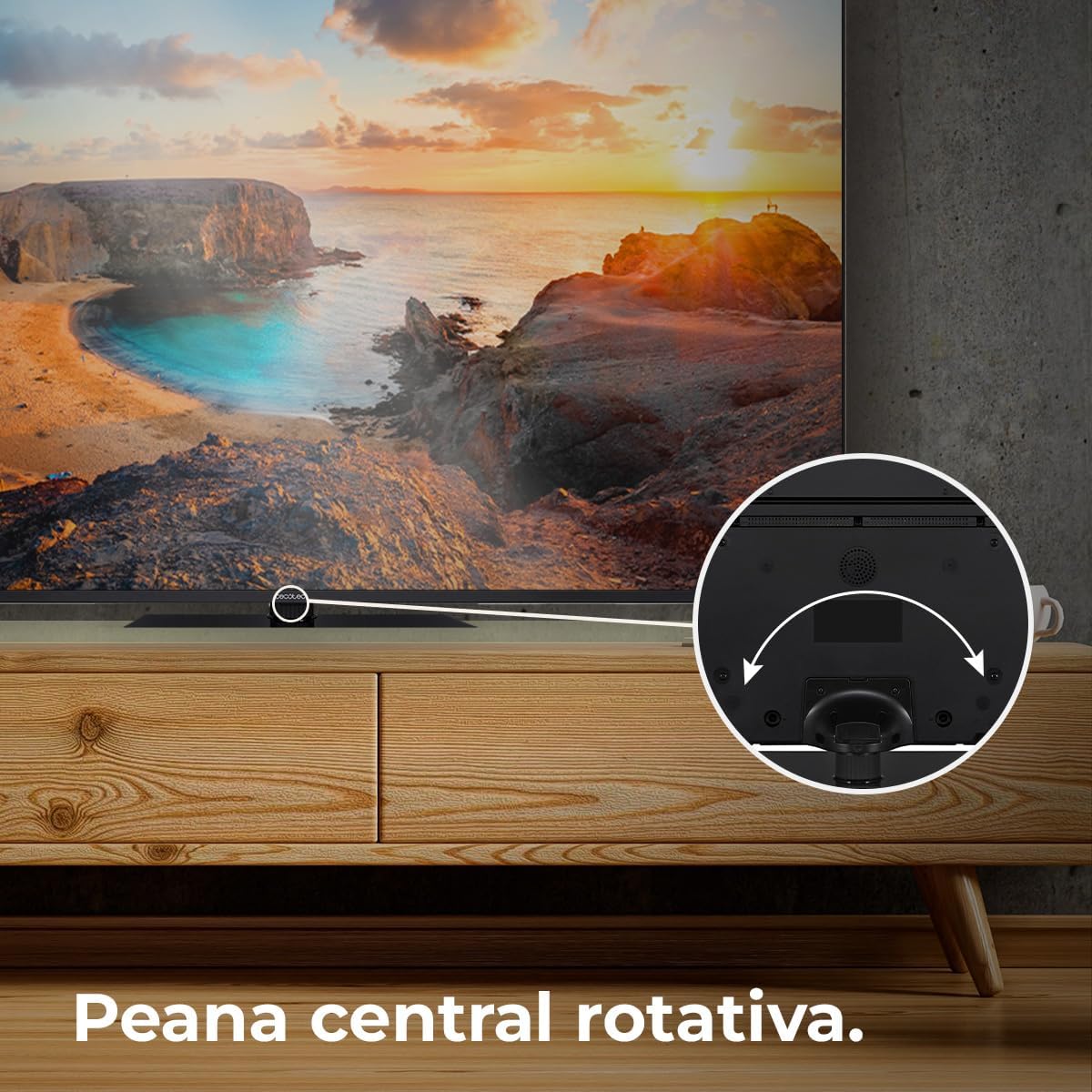
Figure 5.1: The rotative central stand allows for flexible viewing angles.
5.3 Wall Mounting (Optional)
For wall mounting, use a VESA-compatible wall mount kit (not included). Consult a professional for installation to ensure safety and proper mounting.
5.4 Connections
Connect your devices to the TV using the appropriate ports:
- HDMI: For high-definition devices like Blu-ray players, game consoles, and set-top boxes. This TV supports HDMI 2.1 for high frequencies and resolutions.
- USB: For connecting USB storage devices to play media files.
- Ethernet: For a wired internet connection.
- Power: Connect the power cable to the TV and then to a wall outlet.
6. Operating
6.1 Initial Setup
Upon first power-on, the TV will guide you through the initial setup process, including language selection, network connection, and Google account sign-in for Android TV 11 features.

Figure 6.1: The Android TV 11 interface provides access to a wide collection of applications for an optimal user experience.
6.2 Basic Functions
- Power On/Off: Press the power button on the remote control or TV.
- Input Selection: Use the "Input" button on the remote to switch between HDMI, TV, and other sources.
- Volume Control: Use the Volume Up/Down buttons.
- Navigation: Use the directional pad and OK button to navigate menus.
6.3 Smart TV Features
Your Cecotec Smart TV runs on Android TV 11, offering a rich smart experience:
- Google Assistant: Use voice commands via the remote control to search for content, control smart home devices, and get information.
- Chromecast Built-in: Easily cast content from your smartphone, tablet, or computer directly to the TV.
- Google Play Store: Download and install a wide variety of apps, games, and streaming services.
6.4 Picture Settings
Optimize your viewing experience with these advanced picture technologies:
- 4K UHD Resolution: Enjoy ultra-sharp images with high definition, revealing even the smallest details.
- QLED Technology: Delivers vibrant and realistic colors with exceptional contrast.
- HDR10+: Processes images for greater color depth and dynamic range.
- Dolby Vision: Optimizes each frame for purer and more realistic images.
- MEMC (Motion Estimation, Motion Compensation): Adds compensation frames to generate smoother and sharper images, especially beneficial for fast-moving scenes.
- 10-Bit Display: Reproduces over 1 billion colors for a richer and more nuanced picture.

Figure 6.2: Experience ultra-high definition images with 4K UHD and QLED technology.

Figure 6.3: MEMC technology ensures fluid movements and more defined details in fast-paced scenes.

Figure 6.4: HDR 10 provides greater color depth in every image, enhancing realism.

Figure 6.5: The 10-bit display reproduces over 1 billion colors for superior image quality.
6.5 Audio Settings
Enhance your audio experience:
- Dolby Atmos: Provides immersive 360° multi-dimensional surround sound.
- Subwoofer: Integrated subwoofer system improves bass and creates a superior audio experience.

Figure 6.6: Dolby Vision and Dolby Atmos combine for purer images and multi-dimensional surround sound.

Figure 6.7: The integrated subwoofer enhances bass for a superior audio experience.
6.6 Gaming Features
- Low Latency for Gaming (ALLM): Automatically configures latency to improve your console gaming experience.

Figure 6.8: HDMI 2.1 with Auto Low Latency Mode (ALLM) improves your console gaming experience.
7. Maintenance
- Screen Cleaning: Gently wipe the screen with a soft, lint-free cloth. For stubborn marks, slightly dampen the cloth with water or a screen-specific cleaner. Do not spray liquid directly onto the screen.
- Cabinet Cleaning: Use a soft, dry cloth to clean the TV cabinet.
- Dusting: Regularly dust the ventilation openings to prevent overheating.
8. Troubleshooting
If you encounter issues with your television, refer to the following common problems and solutions:
| Problem | Possible Cause | Solution |
|---|---|---|
| No Power | Power cable disconnected; Power outlet issue. | Check power cable connection. Try a different outlet. |
| No Picture, but Sound is Present | Incorrect input source; Loose HDMI/AV cable. | Select correct input source. Reconnect cables securely. |
| No Sound, but Picture is Present | Volume muted or too low; Audio settings incorrect. | Unmute volume or increase level. Check audio output settings. |
| Remote Control Not Working | Dead batteries; Obstruction between remote and TV. | Replace batteries. Remove any obstructions. |
| Wi-Fi Connection Issues | Incorrect password; Router issues; TV too far from router. | Verify password. Restart router. Move TV closer or use Ethernet. |
If the problem persists after trying these solutions, please contact Cecotec customer support.
9. Specifications
| Feature | Detail |
|---|---|
| Model Number | VQU11070Z+S (03632) |
| Screen Size | 70 inches / 178 cm |
| Display Technology | QLED |
| Resolution | 4K UHD (3840 x 2160 pixels) |
| Operating System | Android TV 11 |
| Refresh Rate | 50 Hz |
| Special Features | Chromecast Built-in, HDR10+, Dolby Vision, Dolby Atmos, Subwoofers, Google Voice Assistant, MEMC, 10-Bit Display, Low Latency for Gaming (HDMI 2.1 ALLM), Rotative Central Stand, Eye Safe (minimizes blue light emission) |
| Connectivity | Ethernet, Wi-Fi (implied by Android TV), HDMI 2.1 |
| Aspect Ratio | 16:9 |
| Product Dimensions (with stand) | 27.9 cm (depth) x 157.5 cm (width) x 92.4 cm (height) |
| Product Weight | 27.58 kg |
| Energy Efficiency Class | F (based on 114 kWh/1000h) |
| Origin | Spain |

Figure 9.1: Energy efficiency label for the Cecotec QLED 70" Smart TV. For more details, scan the QR code or visit eprel.ec.europa.eu/qr/1677956.
10. Warranty and Support
Your Cecotec QLED 70" Smart TV is covered by a manufacturer's warranty. Please refer to the warranty card included in your package for specific terms and conditions. For technical support, service, or inquiries, please visit the official Cecotec website or contact their customer service department. Keep your purchase receipt as proof of purchase for warranty claims.
For more information, visit the official Cecotec store: Cecotec Store


