
1. Introduction
The SiOnyx Nightwave is an ultra-low light marine camera designed to enhance visibility and situational awareness for commercial and recreational boaters. It captures crisp, shareable videos in extremely low light conditions, including moonless starlight, without requiring white light or expensive thermal equipment. This manual provides essential information for the installation, operation, and maintenance of your Nightwave camera.

With a stable 44-degree field of view, the Nightwave system helps users navigate nighttime waters confidently by making it easier to spot obstacles, debris, markers, and other vessels. Its rugged design ensures durability against water, sand, salt, and dust, and it is dry nitrogen purged to prevent lens fogging, providing clear visibility even in challenging weather.
2. What's in the Box
Verify that all components are present in your Nightwave package:
- Power Fuse & Fuse Holder
- SMA to BNC adapter
- Analog Video Cable [5M]
- BNC to RCA adapter
- Digital Video Cable USB [3M]

3. Setup and Installation
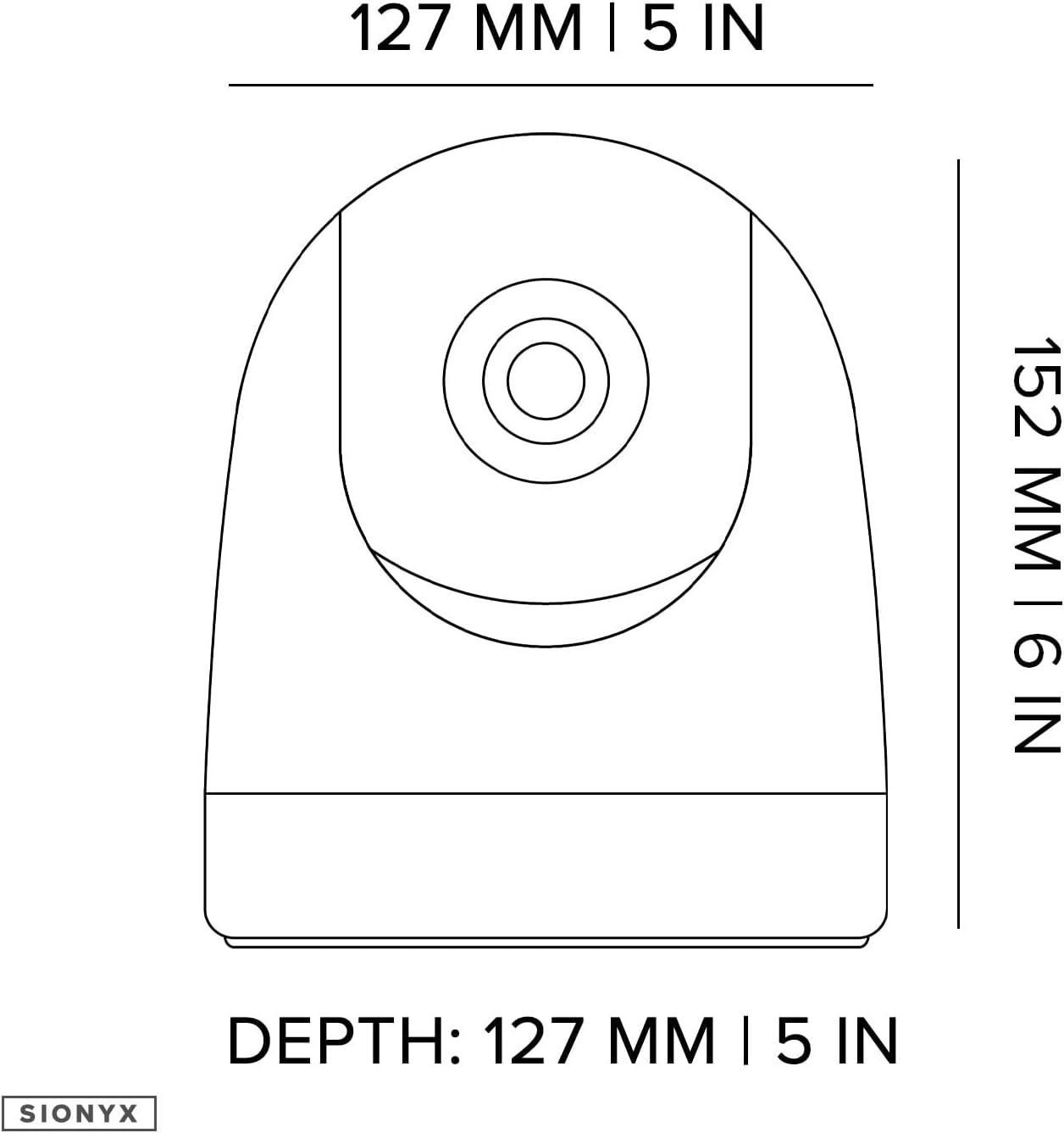
The SiOnyx Nightwave camera is designed for DIY installation, offering both permanent and temporary mounting options. It measures 5 x 5 x 6 inches and weighs 1.9 pounds, making it compact and easy to integrate into your marine setup.
3.1 Mounting
The camera can be permanently mounted to a flat surface. Ensure the mounting location provides a clear field of view and is secure against marine conditions.
3.2 Power and Connectivity
The Nightwave offers flexible connectivity options. It can be powered by 12Vdc using the factory-installed cable or 5Vdc via USB. Seamless connection with major brand marine multifunction displays (MFDs) is supported. For wireless control and live streaming, utilize the new SiOnyx mobile app available for both iOS and Android devices.


4. Operating the Camera
The SiOnyx Nightwave camera is controlled primarily through the SiOnyx mobile app. Once connected, you can view live video streams and adjust settings to optimize your night vision experience.
4.1 Night Vision Capabilities
The Nightwave camera utilizes ultra-low light technology to provide clear digital color night vision, even in moonless starlight. This significantly increases situational awareness, allowing you to see well beyond human eyesight and identify potential hazards on the water.


5. Maintenance
The SiOnyx Nightwave camera is built to withstand harsh marine environments. It is IP67 rated, meaning it is protected against dust and temporary immersion in water. The UV-resistant polycarbonate material ensures long-term durability.
To maintain optimal performance:
- Regularly wipe the lens and camera body with a soft, clean cloth to remove salt, dust, and debris.
- Avoid using abrasive cleaners or solvents that could damage the lens coating or housing.
- Ensure all cable connections are secure and free from corrosion.
6. Troubleshooting
If you encounter issues with your SiOnyx Nightwave camera, please refer to the following common troubleshooting steps:
- No Power: Check all power connections, including the fuse and fuse holder. Ensure the power source (12Vdc or 5Vdc USB) is providing adequate power.
- No Video Output: Verify that the correct video output option is selected in the SiOnyx app (Wi-Fi, USB, or Analog). Check cable connections (SMA to BNC, BNC to RCA, Digital Video Cable USB).
- Poor Image Quality: Ensure the lens is clean and free from obstructions. Check for any fogging (though the unit is dry nitrogen purged, extreme temperature changes can sometimes cause temporary condensation).
- App Connectivity Issues: Ensure your mobile device's Wi-Fi and Bluetooth are enabled. Restart the SiOnyx app and the camera. Confirm the camera is within range of your device.
For further assistance, please contact SiOnyx customer support.
7. Specifications
| Feature | Specification |
|---|---|
| Model Name | CRV-500C |
| Item Model Number | C012800 |
| Dimensions (L x W x H) | 5 x 5 x 6 inches |
| Item Weight | 2 Pounds |
| Color | White |
| Material | UV Resistant Polycarbonate |
| Power Source | 12Vdc, 5Vdc [USB] |
| Voltage | 12 Volts (DC) |
| Wattage | 12 watts |
| Connectivity Technology | Wireless, Bluetooth, Wired (Analog Video Output via SMA/BNC/RCA, USB) |
| Connectivity Protocol | Bluetooth, Wi-Fi |
| Controller Type | SIONYX App |
| Video Capture Resolution | 1024p |
| Frame Rate | 30 HZ |
| Viewing Angle | 44 Degrees |
| Night Vision Range | 150 Meters |
| International Protection Rating | IP67 |
| Focus Type | Auto Focus |
| UPC | 811251020149 |
8. Warranty and Support
For information regarding product warranty, please refer to the warranty card included with your purchase or visit the official SiOnyx website. For technical support, troubleshooting assistance, or any other inquiries, please contact SiOnyx customer service directly.
You can find more information and support resources on the SiOnyx Brand Store.


