1. Introduction
This manual provides essential information for the safe and efficient use of your Cecotec Bolero Hexa M236000 Built-in Multifunction Oven. Please read all instructions carefully before installation and operation, and retain this manual for future reference.
The Cecotec Bolero Hexa M236000 is a 70-liter capacity built-in oven designed for versatile cooking. It features 6 cooking functions, a Cooling Fan system, a programmable timer, and Steam Base XXL technology for steam-assisted cooking and cleaning. The oven is equipped with a triple-glazed door for safety and energy efficiency, and operates with a powerful 2800 W heating element.

Figure 1: Front view of the Cecotec Bolero Hexa M236000 oven.
2. Safety Instructions
Always follow basic safety precautions when using electrical appliances to reduce the risk of fire, electric shock, burns, or injury. This oven is intended for domestic use only.
- Ensure the oven is correctly installed by a qualified technician before first use.
- Do not touch hot surfaces. Use oven mitts or pot holders.
- Supervise children when the oven is in use.
- Do not use abrasive cleaners or sharp metal scrapers to clean the oven door glass, as they can scratch the surface, which may result in shattering.
- Disconnect the appliance from the power supply before cleaning or maintenance.
- Ensure adequate ventilation around the oven during operation.
- Important: This oven does not come with a power plug. Electrical connection must be performed by a qualified electrician with basic electrical knowledge.
3. Setup and Installation
The Cecotec Bolero Hexa M236000 is a built-in oven. Proper installation is crucial for safety and performance.
3.1 Unpacking
Carefully remove the oven from its packaging. Inspect for any damage during transit. Keep packaging materials away from children.
3.2 What's in the Box
- 1 x Cecotec Bolero Hexa M236000 Multifunction Oven
- 1 x User Manual
- 1 x Baking Tray
- 1 x Grill Rack
3.3 Dimensions and Placement
Ensure the cabinet opening meets the required dimensions for a built-in installation. The oven dimensions are approximately 64.5 cm (width) x 67.5 cm (depth) x 66 cm (height).

Figure 2: Oven dimensions for installation.
3.4 Electrical Connection
The oven requires a dedicated electrical circuit. The electrical connection must be performed by a qualified electrician in accordance with local regulations. Ensure the power supply matches the specifications listed on the appliance rating plate.
4. Operating Instructions
Your Cecotec oven offers various functions for diverse cooking needs.
4.1 Control Panel Overview

Figure 3: Oven control panel.
The control panel consists of three rotary knobs:
- Function Selector Knob: Used to choose the desired cooking mode.
- Timer Knob: Used to set the cooking duration.
- Temperature Control Knob: Used to set the desired oven temperature (up to 250°C).
4.2 Cooking Functions
The oven features 6 cooking functions:
- Defrost: For thawing frozen foods.
- Conventional: Top and bottom heating elements for traditional baking and roasting.
- Bottom Heat: Heating from the bottom element only, ideal for crisping bases.
- Convection: Uses a fan to circulate hot air, ensuring even cooking and faster results.
- Convection + Grill: Combines fan-assisted cooking with the grill element for browning and crisping.
- Eco Mode: Energy-efficient cooking mode.
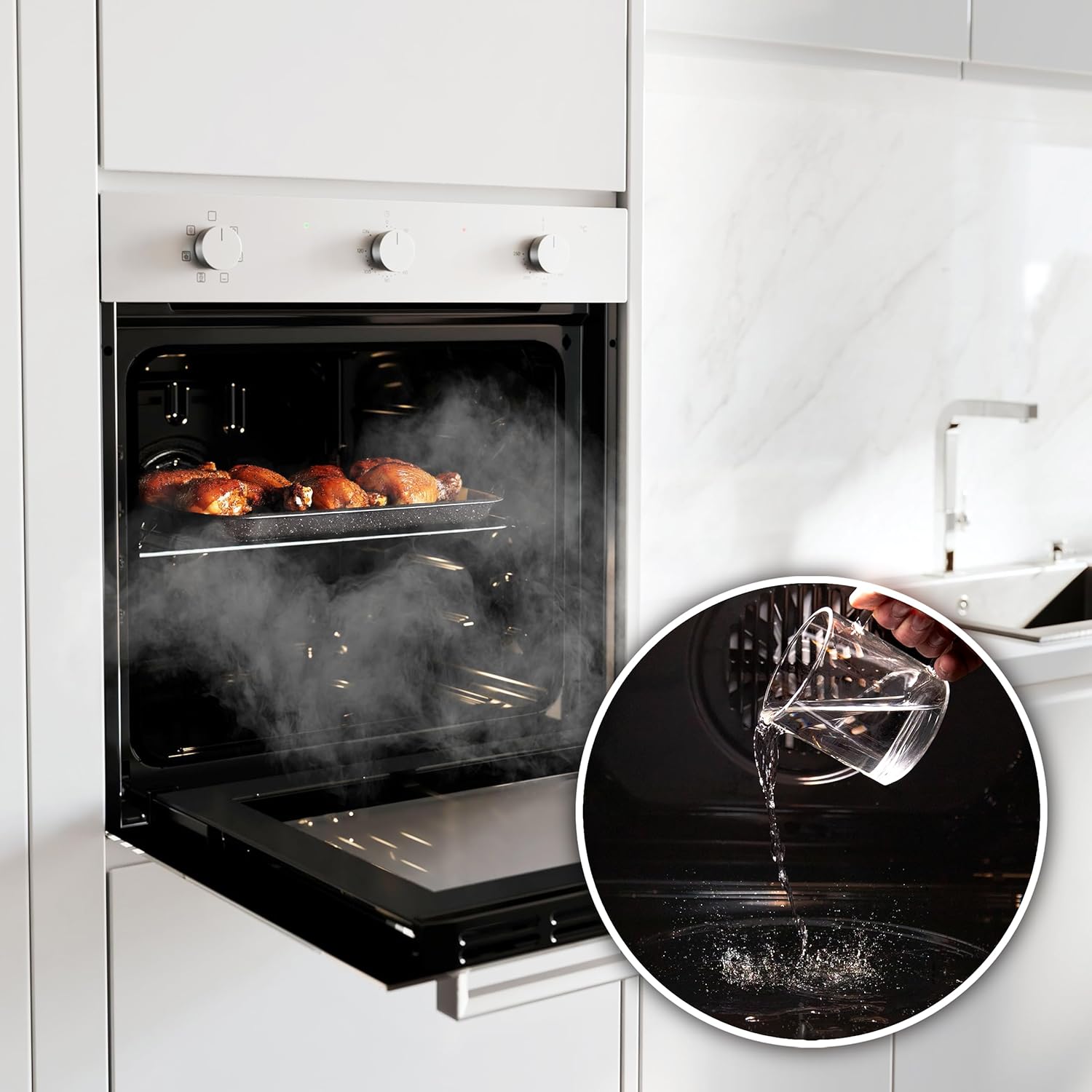
Figure 4: Examples of dishes prepared using different oven functions.
4.3 Using the Timer
The timer allows you to set a specific cooking duration. Turn the Timer Knob to the desired time. The oven will automatically switch off once the set time has elapsed, preventing overcooking.

Figure 5: Detail of the timer knob.
4.4 Steam Assist Function
The Steam Assist function uses the Steam Base XXL to introduce steam during cooking, resulting in dishes with crispy exteriors and juicy interiors.
- Locate the Steam Base XXL at the bottom of the oven cavity.
- Pour up to 0.8 liters of water into the Steam Base XXL.
- Select a cooking function that benefits from steam (e.g., Convection).
- Set the desired temperature and cooking time.

Figure 6: Using the Steam Base XXL for steam-assisted cooking.
4.5 Cooling Fan
The integrated Cooling Fan system ensures optimal cooling of the oven during and after cooking, contributing to the appliance's longevity and user safety by keeping external surfaces cooler.

Figure 7: Internal cooling fan.
5. Maintenance and Cleaning
Regular cleaning and maintenance will ensure the longevity and optimal performance of your oven.
5.1 General Cleaning
- Always ensure the oven is cool and disconnected from the power supply before cleaning.
- Clean the interior and exterior surfaces with a soft cloth and mild detergent.
- Avoid abrasive cleaners, scouring pads, or harsh chemicals that can damage surfaces.
- The baking tray and grill rack can be washed with warm soapy water.
5.2 Steam EasyClean Function
The Steam EasyClean function utilizes steam to loosen baked-on food residues, making manual cleaning easier.
- Ensure the oven is cool.
- Pour approximately 0.8 liters of water into the Steam Base XXL.
- Select the Steam EasyClean function (refer to your oven's specific function settings).
- Allow the cycle to complete. The steam will soften dirt and grease.
- Once the oven has cooled, wipe the interior with a soft cloth to remove loosened residues.

Figure 8: Oven interior before and after using Steam EasyClean.
6. Troubleshooting
If you encounter issues with your oven, refer to the following common troubleshooting steps. For problems not listed here, contact customer support.
| Problem | Possible Cause | Solution |
|---|---|---|
| Oven does not turn on | No power supply; Door not closed properly; Timer not set. | Check power connection; Ensure door is fully closed; Set the timer. |
| Uneven cooking | Incorrect temperature/function; Overcrowding the oven; Food placed too close to heating elements. | Adjust temperature/function; Use appropriate tray positions; Avoid overcrowding. |
| Oven light not working | Bulb needs replacement. | Consult a qualified technician for bulb replacement. |
| Excessive smoke during cooking | Food spills or grease buildup; High-fat food. | Clean oven interior thoroughly; Use a baking tray with higher sides for fatty foods. |
7. Specifications
Detailed technical specifications for the Cecotec Bolero Hexa M236000 oven.
| Feature | Specification |
|---|---|
| Brand | Cecotec |
| Model Number | 04728 |
| Product Dimensions (W x D x H) | 64.5 x 67.5 x 66 cm |
| Weight | 1 kg |
| Capacity | 70 Liters |
| Power | 2800 W |
| Energy Class | A |
| Heating Method | Conduction |
| Fuel Type | Electric |
| Installation Type | Built-in |
| Functions | Defrost, Conventional, Bottom Heat, Convection, Convection + Grill, Eco Mode |
| Special Features | Cooling Fan, Timer, Steam Base XXL, Triple Glazed Door |
| Country of Origin | Spain |

Figure 9: Energy Class A rating for efficiency.

Figure 10: 70-liter oven capacity.
8. Warranty and Support
8.1 Warranty Information
The Cecotec Bolero Hexa M236000 oven comes with a minimum manufacturer's warranty of 36 months from the date of purchase. Please retain your proof of purchase for warranty claims.
8.2 Customer Support
For technical assistance, spare parts, or warranty inquiries, please contact Cecotec customer support or visit their official website:


