
1. Introduction
The SENIX CHX2 20 Volt Max* battery charger is designed for rapid charging of SENIX X2 series lithium-ion batteries. This manual provides essential information for the safe and efficient use of your charger, including setup, operation, maintenance, and troubleshooting.
*20 Volt Max battery, maximum initial battery voltage (measured without a workload) is 20 volts. The nominal voltage is 18.
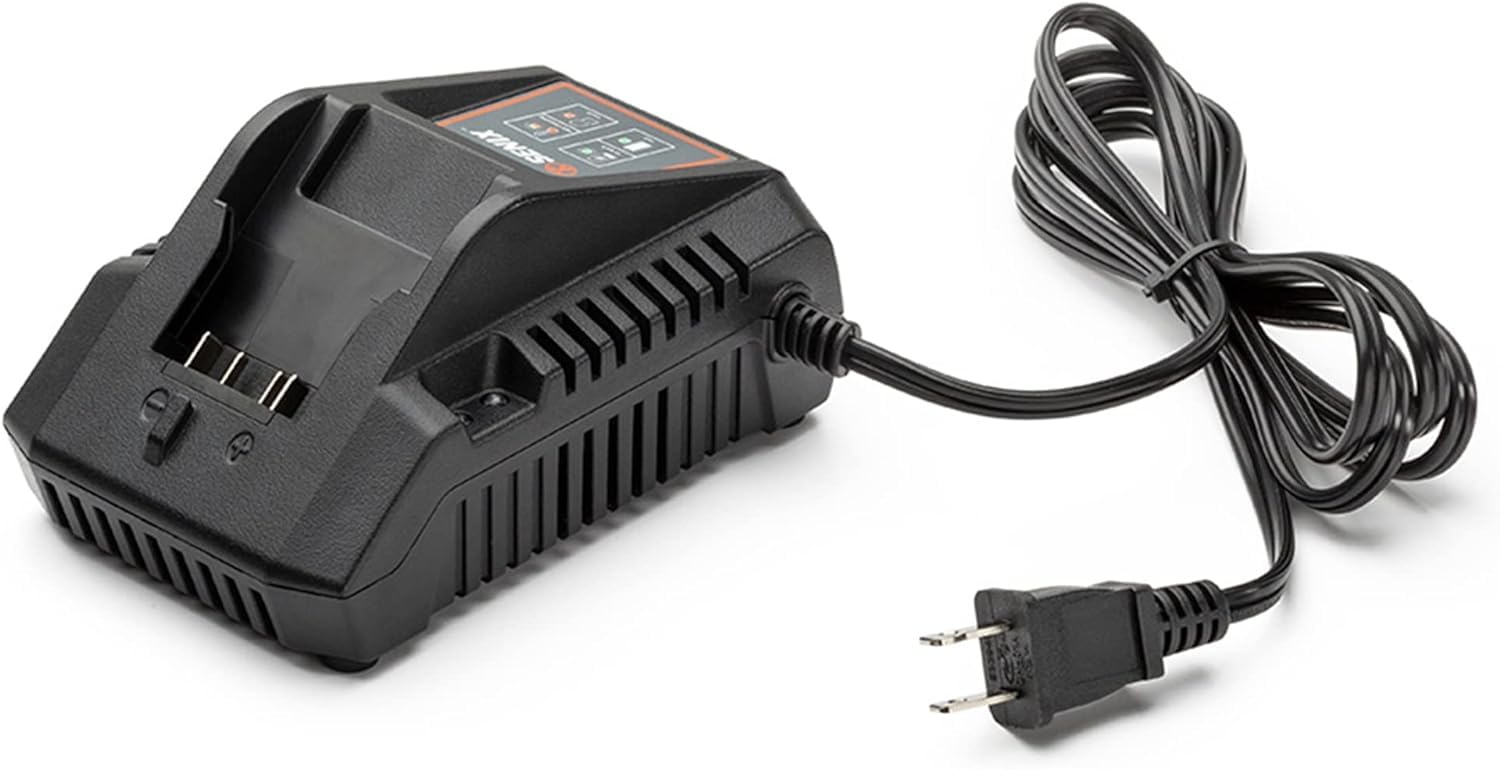
Figure 1: SENIX CHX2 20 Volt Max Lithium Ion Battery Charger. This image shows the front view of the charger with its indicator lights and battery slot.
2. Safety Information
WARNING: For indoor use only. Risk of electric shock. Dry location use only. Risk of injury. Charge 20V Li-Ion Rechargeable batteries only. Other types of batteries may burst causing injury to persons and damage.
WARNING: This product can expose you to chemicals including lead, a chemical known to the State of California to cause cancer and birth defects or other reproductive harm. For more information go to www.P65Warnings.ca.gov.
- Always inspect the charger and battery for damage before use. Do not use if damaged.
- Do not expose the charger to rain or wet conditions.
- Do not attempt to disassemble or modify the charger.
- Ensure proper ventilation during charging.
- Keep out of reach of children.
3. Setup
The SENIX CHX2 charger is designed for easy setup and use. Follow these steps to prepare your charger:
- Unpack: Carefully remove the charger from its packaging. Inspect for any shipping damage.
- Placement: Place the charger on a stable, dry, and well-ventilated surface. Ensure it is away from direct sunlight, heat sources, and moisture.
- Power Connection: Plug the charger's power cord into a standard 120 Volt (AC) electrical outlet.
- Wall Mounting (Optional): The charger features a mounting hole for convenient wall mounting. Secure the charger to a wall using appropriate fasteners (not included) in a location that allows for easy access and proper ventilation.

Figure 2: Back view of the SENIX CHX2 charger, highlighting the wall mount holes and product label with specifications. The product label includes the Mfr Part Number: CHX2 and a QR code with the identifier 2022020000000CHX2000389.
4. Operating Instructions
The SENIX CHX2 charger is compatible with all SENIX 20 Volt Max* X2 batteries, including models B25X2, B50X2, B20X2, and B40X2.
- Insert Battery: Align the battery with the charger slot and slide it in until it clicks securely into place.
- Monitor Charging: The charger features indicator lights that display the current charging status. Refer to the indicator light guide below.
- Remove Battery: Once charging is complete, disconnect the battery from the charger by pressing the release button (if present on the battery) and sliding it out.
Indicator Light Guide

Figure 3: Close-up of the SENIX CHX2 charger's indicator panel, detailing the meaning of each light: "At work" (charging), "Not charging" (temperature too high/low), "Full" (charged), and "Fault" (error).
- "At work" (Green blinking): Battery is currently charging.
- "Full" (Solid Green): Battery is fully charged.
- "Not charging" (Red blinking, thermometer icon): Battery temperature is too high or too low. Charging will resume automatically once the temperature is within the acceptable range.
- "Fault" (Solid Red, exclamation mark icon): An error has occurred. Remove the battery and re-insert. If the fault persists, the battery or charger may be defective.
Charging Times: A 2.0 Ah battery charges in approximately 60 minutes. A 5.0 Ah battery charges in approximately 2.5 hours.
Compatible Batteries

Figure 4: SENIX B50X2 5.0 Ah Lithium Ion Battery. This image shows a 5.0 Ah battery inserted into the charger, for reference only. Battery sold separately.

Figure 5: SENIX B25X2 2.5 Ah Lithium Ion Battery. This image shows a 2.5 Ah battery inserted into the charger, for reference only. Battery sold separately.
5. Maintenance
Proper maintenance ensures the longevity and safe operation of your SENIX CHX2 charger.
- Cleaning: Disconnect the charger from the power outlet before cleaning. Use a soft, dry cloth to wipe the exterior of the charger. Do not use water or chemical cleaners.
- Storage: Store the charger in a dry, indoor location when not in use. Avoid extreme temperatures.
- Inspection: Periodically inspect the power cord and charger housing for any signs of damage. If damage is found, discontinue use and contact customer support.
6. Troubleshooting
If you encounter issues with your SENIX CHX2 charger, refer to the following common troubleshooting steps:
| Problem | Indicator Light Status | Possible Cause | Solution |
|---|---|---|---|
| Battery not charging | Red blinking (thermometer icon) | Battery temperature too high or too low. | Allow battery to reach room temperature. Charging will resume automatically. |
| Battery not charging | Solid Red (exclamation mark icon) | Battery or charger fault. | Remove and re-insert battery. If fault persists, contact customer support. |
| No lights, no charging | No lights | No power to charger or charger malfunction. | Check power outlet. Ensure charger is securely plugged in. Try a different outlet. If still no power, contact customer support. |
7. Specifications
| Specification | Value |
|---|---|
| Brand | SENIX |
| Model Number | CHX2 |
| Input Voltage | 120 Volts (AC) |
| Output Voltage | 20 Volts (DC) |
| Current Rating | 2 Amps |
| Battery Charge Time (2.0 Ah) | 60 minutes |
| Compatible Devices | SENIX X2 Batteries (B25X2, B50X2, B20X2, B40X2) |
| Product Dimensions | 6"D x 4.3"W x 3"H |
| Item Weight | 12.64 ounces |
| Specification Met | UL, FCC |
8. Warranty and Support
The SENIX CHX2 20 Volt Max* Lithium-ion Battery Charger comes with a 3-year limited warranty. This warranty covers defects in material and workmanship under normal use.
For warranty claims, technical assistance, or general inquiries, please contact SENIX customer support. You may also refer to the manufacturer's information on the product label:
- Manufacturer: YAT USA, Inc.
- Address: 6441 Hendry Road, Suite A, Charlotte, NC 28269
- Mfr Part Number: CHX2
- UPC: 843212113157
For additional support, you can visit the SENIX Tools seller page on Amazon: SENIX Tools Seller Page.
9. Product Video Overview
Video 1: Overview of SENIX X2 20 Volt Lithium-ion Battery Pack Charger with Light Indicator. This video demonstrates the features and functionality of the SENIX X2 battery system, including the charger's indicator lights and compatibility with various tools.


