1. Introduction
This manual provides essential information for the safe and efficient operation of your Cecotec ForceClima 9100 Soundless Portable Air Conditioner. Please read these instructions carefully before use and retain them for future reference.

Image 1.1: Cecotec ForceClima 9100 Soundless Portable Air Conditioner. This image shows the front of the portable air conditioner with cool air visibly flowing from its vents, highlighting its primary function.
2. Safety Instructions
To ensure safe operation, always adhere to the following safety guidelines:
- Ensure the power supply matches the voltage specified on the appliance's rating label.
- Do not operate the unit with a damaged power cord or plug.
- Keep the appliance away from heat sources, direct sunlight, and flammable materials.
- Do not block the air inlets or outlets. Maintain adequate clearance around the unit for proper airflow.
- Always unplug the unit before cleaning or performing any maintenance.
- This appliance is not intended for use by persons (including children) with reduced physical, sensory, or mental capabilities, or lack of experience and knowledge, unless they have been given supervision or instruction concerning use of the appliance by a person responsible for their safety.
- The appliance uses R290 refrigerant. Be aware that R290 is a flammable refrigerant.
3. Product Overview
3.1 Components
- Main Unit with Air Vents
- Touch Control Panel
- LED Display
- Remote Control
- Exhaust Hose
- Window Installation Kit
- Drainage Tube
- Multidirectional Wheels
3.2 Control Panel and Remote Control
The unit features a touch control panel on its top surface and comes with a remote control for convenient operation from a distance.
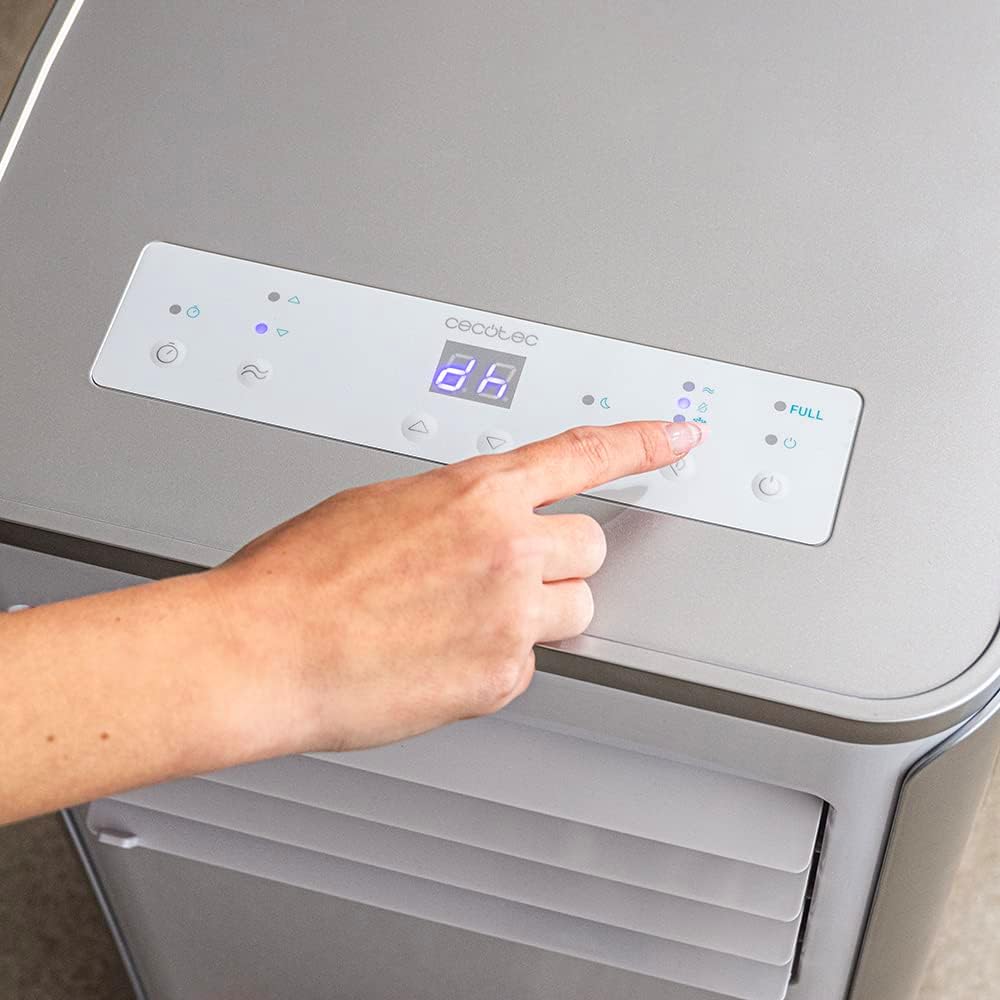
Image 3.1: Touch Control Panel. A close-up view of a finger interacting with the touch-sensitive control panel on the top of the air conditioner, which features an LED display.

Image 3.2: Remote Control. This image shows a hand holding the remote control, which allows for convenient adjustment of the air conditioner's settings from a distance.
4. Setup
4.1 Positioning the Unit
Place the portable air conditioner on a flat, stable surface. Utilize the multidirectional wheels to easily move the unit to your desired location.

Image 4.1: Moving the Unit. A person is shown effortlessly moving the portable air conditioner across a room, demonstrating the convenience of its integrated multidirectional wheels.
4.2 Exhaust Hose Installation
- Connect one end of the exhaust hose to the air outlet on the back of the unit.
- Extend the exhaust hose to the nearest window or opening.
- Install the window kit to seal the opening around the exhaust hose, preventing outside air from entering the room and maximizing cooling efficiency.

Image 4.2: Window Kit Installation. This image illustrates a person installing the provided window kit, which helps to securely vent the exhaust hose out of a window, ensuring efficient operation.
4.3 Drainage Tube Connection
For continuous dehumidification or in high humidity conditions, connect the drainage tube to the designated outlet on the back of the unit and direct it to a suitable drain or container.

Image 4.3: Drainage Tube Connection. A person is shown connecting the transparent drainage tube to the rear of the air conditioner, which is essential for continuous dehumidification.
5. Operating Instructions
The Cecotec ForceClima 9100 offers four operating modes and two fan speeds to suit your comfort needs.
5.1 Power On/Off
Press the Power button on the control panel or remote control to turn the unit on or off.
5.2 Mode Selection
Cycle through the following modes using the Mode button:
- Cooling Mode: Provides powerful cooling for rapid temperature reduction.
- Fan Mode: Circulates air without cooling, ideal for ventilation.
- Dehumidification Mode: Removes excess moisture from the air, with a capacity of up to 24 liters per day.
- Night Mode: Operates at a lower noise level for undisturbed sleep, gradually adjusting temperature.
5.3 Fan Speed Adjustment
Select between two fan speeds: Low and High, to control the airflow intensity.
5.4 Temperature Setting
In Cooling Mode, use the temperature adjustment buttons to set your desired room temperature.
5.5 Timer Function
The 24-hour timer allows you to program the unit to turn on or off automatically after a set period, up to 24 hours.
6. Maintenance
Regular maintenance ensures optimal performance and longevity of your air conditioner.
6.1 Cleaning the Air Filter
- Turn off and unplug the unit.
- Locate and remove the air filter from the back of the unit.
- Clean the filter with a vacuum cleaner or wash it gently with lukewarm water and mild detergent.
- Allow the filter to dry completely before reinserting it.
- Clean the air filter every two weeks or more frequently depending on usage and air quality.
6.2 Draining Accumulated Water
In high humidity environments or when the internal water tank is full, the unit may stop operating. Connect the drainage tube as described in Section 4.3 to continuously drain water, or manually drain the tank when the 'Full' indicator lights up on the LED display.
6.3 Cleaning the Unit Exterior
Wipe the exterior of the unit with a soft, damp cloth. Do not use harsh chemicals or abrasive cleaners.
7. Troubleshooting
If you encounter issues with your air conditioner, refer to the following common problems and solutions:
| Problem | Possible Cause | Solution |
|---|---|---|
| Unit does not turn on | No power supply; Power cord not plugged in; Full water tank | Check power connection; Plug in power cord; Drain water tank |
| Insufficient cooling | Air filter dirty; Exhaust hose not properly installed; Room too large; Doors/windows open | Clean air filter; Ensure exhaust hose is sealed; Close doors/windows; Consider room size |
| Unit is noisy | Unit not on a level surface; Obstruction in fan | Place on a level surface; Check for and remove obstructions |
| Water leakage | Drainage tube loose or blocked; Unit tilted | Secure/clear drainage tube; Ensure unit is level |
If the problem persists after attempting these solutions, please contact customer support.
8. Specifications
| Parameter | Value |
|---|---|
| Model | ForceClima 9100 Soundless (08173) |
| Type | Portable Single-Duct Air Conditioner |
| Cooling Capacity | 9000 BTU (2.642 kW) |
| Refrigerant | R290 |
| Refrigerant Quantity | 0.195 kg |
| Rated Input Power (Cooling) | 1.010 kW |
| Rated Energy Efficiency Ratio (EER) | 2.60 |
| Energy Efficiency Class (Cooling) | A |
| Standby Power Consumption | 0.50 W |
| Sound Power Level (Indoor) | 65 dB(A) |
| Voltage | 220-240 V |
| Frequency | 50 Hz |
| Dehumidification Capacity | Max. 24 liters/day |
| Coverage Area | 20-25 m² |
| Dimensions (H x W x D) | 70 x 35 x 33.5 cm |
| Weight | 22.2 kg |
| Color | White |
9. Warranty and Support
Your Cecotec ForceClima 9100 Soundless Portable Air Conditioner is covered by the standard manufacturer's warranty. Please refer to the warranty card included with your purchase for specific terms and conditions.
For technical assistance, spare parts, or any inquiries regarding your product, please contact Cecotec customer support. Contact information can typically be found on the official Cecotec website or in the product packaging.
Manufacturer: Cecotec


