
1. Introduction
This manual provides essential instructions for the safe and effective use of your iDOO Portable Heating Pad, Model I-I-01. This device is designed to provide targeted heat and massage therapy for discomfort in the abdominal and lumbar regions.

Front view of the iDOO Portable Heating Pad, showcasing its compact design and control panel.
2. Safety Information
- Do not use directly on skin: For your safety and to prevent burns, always use the heating pad over clothing.
- Automatic Shut-off: The device features an overheat protection function and will automatically shut off after 30 minutes of continuous use. This is a safety measure and not an indication of malfunction.
- Voltage: Ensure the charging adapter provides 5 volts.
- Medical Conditions: Consult a healthcare professional before use if you have any underlying medical conditions, especially those affecting skin sensitivity or circulation.
- Children and Pets: Keep out of reach of children and pets.
3. Product Features
- Fast Heating: Utilizes upgraded fast heating technology for rapid warmth delivery, typically within 2 seconds. This promotes blood circulation and muscle relaxation.
- Adjustable Temperature Levels: Offers three distinct heat settings:
- Level 1 (108°F/48°C): Suitable for daily warmth.
- Level 2 (132°F/56°C): Recommended for menstrual care.
- Level 3 (140°F/60°C): Designed for dysmenorrhea relief.
- Vibration Massage Modes: Includes three vibration massage modes (low, medium, high frequency) to complement heat therapy.
- Comfortable Design: Constructed from high-quality, soft, light, and breathable fabric for user comfort.
- Adjustable Belt: Features an elastic belt that can stretch up to 40 inches, accommodating various waist sizes.
- Portable and Rechargeable: Cordless design with a built-in 2000 mAh rechargeable battery, offering approximately 4 hours of continuous use on a full charge. Charges via Type-C USB.

Close-up of the control panel, illustrating the buttons for adjusting the three heat levels and three vibration modes. A graph shows temperature progression for different care needs.
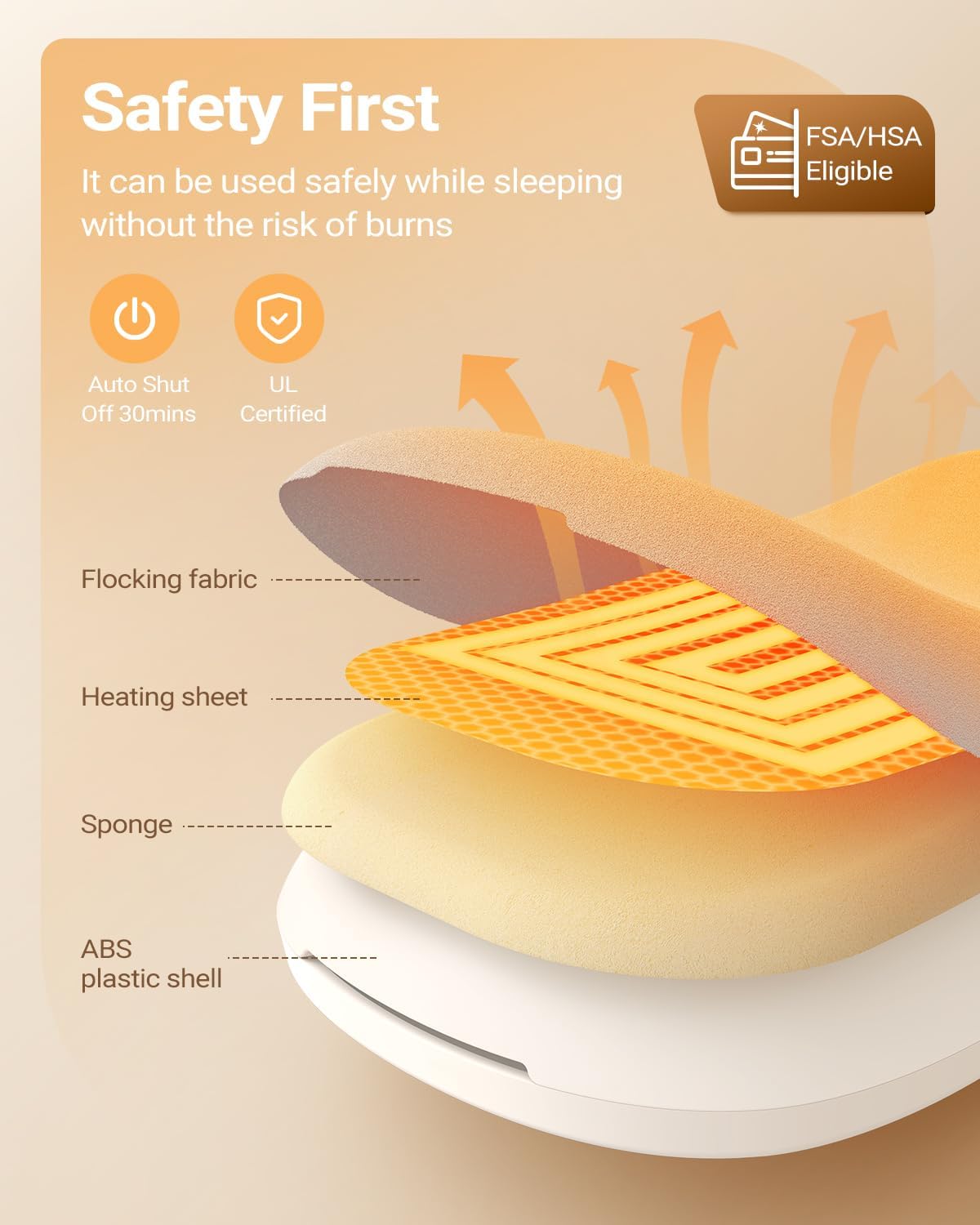
An exploded view diagram showing the internal construction of the heating pad, including the flocking fabric, heating sheet, sponge, and ABS plastic shell, highlighting its safety features like auto shut-off.
4. Setup
4.1 Initial Charging
- Before first use, fully charge the device.
- Connect the provided Type-C USB cable to the charging port on the heating pad.
- Plug the other end of the USB cable into a compatible 5V USB power adapter (not included) or a computer USB port.
- Charging indicators will illuminate or flash during charging and will stop when fully charged. A full charge typically takes approximately 2 hours.

The heating pad connected to a USB-C charging cable, indicating its rechargeable nature and long battery life for extended use.
4.2 Wearing the Device
- Adjust the elastic belt to fit comfortably around your waist. The belt can stretch up to 40 inches.
- Ensure the heating pad is positioned over your clothing, directly on the area requiring heat or massage therapy (e.g., abdomen or lower back).
- Secure the buckle to keep the device in place.

The heating pad worn comfortably around the waist, demonstrating its discreet and portable application for targeted heat therapy.

A person stretching while wearing the heating pad, demonstrating the flexibility and adjustability of the elastic belt, suitable for various waist sizes up to 40 inches.
5. Operating Instructions
5.1 Power On/Off
- To power on, press and hold the power button (usually indicated by a power symbol) for a few seconds until the indicators light up.
- To power off, press and hold the power button again until the indicators turn off.
5.2 Adjusting Heat Levels
- After powering on, press the heat button (often indicated by a thermometer or wave symbol) to cycle through the three heat levels.
- Each press will advance to the next heat level (Low > Medium > High). The corresponding indicator light will show the selected level.
- Select the appropriate temperature for your comfort and needs, always ensuring the device is over clothing.
5.3 Adjusting Vibration Modes
- Press the vibration button (often indicated by a wavy line symbol) to cycle through the three vibration massage modes.
- Each press will advance to the next vibration mode (Low > Medium > High). The corresponding indicator light will show the selected mode.
- You can use heat and vibration modes simultaneously or independently.
6. Maintenance
6.1 Cleaning
- Ensure the device is powered off and unplugged before cleaning.
- Wipe the surface of the heating pad with a soft, damp cloth. Do not use harsh chemicals or abrasive cleaners.
- Do not immerse the device in water or any other liquid.
- Allow the device to air dry completely before storing or next use.
6.2 Storage
- Store the heating pad in a cool, dry place, away from direct sunlight and extreme temperatures.
- If a carrying bag was provided, use it to protect the device during storage and travel.
7. Troubleshooting
| Problem | Possible Cause | Solution |
|---|---|---|
| Device does not turn on. | Battery is depleted. | Charge the device fully using the provided Type-C USB cable. |
| Heat is not felt or is too low. | Incorrect heat level selected; device not positioned correctly. | Ensure a higher heat level is selected. Adjust the device position to ensure direct contact with clothing over the desired area. |
| Device automatically shuts off. | Automatic 30-minute safety shut-off activated. | This is a normal safety feature. You can restart the device if further use is desired. |
| Vibration is not working. | Vibration mode not activated or set to low. | Press the vibration button to cycle through modes and ensure a vibration level is selected. |
8. Specifications
- Model Number: I-I-01
- Manufacturer: iDOO
- Product Dimensions: 7.28 x 3.35 x 0.79 inches
- Item Weight: 0.32 Kilograms (11.29 ounces)
- Material: Carbon Fiber (heating element), Soft Fabric (outer shell)
- Battery Capacity: 2000 mAh
- Charging Voltage: 5 Volts
- Heat Levels: 3 (108°F/48°C, 132°F/56°C, 140°F/60°C)
- Vibration Modes: 3 (Low, Medium, High Frequency)
- Automatic Shut-off: 30 minutes
9. Warranty and Support
For warranty information or technical support, please refer to the contact details provided with your purchase or visit the official iDOO website. Please retain your proof of purchase for any warranty claims.
