
PopBloom Turing RS90
PopBloom RS90 Aquarium LED Reef Light User Manual
Model: Turing RS90
Brand: PopBloom
1. Introduction
The PopBloom RS90 Aquarium LED Reef Light is a high-performance lighting system designed for saltwater SPS/LPS coral fish tanks ranging from 72 to 96 inches. It features a scientifically engineered design to balance PAR output and coverage, ensuring optimal conditions for photosynthetic corals. This manual provides detailed instructions for the installation, operation, and maintenance of your RS90 LED Reef Light.

Figure 1: PopBloom RS90 LED Reef Lights illuminating a marine aquarium.
2. Package Contents
Please verify that all items listed below are included in your package:
- 4 x PopBloom RS90 LED Lights
- 1 x Smart Controller
- 4 x Arm Mounting Kits
- 3 x F Connectors
- 4 x Power Supplies & Plugs
- 1 x User Manual (this document)
3. Product Features
- High-performance LED Lighting: RS90 lights are engineered for optimal PAR output and coverage, providing perfect brightness for your aquarium.
- Natural Simulation: The smart controller allows simulation of natural sunrise/sunset, four seasons, 24-hour day/night cycles, and lunar cycles.
- Programmable Usage Modes: The DIY mode offers 24-hour customization, allowing free setting of start time, end time, light color, and brightness for each channel.
- Best Spectrum: Delivers perfect blue/UV pop bloom color, suitable for all photosynthetic corals. Includes a "Slow acclimation" mode for new tanks or corals.
- Daisy Chain Functionality: All lamps can be programmed simultaneously by a single smart controller, simplifying setup and adjustments.
4. Setup and Installation
Proper installation is crucial for the performance and longevity of your PopBloom RS90 lights. Follow these steps carefully:
4.1 Mounting the Lights
The RS90 comes with adjustable arm mounting kits suitable for various tank types. Ensure the mounting arm is securely attached to your aquarium.
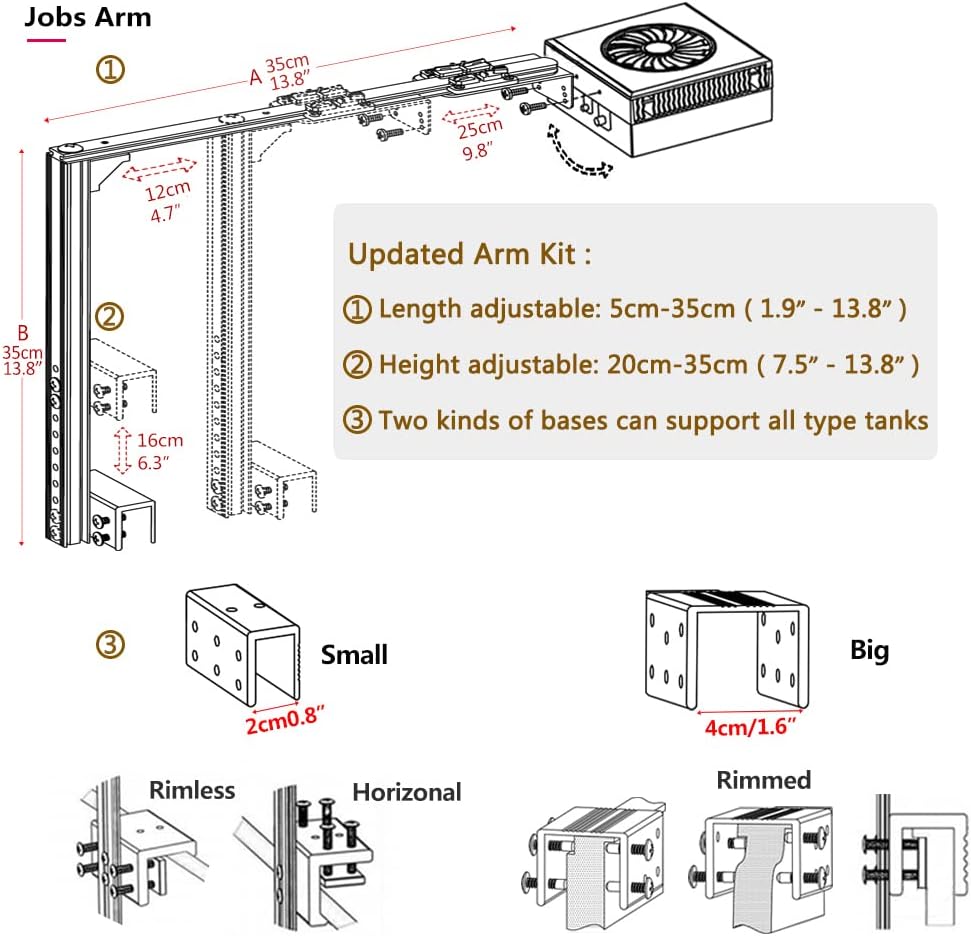
Figure 2: Detailed view of the adjustable mounting arm and base options.
The arm kit features:
- Length adjustable: 5cm-35cm (1.9" - 13.8")
- Height adjustable: 20cm-35cm (7.5" - 13.8")
- Two kinds of bases to support all tank types (rimless, horizontal, rimmed).
4.2 Connecting the Lights (Daisy Chain)
For multiple lights, utilize the daisy chain functionality. All lamps can be programmed and controlled by a single smart controller. Use the provided F connectors to link the lights together.

Figure 3: Daisy chain setup with one controller managing multiple lights.
4.3 Tank Size Recommendations
Refer to the table below for recommended light quantities based on your tank dimensions. Maximum tank width should not exceed 80cm / 32 inches.

Figure 4: Recommended light quantity per tank size.
5. Operating Instructions
The PopBloom RS90 features a smart controller for comprehensive light management. This allows for natural simulations and programmable modes.
5.1 Smart Controller Overview
The smart controller features a large LCD screen for visual control and easy navigation through settings. It enables simulation of sunrise/sunset, 4 seasons, 24-hour day/night cycles, and lunar cycles.
Figure 5: Smart controller interface and natural simulation capabilities.
5.2 Programmable DIY Mode
In DIY mode, you can customize the light schedule over a 24-hour period. Set the start time, end time, and adjust the light color and brightness for each of the 4 channels according to your preferences and the needs of your corals.
5.3 Slow Acclimation Mode
When introducing new corals or setting up a new tank, utilize the "Slow acclimation" mode. This feature gradually increases light intensity, helping corals adapt to the new lighting environment and reducing stress.
5.4 Visual Demonstration
Watch this official video from PopBloom to see the RS90 lights in action and observe their effect on various corals and tank setups.
Video 1: PopBloom Turing RS90 V - A demonstration of the light's performance and coral vibrancy.
6. Maintenance
Regular maintenance will ensure the optimal performance and longevity of your PopBloom RS90 LED Reef Light.
- Cleaning: Periodically wipe the light fixture and lenses with a soft, damp cloth to remove salt creep, dust, and water spots. Ensure the light is unplugged before cleaning.
- Ventilation: Ensure the cooling fins and fan (if applicable) are free from obstructions to allow for proper heat dissipation.
- Cable Management: Keep power cords and connectors tidy and away from water to prevent damage and ensure safety.
7. Troubleshooting
If you encounter issues with your PopBloom RS90 LED Reef Light, refer to the common problems and solutions below:
- Light not turning on: Check all power connections. Ensure the power supply is plugged into a working outlet and the light is securely connected to the controller.
- Lights not responding to controller: Verify the F connectors are properly seated. Ensure the controller is powered and functioning. Try resetting the controller if necessary (refer to controller manual for specific steps).
- Inconsistent light output: Check for any loose connections. Ensure the lenses are clean and free from obstructions.
- Overheating: Ensure the light fixture has adequate ventilation and is not covered. Clean any dust or debris from the cooling fins.
If the issue persists after following these steps, please contact PopBloom customer support for further assistance.
8. Specifications
Detailed technical specifications for the PopBloom Turing RS90 LED Reef Light:

Figure 6: PopBloom Turing RS90 detailed specifications.
| Feature | Detail |
|---|---|
| Model Name | Turing RS90 |
| Product Dimensions | 4.8"D x 4.8"W x 2.2"H (12.2cm x 12.2cm x 5.6cm) |
| Maximum Compatible Wattage | 400 Watts |
| Lamp Type | Aquarium LED Light |
| Light Source Type | Energy Efficient LED |
| Bulb Features | 4 Channels Dimmable & Programmable, High Penetration |
| Switch Type | Push Button |
| Power Source | Corded Electric |
| Connectivity Technology | USB, Wi-Fi |
| Material | Glass-Aluminum Oxide |
| Color | White |
| Water Resistance Level | Not Water Resistant |
| Special Features | 24hrs auto on/off, 4 Seasons, Sunrise sunset, Lunar cycle |
| Manufacturer | Shenzhen PopBloom Electronic Technology Co.,Ltd |
| Date First Available | July 25, 2022 |
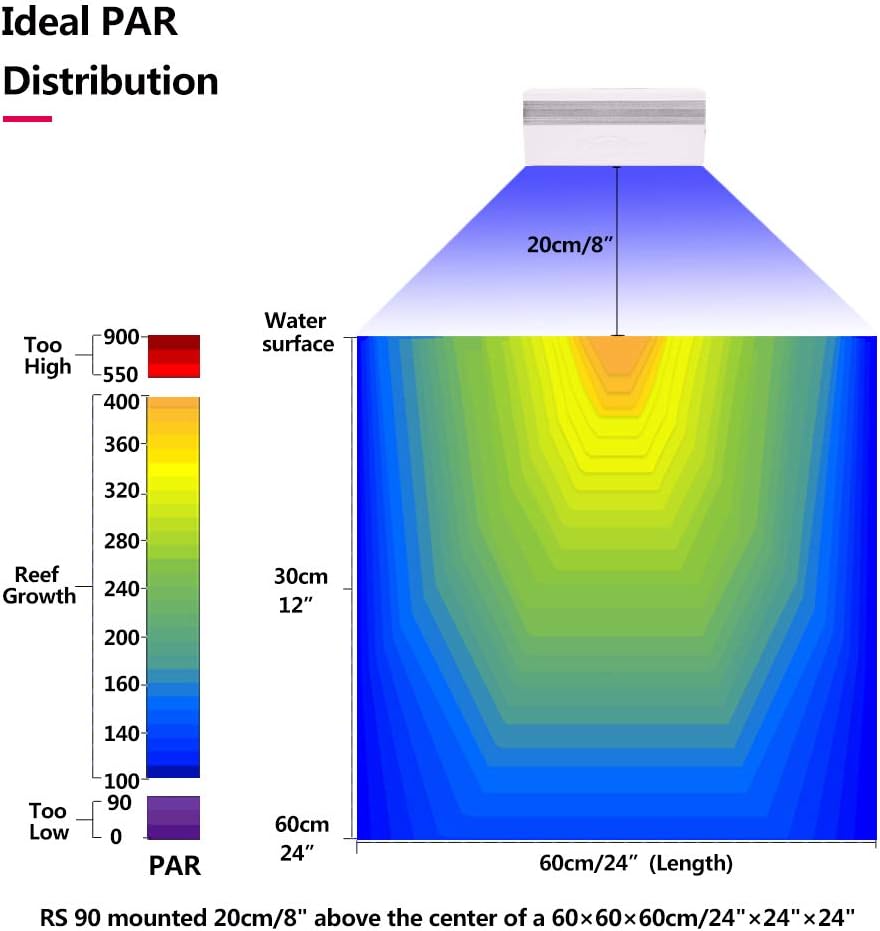
Figure 7: Ideal PAR Distribution for the RS90.
9. Warranty and Support
PopBloom products are manufactured to high-quality standards. For warranty information, technical support, or service inquiries, please refer to the contact details provided on the product packaging or the official PopBloom website. Keep your purchase receipt as proof of purchase for warranty claims.
Ask a question about this manual
Ask about setup, troubleshooting, compatibility, parts, safety, or missing instructions. Manuals+ will review the question and use this page’s manual context to help answer it.