
LiitoKala Lii-M4S
LiitoKala Lii-M4S Smart Universal Battery Charger User Manual
Model: Lii-M4S
Introduction
Thank you for choosing the LiitoKala Lii-M4S Smart Universal Battery Charger. This manual provides detailed instructions for the safe and efficient operation of your charger. The Lii-M4S is a versatile 4-bay charger designed to charge, discharge, test, and store various rechargeable battery types, featuring an intuitive LCD display and touch-sensitive controls.

Image: The LiitoKala Lii-M4S smart universal battery charger, shown with its four battery bays and an accompanying USB Type-C cable. The charger features an LCD display at the top.
Safety Information
- Use only the specified input voltage (5V/2A).
- Do not attempt to charge non-rechargeable batteries.
- Ensure correct battery polarity (+/-) before inserting.
- Keep the charger away from water, moisture, and high temperatures.
- Do not disassemble or modify the charger.
- Supervise charging, especially for the first few cycles.
- Keep out of reach of children.
Setup
- Connect Power: Connect the provided USB Type-C cable to the IN: 5V/2A port on the charger and plug the other end into a compatible USB power adapter (not included). The LCD display will illuminate.
- Insert Batteries: Carefully insert rechargeable batteries into the charging bays, ensuring the correct polarity. The charger will automatically detect the battery type and begin charging in default mode.

Image: A close-up view of the side of the LiitoKala Lii-M4S charger, clearly indicating the Type-C input port (IN: 5V/2A) and the USB-A output port (OUT: 5V).
Operating Modes
The LiitoKala Lii-M4S offers four distinct operating modes: CHARGE, DISCHARGE, TEST, and STORAGE.

Image: The LCD display of the LiitoKala Lii-M4S charger, illustrating the four functional modes: CHARGE, DISCHARGE, TEST, and STORAGE, with brief descriptions for each.
Mode Selection:
Long press the MODE touch point to switch between the four modes. First, tap the 1-2 or 3-4 touch point to select the desired channel(s). Then, long press MODE to change the current mode. Tap MODE again to cycle through the available modes. Press the CURRENT touch point to change the current size. The charger will enter the selected working state if no action is taken for 8 seconds.
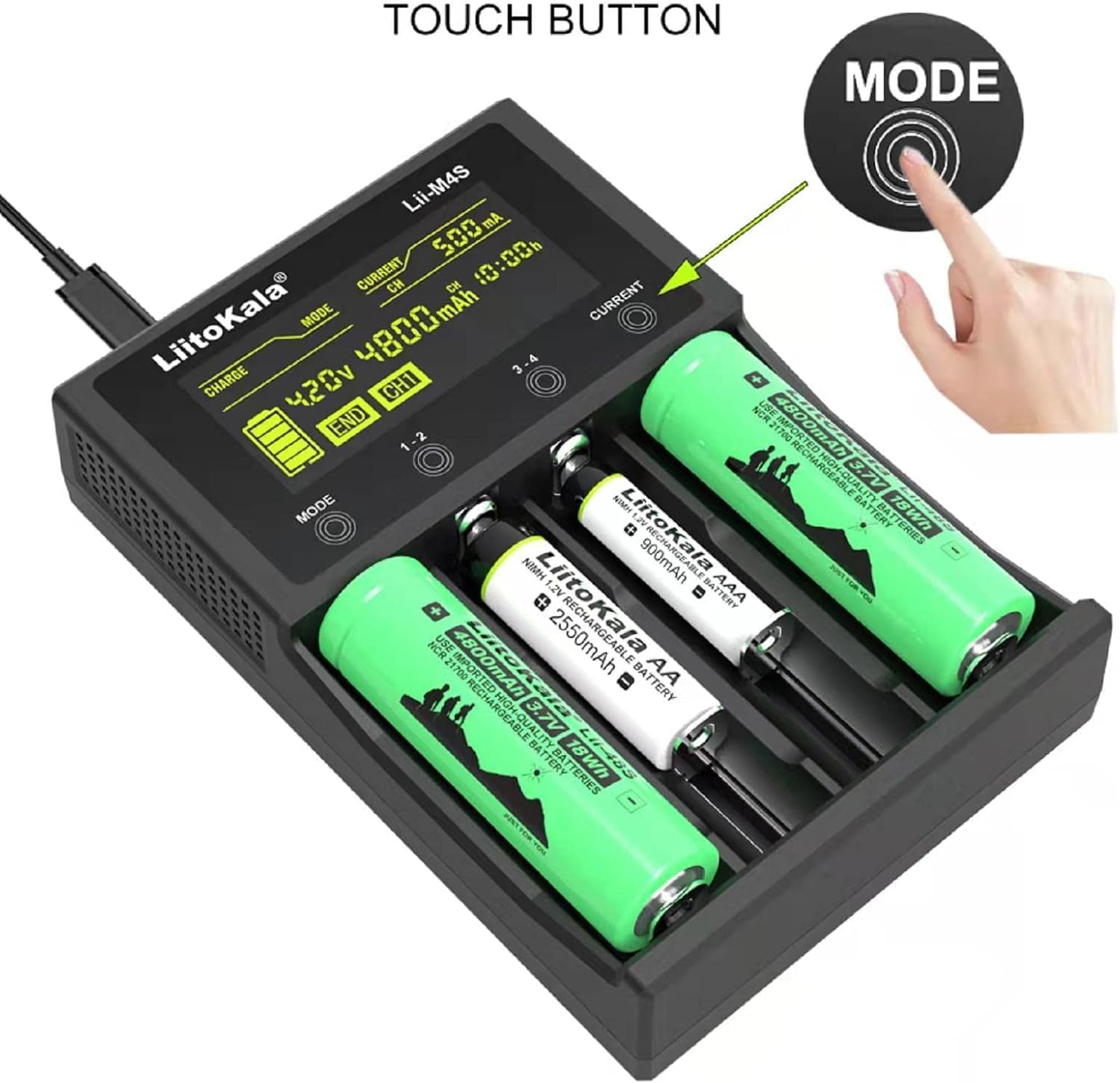
Image: A user's hand demonstrating how to interact with the LiitoKala Lii-M4S charger by pressing the "MODE" touch button, with batteries inserted in the bays.
1. CHARGE Mode:
This mode charges the battery to its full capacity. The display will show voltage (V), current (mA), accumulated capacity (mAh), and charging time (h).
2. DISCHARGE Mode:
This mode discharges the battery to empty. Useful for cycling batteries or preparing them for storage. The display will show discharge parameters.
3. TEST Mode:
This mode tests the actual capacity of the battery. The process involves three steps:
- Fully charges the battery.
- Discharges the battery fully to measure capacity.
- Fully charges the battery again.
The measured discharge capacity (mAh) is the true capacity of the battery.
4. STORAGE Mode:
This mode charges or discharges the battery to a specific voltage (approximately 3.8V for Li-ion batteries). This is ideal for long-term storage to preserve battery health and extend lifespan. This function is primarily for 3.7V Li-ion batteries.

Image: The LiitoKala Lii-M4S charger's LCD screen, with text overlays explaining the functions of TEST mode (Test Battery Capacity), DISCHARGE mode (Discharge The Battery To Empty), and STORAGE mode (This Results In Longer Battery Life And Safer Storage). It notes that only 3.7V batteries have the STORAGE function.
LCD Display Information
The LCD display provides real-time information for each channel. You can tap the 1-2 or 3-4 touch points to view the corresponding channel's data.
- Voltage (V): Current battery voltage.
- Current (mA): Charging or discharging current.
- Capacity (mAh): Accumulated charge/discharge capacity.
- Time (h): Elapsed charging/discharging time.
- Mode Indicator: Shows the active mode (CHARGE, DISCHARGE, TEST, STORAGE).
- Channel Indicator: CH1, CH2, CH3, CH4 to indicate the active channel.
- END: Indicates completion of a process.

Image: A detailed diagram of the LiitoKala Lii-M4S LCD screen, with labels pointing to and explaining each displayed parameter such as Charge, Discharge, Voltage, End, Mode, Storage, Current, Time, Capacity, and Channel indicators. It also highlights the touch buttons for Mode, Slot Switch (1-2, 3-4), and Current.
Supported Battery Types
The LiitoKala Lii-M4S is compatible with a wide range of rechargeable batteries:
- 3.7V Li-ion Batteries: 18650, 26650, 22650, 20700, 18350, 18490, 18500, 18700, 17335, 17670, 17500, 16340 (RCR123), 14500, 10440, 14650, 25500, 32650.
- 1.2V NiMH/Cd Batteries: AA, AAA, SC, C Size.
Note: This charger cannot charge all 1.5V batteries, including some AA/AAA batteries.

Image: The LiitoKala Lii-M4S charger displaying different types of batteries inserted into its bays, alongside a list of compatible Li-ion and NiMH/Cd battery sizes.
Charging and Discharging Currents
The charger allows selection of different current levels for charging and discharging:
- Charging Current Options:
- 300mA x 4 channels
- 500mA x 4 channels
- 700mA x 2 channels
- 1000mA x 2 channels
- Discharge Current Options:
- 250mA x 4 channels
- 500mA x 4 channels
To change the current, press the CURRENT touch point after selecting the channel(s) and mode.

Image: An illustration detailing the four optional charging currents (300mA*4, 500mA*4, 700mA*2, 1000mA*2) and discharge currents (250mA*4, 500mA*4) available on the LiitoKala Lii-M4S charger.
Media Resources
Video: An official product video demonstrating the operation and features of the LiitoKala Lii-M4S 18650 Battery Charger. The video shows how to insert batteries, navigate through modes, and view display information.
Maintenance
- Clean the charger regularly with a soft, dry cloth.
- Do not use abrasive cleaners or solvents.
- Ensure the charging bays are free of debris.
- Store the charger in a cool, dry place when not in use.
Troubleshooting
| Problem | Possible Cause | Solution |
|---|---|---|
| Charger not powering on. | No power supply or faulty cable. | Check USB cable connection and power adapter. Ensure 5V/2A input. |
| Battery not charging. | Incorrect battery type, wrong polarity, or battery is dead/damaged. | Verify battery compatibility and polarity. Try a different battery. Some deeply discharged batteries may not be recognized. |
| Display not showing correct information. | Incorrect channel selected or temporary glitch. | Tap 1-2 or 3-4 buttons to switch channels. Unplug and replug the charger. |
Specifications
- Model: Lii-M4S (Item model number: B0BPS9NZPM)
- Input Voltage: 5 Volts (DC)
- Output Voltage: 4.2 Volts (DC)
- Product Dimensions: 5.7 x 4 x 1.3 inches (14.5 x 10.2 x 3.3 cm)
- Item Weight: 8.8 ounces (0.25 Kilograms)
- Manufacturer: LiitoKala
- Country of Origin: China
- First Available: December 12, 2022
Warranty and Support
LiitoKala offers a 12-month warranty for this product. If you encounter any questions or issues during use, please contact LiitoKala customer support for assistance.
For more information or support, please visit the official LiitoKala Store on Amazon.
Ask a question about this manual
Ask about setup, troubleshooting, compatibility, parts, safety, or missing instructions. Manuals+ will review the question and use this page’s manual context to help answer it.