
Introduction
This manual provides instructions for the azwok replacement remote control, designed for various Smart TV models including Bauhn, Kogan, JVC, Linsar, CHIQ, Saba, and Changhong. It is specifically compatible with ATV55UHD series and models such as RM-C3348, RM-C3227, GCBLTV9MU, RCKGNTVT001, and ATV55UHDS-0519. This remote control is ready to use without any programming required; simply insert batteries, and it will function immediately.
Setup
1. Battery Installation
To begin using your remote control, you must install two AAA batteries (not included). Follow these steps:
- Locate the battery compartment on the back of the remote control.
- Press down on the latch and slide the battery cover off.
- Insert two new AAA batteries, ensuring that the positive (+) and negative (-) terminals align correctly with the markings inside the compartment.
- Slide the battery cover back into place until it clicks securely.

Figure 1: Rear view of the remote control with the battery compartment open, illustrating the correct placement for two AAA batteries.
Once batteries are installed, the remote is ready for use with compatible televisions.
Operation
This remote control provides full functionality for your compatible Smart TV. Point the remote directly at your television's infrared receiver for optimal performance.
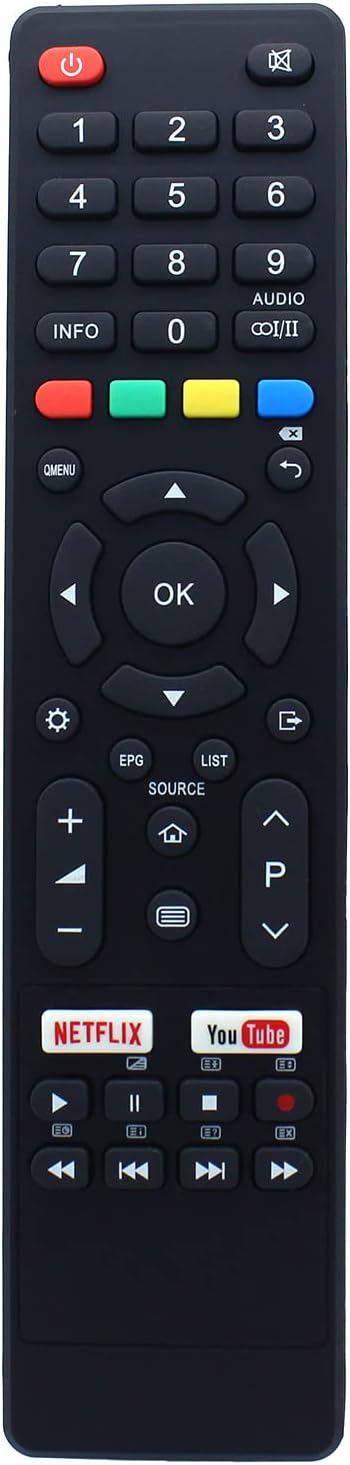
Figure 2: Front view of the azwok replacement remote control, showing the layout of all buttons.
Button Functions
| Button | Function |
|---|---|
| Power (Red) | Turns the TV on or off. |
| Mute | Mutes or unmutes the TV audio. |
| 0-9 (Number Pad) | Direct channel selection and input. |
| INFO | Displays program information. |
| AUDIO (I/II) | Selects audio language or mode. |
| Colored Buttons (Red, Green, Yellow, Blue) | Context-sensitive functions, often used for teletext or smart TV features. |
| Q.MENU | Accesses quick menu options. |
| Navigation Arrows (Up, Down, Left, Right) | Navigates through menus and options. |
| OK | Confirms selections. |
| Back / Exit | Returns to the previous screen or exits a menu. |
| Settings (Gear icon) | Opens the TV settings menu. |
| EPG | Accesses the Electronic Program Guide. |
| LIST | Displays channel list or other lists. |
| SOURCE | Selects input source (HDMI, AV, etc.). |
| Home (House icon) | Returns to the Smart TV home screen. |
| Volume Up (+) / Down (-) | Adjusts the TV volume. |
| Channel Up (P^) / Down (P˅) | Changes TV channels. |
| Netflix | Direct access to the Netflix application. |
| YouTube | Direct access to the YouTube application. |
| Media Playback Controls | Play, Pause, Stop, Fast Forward, Rewind, Skip. |
Maintenance
Cleaning
To maintain the remote control's functionality and appearance:
- Wipe the surface with a soft, dry cloth.
- For stubborn dirt, lightly dampen the cloth with water or a mild, non-abrasive cleaner.
- Do not use harsh chemicals, solvents, or abrasive cleaning pads, as these can damage the remote's finish or internal components.
Storage
When not in use for extended periods, remove the batteries to prevent leakage, which can damage the remote. Store the remote in a cool, dry place away from direct sunlight and extreme temperatures.
Troubleshooting
If you experience issues with your remote control, please refer to the following common problems and solutions:
| Problem | Possible Cause / Solution |
|---|---|
| Remote is not responding. |
|
| Some buttons are not working. |
|
| Remote does not work with my TV model. |
|
Specifications
| Feature | Detail |
|---|---|
| Brand | azwok |
| Model Number | AU-ATV55UHD-BA003 |
| Connectivity Technology | Infrared |
| Special Feature | No programming required |
| Compatible Devices | Television |
| Maximum Number of Supported Devices | 1 |
| Number of Buttons | 45 |
| Controller Type | Button Control |
| Maximum Range | 10 Meters |
| Batteries Required | 2 x AAA (Alkaline recommended) |
| Rechargeable Battery | No |
Compatible TV Models
This azwok replacement remote control is compatible with a wide range of Smart TV models from various brands. Below is a list of known compatible models:
- Brands: Bauhn, Kogan, JVC, Linsar, CHIQ, Saba, Changhong
- Series: ATV55UHD, ATV65UHD
- Specific Models:
- ATV55UHDS-0519, ATV40FHDS-0320, ATV32HDS-0420, ATV65UHDS-0319, ATV50UHDS-1019, ATV40FHDS-0720, ATV40FHDS-0819
- LT-40N5105A, LT-32N3105A, LT-32N3105AC, LT40N5105A, LT32N3105A, LT32N3105AC
- KALED40AF7000STA, AF7000
- LS58UHDSM20, LED32HS71N1, U58G7N, L32H7L/N, U43H7L/N, U50H7L/N, U55H7L/N, L32G7N, L40G7N
- SA32S48N1, S49N1, SB32HDS193LCES, B32G7 N-ESiT, SA24S45N1, SA32S49N1
- GCBL-TV9MU, GCBLTV9MU
- RM-C3348, RM-C3354, RM-C3349, RM-C3227B
- LT-58KB585, LT-50KB585
If your specific TV model is not listed, or if your original remote control differs significantly in appearance, please contact customer support to confirm compatibility before purchase.
Warranty and Returns
This product comes with a 12-month replacement guarantee from the date of purchase. If the remote control fails to function with your compatible device within this period, you are eligible for a replacement or refund.
Additionally, returns are accepted for refund or exchange within 31 days of receipt if the product does not meet your expectations or is found to be defective. Please retain your proof of purchase for warranty claims.
Customer Support
For any questions regarding product compatibility, troubleshooting, or warranty claims, please contact our customer support team. We are committed to assisting you in finding the correct remote control and resolving any issues you may encounter.
Seller: HeeTech-EU
Please refer to your purchase platform for direct contact methods with the seller.