
Luqeeg Luqeeg6dx2rqn47s-14
Contents
Luqeeg MP3 Player User Manual
Model: Luqeeg6dx2rqn47s-14
Introduction
This manual provides detailed instructions for the operation and maintenance of your Luqeeg MP3 Player. Please read this manual thoroughly before using the device to ensure proper functionality and longevity.
The Luqeeg MP3 Player is a portable digital music player designed for high-quality audio playback. It features a durable aluminum alloy casing, a 1.8-inch LCD screen, and supports various audio formats for a versatile listening experience.
What's in the Box
- 1 x Luqeeg MP3 Player
- 1 x Charging Cable
- 1 x Headphones
Key Features
- Lossless Sound Quality: Supports MP3, WMA, FLAC, APE, AAC, OGG, and ACELP audio formats for superior sound.
- Long Battery Life: Up to 8 hours of continuous playback on a full charge (approx. 2 hours charging time).
- Large Storage Capacity: Supports up to 64GB TF memory card expansion (card not included).
- Durable Design: Constructed from high-quality aluminum alloy for durability and corrosion resistance.
- User-Friendly Interface: Easy navigation with playlist support, shuffle playback, and sleep shutdown function.
- Multi-functionality: Beyond music, enjoy video playback, photo browsing, text reading, sound recordings, and FM radio.

Image: The MP3 player's screen displaying icons for various functions including music playback, video playback, photo browsing, text reading, sound recordings, and FM radio.
Setup Guide
1. Initial Charging
Before first use, fully charge your MP3 player. Connect the provided charging cable to the player's charging port and the other end to a USB power adapter (not included) or a computer's USB port. The battery indicator on the screen will show charging progress. A full charge typically takes about 2 hours.

Image: The MP3 player being charged, highlighting its long-lasting battery life of up to 8 hours.
2. Inserting a Memory Card (Optional)
The MP3 player supports TF (Micro SD) memory cards up to 64GB for expanded storage. Locate the memory card slot on the side of the device. Gently insert the TF card into the slot until it clicks into place. Ensure the card is inserted in the correct orientation.
Note: A memory card is not included with the player. For optimal performance, the original MYMAHDI memory card is recommended.

Image: The MP3 player shown with a Micro SD card, illustrating its capability for 64GB TF memory card expansion.
3. Connecting Headphones
Plug the included headphones into the 3.5mm audio jack on the player. Ensure the plug is fully inserted for proper sound output.
Operating Instructions

Image: Front view of the Luqeeg MP3 Player, showing the 1.8-inch LCD screen and the circular control pad with MENU, VOL, and navigation buttons.
Power On/Off
- To power on, press and hold the MENU button until the screen lights up.
- To power off, press and hold the MENU button until the screen turns off.
Navigation
- Use the Left/Right arrow buttons to navigate through menu options or tracks.
- Press the MENU button to select an option or enter a sub-menu.
- Press the VOL button to adjust the volume.
Music Playback
- From the main menu, select "Music".
- Navigate to your desired song or playlist.
- Press MENU to start playback.
- Use the Left/Right arrow buttons to skip tracks.
- Press VOL to adjust the volume.
- The player supports shuffle playback and sleep shutdown functions, which can be configured in the settings menu.
File Transfer
To transfer music or other files to your MP3 player, connect it to your computer using the provided USB cable. The player will appear as a removable disk drive. You can then drag and drop files directly into the player's storage or the inserted TF card.

Image: The MP3 player displaying its audio and video playback capabilities, listing supported audio formats (MP3, WMA, FLAC, APE) and video format (AMV).
Maintenance
- Cleaning: Use a soft, dry cloth to clean the player's surface. Do not use liquid cleaners or abrasive materials.
- Storage: Store the player in a cool, dry place away from direct sunlight and extreme temperatures.
- Battery Care: To prolong battery life, avoid fully discharging the battery frequently. Charge the device regularly, even if not in use for extended periods.
- Avoid Drops: While durable, avoid dropping the player to prevent internal damage.
Troubleshooting
| Problem | Possible Cause | Solution |
|---|---|---|
| Player does not turn on. | Low battery. | Charge the player for at least 30 minutes. |
| Short battery life. | Battery not fully charged or aging battery. | Ensure full charge (approx. 2 hours). If issue persists, battery may be degrading. |
| No sound from headphones. | Headphones not properly connected or faulty. Volume too low. | Ensure headphones are fully inserted. Test with another pair of headphones. Increase volume. |
| Cannot transfer files. | Incorrect USB connection. Player not recognized by computer. | Ensure USB cable is securely connected. Try a different USB port or cable. Restart computer and player. |
| Screen is scratched upon arrival. | Manufacturing defect or shipping damage. | Contact customer support for replacement or refund. |
Specifications
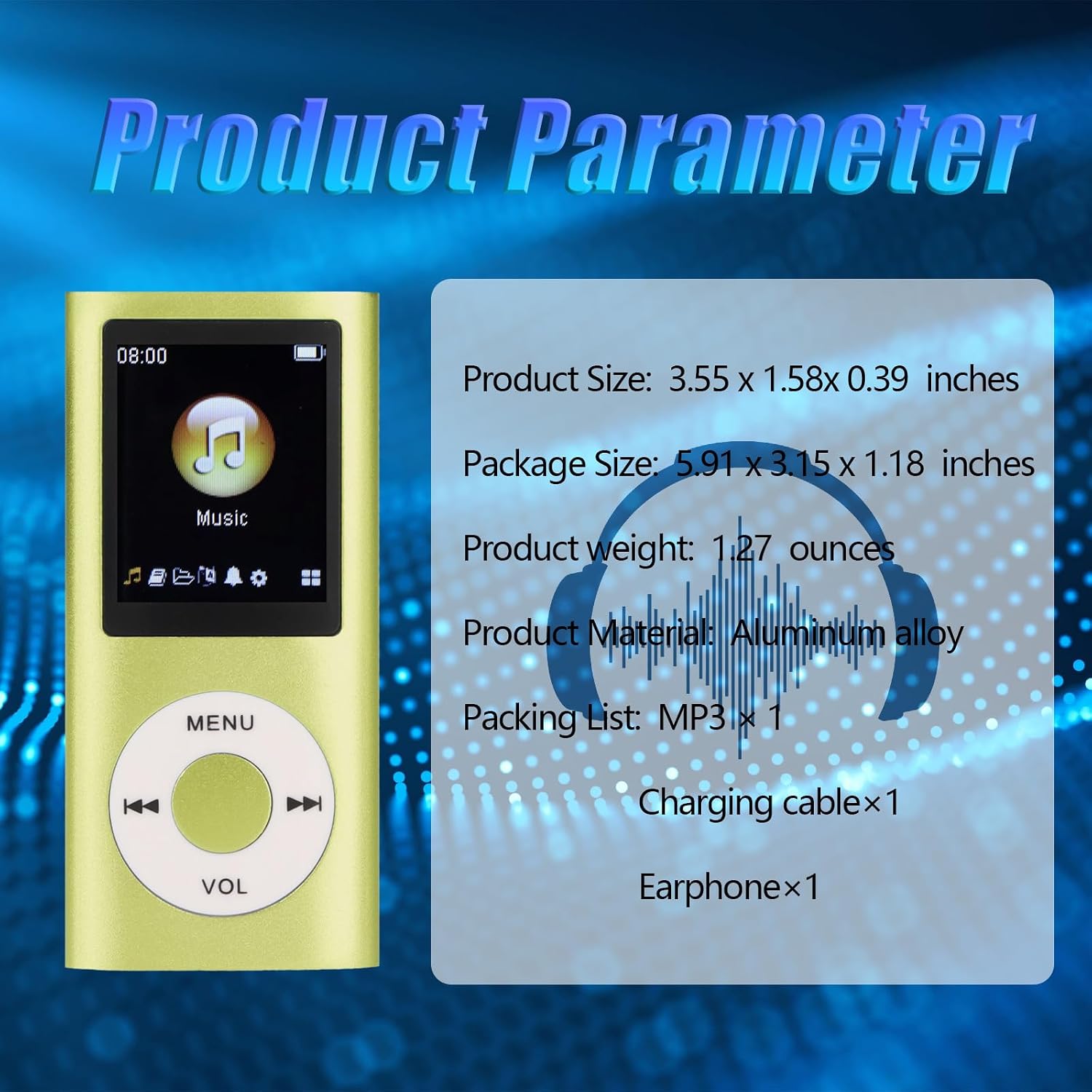
Image: A graphic detailing the product parameters including product size, package size, product weight, material (Aluminum alloy), and packing list (MP3 x 1, Charging cable x 1, Earphone x 1).
| Feature | Detail |
|---|---|
| Model Name | Luqeeg6dx2rqn47s-14 |
| Material | Aluminum Alloy |
| Display | 1.8-inch LCD Screen |
| Connectivity Technology | USB, AUX |
| Storage Capacity | Supports up to 64 GB (TF card not included) |
| Compatible Devices | Personal Computer |
| Supported Audio Formats | MP3, WMA, FLAC, APE, AAC, OGG, ACELP |
| Battery Type | Built-in Lithium Battery (200 mAh) |
| Battery Life | Up to 8 hours (approx.) |
| Charging Time | Approx. 2 hours |
| Product Dimensions | Approx. 3.55 x 1.58 x 0.39 inches |
| Product Weight | Approx. 1.27 ounces |
| Color | Green |
Warranty and Support
For any issues or inquiries regarding your Luqeeg MP3 Player, please contact the seller or manufacturer directly. Refer to your purchase documentation for specific warranty terms and contact information.
The product is manufactured by Luqeeg. For support, you may visit the Luqeeg Store on Amazon.
Please retain your proof of purchase for warranty claims.
Ask a question about this manual
Ask about setup, troubleshooting, compatibility, parts, safety, or missing instructions. Manuals+ will review the question and use this page’s manual context to help answer it.