
1. Introduction
Welcome to the user manual for your KOSPET Optimus 2 Smart Watch Phone. This device is a high-performance Android smartwatch designed to offer advanced features including a unique rotating camera, powerful processing capabilities, and comprehensive connectivity. This manual provides essential information to help you set up, operate, and maintain your watch, ensuring optimal performance and longevity.
2. Product Overview & Key Features
The KOSPET Optimus 2 is engineered with cutting-edge technology to provide a seamless and powerful user experience. Below are its primary features:
2.1. Advanced Camera System
Equipped with a 13MP high-performance camera featuring an IMX214 graphics sensor, the Optimus 2 supports auto-focusing and 3.9 times lossless zoom. It is capable of shooting 1080p video at 30 frames per second. The camera is uniquely designed to rotate 90 degrees, allowing it to function as both a main camera and a front-facing camera for selfies or video calls.

Figure 2.1: The KOSPET Optimus 2 features a 13MP Sony IMX214 camera for high-quality photography and video.
The watch also includes an intelligent light supplement function, enabling clear photos and videos even in low-light environments by activating a built-in flashlight.
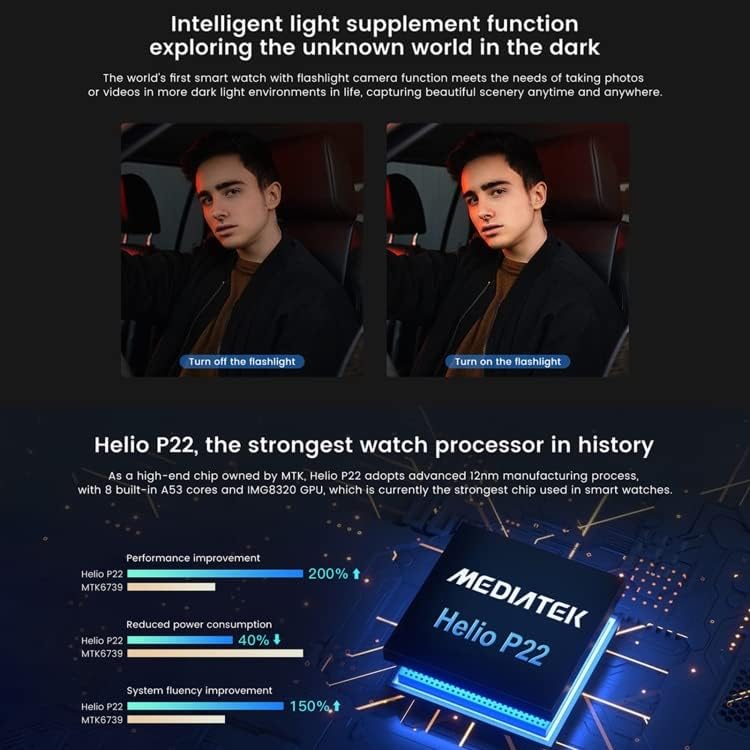
Figure 2.2: Intelligent light supplement function for improved visibility in dark conditions.
2.2. Powerful Processor & Memory
The Optimus 2 is powered by the Helio P22 octa-core smart processor, complemented by a PixArt PAR2822 low-power Bluetooth chip for efficient connectivity. It boasts 4GB of LPDDR4 memory and 64GB of EMMC 5.1 flash storage, ensuring smooth operation for applications, games, and personal files.

Figure 2.3: Dual-chip architecture featuring Helio P22 and PAR2822 for optimized performance and power efficiency.

Figure 2.4: High-capacity memory and storage for smooth application performance and data storage.
2.3. Connectivity & Communication
The watch supports 4G and Wi-Fi (2.4GHz & 5GHz) network connections. With a Nano SIM card (not included), you can make and receive calls, send text messages, and access the internet directly from your wrist. It also features GPS (A-GPS, GLONASS) for navigation and Bluetooth V5.0 for seamless pairing with other devices.
2.4. Health & Fitness Monitoring
Integrated with a VC32S heart rate sensor and a powerful motion sensor, the Optimus 2 accurately monitors your heart rate and blood pressure 24/7. It also includes 31 built-in sports modes to track various physical activities, from outdoor running to basketball and yoga.

Figure 2.5: Overview of the 31 integrated sports modes for comprehensive fitness tracking.
2.5. Display & Battery
The watch features a 1.6-inch display with a resolution of 400 x 400 pixels. It is powered by a 1260mAh battery in the watch itself, supplemented by an additional 1000mAh power bank for extended use. The standby time is approximately 1-2 days in Android mode, with a charging time of about 2 hours.
3. Setup Guide
Follow these steps to set up your KOSPET Optimus 2 Smart Watch Phone:
3.1. Unboxing and Initial Charge
- Carefully unbox your KOSPET Optimus 2 and all included accessories.
- Connect the charging cable to the watch and a compatible USB power adapter.
- Charge the watch fully before first use. A full charge typically takes about 2 hours.

Figure 3.1: KOSPET Optimus 2 Smart Watch, charging cable, and other accessories included in the package.
3.2. SIM Card Installation
The Optimus 2 supports a Nano SIM card for cellular connectivity.
- Locate the SIM card slot on the side of the watch.
- Use the provided SIM ejector tool to open the SIM tray.
- Carefully place your Nano SIM card into the tray, ensuring correct orientation.
- Gently push the SIM tray back into the watch until it clicks into place.
3.3. Initial Power On and Pairing
- Press and hold the power button until the KOSPET logo appears.
- Follow the on-screen prompts to select your language and region.
- To pair with your smartphone, download the companion app (refer to the quick start guide included with your watch for app details).
- Enable Bluetooth on your smartphone and follow the app's instructions to connect to your Optimus 2. The watch is compatible with Android 5.1+ and iOS 9.0+ devices.
4. Operating Instructions
This section covers the basic operation of your KOSPET Optimus 2.
4.1. Navigation and User Interface
- Touchscreen Gestures: Swipe left/right to navigate between screens, swipe up/down for notifications or quick settings. Tap to select items.
- Side Buttons: The power button typically serves as a back button or to return to the home screen. Other buttons may be customizable or dedicated to specific functions like sports modes.
4.2. Switching Operating Modes
The Optimus 2 supports two main operating modes: Android Mode and Lite Mode.
- Android Mode: This is the full-featured smartwatch experience, allowing access to all applications, full connectivity, and advanced functions.
- Lite Mode: A simplified mode designed to conserve battery life, primarily supporting basic call functions, SMS, and fitness tracking.
To switch between modes, navigate to the system settings on your watch and select the desired operating mode. Restarting the watch may be required for the change to take take effect.
4.3. Using the Camera
- Accessing the Camera: Open the camera application from the app drawer.
- Rotating the Camera: The camera module located at the 12 o'clock position can be manually rotated 90 degrees to switch between a forward-facing camera and a selfie/video call camera.
- Flashlight Function: Within the camera app or quick settings, you can activate the intelligent light supplement (flashlight) for better visibility in dark environments.
4.4. Making Calls and Sending Messages
With a Nano SIM card inserted and active, you can use your watch as a standalone phone.
- Calls: Open the Phone app, dial a number, or select a contact to make a call.
- Messages: Open the Messaging app to compose and send SMS messages.
4.5. Health and Fitness Tracking
- Heart Rate & Blood Pressure: Access the Heart Rate or Blood Pressure app to take on-demand measurements. For continuous monitoring, ensure the feature is enabled in settings.
- Sports Modes: Open the Sports app to select from 31 different activities. The watch will track relevant metrics such as steps, distance, calories burned, and heart rate during your workout.
5. Maintenance
Proper maintenance ensures the longevity and optimal performance of your KOSPET Optimus 2.
5.1. Cleaning the Device
- Wipe the screen and body of the watch with a soft, lint-free cloth.
- For stubborn smudges, slightly dampen the cloth with water. Avoid using harsh chemicals or abrasive materials.
- Ensure the charging contacts are clean and dry before charging.
5.2. Battery Care
- Avoid fully discharging the battery frequently.
- Charge the watch using only the provided cable and a compatible power adapter.
- Do not expose the watch to extreme temperatures, as this can affect battery life.
5.3. Software Updates
Regularly check for and install software updates to ensure your watch has the latest features, performance improvements, and security patches. Updates can typically be found in the watch's settings menu under 'About Watch' or 'System Updates'.
6. Troubleshooting
If you encounter issues with your KOSPET Optimus 2, try the following solutions:
- Watch not turning on: Ensure the watch is fully charged. Connect it to the charger and wait a few minutes before attempting to power it on again.
- Poor battery life: Check if background apps are running excessively. Consider switching to Lite Mode for extended battery life. Reduce screen brightness and disable unnecessary features like Wi-Fi or GPS when not in use.
- Connectivity issues (Wi-Fi/Bluetooth/4G): Ensure Wi-Fi and Bluetooth are enabled. For 4G, verify the SIM card is correctly inserted and has an active plan. Try restarting the watch and your connected device.
- Apps crashing or slow performance: Close unused applications. Clear app caches or uninstall and reinstall problematic apps. If issues persist, consider a factory reset (back up your data first).
- Screen unresponsive: Try restarting the watch by holding down the power button. If unresponsive, allow the battery to drain completely and then recharge and restart.
If these steps do not resolve the issue, please refer to the manufacturer's official support channels.
7. Specifications
Detailed technical specifications for the KOSPET Optimus 2 Smart Watch Phone:
| Feature | Specification |
|---|---|
| Model Number | Optimus 2 |
| SIM Type | Nano SIM Card |
| Operating System | Android 5.1 (compatible with iOS 9.0+) |
| Processor | Helio P22 Octa-core + PixArt PAR2822 |
| Memory (RAM) | 4GB LPDDR4 |
| Storage (ROM) | 64GB EMMC 5.1 |
| Display Size | 1.6 inch |
| Display Resolution | 400 x 400 pixels |
| Camera | 13MP (IMX214) Rotating Camera with Flashlight |
| Connectivity | 4G, Wi-Fi (2.4GHz & 5GHz), Bluetooth 5.0, GPS (A-GPS, GLONASS) |
| Battery Capacity | 1260mAh (watch) + 1000mAh (power bank) |
| Charging Time | Approx. 2 hours |
| Standby Time | 1-2 days (Android mode) |
| Special Features | Sleep Monitor, GPS, Camera, Heart Rate Monitor, 31 Sports Modes |
| Manufacturer | Tajomo |
| Date First Available | 10 December 2022 |
8. Warranty and Support
This section provides general information regarding warranty and support for your KOSPET Optimus 2.
8.1. Warranty Information
Specific warranty terms and conditions for the KOSPET Optimus 2 are typically provided by the retailer or manufacturer at the time of purchase. Please refer to your purchase documentation or the manufacturer's official website for detailed warranty coverage, duration, and claim procedures. No specific warranty details are available in this manual.
8.2. Customer Support
For technical assistance, troubleshooting beyond this manual, or service inquiries, please contact the retailer where you purchased the device or visit the official KOSPET (or manufacturer Tajomo) support website. Ensure you have your product model number (Optimus 2) and purchase details ready when contacting support.