
WLtoys K110S
WLtoys K110S 6CH 3D/6G System Flybarless RC Helicopter User Manual
Model: K110S
1. Safety Information
Before operating the WLtoys K110S RC Helicopter, please read and understand all safety instructions. Failure to follow these instructions may result in injury or damage to the product.
- Always operate the helicopter in a spacious, wind-free, and obstacle-free outdoor area. Maintain a safe distance from the aircraft.
- Keep hands, face, and loose clothing away from rotating blades.
- Ensure the battery is fully charged before each flight.
- Do not fly with broken or damaged rotor blades.
- Recommended age for operation is 14 years and up.
- In case of emergency, immediately use the emergency stop function on the remote control.
2. Setup
2.1. Package Contents
The WLtoys K110S package typically includes:
- WLtoys K110S RC Helicopter
- 2.4G 6-channel Remote Control
- 3.7V 450mAh 25C Li-Po Battery
- Dedicated USB Charger (charges 2 batteries simultaneously)
- Spare Main Blades
- Spare Tail Rotor
- Tools (e.g., screwdriver)
- Instruction Manual
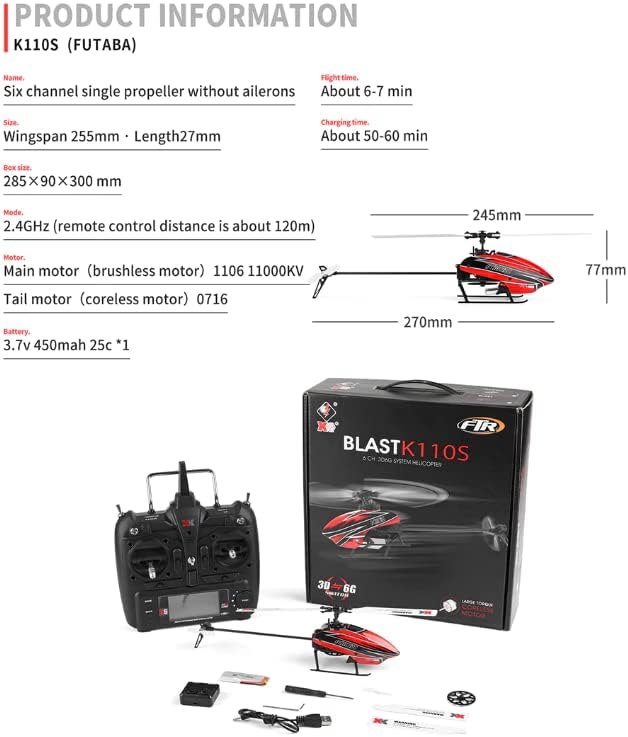
Image: Package contents of the WLtoys K110S helicopter, showing the helicopter, remote control, charger, and various accessories.
2.2. Battery Charging
Ensure the helicopter's 3.7V 450mAh 25C Li-Po battery is fully charged before use. Use the dedicated USB charger provided. The charger can charge two batteries simultaneously.
- Connect the USB charger to a compatible USB power source (e.g., phone adapter, computer USB port).
- Connect the battery to the charger. The indicator light will show charging status.
- Charging time is approximately 50-60 minutes for a single battery.

Image: Illustration of various battery charging methods, including using a cell phone power adapter, computer USB port, or mobile phone charger.
2.3. Remote Control Preparation
The remote control requires 6 AA batteries (not included).
- Install 6 AA batteries into the remote control, ensuring correct polarity.
- Push the throttle stick to its lowest position.
- Set all switches on the remote control to the upper position.
Video: Beginner's instructions for the WLtoys K110S, demonstrating remote control setup and initial checks.
2.4. Connecting and Calibrating
After preparing the remote control and charging the battery:
- Connect the fully charged battery to the helicopter. Ensure battery wires do not interfere with landing gear or internal gears.
- Place the helicopter on a flat, level surface.
- Turn on the remote control. The remote will automatically pair with the helicopter.
- To calibrate, pull both control sticks to their outermost sides. The helicopter blades will twitch up and down, indicating successful calibration.
Video: Demonstrates connecting the battery, turning on the remote, and calibrating the helicopter by moving control sticks.
3. Operating Instructions
3.1. Flight Modes (3D/6G System)
The WLtoys K110S features both 3D and 6G flight modes, switchable via the remote control.
- 6G Mode: Utilizes a 6-axis gyroscope for stable flight, ideal for beginners. It offers enhanced stability and wind resistance.
- 3D Mode: Employs a 3-axis gyroscope, providing responsive control for aerobatics such as rolls, inverted flight, and other advanced maneuvers. Recommended for experienced pilots.
Recommendation: Beginners should start practicing in 6G mode and switch to 3D mode only after mastering all basic functions.

Image: The WLtoys K110S helicopter flying outdoors, illustrating the stability of 6G mode for beginners.

Image: The WLtoys K110S helicopter performing advanced maneuvers, highlighting the responsive control of 3D mode.
3.2. Takeoff and Landing
For takeoff, gently push the throttle stick upwards to lift the helicopter. For beginners, it is advisable to fly at a low altitude initially.
After takeoff, gently control the throttle stick to adjust the helicopter's altitude. Use the right stick to adjust forward/backward and left/right attitude, ensuring the tail remains stable and hovers facing towards you.
To land, slowly pull the throttle stick downwards until the helicopter gently touches down.
Video: Demonstrates gentle takeoff and controlled hovering, emphasizing maintaining tail stability for beginners.
3.3. Hovering Point Adjustment
The remote control allows for setting the aircraft's hovering point. Enter the setting mode to adjust the hover point according to your preference for stable flight.

Image: The WLtoys K110S helicopter maintaining a stable hover, with the remote control showing the "Spot Hover" feature.
4. Maintenance
- Regularly inspect the helicopter for any signs of damage to the blades, frame, or electronic components.
- Replace any damaged parts immediately using genuine WLtoys spare parts.
- Keep the helicopter clean and free from dust and debris.
- Store the helicopter and remote control in a cool, dry place away from direct sunlight.
- Ensure batteries are stored at a partial charge (around 3.8V per cell for Li-Po) if not used for extended periods.
5. Troubleshooting
| Problem | Possible Cause | Solution |
|---|---|---|
| Helicopter does not respond to remote control. | Not paired or low battery. | Ensure remote and helicopter are powered on and paired. Charge helicopter battery. |
| Unstable flight/drifting. | Improper calibration or wind interference. | Recalibrate the helicopter on a flat surface. Fly in a wind-free environment. |
| Blades not spinning. | Throttle hold engaged or battery not connected. | Disengage throttle hold. Ensure battery is properly connected. |
| Short flight time. | Battery not fully charged or old battery. | Fully charge the battery. Consider replacing old batteries. |
6. Specifications
- Model: K110S
- Brand: WLtoys
- Channels: 6CH
- Flight System: 3D/6G (Brushless, Flybarless)
- Main Motor: 1106 Brushless Motor
- Tail Motor: 0716 Coreless Motor
- Battery: 3.7V 450mAh 25C Li-Po
- Flight Time: Approximately 6-7 minutes
- Charging Time: Approximately 50-60 minutes
- Remote Control: 2.4GHz (compatible with FUTABA S-FHSS)
- Remote Control Distance: Approximately 120m
- Product Dimensions: 9.65 x 1.89 x 3.03 inches
- Item Weight: 2.12 ounces
- Recommended Age: 14 years and up

Image: Detailed product information and dimensions for the WLtoys K110S helicopter.

Image: Close-up view of the WLtoys K110S helicopter, highlighting the 1106 brushless main motor and 0716 coreless tail motor.
7. Warranty and Support
For warranty information, technical support, or to purchase spare parts, please contact the seller or the official WLtoys customer service. Refer to your purchase documentation for specific warranty terms and contact details.
Related documentsK110S


Ask a question about this manual
Ask about setup, troubleshooting, compatibility, parts, safety, or missing instructions. Manuals+ will review the question and use this page’s manual context to help answer it.