
1. Introduction
This manual provides instructions for the installation, operation, maintenance, and troubleshooting of your B-Qtech RV Tire Pressure Monitoring System (TPMS) Model T601P with 6 sensors. This system is designed to monitor tire pressure and temperature in real-time for various vehicles, including RVs, trailers, motorhomes, campers, trucks, and buses.
The system utilizes an Infineon SP40 chip for accurate and stable monitoring, updating data every 3 seconds and alerting for anomalies. It features a 3.2-inch HD digital LCD screen for clear display of all tire data and offers 7 alarm modes for comprehensive safety.

Figure 1: B-Qtech T601P TPMS Monitor, 6 Sensors, and Repeater Cable
2. Setup and Installation
2.1 Package Contents
Verify that all components are present:
- TPMS Monitor (1)
- Tire Pressure Sensors (6)
- Signal Repeater (1)
- USB Charging Cable (1)
- User Manual (1)
2.2 Initial Activation
For the first installation, follow these steps:
- Turn on the TPMS monitor.
- Install the sensors onto the tire valves. The monitor requires changes in tire pressure to activate and display readings.
2.3 Sensor Installation
The sensors feature a pure copper valve core for durability and resistance to high air pressure.
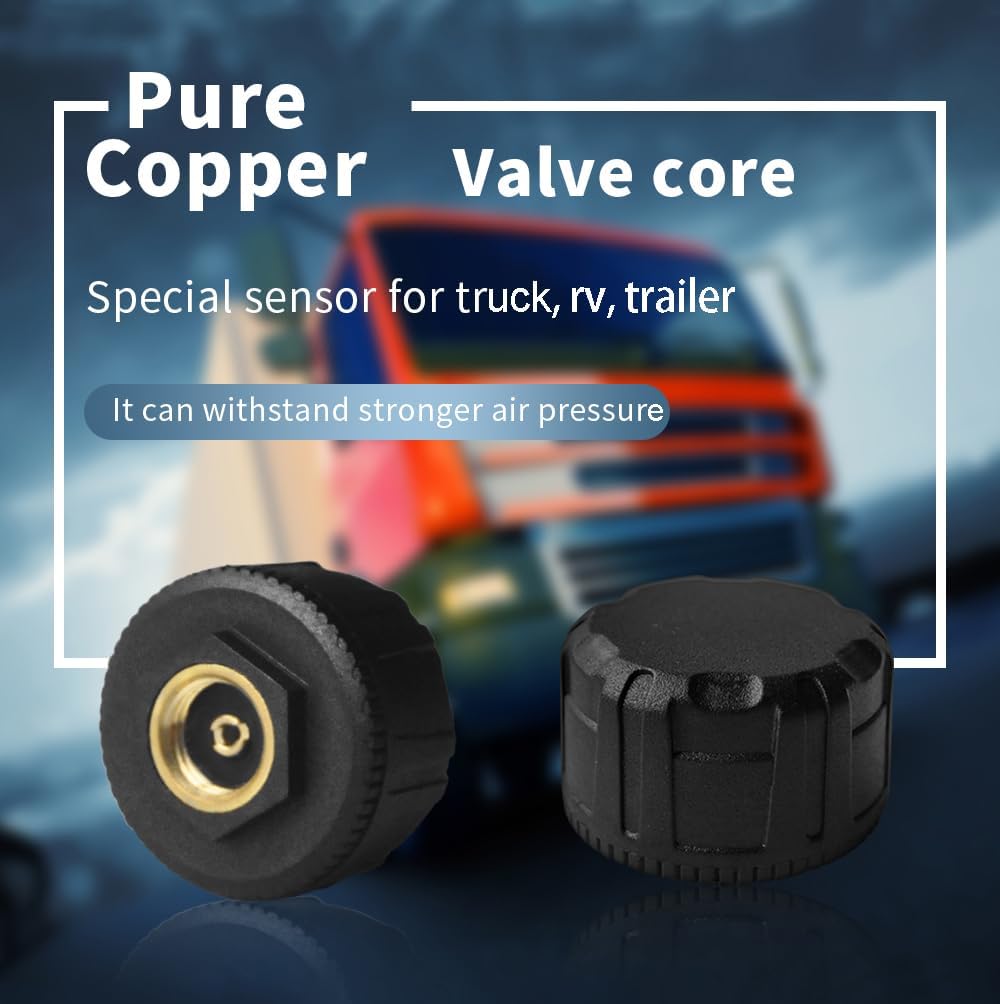
Figure 2: TPMS Sensor with Pure Copper Valve Core
2.4 Vehicle Mode Switching (4-wheel / 6-wheel)
The T601P system supports both 4-wheel and 6-wheel vehicle configurations. Refer to the detailed instructions in the manual (not provided in this summary) for steps on how to switch between these modes. This allows for flexible use across different vehicle types.

Figure 3: 6-Wheel and 4-Wheel Display Modes
2.5 Repeater Installation
The included repeater enhances the signal between the sensors and the monitor, especially for longer vehicles like RVs and trailers. It stabilizes the signal within a range of up to 30 meters (98 feet), preventing signal interruption caused by distance or electronic interference.

Figure 4: Wireless Transmission with Repeater
3. Operating Instructions
3.1 Real-time Monitoring
The 3.2-inch HD digital LCD screen displays real-time tire pressure and temperature for all 6 tires, along with monitor battery level and solar charging status. Data is updated every 3 seconds.

Figure 5: Real-time Monitoring Display
3.2 Alarm Modes and Customization
The system features 7 distinct alarm modes:
- High-pressure alarm
- Low-pressure alarm
- High-temperature alarm
- Sensor low battery alarm
- Fast tire leak alarm
- Sensor failure alarm
- Monitor low battery alarm
Alarm values for high pressure, low pressure, and high temperature can be customized for each axle. Factory default settings are: High-pressure alarm: 116 PSI, Low-pressure alarm: 58 PSI, High-temperature alarm: 149℉.

Figure 6: Seven Alarm Modes
4. Maintenance
4.1 Charging the Monitor
The TPMS monitor is equipped with a built-in 2200mAh rechargeable lithium battery and supports two charging methods:
- Solar Charging: The integrated solar panel provides continuous power on sunny days.
- USB Charging: Use the provided USB charging cable to power the monitor on cloudy days or at night.

Figure 7: Solar and USB Charging
4.2 Sensor Battery Replacement
The sensors are designed for long-term use. If a 'Sensor Low Battery' alarm occurs, refer to the full product manual for instructions on sensor battery replacement.
5. Troubleshooting
This section addresses common issues you might encounter with your B-Qtech TPMS.
- Monitor does not display tire pressure readings after installation: Ensure the monitor is turned on before installing the sensors. The sensors require a change in tire pressure to activate and transmit data.
- Unstable signal or data loss: If the distance between a sensor and the monitor exceeds 8 meters (approximately 26 feet), or if other electronic equipment in the vehicle causes interference, the signal may become unstable. Ensure the signal repeater is correctly installed and positioned to stabilize the signal within its 30-meter (98 feet) range.
- Monitor low battery alarm: Recharge the monitor using either the solar panel or the provided USB charging cable.
- Sensor low battery alarm: Replace the battery in the affected sensor. Refer to the complete manual for specific instructions.
- Sensor failure alarm: This indicates a malfunction with a specific sensor. Contact customer support for assistance.
For any persistent issues or professional technical guidance, please contact B-Qtech customer service.
6. Specifications
| Feature | Detail |
|---|---|
| Brand | B-Qtech |
| Model | T601P (Item model number: 31628) |
| Pressure Range | 0-199 PSI (0-13.7 Bar) |
| Pressure Accuracy | ±2 PSI |
| Temperature Accuracy | ±3℉ |
| High Temperature Alarm Default | 149℉ |
| Monitor Screen Size | 3.2 inch HD Digital LCD |
| Monitor Battery | 2200mAh Rechargeable Lithium Ion (included) |
| Charging Methods | Solar, USB |
| Signal Transmission Range (with Repeater) | Up to 30 meters (98 feet) |
| Item Weight | 1.01 pounds |
| Package Dimensions | 8.27 x 6.02 x 2.83 inches |

Figure 8: Monitor Dimensions
7. Warranty Information
Specific warranty details are not provided within this user manual. Please refer to the product packaging, the official B-Qtech website, or contact B-Qtech customer service for comprehensive warranty information.
8. Customer Support
For technical assistance, product inquiries, or warranty claims, please contact B-Qtech customer service. You can find contact information on the official B-Qtech website or through your purchase platform.
Visit the official B-Qtech Store: B-Qtech Amazon Store


