Introduction
Thank you for choosing the Uvital C05 Corded Telephone. This manual provides detailed instructions for setting up, operating, and maintaining your new telephone. Please read this manual carefully before use to ensure proper functionality and longevity of the product.
The Uvital C05 is designed for ease of use, featuring large buttons, adjustable volume, and one-touch speed dial capabilities, making it suitable for various users, including seniors. Its durable ABS plastic casing ensures reliable performance.
Package Contents
Before you begin, please check the package contents:
- Uvital C05 Corded Telephone Unit
- Handset
- Coiled Handset Cord
- Telephone Line Cord
- User Manual (this document)
Setup
Follow these steps to set up your Uvital C05 telephone:
- Connect the Handset: Plug one end of the coiled handset cord into the port on the side of the telephone base and the other end into the handset.
- Connect the Telephone Line: Plug one end of the telephone line cord into the LINE port on the back of the telephone base. Plug the other end into your wall telephone jack.
- Placement: Place the telephone on a stable, flat surface. Ensure it is not near strong electromagnetic fields or direct sunlight.
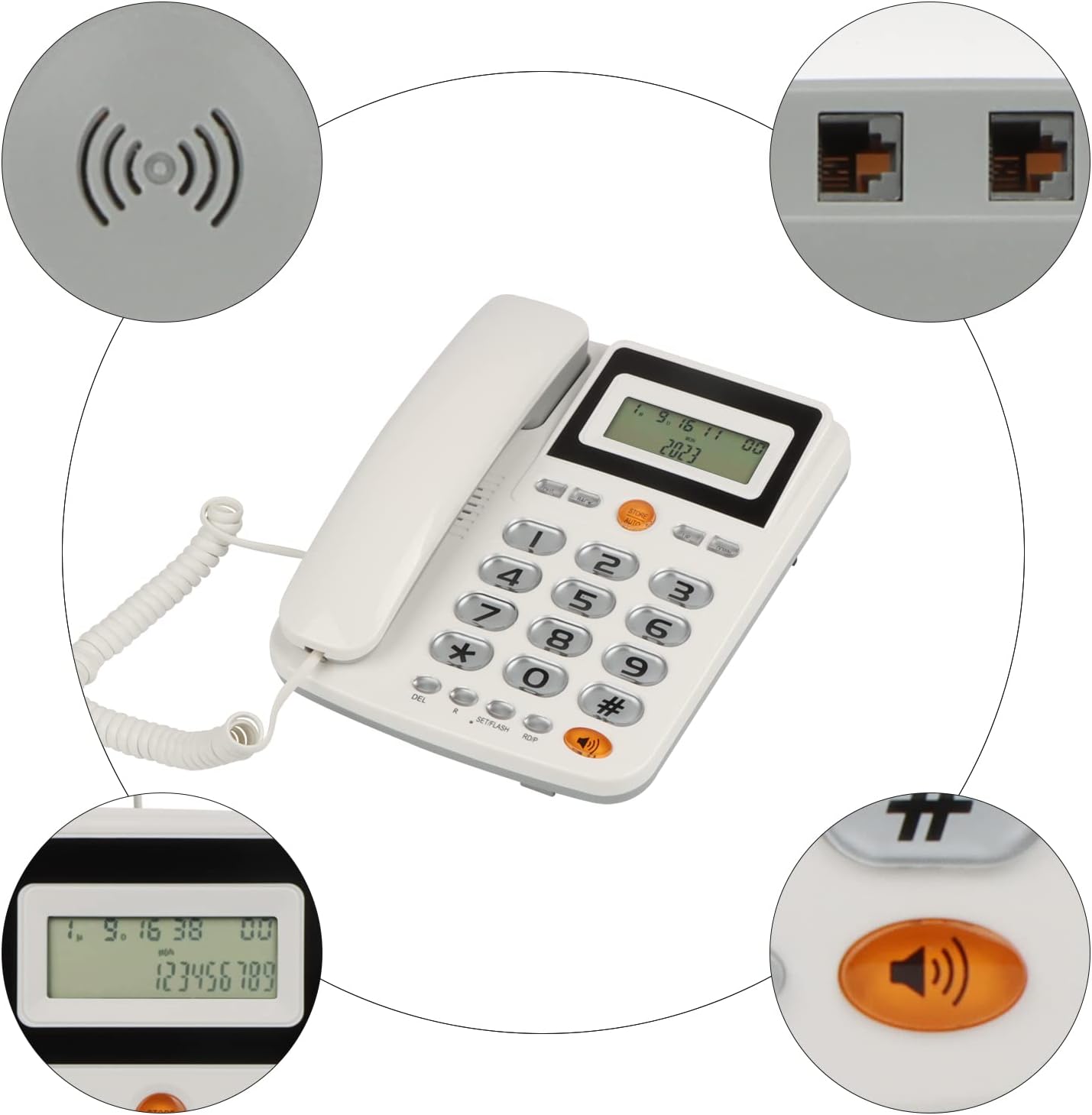
Description for visually impaired users: The image displays a top-down view of the Uvital C05 telephone. Circular insets highlight the handset connection port on the left side of the phone, the two telephone line ports on the back, the speaker grill, and the LCD screen. This illustrates where to connect the cords for initial setup.
Operating Instructions
Key Features and Ease of Use
The Uvital C05 telephone is designed with user convenience in mind, especially for seniors. It features large, easy-to-read buttons and a clear display.

Description for visually impaired users: This image shows a close-up of the Uvital C05 telephone's keypad, with a magnifying glass highlighting the large, clearly labeled numeric buttons. An icon of a hand pressing a button and text "Big Buttons Easy to identify and dial" further emphasizes this feature.
Making a Call
- Lift the handset or press the Speaker button for hands-free calling.
- Dial the desired phone number using the large numeric keypad.
- Wait for the call to connect.
- To end the call, replace the handset or press the Speaker button again.
Receiving a Call
- When the phone rings, lift the handset or press the Speaker button to answer.
- To end the call, replace the handset or press the Speaker button again.
Speed Dial Programming (10 Groups)
The C05 telephone can store up to 10 frequently used phone numbers for quick dialing.
- Dial the phone number you wish to save.
- Press and hold the STORE/AUTO button for approximately three seconds until you hear a confirmation tone or see an indicator on the display.
- Press the desired numeric key (0-9) where you want to save the number. For example, press "1" to save it to speed dial 1.
- The number is now saved.
Using Speed Dial
- Lift the handset or press the Speaker button.
- Press the STORE/AUTO button.
- Press the numeric key (0-9) corresponding to the saved number. The phone will automatically dial the stored number.
Adjusting Volume
The telephone features adjustable volume for both the ringer and the earpiece/speaker. Use the volume control buttons (usually marked with UP/DOWN arrows or a dedicated switch) to adjust the sound level to your preference.

Description for visually impaired users: This image shows the Uvital C05 telephone with a graphic overlay indicating "Loud Sound" and "HD Voice IC". Sound waves emanate from the speaker area, emphasizing the phone's high-volume capability.
LCD Display and Caller ID
The LCD display shows the current date and week. If the telephone line is disconnected and reconnected, the time and date are calculated from saved data. The display brightness can be adjusted for better visibility.
The phone supports Caller ID, allowing you to view incoming call information. You can query a history of 14 to 50 groups of calls, including call time.

Description for visually impaired users: The image features the Uvital C05 telephone, highlighting its LCD screen which displays caller ID information (a phone number) and the current date/time. Arrows point to the side of the phone, indicating "Dimming" with "First gear" through "Five gear" settings, illustrating the adjustable display brightness.
Maintenance
- Cleaning: Use a soft, damp cloth to clean the telephone's surface. Do not use abrasive cleaners or solvents, as they may damage the finish.
- Storage: Store the telephone in a cool, dry place away from direct sunlight and extreme temperatures.
- Handling: Handle the telephone with care. Avoid dropping it or subjecting it to strong impacts.
- Cord Management: Ensure telephone cords are not tangled or pinched, which can lead to damage or poor connection.
Troubleshooting
| Problem | Possible Cause | Solution |
|---|---|---|
| No dial tone | Telephone line cord is disconnected or faulty. | Check that the telephone line cord is securely plugged into both the phone and the wall jack. Try a different line cord if available. |
| Cannot hear caller / Caller cannot hear me | Handset cord is loose or faulty; volume is too low. | Ensure the handset cord is firmly connected. Adjust the volume using the dedicated buttons. |
| Phone does not ring | Ringer volume is off or set too low. | Increase the ringer volume. Check if the ringer is switched off (if applicable). |
| Caller ID not displayed | Caller ID service not subscribed; display brightness too low. | Contact your telephone service provider to ensure Caller ID service is active. Adjust LCD display brightness. |
Specifications
- Model: C05
- Brand: Uvital
- Material: Environmentally friendly and durable ABS plastic
- Display: LCD with adjustable brightness
- Keypad: Large buttons for easy dialing
- Audio: HD Voice IC for clear calls, dual horn design for loud incoming calls
- Speed Dial: Stores up to 10 numbers
- Caller ID: Supports 14-50 group call query
- Dimensions: 21.6 x 21.5 x 6.8 cm (approx.)
- Weight: 650 grams (approx.)
Warranty and Support
Information regarding product warranty and customer support was not available in the provided product data. Please refer to the product packaging or the retailer's website for specific warranty details and contact information for support.
For general inquiries or assistance, you may visit the Uvital brand page on Amazon.


