
1. Introduction
The Technoline WL1028 CO2 Meter is designed to monitor indoor air quality by measuring carbon dioxide (CO2) concentration, temperature, and humidity. Maintaining good indoor air quality is crucial for health and well-being. This device provides real-time data and ventilation recommendations to help you ensure a healthy environment.
The WL1028 features a powerful NDIR CO2 sensor with a measurement range up to 5000 ppm, a multi-color air quality display, a 24-hour historical bar graph for CO2 concentration, and adjustable alarms. It can be powered via a USB cable or its integrated lithium battery for flexible placement.

Figure 1: Technoline WL1028 CO2 Meter displaying 'EXCELLENT' air quality with 480 PPM CO2, 25.0°C, and 58% humidity.
2. Setup
2.1 Unpacking and Initial Inspection
Carefully remove the WL1028 device from its packaging. Verify that all components are present: the WL1028 unit, a USB power cable, and this instruction manual. Inspect the device for any signs of damage. If any damage is found, do not use the device and contact customer support.
2.2 Powering the Device
The WL1028 can be powered in two ways:
- USB Power: Connect the included USB cable to the device's USB port and plug the other end into a compatible USB power adapter (DC 5.0V, 600mA, not included) or a powered USB port. It is recommended to operate the device primarily via mains power for continuous monitoring.
- Integrated Battery: The device has an integrated lithium battery. A full charge provides approximately 20 hours of operation. The battery is intended for backup power or temporary portable use.
2.3 Placement
For accurate readings, place the WL1028 in a central location within the room, away from direct airflow (e.g., windows, vents), heat sources, or areas with high humidity. Ensure it is placed at a height representative of the breathing zone. The device supports tabletop placement or wall-mounting.
2.4 Initial Warm-up
After powering on, the device requires a warm-up period of approximately 60 seconds before displaying accurate CO2 readings.
3. Operating Instructions
3.1 Display Overview
The WL1028 features a clear, multi-color LCD display showing the following information:
- CO2 Concentration: Large numerical display in PPM (Parts Per Million).
- Air Quality Indicator: Colored arc (green, yellow, red) and text (EXCELLENT, GOOD, MEDIUM, POOR) indicating CO2 levels.
- Temperature: Current ambient temperature in °C or °F.
- Humidity: Current relative humidity in %.
- Time: Current time in 12-hour or 24-hour format.
- 24-Hour CO2 History Graph: Bar graph showing CO2 levels over the past 24 hours.
- Alarm Symbol: Indicates if a CO2 alarm is active.
- Ventilation Recommendation Symbol: An 'OPEN' window icon may appear when ventilation is recommended.
- Battery Indicator: Shows current battery level and charging status.
- MIN/MAX Symbols: Indicates display of minimum or maximum recorded values.
3.2 Interpreting CO2 Levels and Ventilation
The device uses a color-coded system to provide quick visual feedback on air quality:
- Green (EXCELLENT/GOOD): CO2 levels are within optimal range.
- Yellow (MEDIUM): CO2 levels are elevated; ventilation is recommended.
- Red (POOR): CO2 levels are high; immediate ventilation is required. An audible alarm may sound if configured.

Figure 2: Display showing 'GOOD' air quality at 638 PPM CO2.
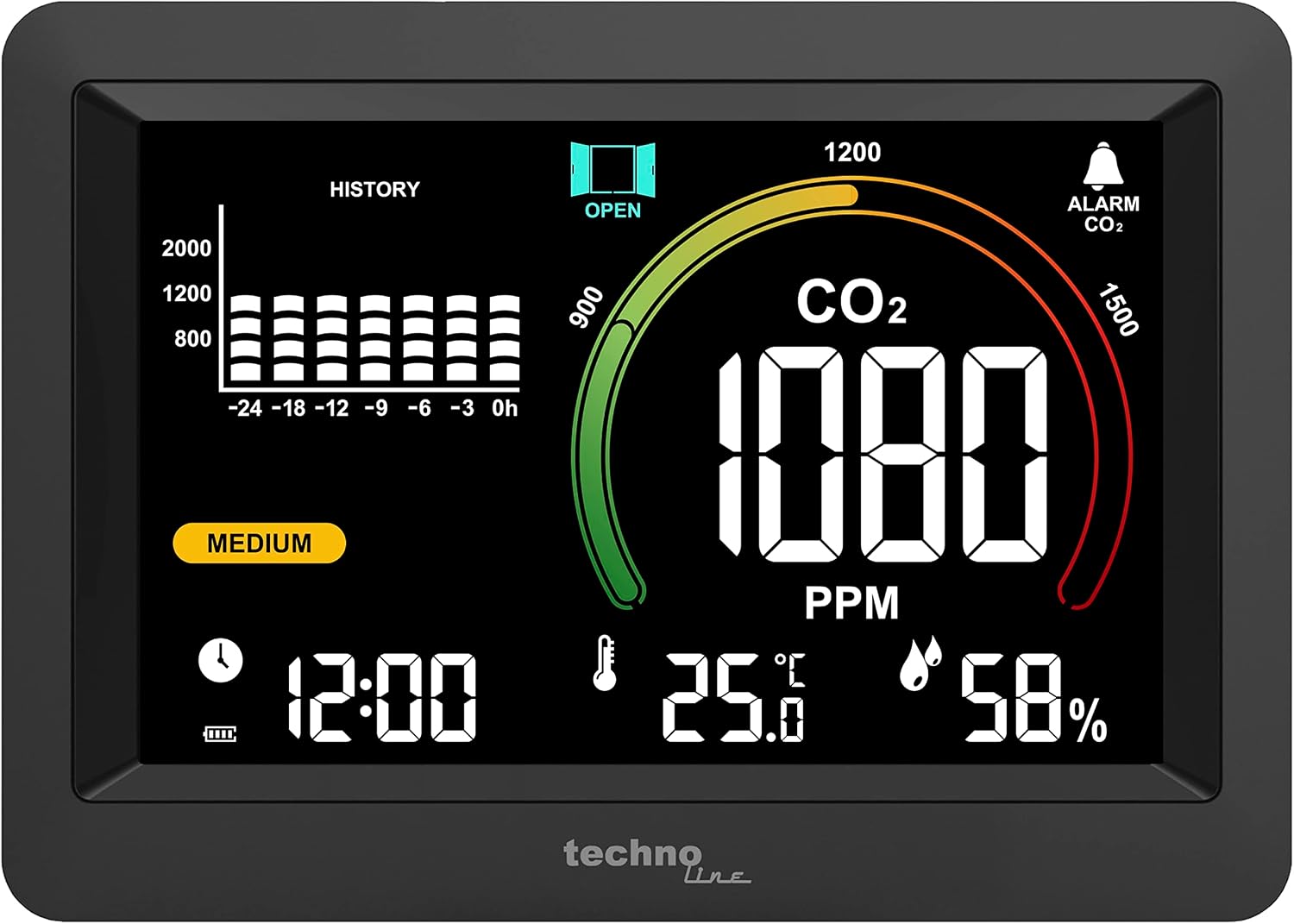
Figure 3: Display showing 'MEDIUM' air quality at 1080 PPM CO2, with a ventilation recommendation.

Figure 4: Display showing 'POOR' air quality at 2180 PPM CO2, with an active alarm.
3.3 Adjusting Settings
The device typically has control buttons (often on the side or back) to adjust settings. Refer to the specific button layout on your device for precise operation.
- Backlight: A touch switch on the top edge controls the display backlight. It usually offers 4 brightness levels (high, medium, low, off).
- Temperature Unit: Switch between Celsius (°C) and Fahrenheit (°F).
- Time Format: Toggle between 12-hour and 24-hour display.
- CO2 Alarm: Set custom high and low CO2 concentration thresholds for visual and optional audible alarms.
- MIN/MAX Values: View the recorded minimum and maximum values for CO2, temperature, and humidity.
3.4 Calibration
The WL1028 supports both manual and automatic baseline calibration for CO2 concentration. Automatic calibration typically occurs when the device is exposed to fresh outdoor air for a prolonged period. For manual calibration, consult the detailed instructions in the included printed manual or manufacturer's website.
4. Maintenance
4.1 Cleaning
To clean the device, gently wipe the display and casing with a soft, dry, or slightly damp cloth. Do not use abrasive cleaners, solvents, or immerse the device in water. Ensure no liquid enters the device openings.
4.2 Battery Care
If using the integrated battery, ensure it is charged regularly. Avoid completely draining the battery frequently to prolong its lifespan. When storing the device for extended periods, charge the battery to approximately 50% and store it in a cool, dry place.
4.3 Sensor Longevity
The NDIR CO2 sensor is designed for long-term stability. Regular exposure to fresh air (e.g., by opening windows) helps the automatic calibration function maintain accuracy.
5. Troubleshooting
5.1 Common Issues and Solutions
- Device not turning on:
- Ensure the USB cable is securely connected and the power adapter is working.
- Check if the integrated battery is charged. Connect to USB power for at least 30 minutes.
- Inaccurate CO2 readings:
- Ensure the device has completed its 60-second warm-up period.
- Verify the device is not placed near strong air currents, heat sources, or directly in front of a person's breath.
- Perform a manual calibration in fresh outdoor air if readings seem consistently off.
- Display is dim or not visible:
- Adjust the backlight brightness using the touch switch.
- Ensure the device is receiving adequate power.
- Alarm sounds frequently:
- This indicates high CO2 levels. Increase ventilation in the room.
- Review and adjust the CO2 alarm thresholds if necessary.
5.2 Resetting the Device
If the device malfunctions or becomes unresponsive, a soft reset may resolve the issue. Disconnect the USB power cable and allow the integrated battery to fully discharge, then reconnect power. For a hard reset, consult the specific instructions in your printed manual.
6. Specifications
| Feature | Specification |
|---|---|
| Model Number | WL1028 |
| CO2 Measurement Range | 400 - 5000 PPM |
| CO2 Resolution | 1 PPM |
| CO2 Accuracy | +/- 8% + 80 PPM (from 400 to 2000 PPM) |
| Sensor Type | Non-dispersive Infrared (NDIR) |
| Warm-up Time | 60 seconds |
| Detection Frequency | 5 seconds |
| Temperature Measurement Range | -9.9 °C to 49.9 °C / 14 °F to 122 °F |
| Temperature Resolution | 0.1 °C / 0.1 °F |
| Temperature Accuracy | +/- 1.5 °C / 2.7 °F |
| Relative Humidity Range | 1% - 99% |
| Relative Humidity Resolution | 1% |
| Relative Humidity Accuracy | +/-5% (40% ~ 80%); +/-8% (outside these ranges) |
| Operating Temperature | 0 °C to 50 °C / 32 °F to 122 °F |
| Operating Humidity | <95% RH (non-condensing) |
| Power Supply | USB cable (DC 5.0V, 600mA) and integrated lithium battery |
| Battery Life (full charge) | Approx. 20 hours |
| Product Dimensions (L x W x H) | 16.1 x 2.5 x 11.5 cm |
| Weight | 290 Grams |
| Alarm Type | Visual (colored display) and optional audible |
7. Warranty and Support
7.1 Warranty Information
The manufacturer provides a 1-year availability for spare parts. For specific warranty terms and conditions, please refer to the documentation included with your purchase or contact the manufacturer directly.
7.2 Customer Support
If you encounter any issues not covered in this manual or require further assistance, please contact Technoline customer support. Contact details can typically be found on the product packaging, the manufacturer's official website, or the included warranty card.


