
1. Product Overview
The YiBiChin AN-MR21GC is a universal magic remote control designed for various 2021 LG Smart TV models. It features magic pointer and intelligent voice control functions, allowing for quick and intuitive navigation and command execution. This remote enhances your TV viewing experience with convenient access to features and content.
1.1 Compatibility
This remote control is compatible with the following 2021 LG TV series:
- LG OLED TVs: G1, C1, A1 series
- LG Mini-LED QNED TVs: QNED99, QNED90 series
- LG NanoCell TVs: NANO99, NANO90, NANO85, NANO80, NANO75 series
- LG UHD TVs: UP80, UP75 series
Note: This remote control does not feature NFC functionality.

Figure 1: Front, side, and back views of the YiBiChin AN-MR21GC Magic Remote.

Figure 2: The remote control highlighting its universal compatibility with 2021 LG Smart TVs.
2. Setup
2.1 Battery Installation
The remote control requires two AA batteries (not included) for operation. Follow these steps to install them:
- Locate the battery compartment cover on the back of the remote control.
- Slide the cover downwards to open the compartment.
- Insert two AA batteries, ensuring the positive (+) and negative (-) terminals align correctly with the indicators inside the compartment.
- Slide the battery compartment cover back into place until it clicks securely.

Figure 3: Correct installation of AA batteries into the remote control.
2.2 Pairing Method
To enable the magic pointer and voice functions, the remote control must be paired with your LG Smart TV. Ensure your TV is connected to a WiFi network for these functions to work correctly. If you are replacing an original remote, it is recommended to disconnect it and remove its batteries before pairing the new remote, as only one smart remote can be paired at a TV at a time.
Follow these steps to pair your remote:
- Manually turn on your LG Smart TV using the power button on the TV itself.
- Point the YiBiChin AN-MR21GC remote control directly towards your TV from a close distance.
- Press and hold the Scroll Wheel (OK button) on the remote control for a few seconds until the pairing process is complete. A confirmation message should appear on your TV screen.
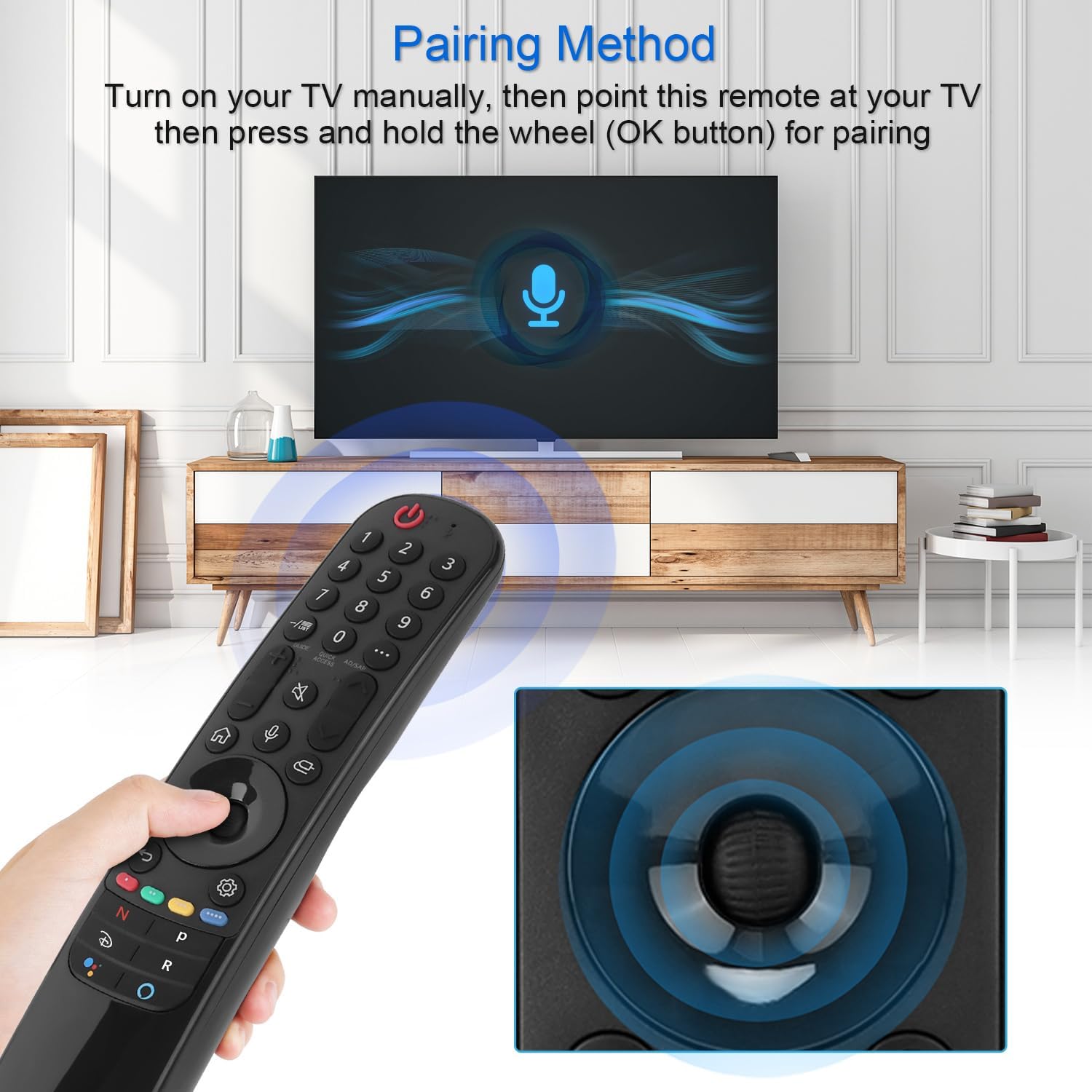
Figure 4: Demonstrating the pairing process by holding the OK button while pointing at the TV.
3. Operating Instructions
The YiBiChin AN-MR21GC remote control offers multiple ways to interact with your LG Smart TV, including traditional button presses, a magic pointer, and voice commands.
3.1 Basic Functions
- Power Button: Turns the TV on or off.
- Number Buttons (0-9): Directly select channels.
- Volume Up/Down: Adjusts the TV volume.
- Channel Up/Down: Changes TV channels.
- Mute Button: Mutes or unmutes the TV audio.
- Home Button: Accesses the TV's main smart interface.
- Back Button: Returns to the previous screen or menu.
3.2 Magic Pointer Function
Once paired, the remote acts as a pointer, allowing you to move a cursor on the TV screen by simply moving the remote in the air. This provides an intuitive way to select items, scroll through menus, and interact with applications.
3.3 Voice Control
Press the Microphone Button to activate voice control. Speak clearly into the remote to issue commands, search for content, or control smart home devices connected to your TV. Voice commands allow for rapid access to desired programs and videos, with a response time of approximately 0.2 seconds.
3.4 Quick Access Buttons
The remote includes dedicated shortcut buttons for popular streaming services, providing instant access to your favorite entertainment platforms.
3.5 Long-Distance Control
The remote utilizes stable infrared and Bluetooth signals, offering a control distance of up to 33 feet (10 meters), ensuring reliable operation from various positions within your room.

Figure 5: The remote's effective operating range and quick response time.
4. Maintenance
4.1 Battery Replacement
When the remote control's performance degrades (e.g., unresponsive buttons, weak signal), it is likely time to replace the batteries. Follow the battery installation steps in Section 2.1 to replace the two AA batteries.
4.2 Cleaning
To clean the remote control, use a soft, dry cloth. For stubborn dirt, slightly dampen the cloth with water or a mild, non-abrasive cleaner. Avoid using harsh chemicals or excessive moisture, as this can damage the remote's electronics.
5. Troubleshooting
5.1 Remote Not Responding
- Check Batteries: Ensure batteries are correctly installed and not depleted. Replace them if necessary.
- Re-pair Remote: If the remote becomes unresponsive, try re-pairing it with your TV by following the steps in Section 2.2.
- Obstructions: Ensure there are no obstructions between the remote and the TV's IR receiver.
5.2 Pointer or Voice Function Not Working
- WiFi Connection: Verify that your LG Smart TV is connected to a stable WiFi network. The pointer and voice functions rely on this connection.
- Re-pair Remote: Re-pairing the remote (Section 2.2) can often resolve issues with these advanced functions.
- Original Remote Interference: Ensure no other smart remote is actively paired with the TV, or that the original remote's batteries have been removed.
6. Specifications
| Brand | YiBiChin |
| Model Name | AN-MR21GC |
| Compatible Devices | 2021 LG Smart TVs (OLED, QNED, NanoCell, UHD series) |
| Connectivity Technology | Wi-Fi, Infrared, Bluetooth |
| Controller Type | Voice Control, Pointer |
| Power Source | Battery Powered |
| Battery Type | 2 x AA (not included) |
| Maximum Range | 10 meters (33 feet) |
| Response Time | 0.2 seconds (for voice commands) |
| Dimensions (L x W x H) | 19.2 x 5.7 x 3.1 cm (7.6 x 2.2 x 1.2 inches) |
| Item Weight | 110 g (3.88 ounces) |
| Color | Black |

Figure 6: Product dimensions of the remote control.
7. Warranty and Support
YiBiChin is committed to providing quality replacement remote controls and excellent customer service. While specific warranty details are not provided in this manual, we offer dedicated support for our products.
7.1 Customer Support
If you have any questions, encounter issues, or require assistance with your YiBiChin AN-MR21GC Magic Remote, please do not hesitate to contact our customer support team. We aim to respond to all inquiries within 24 hours.
For support, please refer to the contact information provided with your purchase or visit the official YiBiChin store page on Amazon.
Thank you for choosing YiBiChin.