1. Introduction
The Wurkkos HD15 is a versatile, high-performance headlamp and right-angle flashlight designed for various outdoor and emergency situations. Featuring dual LEDs for both spotlight and floodlight illumination, USB-C recharging, and a magnetic tailcap, this device offers reliable lighting and convenience. This manual provides essential information for safe and effective use of your HD15.
2. Product Features
- Dual LEDs: Equipped with LH351D and SST20 LEDs in neutral white tint (5000K) for both spotlight and floodlight.
- High CRI: 90CRI for floodlight ensures excellent color rendition at close ranges.
- Beam Angle: Spotlight: 105°, Floodlight: 125°.
- Beam Distance: Up to 151 meters.
- USB-C Rechargeable: Powered by a single rechargeable battery, with a USB-C port for convenient charging.
- Power Bank Function: Can be used to charge other devices via its USB-C port.
- Magnetic Tailcap: Allows attachment to metal surfaces for hands-free operation.
- Two-way Clip: Provides multiple carrying options, including attachment to bags or pockets.
- Compact Design: Includes a shorter flashlight tube for reduced size and portability.
- Waterproof: IP68 rated for water resistance.
3. What's in the Box
- 1 x Wurkkos HD15 Headlamp
- 1 x Rechargeable Battery (Lithium Ion, 3000mAh)
- 1 x Headlamp Band
- 1 x Short Tube (for 18350 battery, if desired)
- 1 x Two-way Clip
- 1 x USB-C Charging Cable
- 1 x Lanyard
4. Setup
4.1 Battery Installation
- Unscrew the tailcap of the flashlight.
- Remove the battery insulation paper from the included 18650 battery.
- Insert the battery with the positive (+) end facing towards the head of the flashlight.
- Screw the tailcap back on tightly to ensure proper contact and water resistance.
Note: Ensure the tailcap and head are tightened before use to prevent water ingress and ensure proper electrical connection.

Image: Removing the battery insulation paper before first use.
4.2 Attaching the Headlamp Band and Clip
The HD15 can be used as a headlamp or a handheld flashlight. To use as a headlamp, insert the flashlight into the silicone holder on the headlamp band. The two-way clip can be attached to the body for various carrying positions.
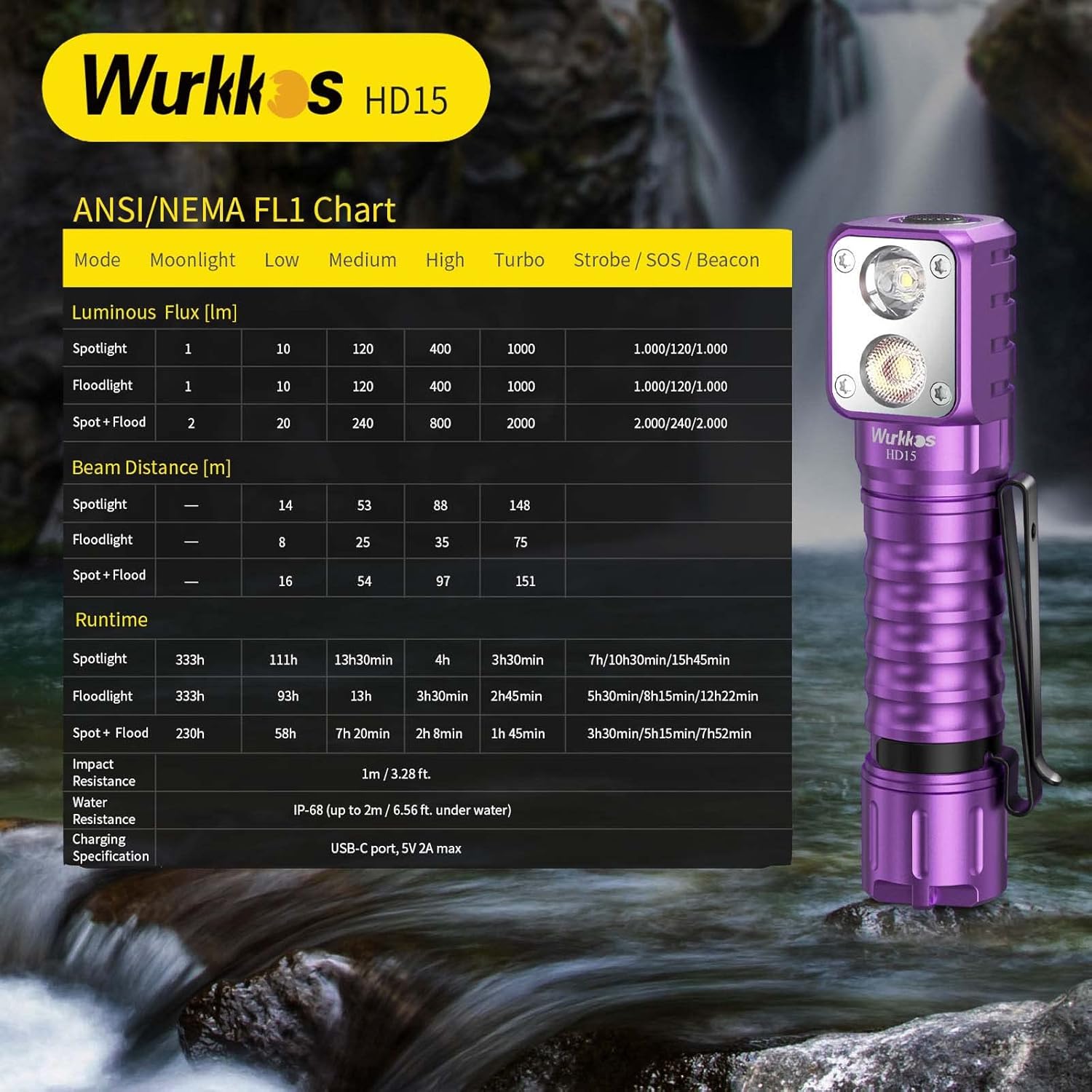
Image: Wurkkos HD15 attached to the adjustable head strap for hands-free use.

Image: Close-up of the adjustable head strap for comfortable fit.
4.3 Using the Short Tube (Optional)
For a more compact form factor, the longer battery tube can be replaced with the included short tube to accommodate an 18350 battery (not included). This reduces the overall length of the flashlight.

Image: The Wurkkos HD15 shown with both the standard long tube and the optional short tube for an 18350 battery.
5. Operating Instructions
The Wurkkos HD15 features a single side switch for all operations. The flashlight has two main groups of modes: Stepped Ramping and Advanced Ramping. It also has special modes like Turbo, Strobe, SOS, and Beacon.
5.1 Basic Operation
- Turn On/Off: Single click the switch. The light will turn on at the last memorized brightness level.
- Moonlight Mode: From OFF, press and hold the switch for 1 second to activate Moonlight mode.
- Cycle Brightness (Low, Medium, High): From ON, press and hold the switch to cycle through Low, Medium, and High modes. Release the switch to select the desired brightness.
- Turbo Mode: Double click the switch from any state (ON or OFF) to activate Turbo mode. Double click again to return to the previous mode.
- Strobe/SOS/Beacon: Triple click the switch from any state to activate Strobe. Double click again to cycle through SOS and Beacon modes. Single click to turn off.
- Lockout Function: From OFF, four clicks will activate the electronic lockout. The light will blink once to confirm. To unlock, four clicks again.
- Battery Status Indicator: From OFF, three clicks will show the battery voltage via the indicator light on the switch.
Video: Demonstration of the Wurkkos HD15's user interface, including power on/off, mode cycling, and special functions.
5.2 Switching Between Spotlight and Floodlight
The HD15 allows you to switch between the spotlight, floodlight, or both simultaneously.
- Cycle Light Sources: From ON, press and hold the switch for 2 seconds (or 3 clicks then hold) to cycle through Spotlight only, Floodlight only, and Both LEDs active. Release to select.
Video: Overview of the Wurkkos HD15 right-angle flashlight, showcasing its dual light sources and magnetic tailcap.
6. Charging and Power Bank Function
6.1 Charging the HD15
The HD15 features a built-in USB-C charging port.
- Locate the rubber cover over the USB-C port on the side of the flashlight head.
- Open the cover and connect the provided USB-C cable to the port.
- Connect the other end of the cable to a USB power source (e.g., wall adapter, computer USB port).
- The indicator light on the switch will blink red during charging and turn solid green when fully charged.
6.2 Power Bank Function (Charging Other Devices)
The HD15 can also act as a power bank to charge other USB-powered devices.
- Connect your device to the USB-C port of the HD15 using a compatible cable.
- The indicator light will show green when charging another device. If the HD15 battery is low, the indicator will flash red.

Image: The Wurkkos HD15 showing both its USB-C charging input and its capability to provide power output to charge other devices.
7. Maintenance
- Cleaning: Clean the body of the flashlight with a soft cloth. If necessary, use a mild detergent.
- Lubrication: Lubricate the O-rings regularly with silicone grease to maintain water resistance.
- Battery Care: Store the battery separately if the flashlight will not be used for an extended period. Recharge the battery every 3-6 months to prolong its lifespan.
- Water Resistance: The HD15 is IP68 rated, meaning it is protected from dust and can be submerged in water up to 2 meters for 30 minutes. Ensure all caps and covers are securely closed before exposure to water.
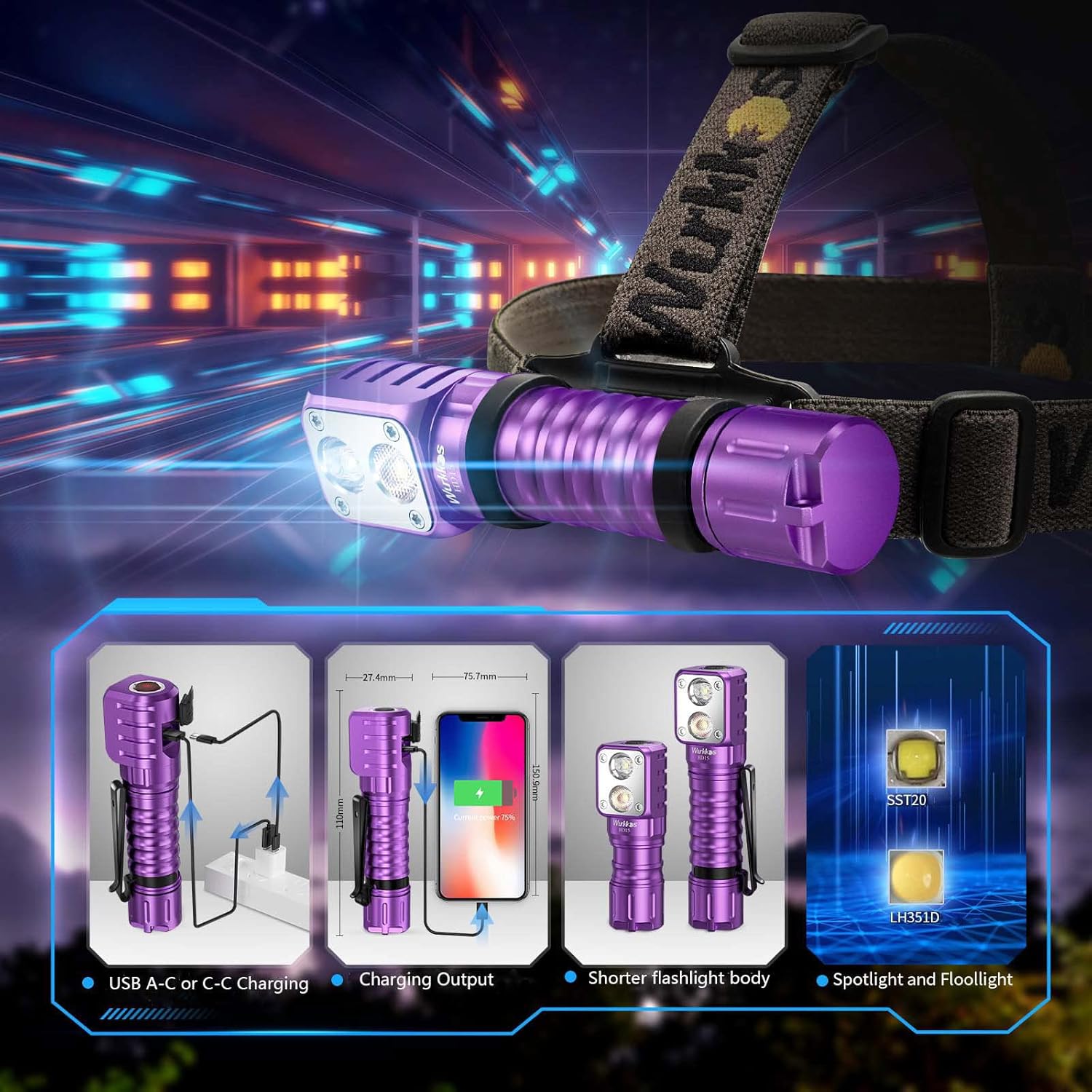
Image: The Wurkkos HD15 submerged in water, highlighting its IP68 waterproof capability.
8. Troubleshooting
- Flashlight does not turn on:
- Check if the battery is inserted correctly with the positive (+) end facing the head.
- Ensure the tailcap and head are screwed on tightly.
- The battery may be depleted; try charging it.
- The flashlight might be in electronic lockout mode. Perform four clicks to unlock.
- Light output is dim or flickers:
- The battery may be low; recharge it.
- Clean the battery contacts and threads with a cotton swab and alcohol.
- Water ingress:
- Ensure all O-rings are properly seated and lubricated.
- Check that the tailcap and head are fully tightened.
- Ensure the USB-C port cover is securely closed.
9. Specifications
| Feature | Specification |
|---|---|
| Model | HD15 |
| Brand | Wurkkos |
| Light Source Type | LED (LH351D, SST20) |
| Brightness | Up to 2000 Lumens |
| Beam Distance | Up to 151 meters |
| Power Source | Battery Powered (1 Lithium Ion battery included) |
| Battery Cell Composition | Lithium Ion |
| Water Resistance Level | IP68 (up to 2m / 6.56 ft under water) |
| Material | Aluminum |
| Product Dimensions | 4.3"D x 1.1"W x 1"H |
| Item Weight | 72 Grams (2.54 ounces) |
| Special Features | Portable, Rechargeable, Waterproof, Magnetic Tailcap |
Image: ANSI/NEMA FL1 Chart providing detailed performance specifications for the Wurkkos HD15.
10. Warranty and Support
Wurkkos provides warranty service for its products. If you encounter any questions or receive a defective product, please contact Wurkkos customer service for assistance. They offer return and exchange services.
For further support, visit the official Wurkkos store or contact their customer service directly.
Contact Information: Refer to your product packaging or the official Wurkkos website for the most up-to-date customer service contact details.


