
1. Introduction
Thank you for choosing the Luminous Electra SQ+ 865 Square Wave Inverter. This manual provides essential information for the safe and efficient operation, installation, and maintenance of your inverter. Please read this manual thoroughly before using the product and keep it for future reference.
The Luminous Electra SQ+ 865 is designed to provide reliable power backup, ensuring uninterrupted electricity supply during outages. It is built to withstand various climatic conditions and offers high durability for long-lasting performance.
2. Safety Instructions
Always follow these safety precautions to prevent injury and damage to the inverter:
- Installation: Ensure installation is performed by a qualified technician.
- Ventilation: Install the inverter in a well-ventilated area to prevent overheating.
- Water Exposure: Keep the inverter away from water, moisture, and direct sunlight.
- Flammable Materials: Do not place flammable materials near the inverter.
- Children: Keep children away from the inverter and its connections.
- Servicing: Do not attempt to open or service the inverter yourself. Refer to qualified personnel.
- Battery Connection: Ensure correct polarity when connecting batteries. Incorrect connection can cause severe damage.
3. Package Contents
Upon unpacking, please verify that all items listed below are present and undamaged:
- Luminous Electra SQ+ 865 Square Wave Inverter Unit
- User Manual (this document)
- Warranty Card (if applicable)
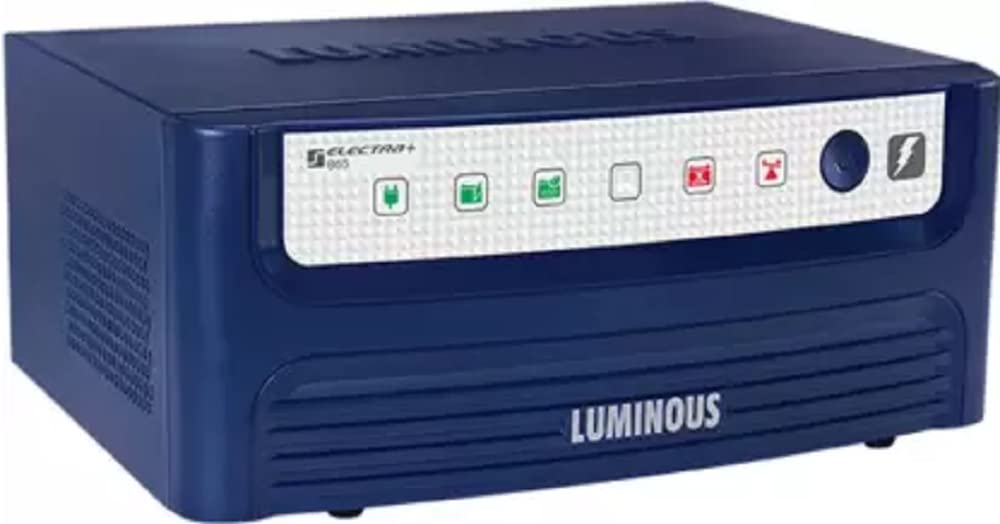
Figure 1: The Luminous Electra SQ+ 865 Square Wave Inverter unit. This image displays the main inverter unit, typically white, with its control panel and connection points visible.
4. Setup and Installation
Proper installation is crucial for the performance and safety of your inverter. It is highly recommended that installation be carried out by a certified electrician or Luminous service technician.
- Site Selection: Choose a cool, dry, well-ventilated area, away from direct sunlight, heat sources, and corrosive gases. Ensure sufficient clearance around the inverter for airflow.
- Mounting: Securely mount the inverter on a flat, stable surface or wall using appropriate fasteners.
- Battery Connection: Connect the battery terminals to the inverter's battery input terminals. Ensure correct polarity: red to positive (+), black to negative (-). Tighten all connections securely.
- Mains Input Connection: Connect the mains power supply to the inverter's AC input terminal. Ensure the input voltage is within the specified range.
- Load Connection: Connect your appliances to the inverter's AC output sockets. Do not overload the inverter beyond its rated capacity.
- MCB (Miniature Circuit Breaker): Ensure the MCB is in the 'OFF' position during installation. Once all connections are secure, switch the MCB to 'ON'.
5. Operating Instructions
Follow these steps to operate your Luminous Electra SQ+ 865 Inverter:
- Power On: After successful installation, switch on the main power supply to the inverter.
- Inverter Mode: The inverter will automatically detect the mains supply. If mains power is present, it will charge the battery and supply power to the connected loads.
- Backup Mode: In case of a power outage, the inverter will automatically switch to battery power, providing an uninterrupted supply to your appliances.
- Power Off: To turn off the inverter, first disconnect all loads, then switch off the MCB, and finally disconnect the mains power supply.
Note: The inverter features an automatic changeover, ensuring a seamless transition between mains power and battery backup.
6. Maintenance
Regular maintenance ensures the longevity and optimal performance of your inverter:
- Cleaning: Keep the inverter clean and free from dust. Use a dry, soft cloth to wipe the exterior. Do not use liquid cleaners.
- Ventilation: Ensure ventilation openings are not blocked. Periodically check for dust accumulation in the vents.
- Connections: Periodically check all electrical connections for tightness and corrosion. Loose connections can lead to power loss or overheating.
- Battery Care: Follow the maintenance guidelines for your specific battery type. For lead-acid batteries, check electrolyte levels regularly and top up with distilled water if necessary.
- Professional Check: It is recommended to have a qualified technician inspect the inverter and battery system annually.
7. Troubleshooting
This section addresses common issues you might encounter with your inverter. For problems not listed here, please contact customer support.
| Problem | Possible Cause | Solution |
|---|---|---|
| Inverter not turning on | No mains supply; Battery discharged; Loose battery connections; MCB is OFF. | Check mains supply; Charge battery; Secure battery connections; Switch MCB to ON. |
| No output power in backup mode | Overload; Battery deeply discharged; Inverter fault. | Reduce load; Allow battery to charge; Contact service center. |
| Inverter beeping continuously | Overload; Low battery voltage; Over-temperature. | Reduce load; Allow battery to charge; Ensure proper ventilation. |
| Battery not charging | Mains supply issue; Loose connections; Battery fault; Inverter charging circuit fault. | Check mains supply; Secure connections; Test battery; Contact service center. |
8. Specifications
Below are the technical specifications for the Luminous Electra SQ+ 865 Inverter:
- Brand: Luminous
- Model Name: ELECTRA SQ+ 865 With MCB
- Power Source: Battery Powered
- Electrical Output Waveform: Square Wave
- Frequency: 50 Hz
- Included Components: Inverter Unit
- Color: White
- Manufacturer Part Number: 210449aec949
9. Warranty and Support
Luminous products are designed for durability and performance. For warranty information, please refer to the warranty card included with your product or visit the official Luminous website.
For technical assistance, service requests, or any queries, please contact Luminous customer support:
- Manufacturer Contact: Luminous Power TECHNOLOGIES Pvt. Ltd.
- Customer Service Number: 18001033039
- Manufacturer Address: VILLAGE DEV NAGAR PO GAGRET TEHAMB DISTT. UNA HIMACHAL PRADESH - 177201
- Official Website: www.luminousindia.com

