Introduction
This user manual provides detailed instructions for the VOKTTA Battery Capacity Voltage Tester. This device is designed to accurately measure and display the voltage and capacity percentage of various battery types, including ternary lithium batteries, lead-acid batteries, and lithium iron phosphate batteries, across a wide voltage range of 8-100V DC. It features an LCD color screen, alarm functions, and easy installation, making it suitable for a variety of applications such as electric motorcycles, golf carts, cars, and RVs.
Product Features
- Wide compatibility: Suitable for 8-100V DC ternary lithium batteries (12V, 24V, 36V, 48V, 60V, 72V), lead-acid batteries, and lithium iron phosphate batteries.
- Memory function: Retains settings after power-off.
- Calibration: Supports voltage calibration for accurate readings.
- Reverse connection protection: Safeguards the device from incorrect wiring.
- Customizable alarms: Set high and low voltage alarm parameters with sound configuration.
- Backlight: Features a backlight for improved visibility.
- LCD color display: Shows voltage, power, and percentage clearly.
- Easy installation: Simple two-wire connection (red for positive, black for negative).
- Versatile applications: Ideal for electric motorcycles, motorcycles, golf carts, cars, and RVs.

Figure 1: Key features of the VOKTTA Battery Capacity Voltage Tester, including timing display, automatic calibration, power-off memory, and high/low pressure alarms.
Package Contents
Please verify that all items are present and in good condition upon opening the package.
- 1 x VOKTTA Battery Capacity Voltage Tester
- 1 x Connection Cable with Temperature Sensor (integrated or separate, as shown in images)
- (Optional) Mounting accessories

Figure 2: The VOKTTA Battery Capacity Voltage Tester and its included wiring.
Specifications
| Parameter | Value |
|---|---|
| Voltage Detection Range | 8-100V DC |
| Working Current | ≤ 15mA |
| Display Mode | LCD Color Screen |
| Detection Accuracy | ± 1% |
| Opening Size | 58.5 x 28.5 mm |
| Refresh Rate | 500 ms/time |
| Dimensions | 61.3 x 33.3 x 13.5 mm |
| Manufacturer | Voktta |
| Model Number | 3f915722-7140-4e10-b59c-6da77801000d |
| Power Source | Battery Powered |
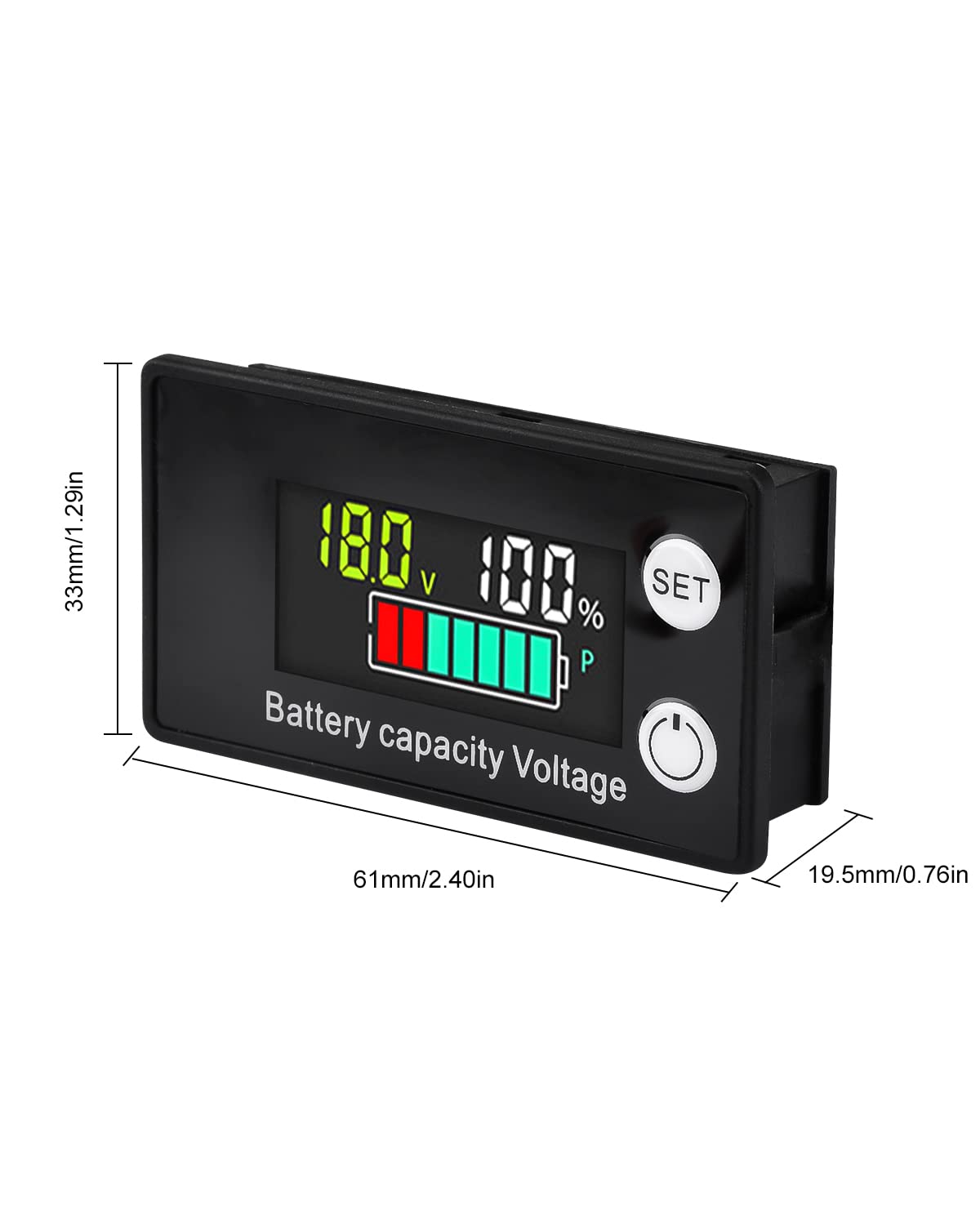
Figure 3: Physical dimensions of the device.
Setup
- Preparation: Ensure the power source is disconnected before wiring the device.
- Mounting: Identify a suitable location for installation. The device requires an opening of 58.5 x 28.5 mm for flush mounting.
- Wiring:
- Connect the red wire to the positive (+) terminal of your battery or power source.
- Connect the black wire to the negative (-) terminal of your battery or power source.
Note: The device includes reverse connection protection, but correct wiring is always recommended.
- Power On: Once wired correctly, connect the power source. The device will power on and display the current voltage and battery capacity.
Operating Instructions
Basic Display
Upon power-up, the LCD screen will display the current battery voltage (V) and the battery capacity percentage (%). A graphical battery icon will also indicate the charge level.

Figure 4: Front view of the device display.
Voltage Calibration
The device supports voltage calibration to ensure accuracy. This is typically done via a potentiometer on the back of the unit.
- Locate the small adjustment screw (potentiometer) on the back of the device.
- Using a small screwdriver, gently turn the screw clockwise or counter-clockwise to adjust the displayed voltage to match a known accurate voltage source.

Figure 5: Location of the voltage adjustment potentiometer.
Setting Alarms and Parameters
The device allows for customization of high and low voltage alarm thresholds and sound configuration. Refer to the detailed instructions provided with the product for specific button press sequences to enter programming mode and adjust these settings.
Note: The "SET" button on the front panel is used to navigate through settings and confirm selections. The power button may also have dual functionality for entering/exiting menus.
Maintenance
- Cleaning: Use a soft, dry cloth to clean the display and casing. Avoid abrasive cleaners or solvents.
- Connections: Periodically check all wiring connections to ensure they are secure and free from corrosion.
- Storage: If storing the device for an extended period, ensure it is kept in a dry environment away from extreme temperatures.
Troubleshooting
| Problem | Possible Cause | Solution |
|---|---|---|
| Device does not power on. | Incorrect wiring; no power supply; faulty device. | Check red and black wire connections to positive and negative terminals. Ensure power source is active and within the 8-100V range. If problem persists, contact support. |
| Inaccurate voltage reading. | Needs calibration; poor connection. | Perform voltage calibration using the potentiometer on the back. Check wire connections for looseness or corrosion. |
| Display is dim or flickering. | Low voltage input; environmental factors. | Ensure input voltage is stable and within the specified range. Avoid extreme temperatures. |
Warranty and Support
VOKTTA products are manufactured to high-quality standards. For any questions, technical assistance, or warranty claims, please contact VOKTTA customer support. Refer to your purchase documentation for specific warranty terms and contact information.
If you have any questions, please do not hesitate to contact us. We will do our best to help you solve the problem.


